

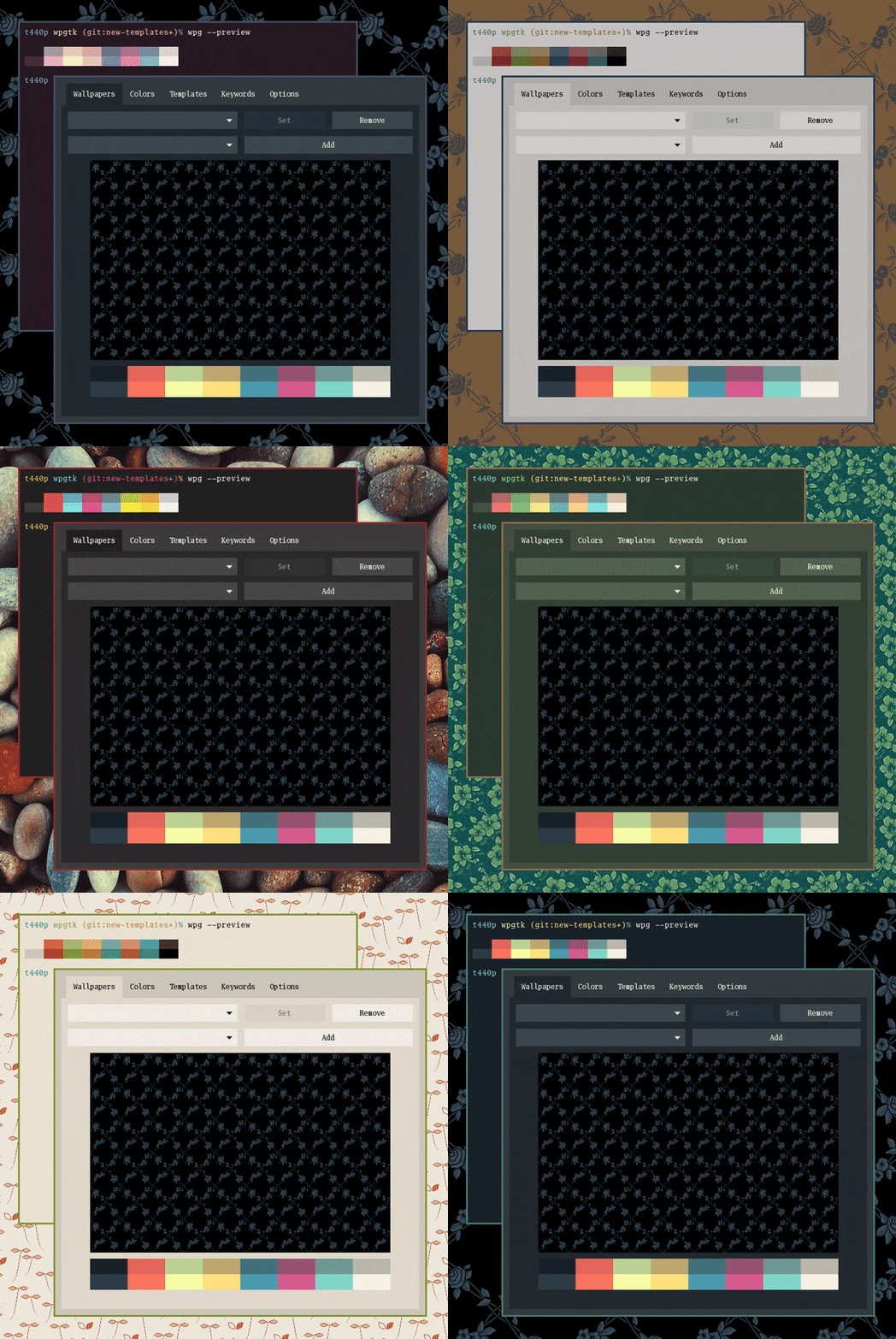
wpgtk is a wallpaper and colour scheme manager that helps keep the appearance of your desktop consistent. Instead of setting a wallpaper and then adjusting application colours separately, it can generate a matching palette and apply it to supported applications.
The program builds on pywal, which extracts colours from images and generates coordinated colour schemes. wpgtk adds a graphical interface for managing wallpapers, editing palettes and associating saved colour schemes with particular backgrounds.
Its template system allows generated colours to be applied to applications that store their settings in text files. Default templates are provided for GTK2, GTK3, Openbox and Tint2, while additional templates can be created for terminal emulators and other applications.
wpgtk also includes a large collection of preset colour schemes inherited from pywal. Users can modify generated or preset palettes, save them for later use and switch between wallpapers and their associated themes through the graphical interface or command line.
This is free and open source software.
Key Features
- Generate colour schemes from wallpaper images using pywal.
- Manage wallpapers and their associated colour palettes through a graphical interface.
- Edit generated colour schemes and save customised palettes with individual wallpapers.
- Apply colours to applications through a configurable text-template system.
- Provides default templates for GTK2, GTK3, Openbox and Tint2.
- Define custom template keywords and replacement values.
- Use preset pywal colour schemes instead of automatically generated palettes.
- Automatically adjust generated palettes to improve colour readability.
- Supports light and dark themes for dynamic icons.
- Control wallpaper and colour scheme management from the command line.
Website: github.com/deviantfero/wpgtk
Support:
Developer: Fernando Vásquez and contributors
License: GNU General Public License v2.0
wpgtk is written in Python. Learn Python with our recommended free books and free tutorials.
Related Software
| Wallpaper Setters | |
|---|---|
| Fantascene | Play video wallpapers on your background |
| Variety | Highly configurable utility that offers a great range of features |
| WallpaperDownloader | Download, change, manage wallpapers with this Java tool |
| Superpaper | Advanced multi monitor wallpaper manager |
| wpgtk | Colorscheme, wallpaper and template manager |
| Waywallen | Dynamic wallpaper manager for Wayland desktop environments |
| Picture Of The Day | Grabs a picture of the day from a variety of sources |
| HydraPaper | Gtk utility to set different backgrounds for each monitor on GNOME |
| Waypaper | Lightweight graphical wallpaper manager |
| pacwall | Live wallpaper showing dependency graph and installed packages |
| chwall | Tiny automatic wallpaper changer |
| swaybg | Wallpaper utility for Wayland compositors |
| mpvpaper | Video wallpaper software |
| Komorebi | Fully customisable image, video, and web page wallpapers |
| Azote | GTK+3 based picture browser and background setter |
| WSelector | Wallpaper selector manager |
| Wall Changer | Automatic wallpaper changer |
| Hyprpaper | Wallpaper utility designed for Hyprland |
| Fondo | Quickly find beautiful wallpapers from Unsplash |
| feh | Mode-based image viewer and cataloger aimed at console users |
| xwallpaper | Wallpaper setting utility |
| Damask | Automatically set wallpaper images |
| wpaperd | Lightweight wallpaper daemon with automatic image rotation |
| Walt | Wallpaper manager for Hyprland |
| awww | Wallpaper daemon for Wayland |
| flowy | Lean privacy-preserving dynamic wallpaper changer |
| hpaper | Advanced wallpaper management for Wayland |
| chwp | Changes the wallpaper from the command line |
| Wallrus | Generate colorful abstract wallpapers |
| awtwall | Fast TUI wallpaper picker for Wayland |
| Tinte | Wallpaper utility and theme generator |
| Nitrogen | Background browser and setter |
| gSlapper | Wallpaper utility for Wayland |
| wewa | Renders web content as desktop wallpaper |
| Walldo | Simple graphical wallpaper changer for Linux desktops |
| randwall | Randomly changes the desktop wallpaper |
| Matuwall | Fast graphical wallpaper picker for Wayland desktops |
| Icebg | Lightweight wallpaper setter for Wayland compositors |
| Clockwork Orange | Manage wallpapers and lock screen backgrounds |
Read our verdict in the software roundup.
| Color Scheme Generators | |
|---|---|
| pastel | Work with colours from the command line |
| wpgtk | Manage wallpapers, themes and application templates |
| Matugen | Create Material You themes from images |
| wallust | Build terminal palettes from wallpaper colours |
| lule | Fast ANSI theme creator written in Rust |
| Rickrack | Design and manage colour palettes |
| Pywal16 | Generate and apply colour schemes from wallpapers |
| KDE Material You Colors | Automatically theme KDE Plasma from your wallpaper |
| Hellwal | Fast, extensible wallpaper-based theming |
| walrs | Build themes from an image’s dominant colours |
| Aether | Customise and coordinate desktop themes visually |
| cwal | Create dynamic themes from image colours |
| K’uychi | Generate harmonious colour palettes from images |
| Tinct | Extract reusable palettes from images |
| clrsync | Synchronise themes across applications |
| rong | Extract Material You colours from images |
| Colorway | Discover complementary colour pairings |
| Colorice | Wallpaper-driven colour scheme generator |
Read our verdict in the software roundup.
 LinuxLinks helps you discover the best free and open source software for Linux. Explore our extensive collection of recommended applications, including alternatives to popular proprietary software. We also publish software reviews, Linux tutorials, hardware reviews, free programming books and articles covering the wider open source community. Browse our Linux resources to discover more. Know a useful free and open source Linux application we haven't covered? Suggest a program for inclusion. Has your software been featured on LinuxLinks? Display one of our Featured on LinuxLinks badges on your website or GitHub README. |
Please read our Comment Policy before commenting.