
Clockwork Orange is a wallpaper manager for KDE Plasma, Windows and macOS. It combines automatic wallpaper rotation with support for local image collections, online wallpaper sources and multi-monitor desktop configurations.
The application uses a Go-based architecture with a Fyne graphical interface and command-line controls. Wallpaper changes can be managed interactively or automated through a background service.
Clockwork Orange can select images from local directories and online services. It keeps a history of downloaded images to avoid retrieving duplicate content, and allows unwanted wallpapers to be blacklisted so they are not selected again.
On KDE Plasma, the program can also manage lock screen backgrounds. Desktop and lock screen wallpapers can be controlled independently, making it possible to use different images for each.
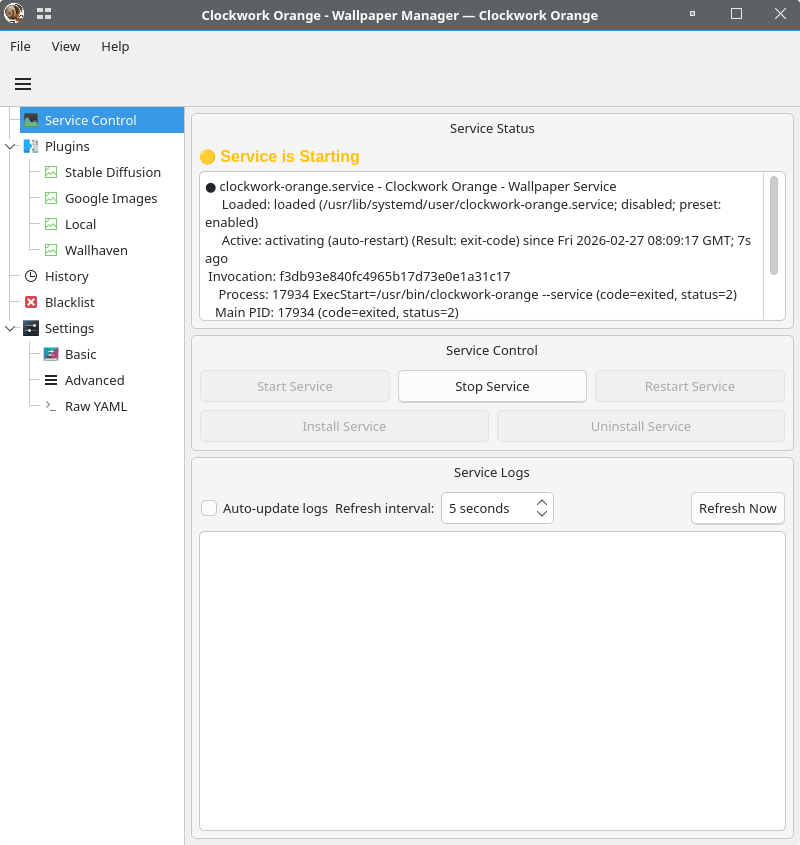
The application includes a graphical interface for managing wallpaper sources, reviewing downloaded images, changing settings and monitoring background activity. Configuration is stored in YAML, while image history and blacklist information are maintained in SQLite databases.
This is free and open source software.
Key Features
- Manage desktop wallpapers from local directories and online sources.
- Supports multiple monitors with independent wallpapers for each display.
- Uses fair random selection to balance images from different wallpaper sources.
- Automatically rotates desktop wallpapers at configurable intervals.
- Supports KDE Plasma lock screen wallpaper management.
- Allows different images to be applied to desktop and lock screen backgrounds.
- Downloads wallpapers from Wallhaven and DuckDuckGo Images.
- Provides configurable search queries and download intervals for online sources.
- Records downloaded images using URLs and content hashes to prevent duplicates.
- Includes a shared blacklist for excluding unwanted wallpaper images.
- Provides graphical controls for reviewing and rejecting downloaded images.
- Offers wallpaper history statistics and the ability to import existing image collections.
- Supports pinning individual wallpaper images and pausing or skipping automatic rotation.
- Includes a Fyne graphical interface with configuration, history, service and appearance controls.
- Offers command-line controls for wallpaper management, plugins, history and configuration.
- Supports a systemd user service on Linux and a system tray application on supported desktop platforms.
- Uses YAML configuration with automatic reloading of modified settings.
- Includes logging and self-test facilities for troubleshooting.
- Cross-platform support – runs on Linux, macOS, and Windows.
Website: github.com/ushineko/clockwork-orange
Support:
Developer: clockwork-orange
License: MIT License
Clockwork Orange is written in Go. Learn Go with our recommended free books and free tutorials.
Related Software
| Wallpaper Setters | |
|---|---|
| Fantascene | Play video wallpapers on your background |
| Variety | Highly configurable utility that offers a great range of features |
| WallpaperDownloader | Download, change, manage wallpapers with this Java tool |
| Superpaper | Advanced multi monitor wallpaper manager |
| wpgtk | Colorscheme, wallpaper and template manager |
| Waywallen | Dynamic wallpaper manager for Wayland desktop environments |
| Picture Of The Day | Grabs a picture of the day from a variety of sources |
| HydraPaper | Gtk utility to set different backgrounds for each monitor on GNOME |
| Waypaper | Lightweight graphical wallpaper manager |
| pacwall | Live wallpaper showing dependency graph and installed packages |
| chwall | Tiny automatic wallpaper changer |
| swaybg | Wallpaper utility for Wayland compositors |
| mpvpaper | Video wallpaper software |
| Komorebi | Fully customisable image, video, and web page wallpapers |
| Azote | GTK+3 based picture browser and background setter |
| WSelector | Wallpaper selector manager |
| Wall Changer | Automatic wallpaper changer |
| Hyprpaper | Wallpaper utility designed for Hyprland |
| Fondo | Quickly find beautiful wallpapers from Unsplash |
| feh | Mode-based image viewer and cataloger aimed at console users |
| xwallpaper | Wallpaper setting utility |
| Damask | Automatically set wallpaper images |
| wpaperd | Lightweight wallpaper daemon with automatic image rotation |
| Walt | Wallpaper manager for Hyprland |
| awww | Wallpaper daemon for Wayland |
| flowy | Lean privacy-preserving dynamic wallpaper changer |
| hpaper | Advanced wallpaper management for Wayland |
| chwp | Changes the wallpaper from the command line |
| Wallrus | Generate colorful abstract wallpapers |
| awtwall | Fast TUI wallpaper picker for Wayland |
| Tinte | Wallpaper utility and theme generator |
| Nitrogen | Background browser and setter |
| gSlapper | Wallpaper utility for Wayland |
| wewa | Renders web content as desktop wallpaper |
| Walldo | Simple graphical wallpaper changer for Linux desktops |
| randwall | Randomly changes the desktop wallpaper |
| Matuwall | Fast graphical wallpaper picker for Wayland desktops |
| Icebg | Lightweight wallpaper setter for Wayland compositors |
| Clockwork Orange | Manage wallpapers and lock screen backgrounds |
Read our verdict in the software roundup.
 Explore our carefully curated directory of recommended free and open source software, covering every major software category. Explore our carefully curated directory of recommended free and open source software, covering every major software category.The directory forms part of our extensive collection of articles for Linux enthusiasts. It includes hundreds of detailed reviews, together with free and open source alternatives to proprietary software from companies such as Google, Microsoft, Apple, Adobe, IBM, Cisco, Oracle, and Autodesk. LinuxLinks also covers interesting projects worth exploring, Linux-compatible hardware, free programming books and tutorials, and much more. Know a useful free and open source Linux application that we haven’t covered? Tell us about it using our submission form. |
Please read our Comment Policy before commenting.