

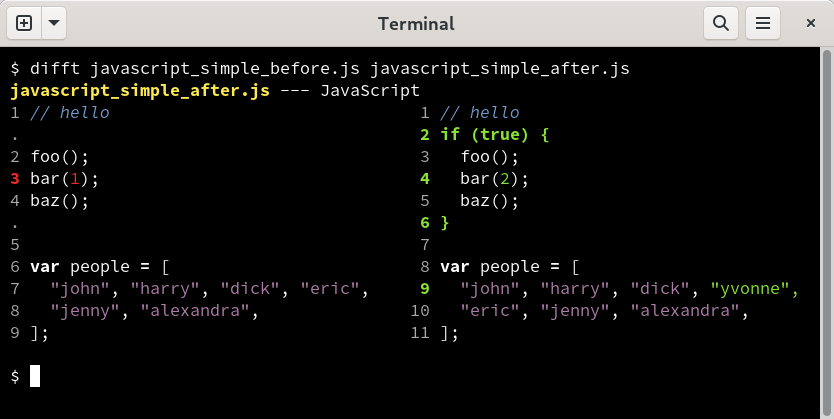
difftastic is a structural diff tool that compares files using their syntax rather than treating everything as a sequence of lines. It parses supported languages with tree-sitter and compares simplified syntax trees, allowing it to distinguish meaningful code changes from many formatting changes.
This approach is particularly useful when code has been reformatted, expressions have moved across lines, or indentation has changed without altering the underlying syntax. For files it cannot parse, difftastic falls back to a conventional line-oriented comparison with word highlighting.
This is free and open source software.
Key Features
- Structural diffing based on syntax trees rather than raw lines.
- Supports more than 30 programming languages together with structured formats including CSS, HCL, HTML, JSON, TOML and YAML.
- Understands when whitespace is syntactically significant and when it is merely formatting.
- Can show useful changes even when code has been reformatted across different lines.
- Falls back to line-oriented diffing with word highlighting for unrecognised file types or parse failures.
- Provides side-by-side output designed for terminal viewing.
- Integrates with Git and Mercurial workflows.
- Can interpret merge conflict markers and compare the two conflicting versions of a file.
- Offers a check-only mode for determining whether two files have syntactic differences without calculating a full diff.
- Allows a configurable number of parse errors before falling back to textual comparison.
- Treats structural comparison as a graph problem and uses a shortest-path approach to calculate differences.
- Can compare directories as well as individual files.
Website: github.com/Wilfred/difftastic
Support:
Developer: Wilfred Hughes
License: MIT License
difftastic is written in Rust. Learn Rust with our recommended free books and free tutorials.
Related Software
| Terminal-Based Diff Tools | |
|---|---|
| difftastic | Structural diff tool that compares files based on their syntax |
| hunk | Terminal diff viewer with syntax highlighting and side-by-side views |
| diff-so-fancy | Attractive diffs with diff-highlight and more |
| delta | Viewer for git and diff output |
| icdiff | An improved colored diff |
| diffoscope | In-depth comparison of files, archives, and directories |
| colordiff | Wrapper for diff with pretty syntax highlighting |
| diffsitter | Semantic diff tool |
| objdiff | Local diffing tool for decompilation project |
| ydiff | Tool to view colored, incremental diff in a version controlled workspace |
| diffr | Word-by-word diff highlighting utility |
| dyff | diff tool for YAML files |
| Wdiff | Wordwise implementation of diff |
| dwdiff | diff program that operates at the word level |
| diffyml | Compares YAML documents by their structure |
| oyo | Step-through diff viewer |
| diff2html-cli | Generate HTML diffs |
| biodiff | Terminal-based binary diff viewer |
| dirdiff | Compute the differences between two directories |
| csvdiff | Fast diff tool for comparing CSV files |
| VBinDiff | Visual binary diff |
| riff | Wrapper around diff |
| csv-diff | Diffing CSV and JSON files |
| xmldiff | Compare XML documents |
| Patdiff | File diff using the Patience Diff algorithm |
| dead-ringer | Binary diff utility |
| sesdiff | Generates a shortest edit script |
| semdiff | Semantic diff tool written in Rust |
Read our verdict in the software roundup.
| Git Tools for Diff Review and Repository History | |
|---|---|
| difftastic | Structural diff tool that compares files based on their syntax |
| git-filter-repo | Quickly rewrite git repository history |
| onefetch | Displays information about a local Git repository |
| git-stats | Local git statistics including GitHub-like contributions calendars |
| diff-so-fancy | Attractive diffs with diff-highlight and more |
| BFG Repo-Cleaner | Clean unwanted data from Git repository history |
| git-delta | Viewer for git and diff output |
| gitlogue | Cinematic Git commit replay tool |
| git-quick-stats | Access various statistics in a git repository |
| git-who | Command-line Git analysis tool |
| git-standup | Recall what you did on the last working day |
| git-of-theseus | Analyze how a Git repo grows over time |
| git-sizer | Compute various size metrics for a git repository |
| diffnav | Git diff pager based on delta but with a file tree, à la GitHub |
| critique | Terminal UI for reviewing git diffs |
| git-big-picture | Visualization tool for Git repositories |
| hercules | Gain advanced insights from Git repository history |
| keifu | TUI that visualizes Git commit graphs |
| git-fame | Git repository collaborators sorted by contributions |
| needle | Highlights GitHub PRs |
| mergiraf | Git merge driver |
| git-history | Analyze Git history using SQLite |
| ec | Terminal Git mergetool |
| diffr | Word-by-word diff highlighting utility |
| git-scope | Fast TUI dashboard to view the git status of all your repositories |
| mamediff | Manages unstaged and staged Git diffs |
| deadbranch | Keep Git repositories tidy |
| GitTop | Lightweight desktop client for GitHub notifications |
| git-heatmap | Generates a customizable heatmap |
Read our verdict in the software roundup.
 LinuxLinks helps you discover the best free and open source software for Linux. Explore our extensive collection of recommended applications, including alternatives to popular proprietary software. LinuxLinks helps you discover the best free and open source software for Linux. Explore our extensive collection of recommended applications, including alternatives to popular proprietary software.We also publish software reviews, Linux tutorials, hardware reviews, free programming books and articles covering the wider open source community. Browse our Linux resources to discover more. Know a useful free and open source Linux application we haven't covered? Suggest a program for inclusion. Has your software been featured on LinuxLinks? Display one of our Featured on LinuxLinks badges on your website or GitHub README. |
Please read our Comment Policy before commenting.