
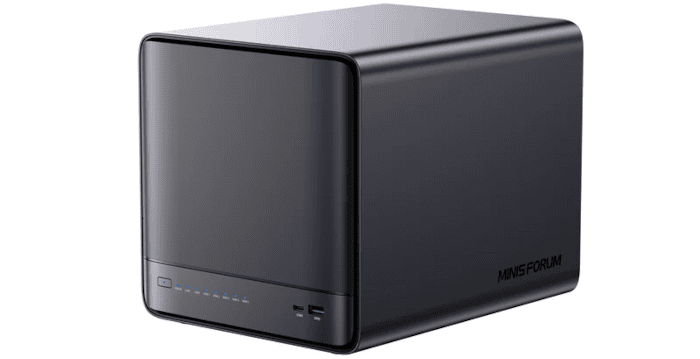
The Minisforum N5 Pro is a five-bay NAS that offers considerably more computing power than the typical home or small-business storage appliance. At its heart is AMD’s Ryzen AI 9 HX PRO 370, a 12-core, 24-thread processor that gives the system serious potential beyond simply serving files. There’s also extensive scope for storage expansion, with five SATA drive bays complemented by multiple M.2/U.2 slots.
Networking is equally ambitious, with both 10GbE and 5GbE connectivity provided as standard. The N5 Pro can therefore function as a conventional NAS, but its hardware also makes it attractive for containers, virtualisation and other server workloads. Minisforum supplies the machine with its own minisCloud OS, although Linux and Windows are also officially supported.
In this review, I’ll explore its hardware, storage capabilities and power consumption. Later articles in this series will examine the N5 Pro more closely as a NAS, including network performance, CPU utilisation during file transfers, storage configurations and other aspects of day-to-day operation.
To get the Minisforum N5 Pro up and running, you’ll need to supply storage drives. The system accommodates up to five 3.5-inch or 2.5-inch SATA drives, with additional solid-state storage available through its M.2/U.2 connectivity.
My review system came with 16GB of SO-DIMM RAM and minisCloud OS installed on a 128GB NVMe SSD, so memory and an operating system drive were already provided. A monitor, keyboard and mouse are not required for the initial minisCloud OS setup, as the system can be configured remotely over the network.
I’ve already explored MinisCloud OS in a separate review. For this review, I wanted to interrogate the hardware in considerably more detail, so I installed Ubuntu 26.04 LTS on a separate NVMe and use that as my main operating system. It’s also worth noting that minisCloud OS is in a beta stage of development.
Installing another operating system requires a monitor, keyboard and mouse for the installation and initial configuration.
Before doing so, let’s look at the design and ports.
Design
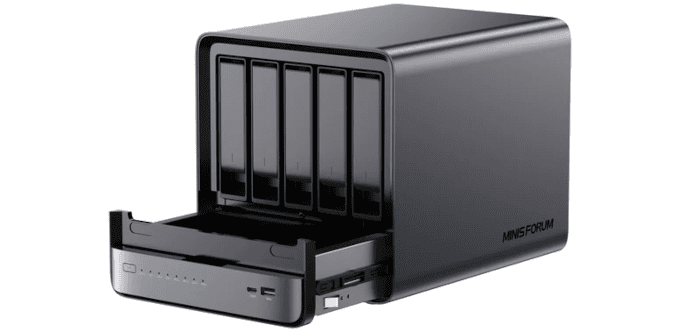
The N5 Pro has a substantial, almost cube-shaped chassis measuring 199 x 202 x 252mm and weighing around 5kg before drives are installed. The design is dominated by the five SATA drive bays at the front. These sit behind a glossy magnetic cover which simply pulls away, giving immediate access to the individual drive trays. Fitting a 3.5-inch drive is tool-free, while 2.5-inch drives are secured to the trays with screws (which are supplied). Neither the magnetic front cover nor the individual drive trays has a locking mechanism. That’s unlikely to matter in a home environment, but it is worth bearing in mind if the N5 Pro is installed somewhere where the drives are readily accessible.
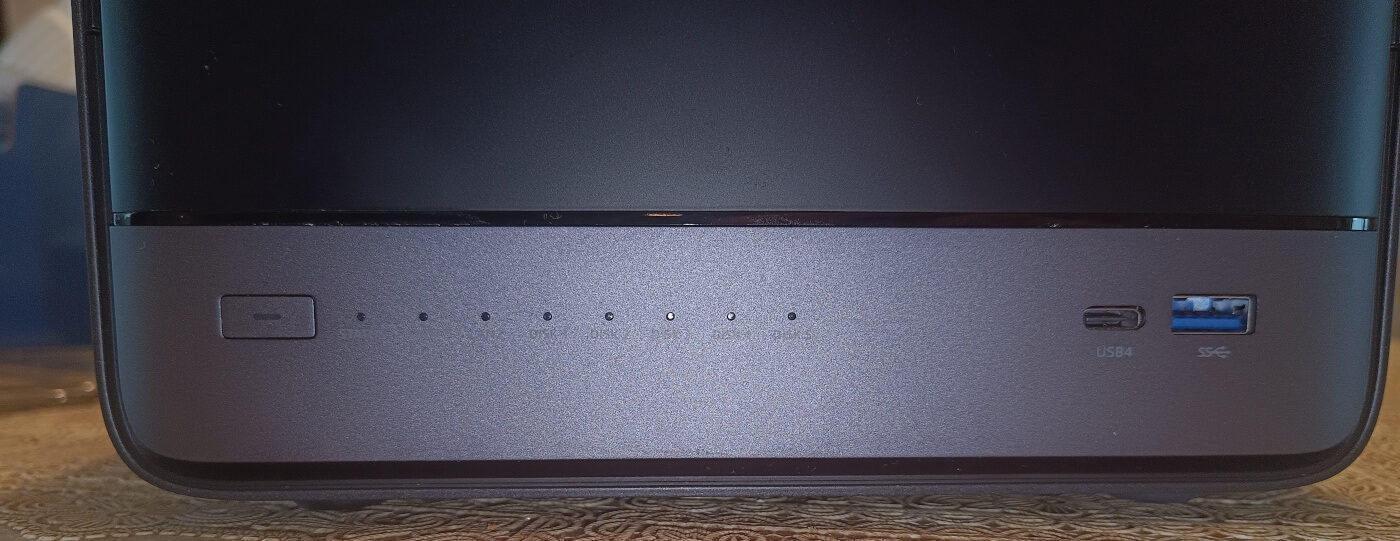
The front is otherwise fairly restrained. Alongside the power button are status indicators for the system, two network interfaces and each of the five drives, together with USB4 and USB 3.2 Gen 2 Type-A ports.
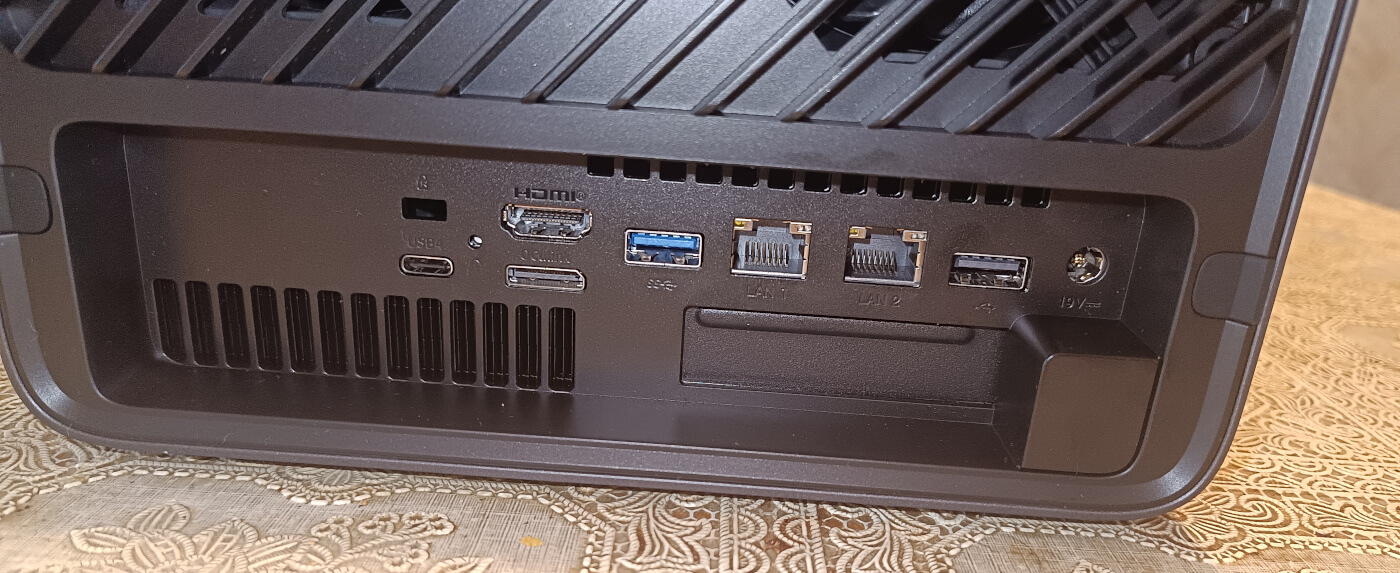
Most of the connectivity is at the rear, including another USB4 port, HDMI, OCuLink, USB ports, 10GbE and 5GbE Ethernet. There is also a low-profile PCIe x16 slot, although electrically it operates at PCIe 4.0 x4. Although four lanes limit the bandwidth available to the slot, it still provides useful expansion possibilities. Potential uses include additional networking, storage controllers or a modest low-profile accelerator.
Cooling needs some consideration with higher-power add-in cards, particularly passively cooled server adapters that normally rely on strong chassis airflow. Large ventilation areas and separate cooling for the drive and compute sections reflect the amount of hardware packed inside.
The solid-state storage options are more flexible than the photographs might initially suggest. The two data SSD positions support both M.2 2280 and longer M.2 22110 drives. Minisforum also offers a U.2 adapter arrangement that allows two 7mm U.2 SSDs to be fitted while retaining an M.2 SSD for the operating system. The limitation is that thicker 15mm U.2 drives, which are common among higher-capacity enterprise models, cannot be accommodated.
The N5 Pro is effectively divided into two sections, with the five-drive storage compartment above a removable compute tray. Two screws secure the compute section, which can be withdrawn from the chassis to gain access to the motherboard, memory and NVMe storage. A large internal connector links the compute tray to the SATA section, carrying the necessary data and power connections without a mass of internal cabling.
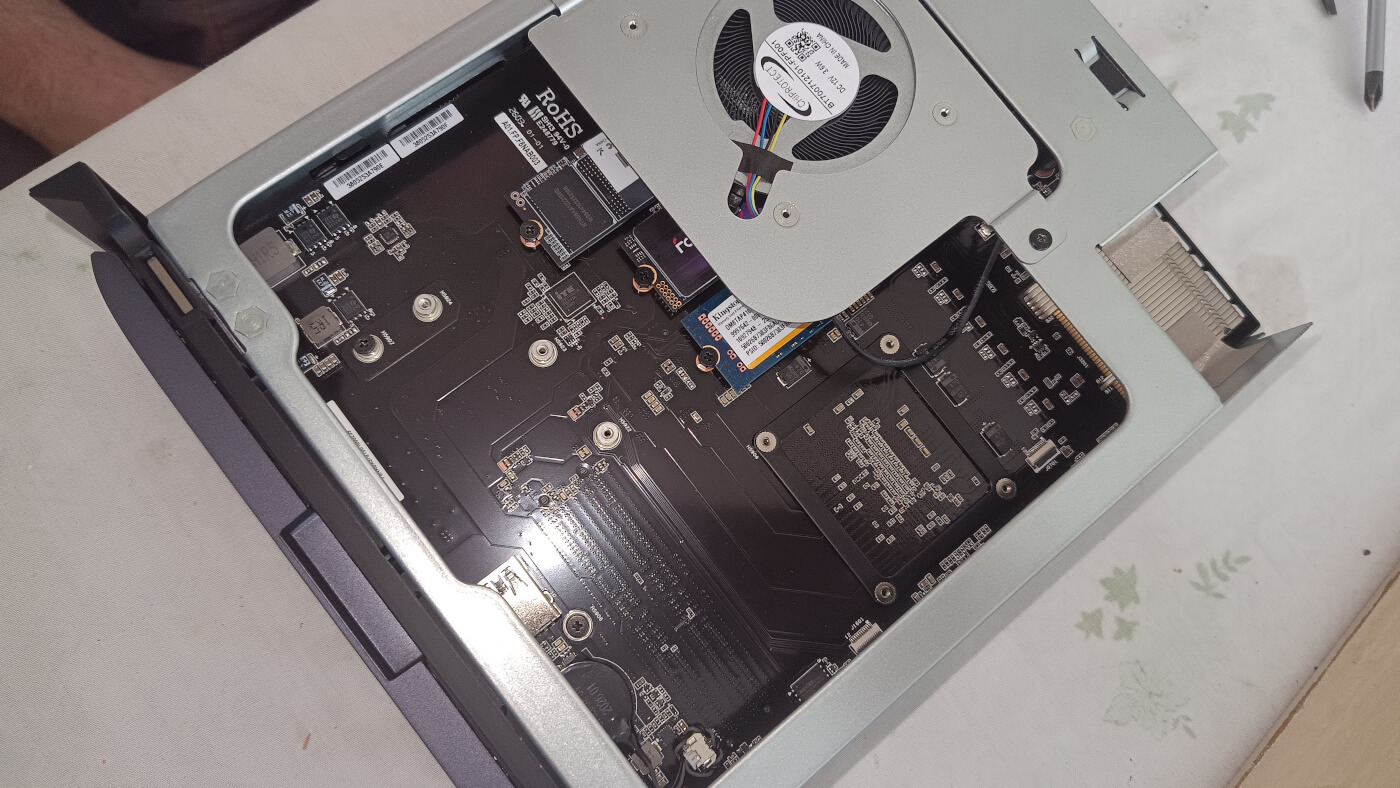
Removing the access panel exposes the N5 Pro’s storage expansion board. Most of the PCB is readily accessible, with the various M.2 sockets and mounting points within easy reach. Installing or replacing NVMe drives only requires removing two of the three screws securing the fan assembly.
The small blue AirDisk module beside the fan is the 128GB NVMe SSD supplied with my review unit, which contains minisCloud OS. I’ve added two further NVMe drives, installing Ubuntu 26.04 LTS on the 1TB drive and using the 2TB drive for data. Minisforum supplies the necessary mounting screws for fitting these NVMe drives.
Cooling is provided in part by the large blower-style fan mounted beneath the metal plate at the upper right. It sits directly above the storage area and helps move air across the SSDs and surrounding components. The layout is generally tidy, although the fan assembly and its metal shroud obscure part of the PCB.
If you look closely, you can also see an internal USB 3.2 Gen 2 Type-A port. That’s useful for devices that can remain permanently installed inside the chassis.
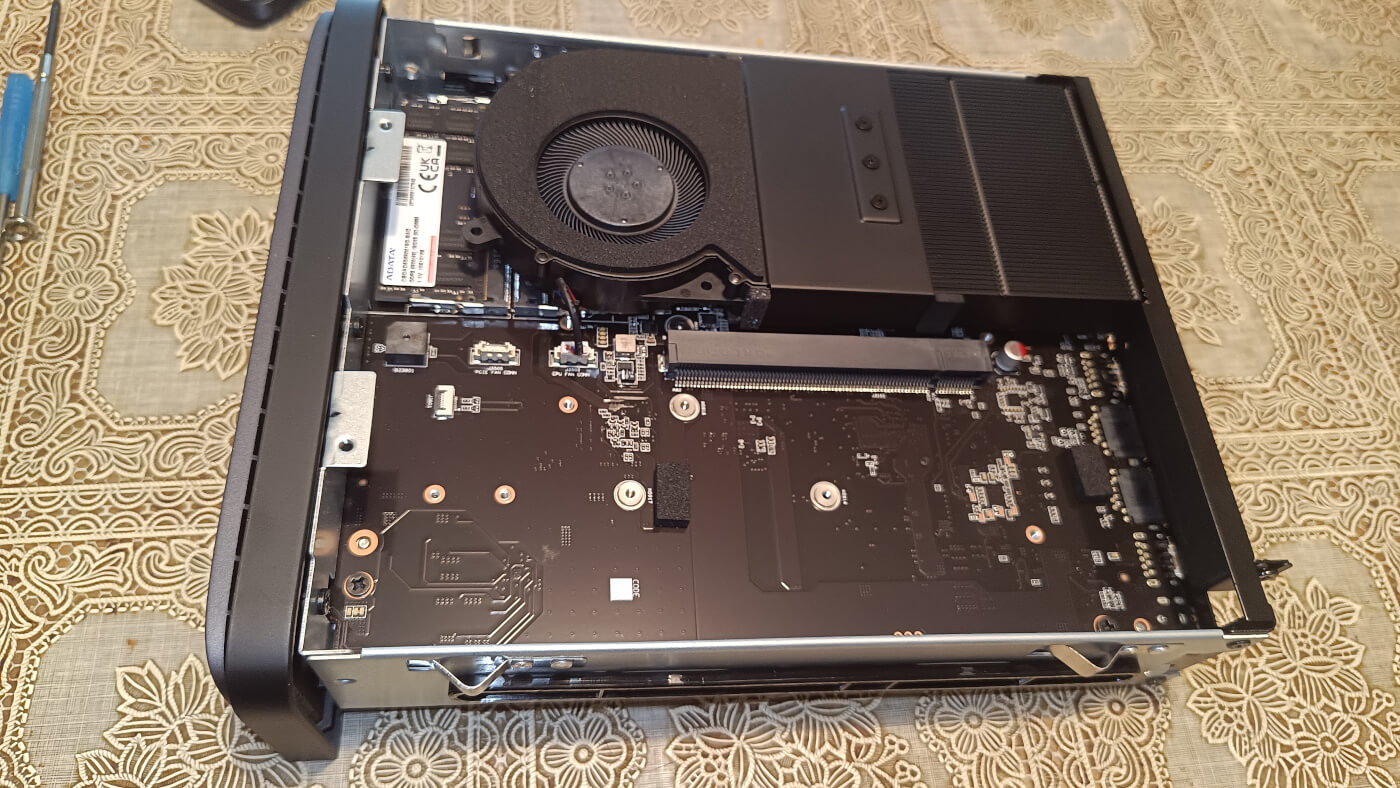
The N5 Pro’s mainboard and cooling system are exposed. Two SO-DIMM memory slots sit at the upper left of the board; one is populated with the 16GB ADATA module supplied with my review unit, leaving the second slot free for expansion.
I removed the supplied 16GB ADATA SO-DIMM and replaced it with two matching 16GB Crucial modules, increasing total memory to 32GB. The extra capacity is useful because I intend to use the N5 Pro for more than simple file serving, including containers, virtual machines and AI-related workloads.
Using two modules also allows the processor to make use of the full memory interface rather than relying on a single SO-DIMM. That increases available memory bandwidth, which benefits CPU-intensive workloads and is particularly useful for the integrated Radeon 890M, which uses system memory as graphics memory. For a system with this level of processing power, 32GB in a matched two-module configuration is a much better-balanced setup than the supplied single 16GB module.
Another useful feature for server use is support for ECC memory, courtesy of the Ryzen PRO platform. Minisforum offers the N5 Pro with up to 96GB of DDR5 ECC memory using two 48GB SO-DIMMs. My 32GB Crucial configuration does not use ECC, but the option is attractive for users placing greater emphasis on data integrity or running the machine as a virtualisation host.
A large blower-style fan dominates the upper section, directing air through the substantial finned heatsink on the right. This cooling assembly sits above the processor and associated components. The fan also needs to be removed to install or replace the SO-DIMM memory, but access is straightforward as it is secured by only three screws.
Across the centre of the board is a long expansion connector/riser interface, while several smaller headers and connectors are positioned around it.
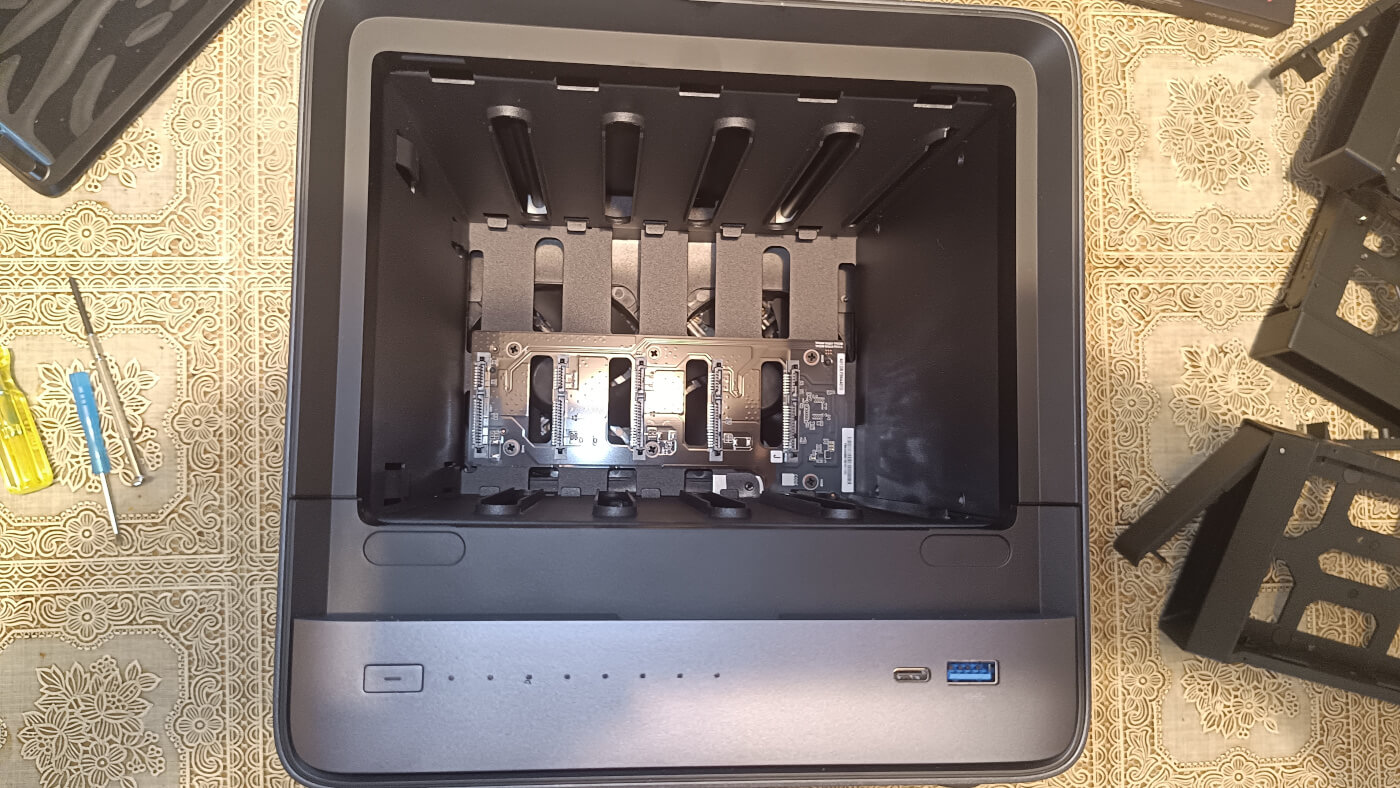
With the drive trays removed, the N5 Pro’s five-bay storage compartment is clearly visible. Each 3.5-inch drive slides vertically into its own bay and mates directly with the SATA backplane mounted at the rear of the compartment, so there are no individual power or data cables to connect.
The bay structure is largely open, which should help airflow around the drives. The backplane itself is compact and sits centrally beneath the drive connectors, while the substantial gaps around the bays provide a reasonably unobstructed path for cooling air through the storage section.
Power comes from a substantial external 280W adapter rather than an internal PSU. The capacity provides plenty of headroom for the five hard disks and additional expansion hardware.
Let’s interrogate the system.
Next page: Page 2 – Interrogation of the System
Pages in this article:
Page 1 – Introduction and Design
Page 2 – Interrogation of the System
Page 3 – First Impressions running Ubuntu 26.04 LTS
Page 4 – Power Consumption and Summary
Complete list of articles in this series:
| Minisforum N5 Pro NAS | |
|---|---|
| Introduction | Five-Bay NAS with Ryzen AI 9 Power |
| MinisCloud OS | Customised Linux NAS operating system |
| More articles to be published next week | |
Please read our Comment Policy before commenting.