
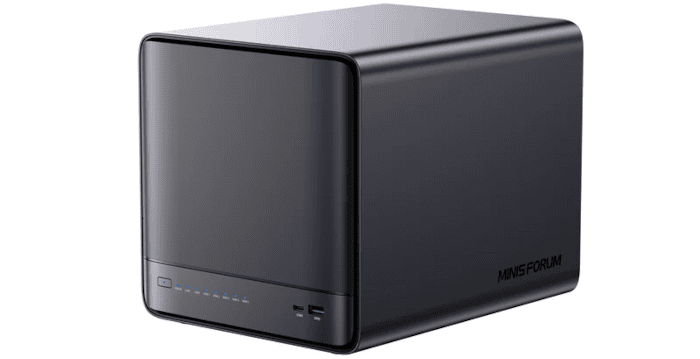
Ubuntu 26.04 LTS
Installing Ubuntu 26.04 LTS on the N5 Pro is no different from installing Linux on a conventional mini PC. I copied the Ubuntu ISO to a USB drive prepared with Ventoy, connected a monitor and keyboard, and booted the machine from the USB drive.
From there, Ubuntu’s standard installer handles the installation. The N5 Pro’s BIOS lets you choose which installed NVMe drive to boot from, so I installed Ubuntu on the 1TB NVMe while leaving the supplied 128GB AirDisk, containing minisCloud OS, untouched. The 2TB NVMe is reserved for data.
Ubuntu is a good choice for a NAS because it combines a stable base with a huge software ecosystem and excellent hardware support. The LTS releases receive security updates for many years, while standard Linux storage technologies such as ext4, XFS, Btrfs, ZFS, mdadm and LVM are all readily available. Samba and NFS provide file sharing, and Docker, Podman and virtualisation tools can be added easily if the machine is going to do more than simply store files.
It is also particularly useful on hardware such as the N5 Pro because you retain full control of the system. There is straightforward access to SMART data, drive power management, networking, system logs, temperature monitoring and the underlying filesystem rather than having these hidden behind a NAS-specific interface. Ubuntu also has extensive documentation and a very large user base, which makes troubleshooting relatively easy.
The trade-off is that Ubuntu is not a turnkey NAS operating system. Storage pools, shares, permissions, drive monitoring and other services need to be configured manually, whereas systems such as TrueNAS or OpenMediaVault provide web interfaces for much of this work. For my purposes, however, that additional control is an advantage because it makes it much easier to examine exactly how the N5 Pro behaves.
Remote Desktop
Most Linux remote desktop solutions still have a significant weakness: performance. Many were designed primarily around X11 and either work poorly with Wayland or require workarounds. That matters on Ubuntu 26.04 LTS because GNOME now uses Wayland as the standard desktop session.
Fortunately, there is a very simple solution. GNOME includes its own Remote Desktop implementation, which integrates properly with Ubuntu 26.04’s Wayland session rather than relying on X11-oriented workarounds. It supports RDP and, crucially, makes use of the Radeon 890M’s graphics acceleration. That makes a huge difference to responsiveness.
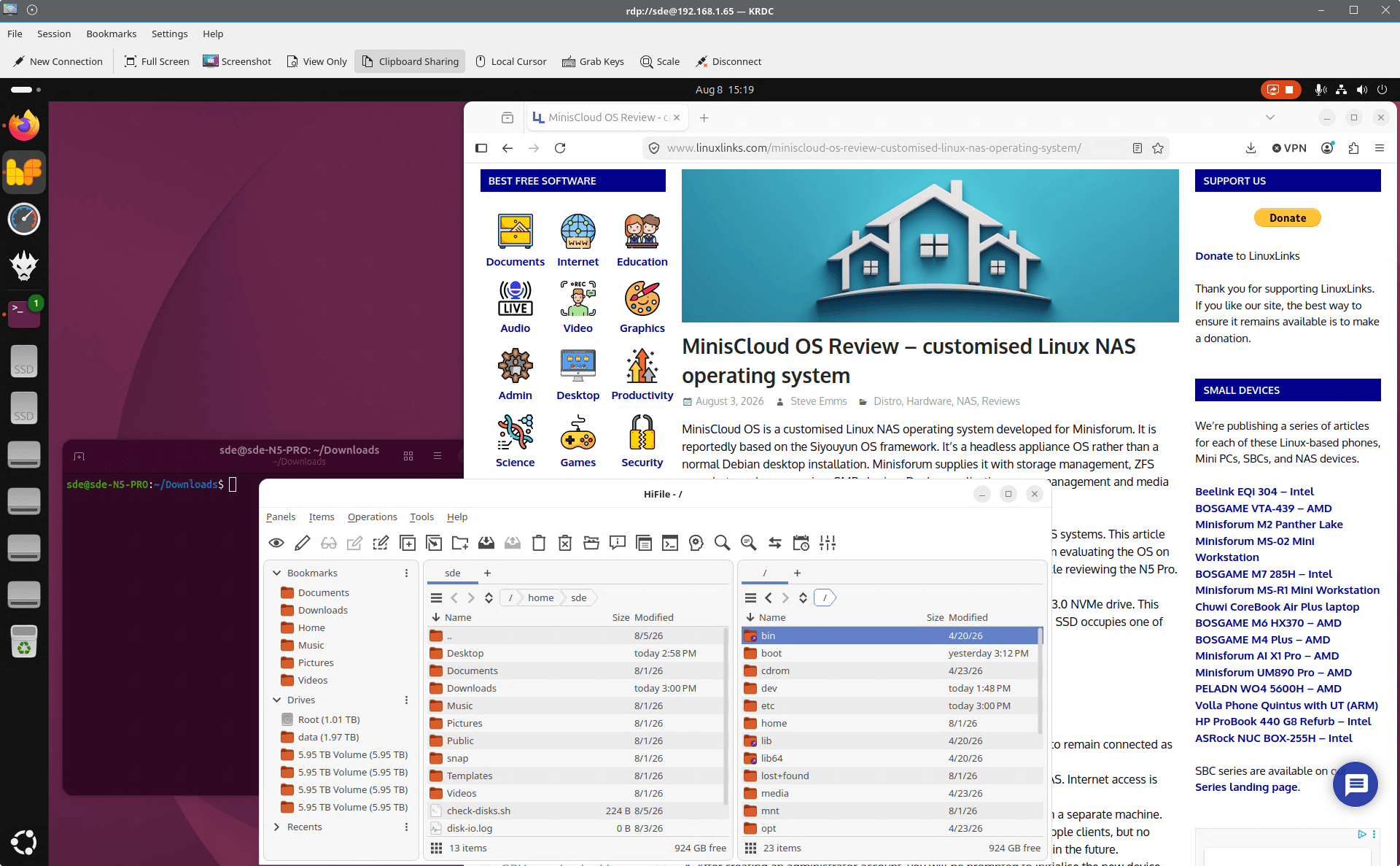
In practice, GNOME Remote Desktop works extremely well on the N5 Pro. Once acceleration is active, the remote desktop feels close to using the machine locally, and even 4K video playback is smooth. For a headless NAS that I still want to use occasionally as a full Linux workstation, it is a far better fit than many of the traditional Linux remote desktop options.
KDiskMark
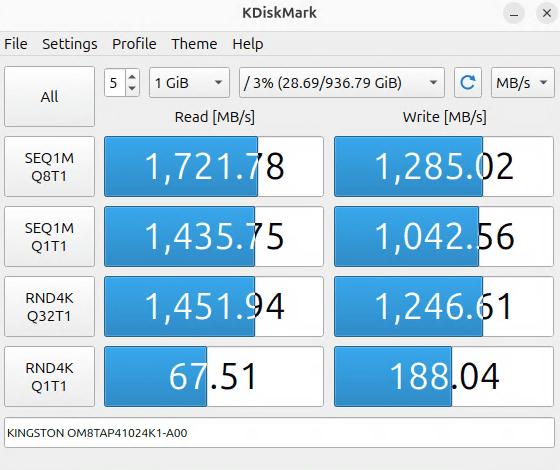
The N5 Pro’s three NVMe slots operate at PCIe 4.0 x1, x2 and x1, so they do not all offer the same bandwidth. The x1 slots provide just under 2GB/s theoretical bandwidth, while the x2 slot doubles this to just under 4GB/s. I installed a 2TB NVMe in the faster x2 slot.
The 1TB Kingston is a PCIe 4.0 x4 NVMe SSD, but it is installed in one of the N5 Pro’s PCIe 4.0 x1 slots. KDiskMark records sequential speeds of 1,722MB/s read and 1,285MB/s write, with the read figure approaching the practical limit of a PCIe 4.0 x1 connection.
So the slot, rather than the SSD, is the main performance constraint, although these speeds are still more than adequate for the Ubuntu 26.04 LTS system drive.
Here’s the KDiskMark result for the 2TB NVMe SSD running over a PCIe 4.0 x2 connection.
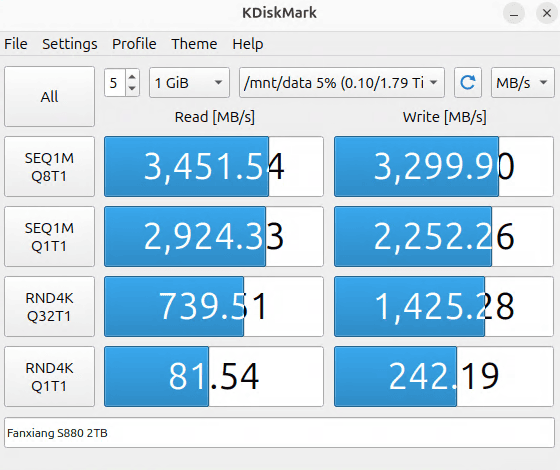
The 2TB Fanxiang is also a PCIe 4.0 x4 NVMe SSD, but here it is installed in the N5 Pro’s faster PCIe 4.0 x2 slot. KDiskMark reports sequential speeds of 3,452MB/s read and 3,300MB/s write, which is close to the practical limit of a PCIe 4.0 x2 connection. That is roughly double the throughput of the Kingston drive in the x1 slot, showing clearly how much the slot bandwidth matters.
I would have preferred at least one of the NVMe slots to offer full PCIe 4.0 x4 bandwidth, although restricted lane counts are hardly unusual among NAS appliances. The N5 Pro’s x1/x2/x1 arrangement still delivers good performance, with the x2 slot exceeding 3.4GB/s in my testing.
Next page: Page 4 – Power Consumption and Summary
Pages in this article:
Page 1 – Introduction and Design
Page 2 – Interrogation of the System
Page 3 – First Impressions running Ubuntu 26.04 LTS
Page 4 – Power Consumption and Summary
Complete list of articles in this series:
| Minisforum N5 Pro NAS | |
|---|---|
| Hardware Review | Five-Bay NAS with Ryzen AI 9 Power |
| MinisCloud OS | Customised Linux NAS operating system |
| NPU | Using the NPU with FastFlowLM |
| More articles to be published next week | |
Please read our Comment Policy before commenting.