
Power Management
As I’m running Ubuntu from one of the NVMe drives and using the 2TB NVMe for data, the mechanical disks do not need to remain spinning all the time. In this configuration, it makes sense to let the hard disks enter standby during extended periods of inactivity, reducing power consumption, heat and noise.
I configured the four mechanical disks with hdparm, setting their Advanced Power Management level to 127 and a 20-minute spindown timer. I added the settings to /etc/hdparm.conf so they are applied automatically at boot.
I also had to stop background services from touching the disks. In particular, udisks2 was waking them, so I excluded the four SATA drives from UDisks management. Initially, ext4’s background lazy inode-table initialisation also prevented two of the disks from sleeping. Once that process had completed, all four drives were able to enter standby normally.
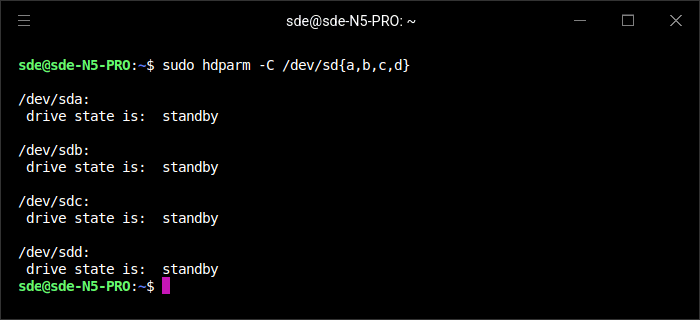
With all four mechanical disks in standby and the three NVMe drives idle, the N5 Pro draws just 18.4W at the wall. That’s impressively low for a system containing four mechanical disks, three NVMe SSDs, 32GB of RAM and a powerful 12-core processor.
With all four hard disks spinning, power consumption rises considerably to around 53W. That difference demonstrates why disk spindown is worthwhile on this particular configuration, especially when the NVMe storage can handle day-to-day activity without waking the mechanical disks.
Summary
The Minisforum N5 Pro is an unusually powerful five-bay NAS that feels closer to a compact server than a conventional storage appliance. Its Ryzen AI 9 HX PRO 370, Radeon 890M graphics, dual 10GbE/5GbE networking, PCIe expansion, OCuLink and extensive NVMe support give it considerably more scope than simply serving files.
Storage flexibility is one of its strongest features. Alongside the five SATA bays are three NVMe positions, support for M.2 2280/22110 drives and an optional U.2 arrangement. The NVMe slots are limited to PCIe 4.0 x1/x2/x1 rather than full x4 connectivity, but performance is still good, with the x2 slot exceeding 3.4GB/s in testing.
The hardware is also easy to repurpose. I retained minisCloud OS on the supplied 128GB AirDisk, installed Ubuntu 26.04 LTS on a separate 1TB NVMe and use the 2TB NVMe for data. With 32GB of dual-channel memory, the N5 Pro has ample resources for containers, virtual machines, AI workloads and other server duties.
Running Ubuntu also exposes the hardware in a way that suits more advanced users. GNOME Remote Desktop works particularly well with the Radeon 890M’s acceleration, while the mechanical disks can be configured to enter standby when unused. With four 6TB hard disks in standby and the three NVMe drives idle, my system draws just 18.4W at the wall, rising to around 53W with all four hard disks spinning.
Overall, the N5 Pro stands out because it combines the storage capacity and convenience of a five-bay NAS with the processor, networking and expansion capabilities of a small server. It is excessive if all you need is basic file storage, but for users who want a NAS that can also handle virtualisation, containers, AI and other demanding workloads, the hardware is exceptionally capable.
The Minisforum N5 Pro is currently available for £839 with a 128GB SSD but no RAM.
Pages in this article:
Page 1 – Introduction and Design
Page 2 – Interrogation of the System
Page 3 – First Impressions running Ubuntu 26.04 LTS
Page 4 – Power Consumption and Summary
Complete list of articles in this series:
| Minisforum N5 Pro NAS | |
|---|---|
| Hardware Review | Five-Bay NAS with Ryzen AI 9 Power |
| MinisCloud OS | Customised Linux NAS operating system |
| NPU | Using the NPU with FastFlowLM |
| More articles to be published next week | |
Please read our Comment Policy before commenting.