
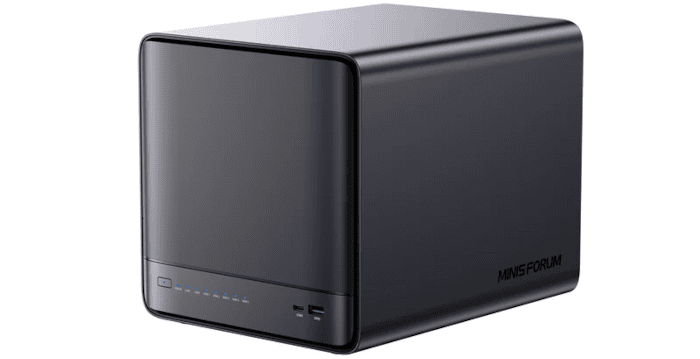
Interrogation of the System
The N5 Pro comes with minisCloud OS pre-installed on a 128GB NVMe SSD, but you’ll still need to add some storage before using it as a NAS. As I wanted to interrogate the hardware in more detail, it made more sense to install a conventional Linux distribution. I chose Ubuntu 26.04 LTS.
I’ll use the inxi utility to examine the N5 Pro’s technical specifications in detail.
Processor
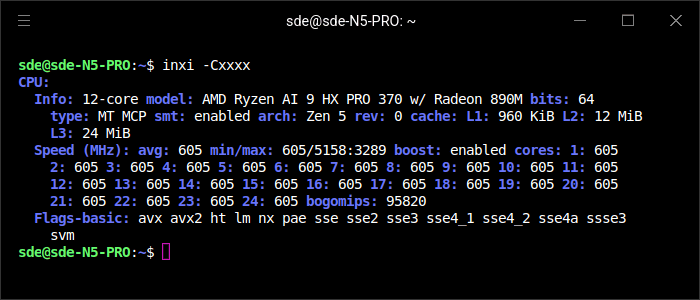
The N5 Pro is powered by AMD’s Ryzen AI 9 HX PRO 370, which combines four Zen 5 cores with eight more compact Zen 5c cores for a total of 12 cores and 24 threads with SMT. The two core clusters have 16MB and 8MB of L3 cache respectively, giving 24MB in total, alongside 12MB of L2 cache and 960KiB of L1 cache.
The Ryzen AI 9 HX PRO 370 is a very strong CPU, especially for a NAS. It’s one of the N5 Pro’s defining strengths, but also overkill if the machine is only going to serve files.
At the time of the screenshot, all cores are idling at around 605MHz, with boost enabled and a reported maximum frequency of roughly 5.16GHz. The processor also exposes the expected modern instruction sets, including AVX and AVX2, together with AMD-V (svm) hardware virtualisation support.
Graphics
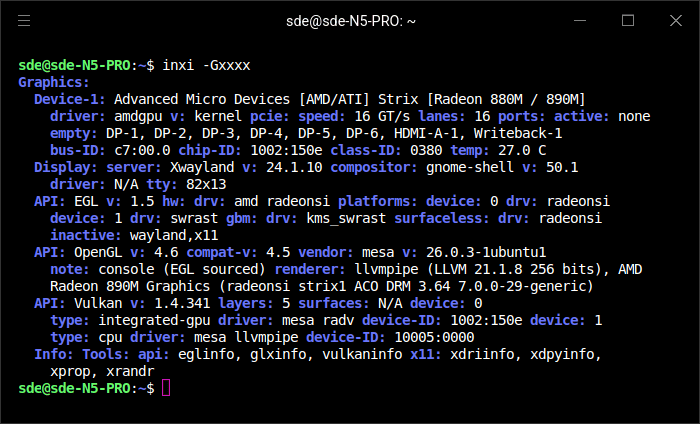
At the time I ran the command, no displays were attached, which is why all of the reported display outputs are shown as empty. The N5 Pro can nevertheless drive up to three displays simultaneously: one through the HDMI port and two through the USB4 ports.
The Radeon 890M is also useful for AI workloads. It is a relatively powerful integrated GPU based on AMD’s RDNA 3.5 architecture, with 16 compute units, and can accelerate suitably supported inference workloads under Linux. Because it uses shared system memory rather than dedicated VRAM, increasing the N5 Pro’s RAM can be particularly useful when running larger models. It is not a replacement for a high-end discrete GPU, but it makes the N5 Pro capable of experimenting with local AI without adding extra hardware. The Ryzen AI 9 HX PRO 370 also includes a separate XDNA 2 NPU for workloads able to take advantage of it.
For heavier GPU or AI workloads, the N5 Pro also provides an OCuLink connector. This exposes PCIe externally and can be used with a suitable enclosure or adapter to attach a discrete graphics card. That gives the machine a considerably more powerful upgrade path than relying on the Radeon 890M alone, particularly for AI workloads that benefit from a GPU with substantial dedicated VRAM.
Disk
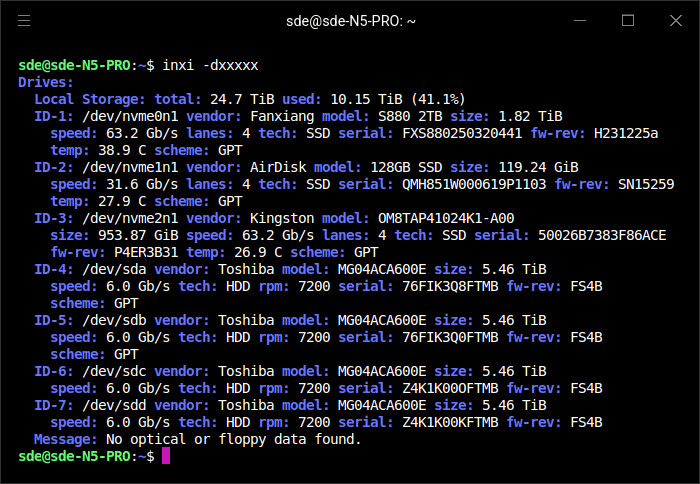
The inxi -dxxxxx output shows the N5 Pro fitted with three NVMe SSDs and four mechanical hard disks. The 128GB AirDisk SSD is supplied with the NAS and contains the factory-installed minisCloud OS. I added a 2TB Fanxiang NVMe SSD, which I use for data, together with a 1TB Kingston NVMe SSD for Ubuntu 26.04 LTS.
The three NVMe slots are not electrically identical, operating at PCIe x1, x2 and x1. I installed the 2TB Fanxiang drive in the faster x2 slot. inxi reports all three NVMe devices as using four PCIe lanes, but that is not an accurate reflection of the N5 Pro’s actual lane allocation.
For bulk storage, I installed four identical 6TB Toshiba 7,200 RPM hard disks, generously provided by Toshiba. Linux reports each as around 5.46TiB, which is normal for a drive marketed as 6TB. As the N5 Pro has five SATA bays, one bay remains free, giving me scope to add a fifth mechanical disk later for extra capacity or a different storage layout.
Memory
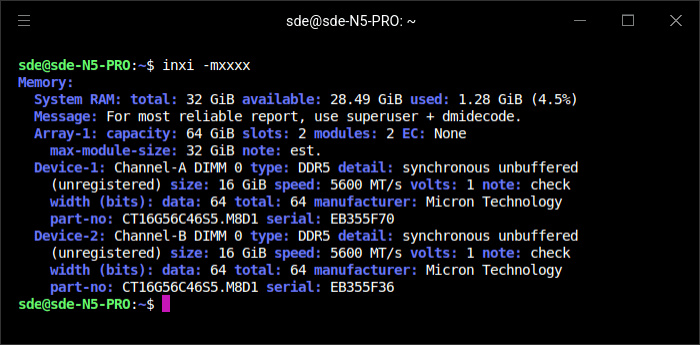
The N5 Pro was supplied with a single 16GB ADATA DDR5 SO-DIMM. I replaced it with two matching 16GB Crucial modules, giving the system 32GB of RAM. Populating both memory channels allows the system to operate in dual-channel mode rather than relying on a single module. That provides substantially more memory bandwidth, benefiting general CPU performance and, in particular, the integrated Radeon 890M, which shares system memory with the processor.
Network
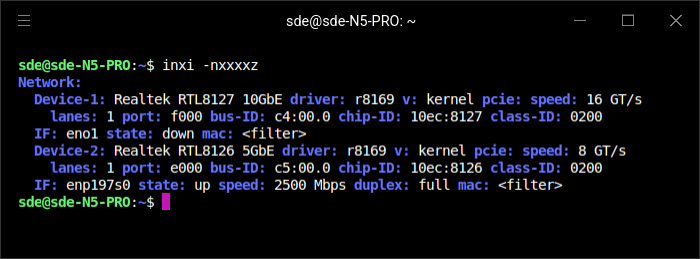
Networking is one of the N5 Pro’s strongest features. It provides two wired Ethernet interfaces: a Realtek RTL8127 10GbE controller and a Realtek RTL8126 5GbE controller. That gives the system considerably more network bandwidth than a typical consumer NAS and makes it well suited to fast file transfers, multi-user workloads, virtualisation and other server duties.
The screenshot shows the 5GbE interface active at 2.5Gbps, while the 10GbE interface is down. At the time I took it, the N5 Pro was simply connected to my router rather than to a 5GbE or 10GbE switch, so the negotiated speed reflects the capabilities of that connection rather than the maximum speed of the NAS itself.
Having both 10GbE and 5GbE built in is a real strength. It gives the N5 Pro plenty of flexibility for faster networks without requiring an add-in NIC, and the two interfaces can also be used independently for different networks or workloads.
The machine doesn’t include Wi-Fi or Bluetooth, although either can easily be added with a suitable USB adapter.
Temperature
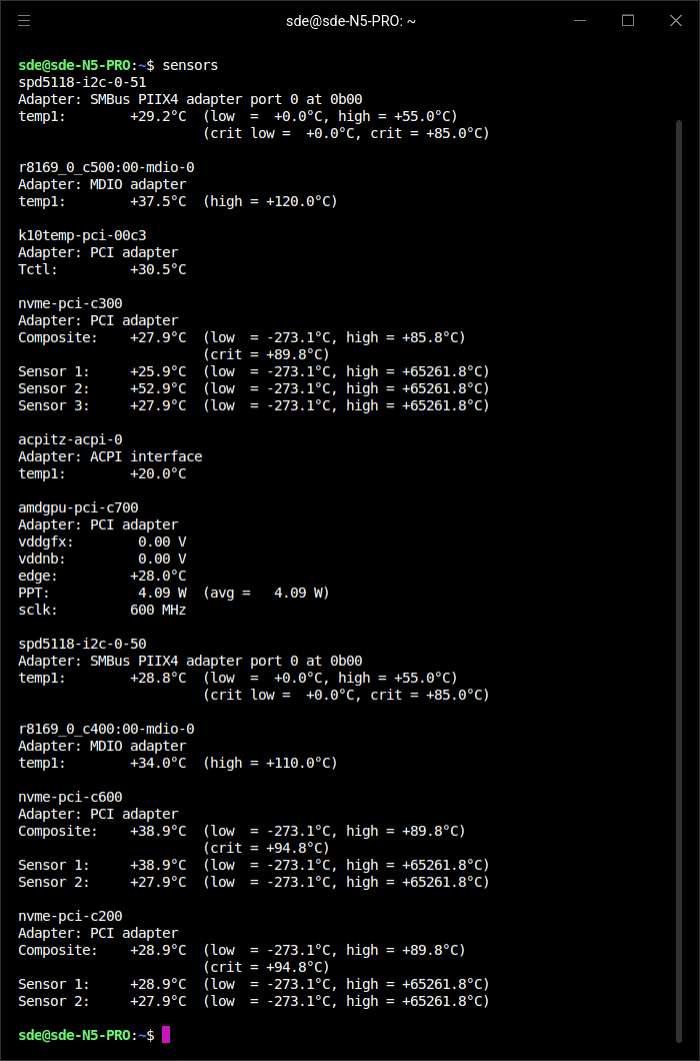
With the system sitting idle, the Ryzen AI 9 HX PRO 370 reports a Tctl temperature of around 30.5°C, while the Radeon 890M is at about 28°C and clocked down to 600MHz. The GPU is drawing only around 4W at this point.
The two SO-DIMMs are also cool at roughly 29°C. NVMe composite temperatures range from about 28°C to 39°C, although one of the additional NVMe sensor readings reaches 53°C. The two Realtek network controllers are sitting at approximately 34°C and 38°C.
Overall, these idle readings indicate the N5 Pro’s cooling system has no difficulty keeping the processor, memory, networking and storage hardware comfortably within their operating ranges when the machine is doing very little work.
Next page: Page 3 – First Impressions running Ubuntu 26.04 LTS
Pages in this article:
Page 1 – Introduction and Design
Page 2 – Interrogation of the System
Page 3 – First Impressions running Ubuntu 26.04 LTS
Page 4 – Power Consumption and Summary
Complete list of articles in this series:
| Minisforum N5 Pro NAS | |
|---|---|
| Hardware Review | Five-Bay NAS with Ryzen AI 9 Power |
| MinisCloud OS | Customised Linux NAS operating system |
| NPU | Using the NPU with FastFlowLM |
| More articles to be published next week | |
Please read our Comment Policy before commenting.