

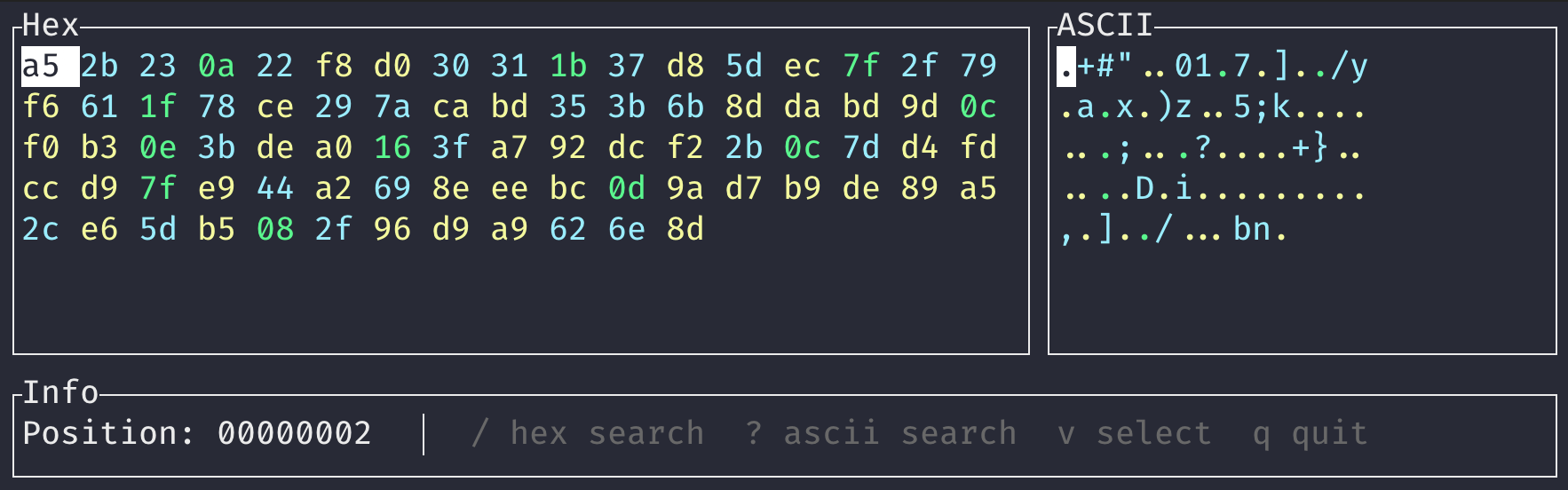
dead-ringer is an interactive terminal utility for comparing two binary files. It displays differing data in hexadecimal and ASCII representations, giving users a compact way to inspect changed bytes and their offsets without opening a graphical hex editor.
Navigation is keyboard driven, while search and selection tools make it possible to move through larger binary comparisons and extract interesting data directly from the terminal.
This is free and open source software.
Key Features
- Displays binary differences using hexadecimal and ASCII representations.
- Uses colour highlighting to distinguish different classes of byte values.
- Provides keyboard navigation with arrow keys and Vim-style movement keys.
- Displays the byte offset corresponding to the current focus position.
- Searches for hexadecimal byte sequences.
- Searches independently for ASCII strings.
- Lets users move forwards and backwards through search matches.
- Allows switching between hexadecimal and ASCII search modes while entering a query.
- Provides a visual selection mode for marking ranges of bytes.
- Copies selected data to the clipboard as hexadecimal text.
- Can alternatively copy the selected bytes as ASCII text.
- Uses the OSC 52 terminal sequence for clipboard transfer without depending on a graphical clipboard application.
- Supports OSC 52 forwarding through suitably configured tmux sessions.
- Displays extra bytes when compared files have different lengths.
- Adapts its display to make effective use of available terminal width.
Website: github.com/ztroop/dead-ringer
Support:
Developer: Zackary Troop
License: MIT License
dead-ringer is written in Rust. Learn Rust with our recommended free books and free tutorials.
Related Software
| Terminal-Based Diff Tools | |
|---|---|
| difftastic | Structural diff tool that compares files based on their syntax |
| hunk | Terminal diff viewer with syntax highlighting and side-by-side views |
| diff-so-fancy | Attractive diffs with diff-highlight and more |
| delta | Viewer for git and diff output |
| icdiff | An improved colored diff |
| diffoscope | In-depth comparison of files, archives, and directories |
| colordiff | Wrapper for diff with pretty syntax highlighting |
| diffsitter | Semantic diff tool |
| objdiff | Local diffing tool for decompilation project |
| ydiff | Tool to view colored, incremental diff in a version controlled workspace |
| diffr | Word-by-word diff highlighting utility |
| dyff | diff tool for YAML files |
| Wdiff | Wordwise implementation of diff |
| dwdiff | diff program that operates at the word level |
| diffyml | Compares YAML documents by their structure |
| oyo | Step-through diff viewer |
| diff2html-cli | Generate HTML diffs |
| biodiff | Terminal-based binary diff viewer |
| dirdiff | Compute the differences between two directories |
| csvdiff | Fast diff tool for comparing CSV files |
| VBinDiff | Visual binary diff |
| riff | Wrapper around diff |
| csv-diff | Diffing CSV and JSON files |
| xmldiff | Compare XML documents |
| Patdiff | File diff using the Patience Diff algorithm |
| dead-ringer | Binary diff utility |
| sesdiff | Generates a shortest edit script |
| semdiff | Semantic diff tool written in Rust |
Read our verdict in the software roundup.
 LinuxLinks helps you discover the best free and open source software for Linux. Explore our extensive collection of recommended applications, including alternatives to popular proprietary software. LinuxLinks helps you discover the best free and open source software for Linux. Explore our extensive collection of recommended applications, including alternatives to popular proprietary software.We also publish software reviews, Linux tutorials, hardware reviews, free programming books and articles covering the wider open source community. Browse our Linux resources to discover more. Know a useful free and open source Linux application we haven't covered? Suggest a program for inclusion. Has your software been featured on LinuxLinks? Display one of our Featured on LinuxLinks badges on your website or GitHub README. |
Please read our Comment Policy before commenting.