
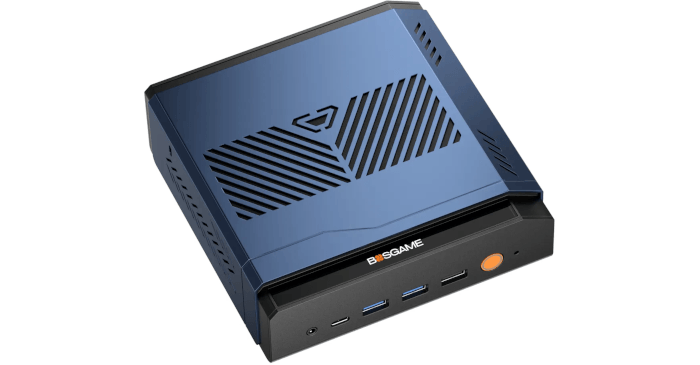
Why the VTA-439?
I’ve been putting the BOSGAME VTA-439 through a series of gaming tests to see how far its Radeon 890M integrated graphics can go under Linux. Some games demand considerable compromises in graphical quality, while others run surprisingly well at 1920×1080.
The VTA-439 is powered by AMD’s Ryzen AI 9 HX 470, a 12-core processor combining Zen 5 and Zen 5c cores. Its Radeon 890M uses shared system memory rather than dedicated video memory, making it interesting to see how it performs in games originally developed with more powerful graphics hardware in mind.
This time I’m testing Total War: WARHAMMER III, comparing four graphics presets under CachyOS. I’ve also repeated the benchmarks under Windows 11 on the same machine and included results from my GeForce RTX 3060 Ti desktop running Kubuntu 26.04 LTS.
Total War: WARHAMMER III
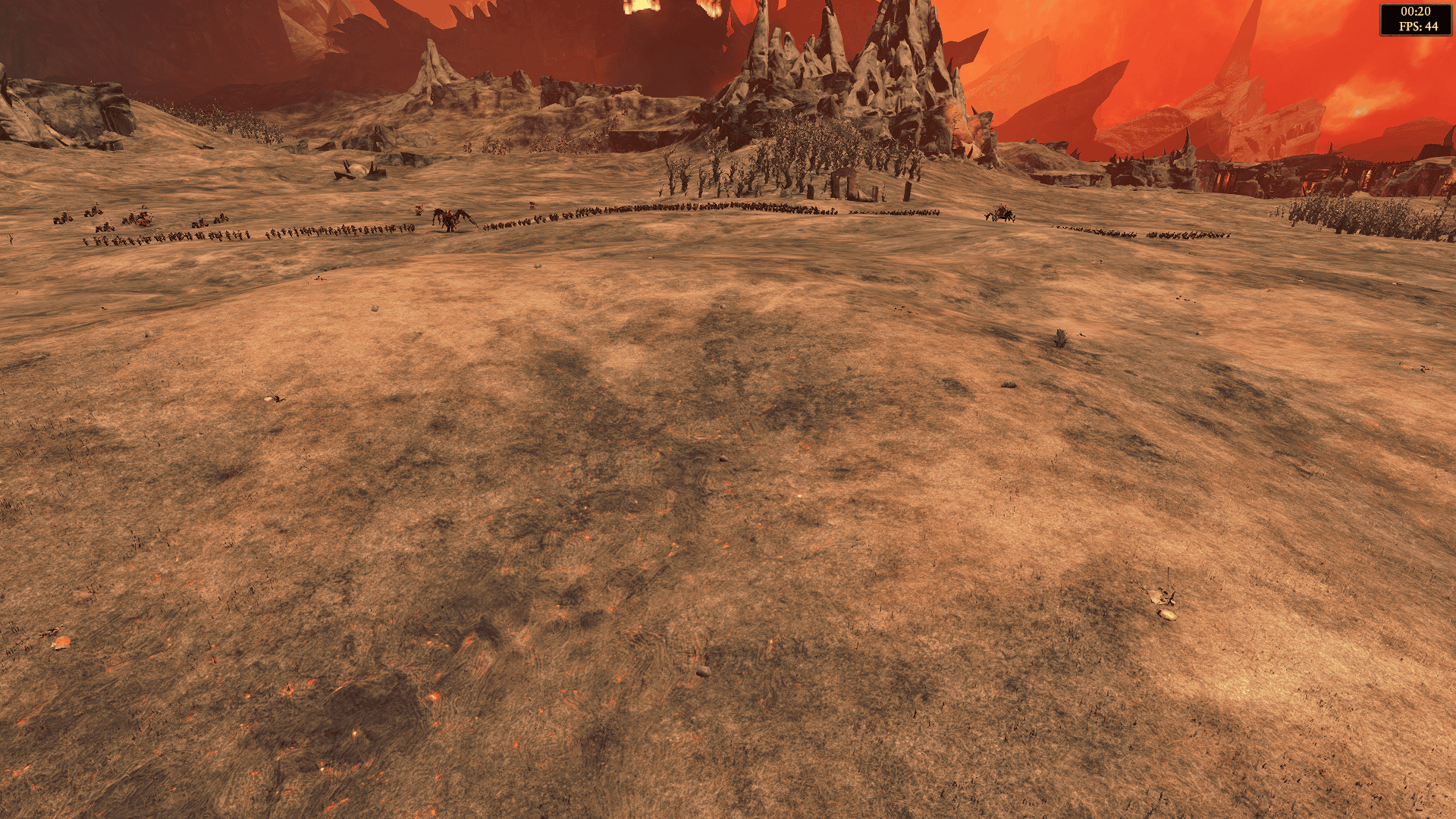
Total War: WARHAMMER III is a fantasy strategy game developed by Creative Assembly. It combines turn-based empire management with large-scale real-time battles involving hundreds or thousands of troops, elaborate environments and spectacular visual effects.
These battles can place considerable demands on graphics hardware. Large armies, detailed character models, shadows, particle effects and complex battlefields make the game an interesting challenge for integrated graphics.
I’m testing the Epic Games version under CachyOS using Heroic and Proton.
I’m comparing four graphics presets: Low, Medium, High and Ultra. All benchmarks are conducted at 1920×1080 using the game’s built-in benchmarking tool. The results report both average and minimum FPS, rather than 1% lows.
Performance
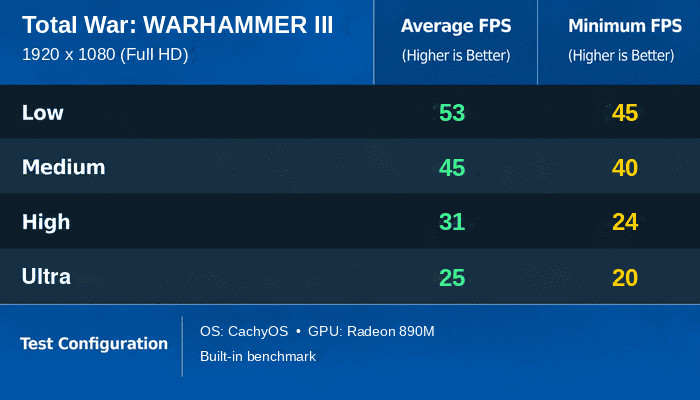
The Radeon 890M faces a considerably tougher challenge here than in World War Z. Even at Low, the VTA-439 averages 53 FPS, with a minimum of 45 FPS. That’s a respectable showing for integrated graphics in a demanding strategy game, although it falls short of the 60 FPS target many gamers prefer.
Moving to Medium brings the average down to 45 FPS, with a minimum of 40 FPS. That’s a reduction of around 15% in average performance. It doesn’t sound particularly dramatic, but when the game is already running below 60 FPS, those eight frames are worth having.
High is where performance becomes more problematic. The average falls to 31 FPS, with a minimum of just 24 FPS. That’s a sizeable 31% reduction from Medium. While 30 FPS can be acceptable in some strategy games, the minimum suggests that more demanding scenes could feel noticeably less fluid.
Ultra pushes the Radeon 890M further beyond its comfortable limits. The average drops to 25 FPS, with a minimum of 20 FPS. That’s another 19% reduction from High, leaving little performance headroom.
The overall decline is substantial. Moving from Low to Ultra reduces the average frame rate by approximately 53%. Unlike World War Z, where the highest graphics preset carried almost no additional penalty over High, Total War: WARHAMMER III becomes progressively more demanding as graphical quality increases.
For this game, I’d favour Low at 1920×1080. Its 53 FPS average and 45 FPS minimum aren’t outstanding, but they provide more headroom than Medium. The latter averages 45 FPS, dropping to 40 FPS at its lowest point. Some players will find that acceptable in a strategy game, particularly if they value graphical detail over smoothness. Personally, I’d rather have the additional frames.
Neither preset manages an average of 60 FPS, so there’s certainly room for improvement. Reducing the resolution to 1600×900 might be worth investigating, although I haven’t benchmarked that option. High and Ultra are simply too demanding for the Radeon 890M at 1080p.
CachyOS vs Windows 11
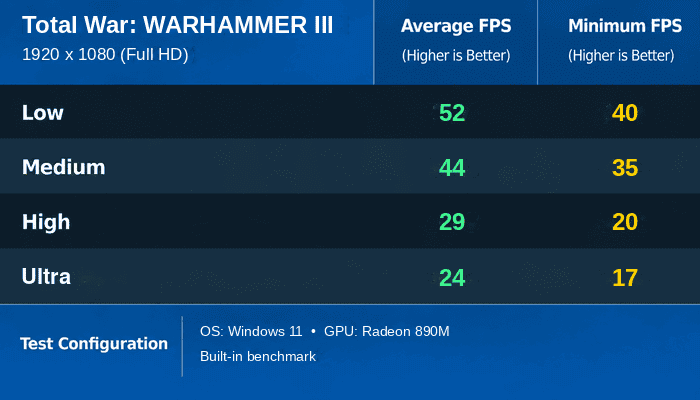
CachyOS performs slightly better than Windows 11 across all four graphics presets, although the differences in average FPS are small.
At Low, CachyOS averages 53 FPS against 52 FPS under Windows 11. Medium produces an almost identical result, with 45 FPS under CachyOS and 44 FPS under Windows. High sees CachyOS extend its advantage to two frames, averaging 31 FPS compared with 29 FPS. Ultra returns to a one-frame difference, at 25 FPS against 24 FPS.
These are modest advantages, and I wouldn’t attach too much significance to differences of just one or two frames. The two operating systems deliver broadly comparable average performance.
The minimum FPS results are more interesting. CachyOS records 45 FPS at Low against 40 FPS under Windows 11. At Medium, the figures are 40 FPS and 35 FPS respectively. CachyOS also leads at High, with 24 FPS against 20 FPS, and at Ultra, with 20 FPS against 17 FPS.
That gives CachyOS a minimum FPS advantage of between three and five frames across all four presets. In percentage terms, the improvement is more substantial than the differences in average performance.
It’s an encouraging result for Linux, although minimum frame rates can be sensitive to individual benchmark runs. I’d want repeated measurements before drawing firm conclusions about whether CachyOS consistently handles the more demanding moments better.
What matters most is that running the game under CachyOS hasn’t introduced a performance penalty in these tests. Average frame rates are marginally higher under Linux, and the minimum figures are consistently more favourable.
Neither operating system changes the overall picture, however. Low remains my preferred setting at 1080p, while Medium is worth considering if you’re prepared to accept lower frame rates in exchange for better visuals.
Discrete GPU context
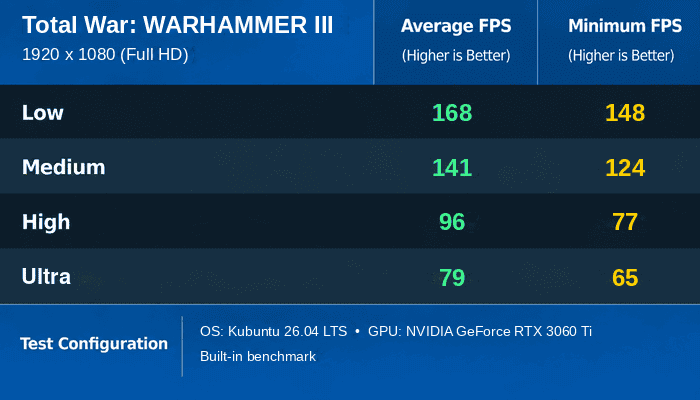
My GeForce RTX 3060 Ti desktop running Kubuntu 26.04 LTS provides a very different picture. It’s a different system, so this isn’t a strictly controlled GPU-only comparison, but the results illustrate the considerable performance advantage of a dedicated graphics card.
At Low, the RTX 3060 Ti averages 168 FPS, with a minimum of 148 FPS. That’s more than three times the performance of the Radeon 890M under CachyOS.
Medium still delivers an impressive 141 FPS, with a minimum of 124 FPS. High averages 96 FPS, with a minimum of 77 FPS. Even Ultra maintains 79 FPS, with a minimum of 65 FPS.
What’s particularly striking is that the RTX 3060 Ti delivers better performance at Ultra than the Radeon 890M manages at Low. The dedicated graphics card averages 79 FPS at the highest preset, compared with just 53 FPS for the integrated GPU at the lowest preset.
Across all four graphics presets, the RTX 3060 Ti is approximately 3.1 to 3.2 times faster. The performance gap is remarkably consistent.
The dedicated graphics card also maintains minimum frame rates above 60 FPS at every preset. That provides considerably more headroom for demanding scenes and makes Ultra a perfectly reasonable choice.
Moving from Low to Ultra reduces the RTX 3060 Ti’s average performance by approximately 53%, almost exactly the same proportional reduction seen on the Radeon 890M. Both graphics solutions therefore respond similarly to increasing graphical demands, but from very different starting points.
The desktop clearly provides a substantially better experience, particularly at High and Ultra. That’s hardly surprising given the difference in graphics hardware, but the results demonstrate how demanding Total War: WARHAMMER III can be when graphical quality is increased.
Summary
Total War: WARHAMMER III gives the BOSGAME VTA-439’s Radeon 890M a serious workout. At 1920×1080, even the Low preset falls short of averaging 60 FPS, although its 53 FPS average and 45 FPS minimum are respectable for integrated graphics.
Medium reduces performance to 45 FPS, with a minimum of 40 FPS. That’s potentially acceptable for a strategy game, but I’m not convinced it’s worth giving up the additional performance available at Low. High and Ultra are much harder to justify, averaging just 31 FPS and 25 FPS respectively.
CachyOS compares favourably with Windows 11. Average performance is almost identical, with Linux holding a small advantage across all four presets. The minimum FPS results also favour CachyOS, although the differences need to be treated with some caution.
My RTX 3060 Ti desktop is in another league. It delivers more than three times the average FPS at equivalent graphics presets and comfortably handles Ultra at 1080p.
Unlike World War Z, this isn’t a game where the Radeon 890M can deliver high graphical quality without significant compromises. Even at Low, the frame rate isn’t quite where I’d like it to be, although the results show that this demanding strategy game is within reach of integrated graphics.
For the VTA-439, I’d stick with Low. Medium is an option if graphical quality matters more to you than frame rate, but neither setting delivers the consistently smooth performance I’d ideally like. A lower rendering resolution might offer a better compromise, and that’s something worth exploring in future testing.
Complete list of articles in this series:
| BOSGAME VTA-439 Mini PC | |
|---|---|
| Introduction | Introduction to the series and interrogation of the machine |
| Benchmarks | Benchmarking the BOSGAME VTA-439 Mini PC |
| Power | Testing and comparing the power consumption |
| Easy Diffusion | Local Stable Diffusion package with a browser-based GUI |
| BIOS | Explore the machine's BIOS |
| Noise | How quiet is this mini PC? |
| NPU | Running LLMs on the Ryzen AI 9 HX 470 NPU |
| VirtualBox | Run VirtualBox on the Ryzen AI 9 HX 470's Zen 5 Cores |
| Lemonade Server | Local AI server on the BOSGAME VTA-439 |
| Gaming with the Radeon 890M | |
| Shadow of the Tomb Raider | Comparing graphics presets and frame rates |
| Tiny Tina’s Wonderlands | How well does this demanding shooter perform? |
| The Callisto Protocol | Pushing the integrated GPU with a demanding title |
| Deus Ex: Mankind Divided | Performance across the graphics presets |
| World War Z | Comparing Linux and Windows gaming performance |
| Total War: WARHAMMER III | Campaign and battle benchmark performance |
Please read our Comment Policy before commenting.