
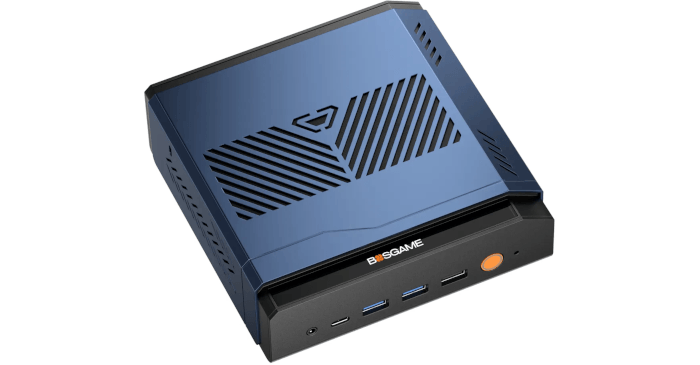
The AMD Ryzen AI 9 HX 470 in the BOSGAME VTA-439 is a 12-core, 24-thread processor, but its cores are not all the same. It combines four higher-performance Zen 5 cores with eight smaller Zen 5c cores.
I previously looked at how well the Linux task scheduler handles modern Intel and AMD processors, and my findings show it generally performs well. I have also benchmarked Zen 5 and Zen 5c cores individually. Those benchmarks demonstrate why CPU placement can matter. A Zen 5c core is significantly slower than a full Zen 5 core in workloads where single-thread performance is important.
This raises an interesting question when running virtual machines. Is it better to let VirtualBox use all cores, or restrict it to the four faster Zen 5 cores?
VirtualBox and the HX 470
VirtualBox lets me specify how many virtual CPUs are presented to a guest, but it does not offer a simple setting that says those virtual CPUs should run exclusively on the fastest class of CPU core.
On a Linux host, VirtualBox ultimately relies on the Linux scheduler to decide where its runnable threads execute.
Linux has support for heterogeneous AMD processors and can use information about the relative performance of individual cores when making scheduling decisions. That is useful on the HX 470 because the four Zen 5 cores can boost much higher than the eight Zen 5c cores.
However, a virtual machine is a slightly unusual workload.
VirtualBox creates host threads for the guest’s virtual CPUs together with additional threads used for device emulation, I/O, timers, display handling and other work. Linux sees these as ordinary runnable host threads. It does not intrinsically know that I would prefer the interactive workload inside my desktop VM to remain on the four fastest cores.
Unless CPU affinity is imposed, those VirtualBox threads are eligible to run on all 24 logical CPUs. Linux can migrate them between CPUs as load changes.
This means a four-vCPU virtual machine should not be thought of as occupying four fixed physical cores. Its vCPU threads may run on a Zen 5 core at one moment and a Zen 5c core later. Different VirtualBox threads can also be executing simultaneously on different core types.
Looking at per-CPU utilisation can therefore give the impression that VirtualBox is spreading its workload fairly evenly across the processor. It is not VirtualBox deliberately dividing each virtual CPU equally between all the cores. Rather, VirtualBox has multiple runnable threads and the Linux scheduler is free to place and migrate those threads throughout the allowed CPU set.
On an unrestricted HX 470, that allowed set contains both Zen 5 and Zen 5c cores.
That is not necessarily incorrect scheduling. The Zen 5c cores still offer plenty of performance, and using them increases the total CPU resources available to VirtualBox. The Linux scheduler is also balancing the VM against all the other work running on the host.
But for an interactive desktop VM, I am more interested in consistent high single-thread performance than maximising the number of cores available. Allowing an important vCPU thread to move between Zen 5 and Zen 5c cores can therefore be different from the scheduling policy I actually want for this workload.
Which CPUs are the Zen 5 cores?
On my VTA-439, Linux exposes the processor as follows:
| Logical CPUs | Core type |
|---|---|
| 0-3 | Zen 5 |
| 4-11 | Zen 5c |
| 12-15 | Zen 5 SMT siblings |
| 16-23 | Zen 5c SMT siblings |
The four Zen 5 physical cores are therefore represented by logical CPUs 0-3 and their SMT siblings 12-15.
Run VirtualBox only on Zen 5
Linux provides a very simple way of restricting a process to specific CPUs with taskset.
I can launch VirtualBox like this:
$ taskset -c 0-3,12-15 VirtualBox
VirtualBox is now allowed to execute only on the four Zen 5 physical cores and their SMT siblings. The eight Zen 5c cores and their SMT siblings are excluded.
There is an important distinction here. This does not pin virtual CPU 0 to Zen 5 core 0, virtual CPU 1 to core 1, and so on.
Instead, taskset gives the VirtualBox process an affinity mask containing eight logical CPUs. Linux remains free to move VirtualBox threads between those CPUs. A vCPU thread might run on CPU 0 and later migrate to CPU 13, for example. What the scheduler cannot do is move it onto one of the Zen 5c logical CPUs.
VirtualBox can therefore still make use of normal Linux scheduling and load balancing, but only within the Zen 5 portion of the processor.
That is exactly what I want for this test. I am not trying to replace the Linux scheduler or permanently bind individual VM threads to individual cores. I am simply limiting the pool of CPUs from which the scheduler can choose.
A good match for a four-vCPU VM
This configuration is particularly interesting with a VM configured with four virtual CPUs. The HX 470 has four full Zen 5 physical cores, so a four-vCPU guest can be serviced entirely by that part of the processor. The Zen 5 SMT siblings are also available for additional VirtualBox threads and periods where more runnable work is present.
Meanwhile, the eight Zen 5c cores remain available to KDE Plasma, background applications and the rest of the host system.
This does not reserve the Zen 5c cores exclusively for the host, nor does it stop other host processes from being scheduled on the Zen 5 cores. What it does guarantee is that VirtualBox itself cannot consume CPU time on the Zen 5c cores. In practice, this gives the host a substantial pool of CPU resources that the VM cannot use.
Check the CPU affinity
After starting a virtual machine, I can find its VirtualBox process with:
$ pgrep -a VirtualBoxVM
To check the affinity mask of the most recently started VM:
$ taskset -pc $(pgrep -n VirtualBoxVM)
I can also see which logical CPUs its individual threads are currently running on:
$ ps -L -p $(pgrep -n VirtualBoxVM) -o pid,tid,psr,comm
Here’s the output from the 3 commands:
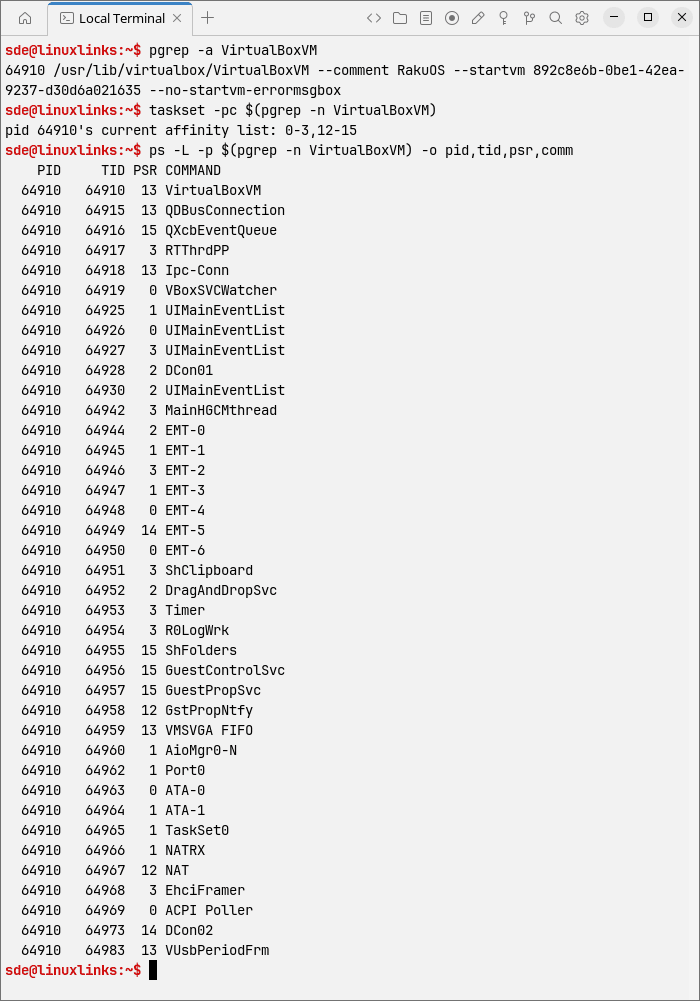
The PSR column shows the logical CPU currently executing each thread. With unrestricted VirtualBox, repeated checks can show its threads moving around the processor and appearing on both Zen 5 and Zen 5c CPUs.
With the affinity restriction active, the threads can still move around, but they should only ever appear on CPUs 0-3 and 12-15.
This is a useful distinction when interpreting tools such as top and htop. Seeing VirtualBox activity across many CPUs does not mean a single VM thread is being divided between them. It reflects multiple VirtualBox threads being scheduled and migrated independently by Linux.
What about using CPUs 0-3 only?
There is another interesting configuration:
$ taskset -c 0-3 VirtualBox
This restricts VirtualBox to one hardware thread on each of the four physical Zen 5 cores. It excludes both the Zen 5c cores and the SMT siblings of the Zen 5 cores.
For a four-vCPU VM, this avoids having two busy VirtualBox threads sharing the execution resources of a single physical Zen 5 core.
There is a downside. VirtualBox runs more than just its four principal vCPU threads. Device emulation, I/O and its other supporting threads would also need to share the same four logical CPUs.
For that reason I prefer to start with:
$ taskset -c 0-3,12-15 VirtualBox
This gives VirtualBox access to all eight logical CPUs belonging to the four Zen 5 physical cores while completely excluding Zen 5c.
It is still worth benchmarking both arrangements.
Create a KDE desktop entry
I do not want to type the taskset command every time I start VirtualBox, so I created a separate application launcher.
Create the desktop file:
$ nano ~/.local/share/applications/virtualbox-zen5.desktop
Add:
[Desktop Entry]
Name=VirtualBox - Zen 5
Comment=Run VirtualBox on the Ryzen AI 9 HX 470 Zen 5 cores
Exec=/usr/bin/taskset -c 0-3,12-15 /usr/bin/VirtualBox %U
Icon=virtualbox
Terminal=false
Type=Application
Categories=System;Emulator;
StartupNotify=true
Save the file and make it executable:
$ chmod +x ~/.local/share/applications/virtualbox-zen5.desktop
KDE Plasma now shows a separate VirtualBox – Zen 5 entry in the application launcher.
I have kept the standard VirtualBox entry as well. This makes it easy to switch between unrestricted VirtualBox and the Zen 5-only configuration for testing.
Is Zen 5-only actually better?
Restricting VirtualBox to Zen 5 is not automatically going to make every virtual machine faster.
A heavily multithreaded VM may benefit from access to the additional eight Zen 5c physical cores. If I give a VM eight, twelve or more virtual CPUs, restricting the whole VirtualBox process to only four physical Zen 5 cores is likely to become a bottleneck.
The situation is different for a four-vCPU desktop VM. Here, maximum per-thread performance and consistent latency are generally more important than access to a large pool of slower cores.
My previous Zen 5 versus Zen 5c testing shows that these two core types should not simply be treated as interchangeable. The difference is particularly relevant to workloads which depend heavily on one or a few busy threads.
VirtualBox itself is not really making the Zen 5 versus Zen 5c scheduling decision. It creates the host threads needed to run the VM and, unless I specify an affinity mask, makes them eligible to execute across the processor. Linux then decides where those threads run.
That can produce exactly the behaviour I see with an unrestricted VM: VirtualBox activity distributed across both Zen 5 and Zen 5c logical CPUs, with individual threads moving between CPUs as the scheduler balances the system.
The Linux scheduler cannot know that my particular priority is to give an interactive desktop VM preferential access to the four fastest physical cores.
Using CPU affinity lets me impose that policy explicitly while still leaving Linux free to schedule VirtualBox’s threads within the selected Zen 5 CPU set.
Complete list of articles in this series:
| BOSGAME VTA-439 Mini PC | |
|---|---|
| Introduction | Introduction to the series and interrogation of the machine |
| Benchmarks | Benchmarking the BOSGAME VTA-439 Mini PC |
| Power | Testing and comparing the power consumption |
| Easy Diffusion | Local Stable Diffusion package with a browser-based GUI |
| BIOS | Explore the machine's BIOS |
| Noise | How quiet is this mini PC? |
| NPU | Running LLMs on the Ryzen AI 9 HX 470 NPU |
| VirtualBox | Run VirtualBox on the Ryzen AI 9 HX 470's Zen 5 Cores |
Please read our Comment Policy before commenting.