

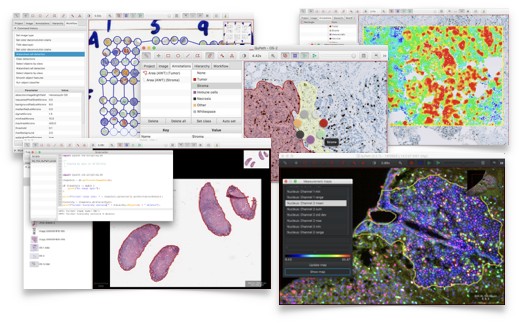
QuPath is a desktop application for analysing digital pathology slides and microscopy images. It is particularly useful for whole-slide imaging, where researchers need to navigate large tissue specimens at different magnifications and obtain quantitative measurements from regions of interest.
The software is designed for research involving histology, immunohistochemistry and fluorescence microscopy. Its project-based workflow brings images, annotations, measurements and analysis results together, making it easier to work with collections of biological samples.
QuPath combines interactive examination with automated image processing. Researchers can develop analysis procedures, inspect the results and apply the same methods across multiple images. This is valuable in cancer research, tissue characterisation and other fields where reproducible image analysis is important.
This is free and open source software.
Key Features
- Multiresolution viewer for navigating large whole-slide images without loading the complete image into memory.
- Annotation tools for drawing, editing and organising regions of interest, including polygons, lines and points.
- Automated tissue detection to identify areas suitable for further analysis and exclude unwanted background regions.
- Cell and nucleus detection with measurements of morphology, staining intensity and other image-derived properties.
- Pixel classification tools for separating tissue regions according to their image characteristics.
- Object classification for assigning detected cells and other structures to biologically meaningful categories.
- Colour deconvolution for analysing stains in brightfield microscopy images, including haematoxylin and DAB.
- Support for fluorescence images with multiple channels and tools for examining their signals.
- Measurement tables and data export for subsequent statistical analysis and reporting.
- Integrated scripting editor for automating repetitive tasks, processing image collections and developing reproducible workflows.
- Extension system for integrating additional image analysis methods and external processing tools.
- Cross-platform support – runs on Linux, macOS, and Windows.
Website: github.com/qupath/qupath
Support:
Developer: Pete Bankhead and the QuPath development team
License: GNU General Public License v3.0
QuPath is written in Java. Learn Java with our recommended free books and free tutorials.
Related Software
| Biology Tools | |
|---|---|
| EMBOSS | The European Molecular Biology Open Software Suite |
| NAMD | Parallel, object-oriented molecular dynamics |
| GROMACS | Molecular dynamics simulator, with building and analysis tools |
| VMD | Displays, animates, and analyzes large biomolecular systems 3-D graphics |
| simuPOP | Forward-time population genetics simulation environment |
| MUSCLE | MUltiple Sequence Comparison by Log-Expectation |
| SeaView | Graphical user interface for molecular phyologeny |
| SeqViz | DNA, RNA, and protein sequence viewer |
| TREE-PUZZLE | Reconstruction of phylogenetic trees by maximum likelihood |
| TreeView X | Displays and prints phylogenetic trees |
| CellProfiler | Image analysis application for researchers |
| napari | Python-based image viewer |
| COPASI | Biochemical systems simulator |
| VCell | Modeling and simulation framework |
| NEURON | Build and run biophysically detailed models |
| NEST | Simulator for spiking neural network models |
Read our verdict in the software roundup.
 LinuxLinks helps you discover the best free and open source software for Linux. Explore our extensive collection of recommended applications, including alternatives to popular proprietary software. We also publish software reviews, Linux tutorials, hardware reviews, free programming books and articles covering the wider open source community. Browse our Linux resources to discover more. Know a useful free and open source Linux application we haven't covered? Suggest a program for inclusion. Has your software been featured on LinuxLinks? Display one of our Featured on LinuxLinks badges on your website or GitHub README. |
Please read our Comment Policy before commenting.