
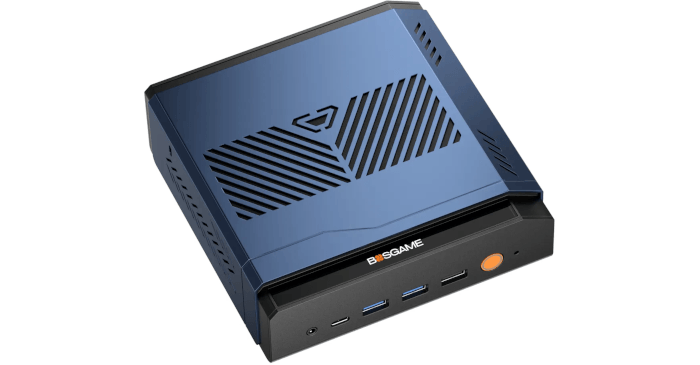
The BOSGAME VTA-439 is a compact mini PC built around AMD’s Ryzen AI 9 HX 470. This 12-core, 24-thread processor combines considerable CPU performance with Radeon 890M integrated graphics and an XDNA 2 NPU rated at up to 55 TOPS.
That NPU is particularly interesting under Linux. For most desktop workloads it sits largely unused, yet it provides a dedicated processor specifically designed for AI inference. Running suitable workloads on the NPU also means the CPU and Radeon GPU remain available for other tasks.
FastFlowLM provides a practical way to put this hardware to work. It is an NPU-first runtime for AMD Ryzen AI processors which runs large language models directly on XDNA 2 hardware. Its interface will be immediately familiar to anyone who has used Ollama, with straightforward commands for downloading, running and benchmarking models as well as operating a local server.
Processing takes place locally. Prompts, documents and responses therefore do not need to be sent to a cloud AI service, making the VTA-439 potentially useful as a private AI workstation or as an always-available AI server for other machines on the local network.
Linux support for AMD’s NPU hardware is still relatively new and requires the correct amdxdna driver, firmware and XRT userspace stack. Once these pieces are in place, however, FastFlowLM makes accessing the NPU surprisingly straightforward.
Installing FastFlowLM
For these tests I used Ubuntu 26.04 LTS.
I downloaded the FastFlowLM DEB package from the project’s releases page.
$ wget https://github.com/ROCm/FastFlowLM/releases/download/v1.0.0/fastflowlm_1.0.0_ubuntu26.04_amd64.deb
I then installed the package with dpkg.
$ sudo dpkg -i ./fastflowlm_*.deb
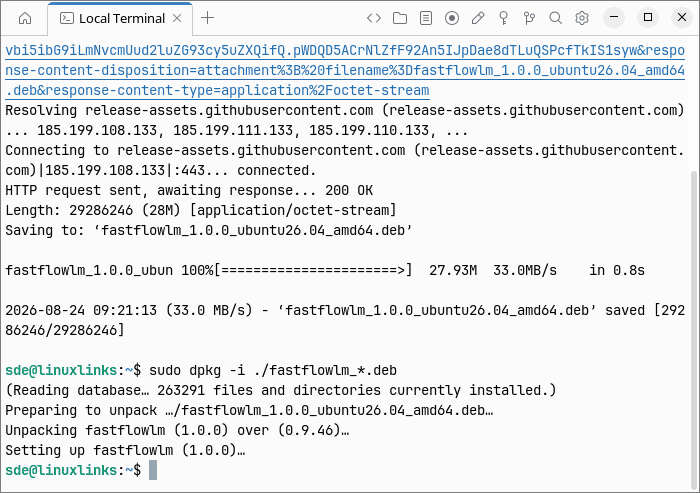
The screenshot shows that an earlier release of FastFlowLM was already installed on the VTA-439. Installing the 1.0.0 DEB upgraded the existing package in place, so there was no need to remove the older version first. If the installation reports any missing dependencies, run:
$ sudo apt -f install
Validating the Installation
FastFlowLM provides a useful validation command which checks the Linux kernel, NPU device, firmware and memory-locking configuration.
$ flm validate
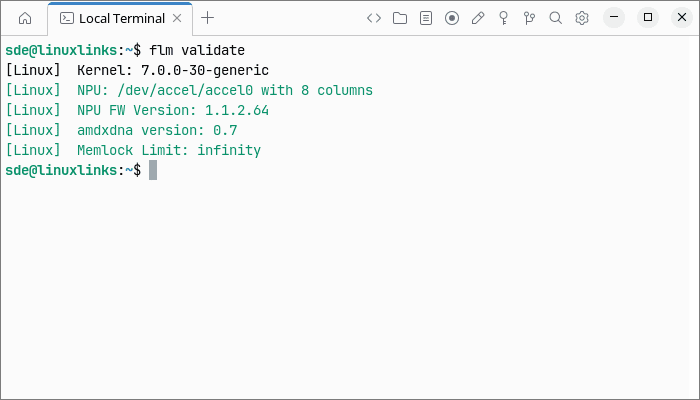
Everything looks rosy on my system. But if the validation check reported that the locked-memory limit is too low, edit /etc/security/limits.conf.
$ sudo nano /etc/security/limits.conf
Add the following lines at the bottom of the file.
* soft memlock unlimited
* hard memlock unlimited
Reboot the system for the changes to take effect.
$ sudo reboot
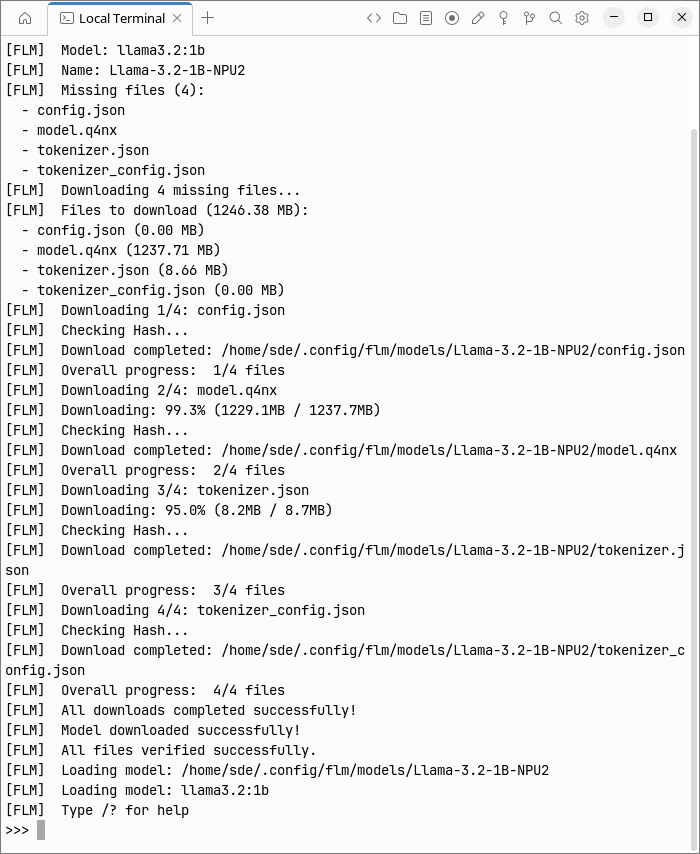
With everything set up, let’s run a small model to confirm that FastFlowLM can actually execute inference on the NPU.
$ flm run llama3.2:1b
Benchmarks
FastFlowLM includes a dedicated benchmark command.
$ flm bench llama3.2:1b
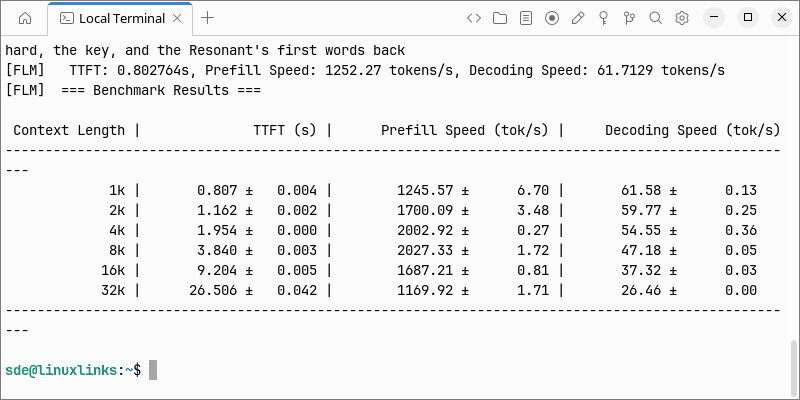
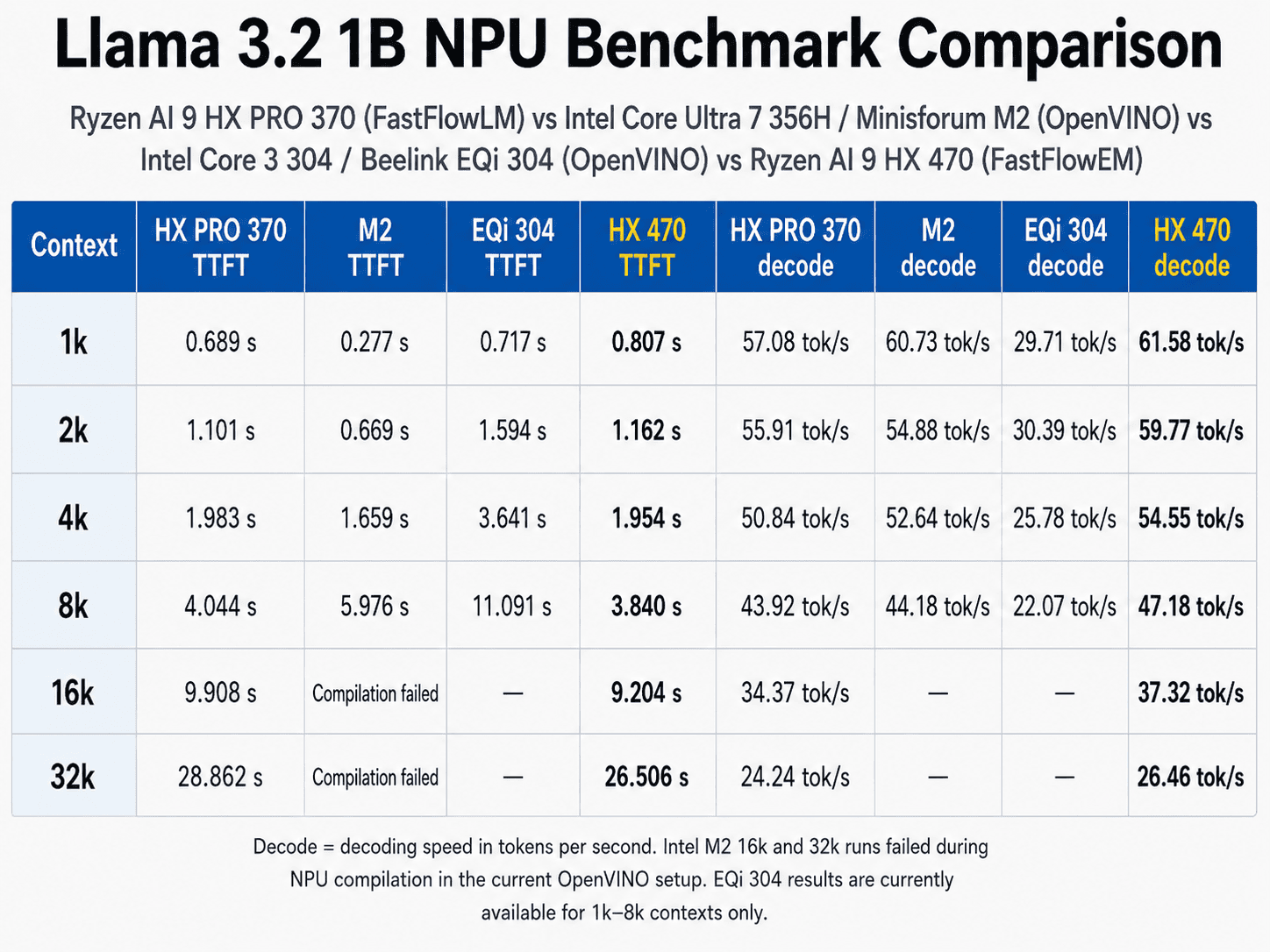
Compared with the Ryzen AI 9 HX PRO 370 in the Minisforum N5 Pro, the HX 470 shows a clear improvement in NPU performance. Decoding is consistently around 7–9% faster across every context length tested, rising from 61.58 tokens/s at 1K to 26.46 tokens/s at 32K. The advantage is particularly noticeable with longer contexts, where both prefill performance and time to first token also improve by around 8–9%. Given that the HX 470’s XDNA 2 NPU is rated at 55 TOPS compared with 50 TOPS for the HX PRO 370, the measured improvement in decoding performance tracks the theoretical increase surprisingly closely.
The llama3.2:1b model contains roughly one billion parameters. It is designed for lightweight local chat, summarising, rewriting and simple information extraction. Its modest size makes it useful for testing the NPU, but its reasoning, factual knowledge and coding ability are significantly weaker than those of larger models.
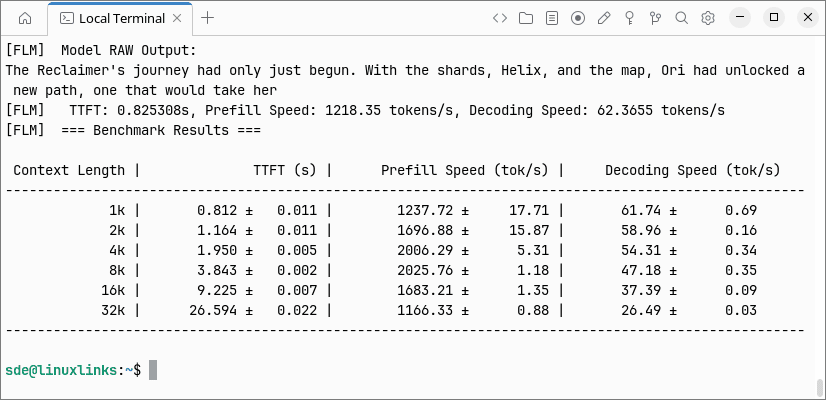
By default, FastFlowLM performs two iterations at each context length. I also repeated the benchmark with four iterations.
$ flm bench llama3.2:1b --bench-iterations 4
A much more interesting test is an 8B model.
$ flm bench qwen3:8b
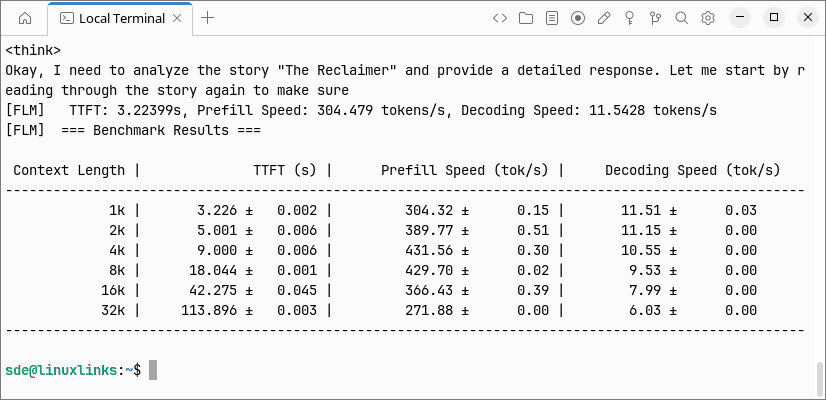
Qwen3 8B provides an even clearer indication of the performance difference between the two NPUs. Compared with the Ryzen AI 9 HX PRO 370 in the Minisforum N5 Pro, the HX 470 is consistently around 8% faster at token generation across every context length. At 1K it reaches 11.51 tokens/s compared with 10.63 tokens/s, while at 32K the figures are 6.03 and 5.55 tokens/s respectively.
Prefill performance is more variable at short contexts, with the HX PRO 370 actually faster at 1K. From 2K onwards, however, the HX 470 pulls ahead, culminating in a 9% advantage at 32K. Time to first token follows the same trend: at 32K the HX 470 reduces the wait from more than 124 seconds to just under 114 seconds.
Given that AMD rates the HX 470’s NPU at 55 TOPS compared with 50 TOPS for the HX PRO 370, the roughly 8% improvement in sustained decoding performance is broadly in line with the increase in theoretical NPU compute.
The larger model puts significantly more pressure on the NPU and memory subsystem, but it also provides a much better indication of the sort of local AI experience the VTA-439 can deliver in everyday use.
Pay particular attention to both token generation rate and time to first token. Generation speed determines how quickly the answer appears once inference has started, whereas long prompt-processing times can make a model feel sluggish even when its subsequent token rate looks respectable.
Running FastFlowLM as a Server
FastFlowLM also includes an OpenAI-compatible server mode. This lets the VTA-439 act as a dedicated local AI server for other computers on the network.
To make it available over the LAN, I started it with:
$ flm serve llama3.2:1b --host 0.0.0.0 --port 52625
The model name can be replaced with another model supported by FastFlowLM.
I can then send requests from another computer on the network, with inference handled by the VTA-439’s NPU.
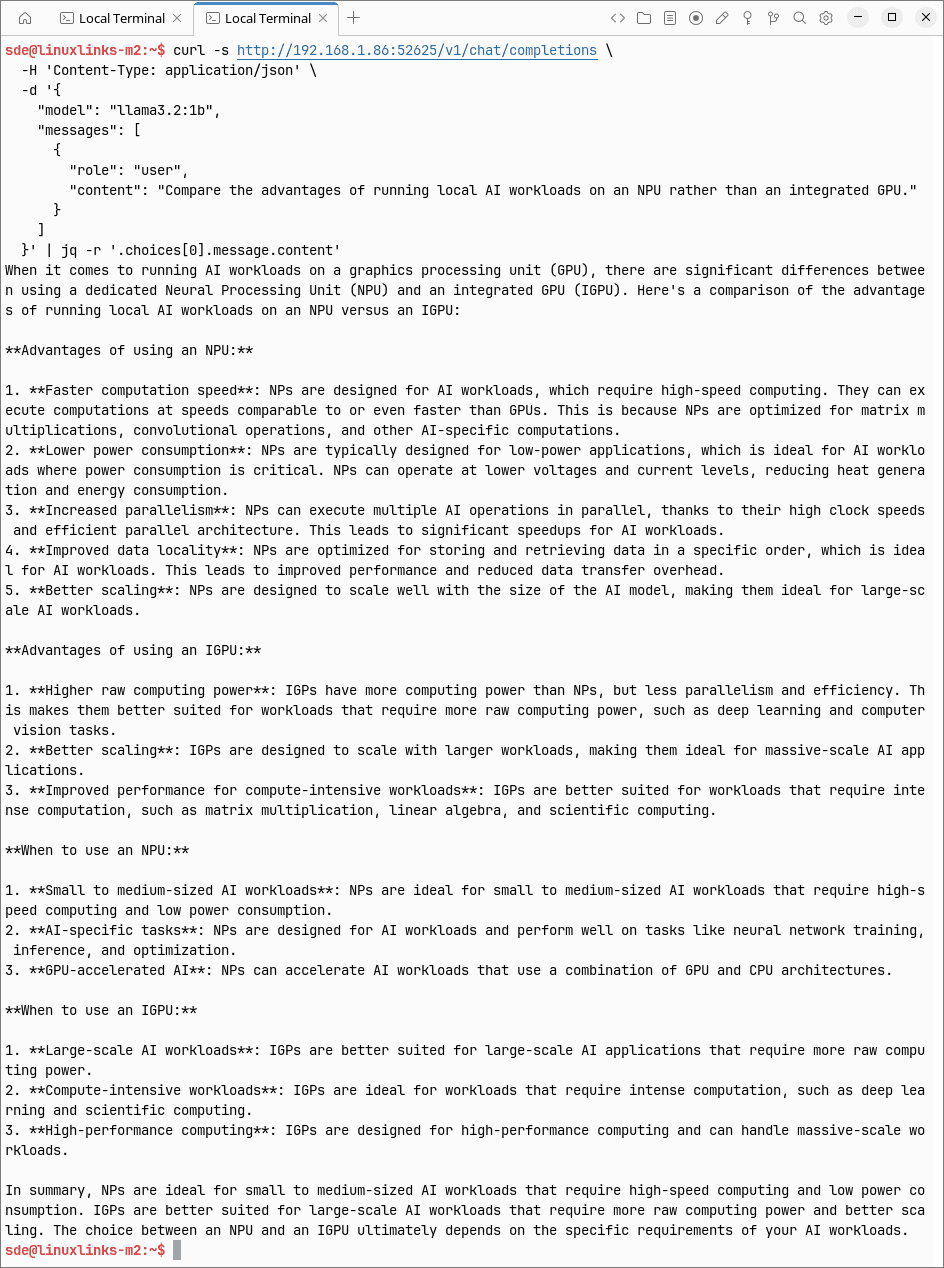
This is one of the most interesting uses for the machine. The VTA-439 has enough general-purpose processing power to be a capable desktop in its own right, while FastFlowLM allows the dedicated NPU to service AI requests without having to rely on the Radeon 890M or consume substantial CPU resources.
Summary
The Ryzen AI 9 HX 470 is already an extremely capable processor, but its 55-TOPS XDNA 2 NPU adds another interesting dimension to the BOSGAME VTA-439.
FastFlowLM provides an uncomplicated way to access that hardware under Linux. Once the AMD NPU driver, firmware and XRT stack are working correctly, running a model requires little more than the same sort of command-line interaction offered by established tools such as Ollama.
The server mode is particularly appealing. It allows the VTA-439 to provide private local AI services to other machines on the LAN while leaving its CPU and Radeon GPU largely free for other workloads.
Linux support for XDNA 2 remains comparatively young, but the experience is becoming considerably more polished. FastFlowLM turns a component that many Linux users would otherwise leave idle into a genuinely useful accelerator and gives the VTA-439 another workload where its unusually capable hardware can be put to good use.
Complete list of articles in this series:
| BOSGAME VTA-439 Mini PC | |
|---|---|
| Introduction | Introduction to the series and interrogation of the machine |
| Benchmarks | Benchmarking the BOSGAME VTA-439 Mini PC |
| Power | Testing and comparing the power consumption |
| Easy Diffusion | Local Stable Diffusion package with a browser-based GUI |
| BIOS | Explore the machine's BIOS |
| Noise | How quiet is this mini PC? |
| NPU | Running LLMs on the Ryzen AI 9 HX 470 NPU |
| VirtualBox | Run VirtualBox on the Ryzen AI 9 HX 470's Zen 5 Cores |
| Lemonade Server | Local AI server on the BOSGAME VTA-439 |
| Gaming with the Radeon 890M | |
| Shadow of the Tomb Raider | Comparing graphics presets and frame rates |
| Tiny Tina’s Wonderlands | How well does this demanding shooter perform? |
| The Callisto Protocol | Pushing the integrated GPU with a demanding title |
| Deus Ex: Mankind Divided | Performance across the graphics presets |
| World War Z | Comparing Linux and Windows gaming performance |
| Total War: WARHAMMER III | Campaign and battle benchmark performance |
Please read our Comment Policy before commenting.