

clavirio is a terminal-based touch typing tutor designed to help users improve their typing speed and accuracy through structured lessons and practice exercises.
The application follows a progressive learning approach, introducing keyboard rows and finger movements in stages. Lessons begin with individual finger pairs before moving to complete keyboard rows, capital letters, numbers and symbols.
Users can practise using different keyboard layouts or choose exercises based on ordinary words, programming terminology and their own text files. The interface provides immediate performance feedback and retains statistics between sessions, making it possible to monitor progress and concentrate on troublesome keys.
This is free and open source software.
Key Features
- 27 structured typing lessons covering keyboard rows, capital letters, numbers and symbols.
- Support for QWERTY, Dvorak and Colemak keyboard layouts.
- Progressive exercises introducing finger pairs and keyboard movements.
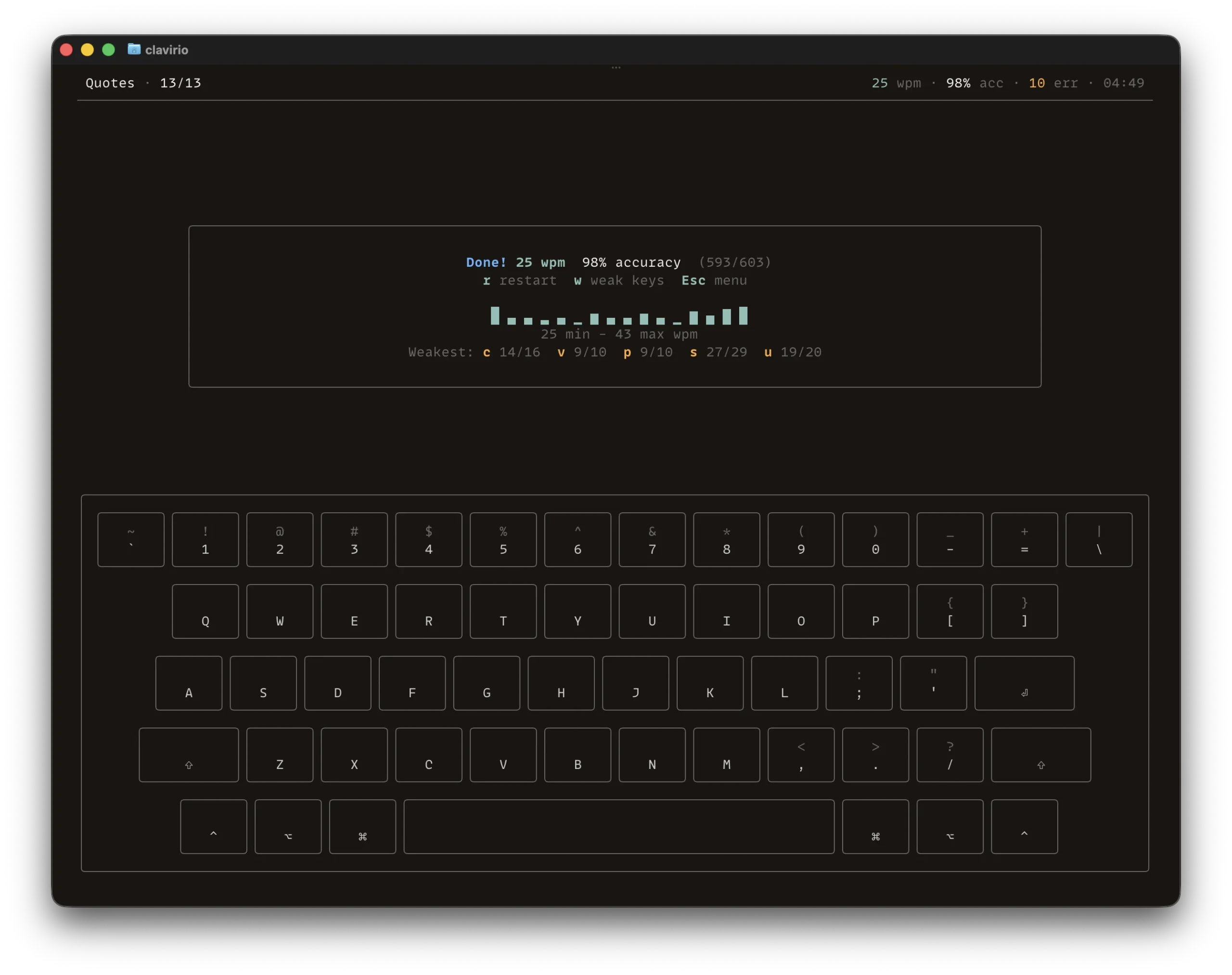
- Virtual keyboard displaying highlighted keys and suggested finger positions.
- Random word practice using selectable English vocabulary lists.
- Programming terminology exercises covering Rust, Python, JavaScript, Go, C/C++, Java and HTML/CSS.
- Timed typing sessions and exercises using a specified number of words.
- Real-time words-per-minute, accuracy, error and progress statistics.
- Performance graphs showing typing speed during a session.
- Weak-key exercises generated from recorded typing errors.
- Practice with common letter pairs and quotations.
- Zen mode for unrestricted typing practice.
- Load custom text files for additional typing exercises.
- Optional punctuation and number inclusion in practice exercises.
- Configurable error handling, including requiring corrections before continuing.
- Session history with per-lesson tracking and performance averages.
- Dark and light interface themes.
- Cross-platform support – runs on Linux, macOS, and Windows.
Website: github.com/alexylon/clavirio
Support:
Developer: Alexander Alexandrov
License: Apache License 2.0
clavirio is written in Rust. Learn Rust with our recommended free books and free tutorials.
Related Software
| TUI Typing Tutors | |
|---|---|
| ttyper | Supports languages including English, German, Norwegian, Ukrainian, Spanish |
| Smassh | TUI based typing test application inspired by MonkeyType |
| GitType | Turn your source code into typing challenges |
| toipe | Trusty terminal typing tester |
| typioca | Minimal terminal based typing speed tester |
| GNU Typist | Simple ncurses touch typing tutor |
| tt | Terminal based typing test |
| typtea | Typing speed tester supporting dozens of programming languages |
| Typeracer | Terminal typing game |
| thokr | Sleek typing TUI with visualized results and historical logging |
| Couik | Terminal-based typing test |
| OctoType | TUI typing trainer made with Ratatui |
| typomat | Command-line typing practice tool |
| Textype | Supports structured lessons, sentence practice, code typing |
| olagem | Terminal based typing speed test |
| Termitype | Feature-rich typing test with detailed performance statistics |
| typa | Minimal typing speed test focused on quick practice sessions |
Read our verdict in the software roundup.
 LinuxLinks helps you discover the best free and open source software for Linux. Explore our extensive collection of recommended applications, including alternatives to popular proprietary software. LinuxLinks helps you discover the best free and open source software for Linux. Explore our extensive collection of recommended applications, including alternatives to popular proprietary software.We also publish software reviews, Linux tutorials, hardware reviews, free programming books and articles covering the wider open source community. Browse our Linux resources to discover more. Know a useful free and open source Linux application we haven't covered? Suggest a program for inclusion. Has your software been featured on LinuxLinks? Display one of our Featured on LinuxLinks badges on your website or GitHub README. |
Please read our Comment Policy before commenting.