

Termitype is a terminal user interface (TUI) typing test designed for practising and measuring typing speed without leaving the terminal.
Inspired by Monkeytype, it combines a keyboard-driven interface with extensive configuration and several ways to customise both the typing test and its presentation.
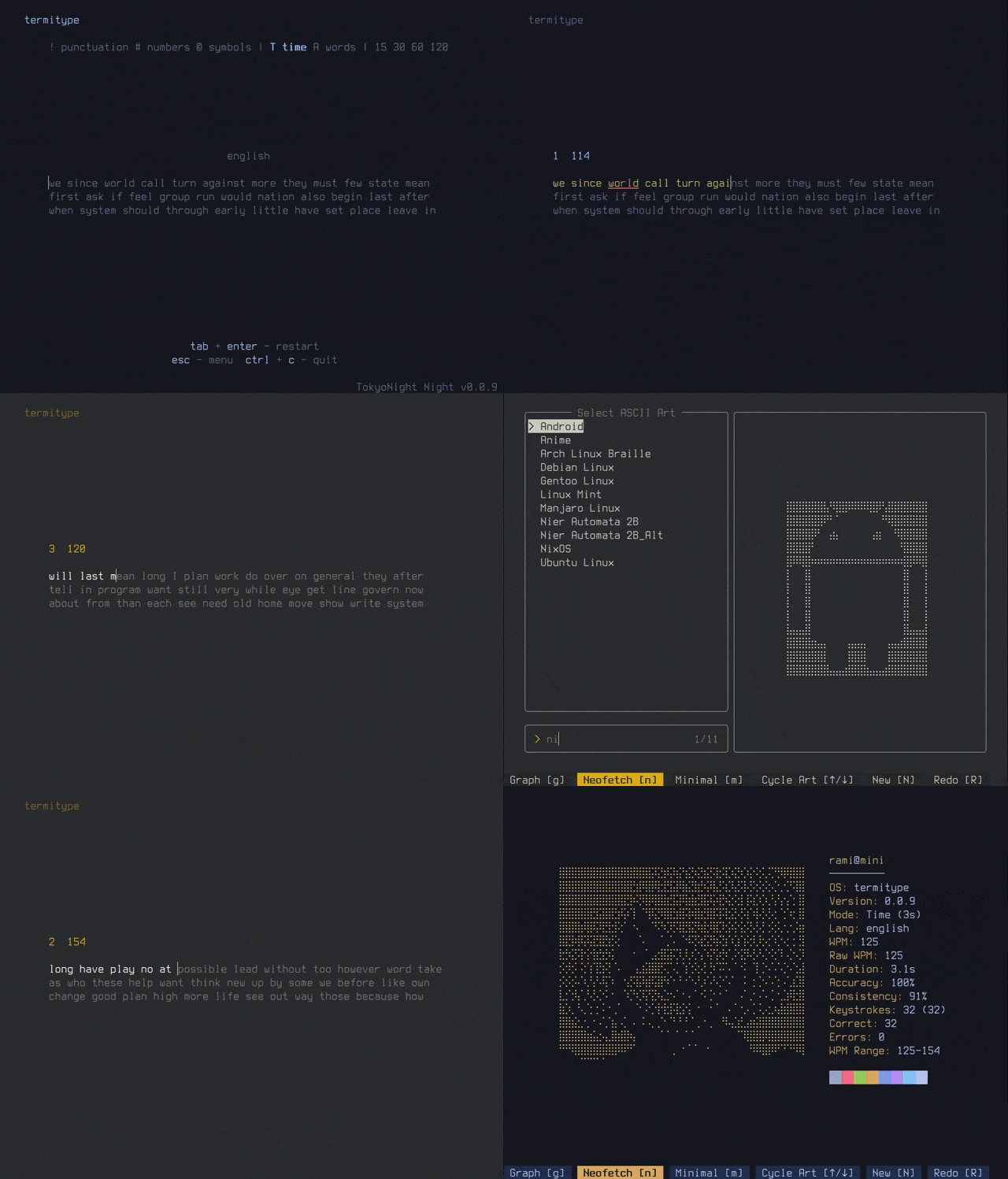
Tests can be configured by duration or word count, with options to introduce punctuation, numbers, symbols, and alternative language dictionaries. Most settings can be changed interactively from Termitype’s built-in menu as well as from command-line options.
This is free and open source software.
Key Features
- Terminal-based typing test with a keyboard-focused TUI.
- Run timed tests with a user-selected duration.
- Run tests containing a specified number of words.
- Supply custom words directly from the command line.
- Include numbers, symbols, and punctuation in typing exercises.
- Choose from multiple language dictionaries.
- Displays live words-per-minute information while typing.
- Tracks test results locally so typing performance can be reviewed over time.
- Local results tracking can be disabled with the no-save option.
- Offers minimal, graph, and Neofetch-inspired results displays.
- Includes an interactive menu for changing settings while the application is running.
- Command palette provides keyboard-driven access to application functions.
- Includes a results and leaderboard screen for examining recorded performance.
- Offers a curated collection of built-in terminal colour themes.
- Themes can be previewed and changed in real time.
- Supports several cursor styles including beam, block, underline, and blinking variants.
- Lets users control the number of visible lines displayed during a test.
- Optional notifications can be disabled.
- Uses Ratatui and Crossterm to provide its terminal interface.
Website: github.com/emanuel2718/termitype
Support:
Developer: Emanuel Ramirez
License: GNU General Public License v3.0
Termitype is written in Rust. Learn Rust with our recommended free books and free tutorials.
Related Software
| TUI Typing Tutors | |
|---|---|
| ttyper | Supports languages including English, German, Norwegian, Ukrainian, Spanish |
| Smassh | TUI based typing test application inspired by MonkeyType |
| GitType | Turn your source code into typing challenges |
| toipe | Trusty terminal typing tester |
| typioca | Minimal terminal based typing speed tester |
| GNU Typist | Simple ncurses touch typing tutor |
| tt | Terminal based typing test |
| typtea | Typing speed tester supporting dozens of programming languages |
| Typeracer | Terminal typing game |
| thokr | Sleek typing TUI with visualized results and historical logging |
| Couik | Terminal-based typing test |
| OctoType | TUI typing trainer made with Ratatui |
| typomat | Command-line typing practice tool |
| Textype | Supports structured lessons, sentence practice, code typing |
| olagem | Terminal based typing speed test |
| Termitype | Feature-rich typing test with detailed performance statistics |
| typa | Minimal typing speed test focused on quick practice sessions |
Read our verdict in the software roundup.
 Explore our carefully curated directory of recommended free and open source software, covering every major software category. Explore our carefully curated directory of recommended free and open source software, covering every major software category.The directory forms part of our extensive collection of articles for Linux enthusiasts. It includes hundreds of detailed reviews, together with free and open source alternatives to proprietary software from companies such as Google, Microsoft, Apple, Adobe, IBM, Cisco, Oracle, and Autodesk. LinuxLinks also covers interesting projects worth exploring, Linux-compatible hardware, free programming books and tutorials, and much more. Know a useful free and open source Linux application that we haven’t covered? Tell us about it using our submission form. |
Please read our Comment Policy before commenting.