
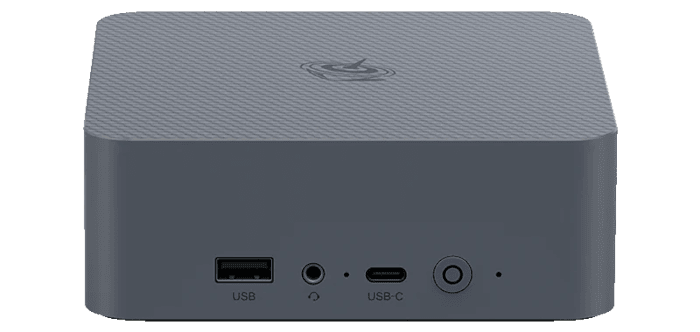
An NPU, or Neural Processing Unit, is a dedicated accelerator designed to run AI and machine-learning workloads more efficiently than a general-purpose CPU. It is particularly useful for inference tasks where low power consumption matters, allowing suitable workloads to be offloaded while leaving the CPU and GPU available for other work.
The Beelink EQi Core 3 304 is an interesting system on which to explore this. Its Intel Core 3 304 is a low-power five-core processor from Intel’s Wildcat Lake family, with one performance core and four low-power efficiency cores. Despite being positioned well below Intel’s Core Ultra processors, it still includes a dedicated NPU.
Intel rates the Core 3 304’s NPU at 15 INT8 TOPS. Its integrated GPU provides another 9 INT8 TOPS. This is therefore a much less powerful AI platform than machines equipped with a 50-TOPS NPU, but that arguably makes it more interesting: is the NPU actually useful for local AI workloads, or is 15 TOPS simply too little for practical use?
I previously explored FastFlowLM on the Minisforum N5 Pro, powered by AMD’s Ryzen AI 9 HX PRO 370, and subsequently tested OpenVINO with the 50-TOPS Intel NPU in the Minisforum M2. This time I wanted to see what could be achieved with a much more modest Intel NPU.
FastFlowLM is AMD-only
FastFlowLM currently targets AMD Ryzen AI NPUs and cannot use the Intel NPU in the Beelink EQi Core 3 304.
For Intel hardware, OpenVINO provides the more appropriate route. It supports inference across Intel CPUs, GPUs and NPUs and, importantly for this exercise, lets us explicitly target the NPU rather than silently running the workload on the CPU.
For this test, I used the following setup:
- System: Beelink EQi Core 3 304.
- Processor: Intel Core 3 304.
- NPU: 15 INT8 TOPS.
- Memory: 16 GB LPDDR5-6400.
- Operating system: Ubuntu 26.04 LTS.
- Software: OpenVINO 2026.3 and OpenVINO GenAI.
- Model: Llama 3.2 1B Instruct, converted to symmetric INT4 with a group size of 128.
A small model such as Llama 3.2 1B is a sensible starting point. With only 15 TOPS available from the NPU, the purpose here isn’t to see how large a language model I can squeeze onto the system. Instead, I’m interested in whether the accelerator can deliver useful interactive performance without placing the workload on the CPU or GPU.
Checking the Intel NPU
The Core 3 304 belongs to Intel’s Wildcat Lake family. Intel lists OpenVINO among the software frameworks supported by its NPU.
Before installing OpenVINO, I checked whether Ubuntu could see the accelerator:
$ lspci -nn | grep -Ei 'vpu|npu|neural|processing accelerator'
I also checked that Intel’s NPU kernel driver was loaded:
$ lsmod | grep intel_vpu
The accelerator should be exposed through Linux’s accelerator subsystem:
$ ls -l /dev/accel/
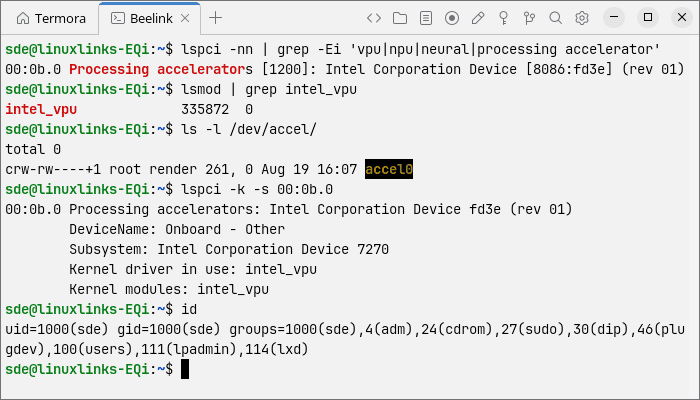
lspci detects the Intel Processing Accelerator at 00:0b.0. The intel_vpu kernel module is loaded and /dev/accel/accel0 exists. Linux exposes compute accelerators through /dev/accel/accel*, so this confirms that the driver has created the user-space accelerator device.
The device is owned by root:render, with read and write permissions for the render group. The NPU and its kernel driver therefore appear to be working out of the box, with no changes needed.
There is one apparent issue: the output from id shows that my user account is not a member of the render group. However, the following commands:
$ test -r /dev/accel/accel0 && echo "read access"
$ test -w /dev/accel/accel0 && echo "write access"
confirm that my account already has read and write access, so I don’t need to add it to the render group.
Installing OpenVINO
I first installed curl:
$ sudo apt update
$ sudo apt install curl
I used uv to create a Python 3.13 environment. The official installer sets up uv with:
$ curl -LsSf [https://astral.sh/uv/install.sh](https://astral.sh/uv/install.sh) | sh
I then installed Python 3.13:
$ ~/.local/bin/uv python install 3.13
Next, I created and activated a dedicated OpenVINO environment:
$ ~/.local/bin/uv venv ~/openvino-npu --python 3.13
$ source ~/openvino-npu/bin/activate
I installed the OpenVINO prerequisites using uv pip, which does not require a separate pip executable in the virtual environment:
$ ~/.local/bin/uv pip install nncf==2.19.0 onnx==1.18.0 optimum-intel==2.1.0 transformers==5.0.0
I then installed OpenVINO 2026.3 and its generative AI components:
$ ~/.local/bin/uv pip install openvino==2026.3.0 openvino-tokenizers==2026.3.0.0 openvino-genai==2026.3.0.0
At this point, OpenVINO could see only the CPU:
$ python - <<'PY'

import openvino as ov

print(ov.Core().available_devices)

PY
['CPU']
Ubuntu 26.04 already provides a working kernel driver and firmware for the EQi 304’s NPU, but OpenVINO also needs Intel’s user-mode NPU driver and Level Zero libraries.
Canonical packages these components in the intel-npu-driver snap:
$ sudo snap install intel-npu-driver
The snap also supplies newer NPU firmware. I verified that its user-mode driver could communicate with the NPU by running:
$ intel-npu-driver.npu-umd-test
Most importantly, the test successfully compiled and executed inference workloads on the NPU.
The snap’s Level Zero libraries are stored in:
/snap/intel-npu-driver/current/usr/lib/x86_64-linux-gnu
They include libze_loader.so, libze_intel_npu.so and the OpenVINO NPU compiler libraries.
Because these libraries are supplied by a snap rather than installed system-wide, they are not automatically visible to the OpenVINO virtual environment. I therefore added the directory to LD_LIBRARY_PATH:
$ export NPU_LIB=/snap/intel-npu-driver/current/usr/lib/x86_64-linux-gnu
$ export LD_LIBRARY_PATH="$NPU_LIB${LD_LIBRARY_PATH:+:$LD_LIBRARY_PATH}"
Finally, I checked which devices OpenVINO could use:
$ python - <<'PY'

import openvino as ov

print(ov.Core().available_devices)

PY
This time the result was:
['CPU', 'NPU']
The EQi 304’s Intel NPU was now accessible to OpenVINO and ready for inference workloads.
Converting Llama 3.2 1B
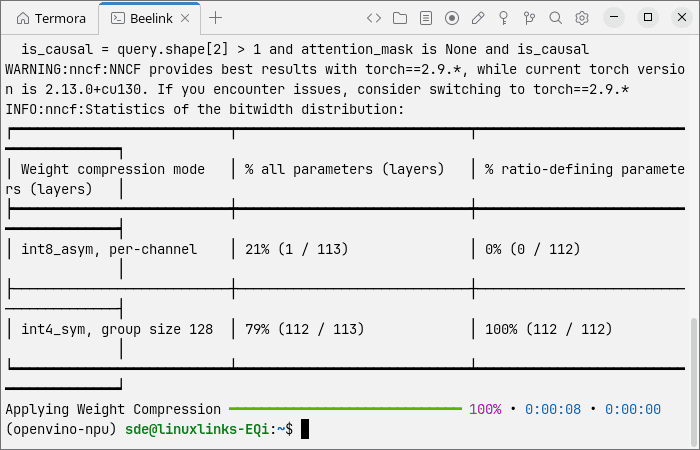
For testing, I used Llama 3.2 1B Instruct. I converted the model to OpenVINO format using symmetric INT4 compression and a group size of 128:
$ optimum-cli export openvino -m meta-llama/Llama-3.2-1B-Instruct --weight-format int4 --sym --ratio 1.0 --group-size 128 llama3.2-1b-int4
This downloads Llama 3.2 1B Instruct from Hugging Face, converts it to OpenVINO format and compresses its weights to INT4.
The resulting model is much better suited to a relatively modest accelerator than a substantially larger language model.
First NPU benchmark
I used the same basic OpenVINO GenAI benchmark approach as on the Minisforum M2, explicitly selecting the NPU as the inference device.
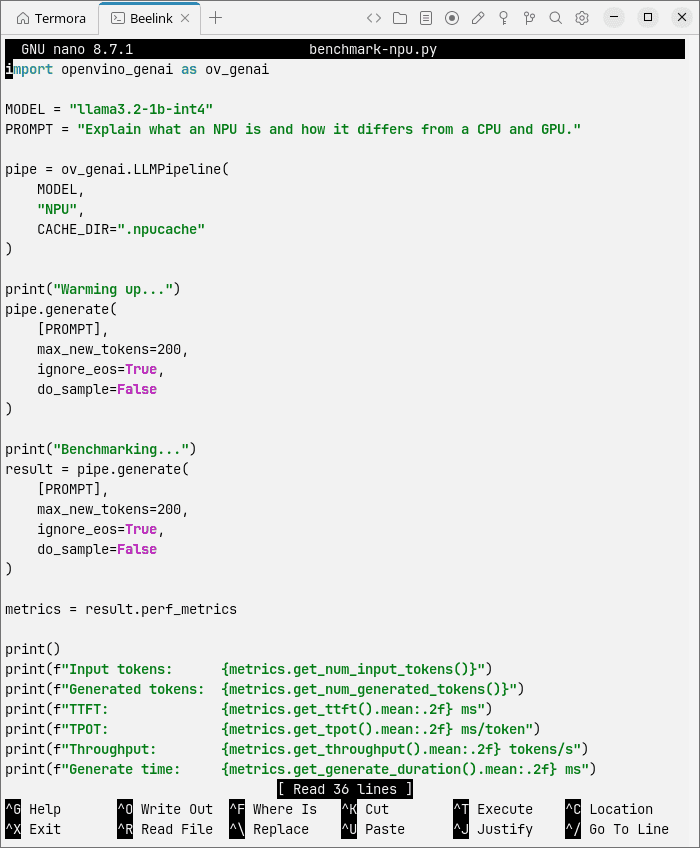
Here are the results:
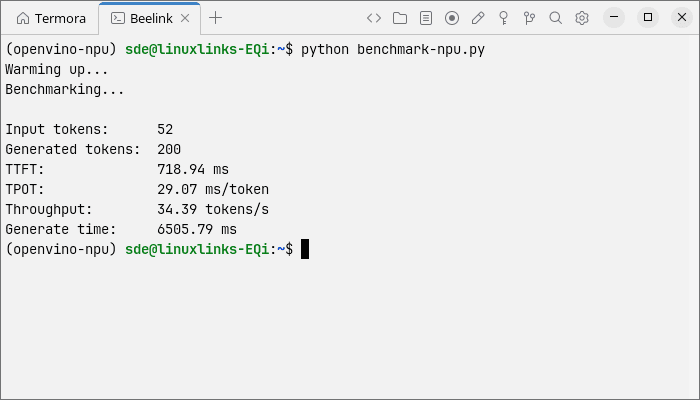
With only 15 TOPS available, I wasn’t expecting the Core 3 304 to approach Intel’s 50-TOPS NPU. The more useful question is whether its generation rate and time to first token are fast enough for interactive use.
The EQi 304 generated 200 tokens at 34.39 tokens/s, averaging 29.07 ms per token, with a 718.94 ms time to first token (TTFT). This is still fast enough for responsive interactive use, but it is substantially slower than the Minisforum M2. Running the same Llama 3.2 1B benchmark, the M2 achieved 65.26 tokens/s, 15.32 ms/token and a 275 ms TTFT.
The M2 therefore delivers about 1.9 times the token-generation throughput and produces its first token roughly 2.6 times faster. Given that the EQi 304’s NPU is rated at 15 TOPS compared with 50 TOPS for the M2’s Intel NPU, its result is respectable: the M2 has more than three times the quoted NPU compute but is less than twice as fast in this particular workload.
Increasing the context length
A short prompt doesn’t tell us much about how the NPU behaves as the workload becomes more demanding, so I modified the benchmark script and repeated the test at increasing context lengths.
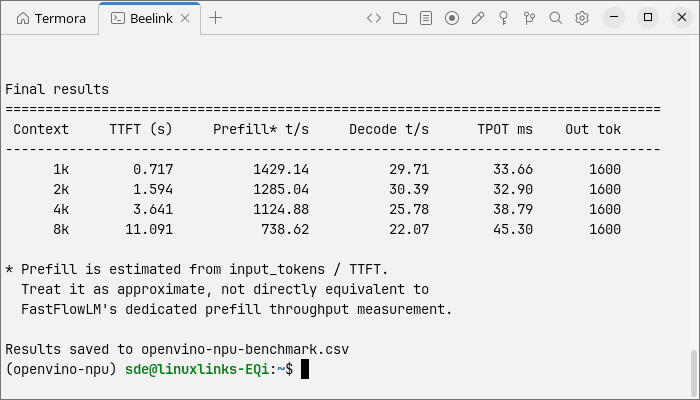
This test is particularly useful with the Core 3 304. A 15-TOPS NPU may produce acceptable decoding performance with a small model, but longer contexts place considerably more pressure on both the accelerator and memory subsystem.
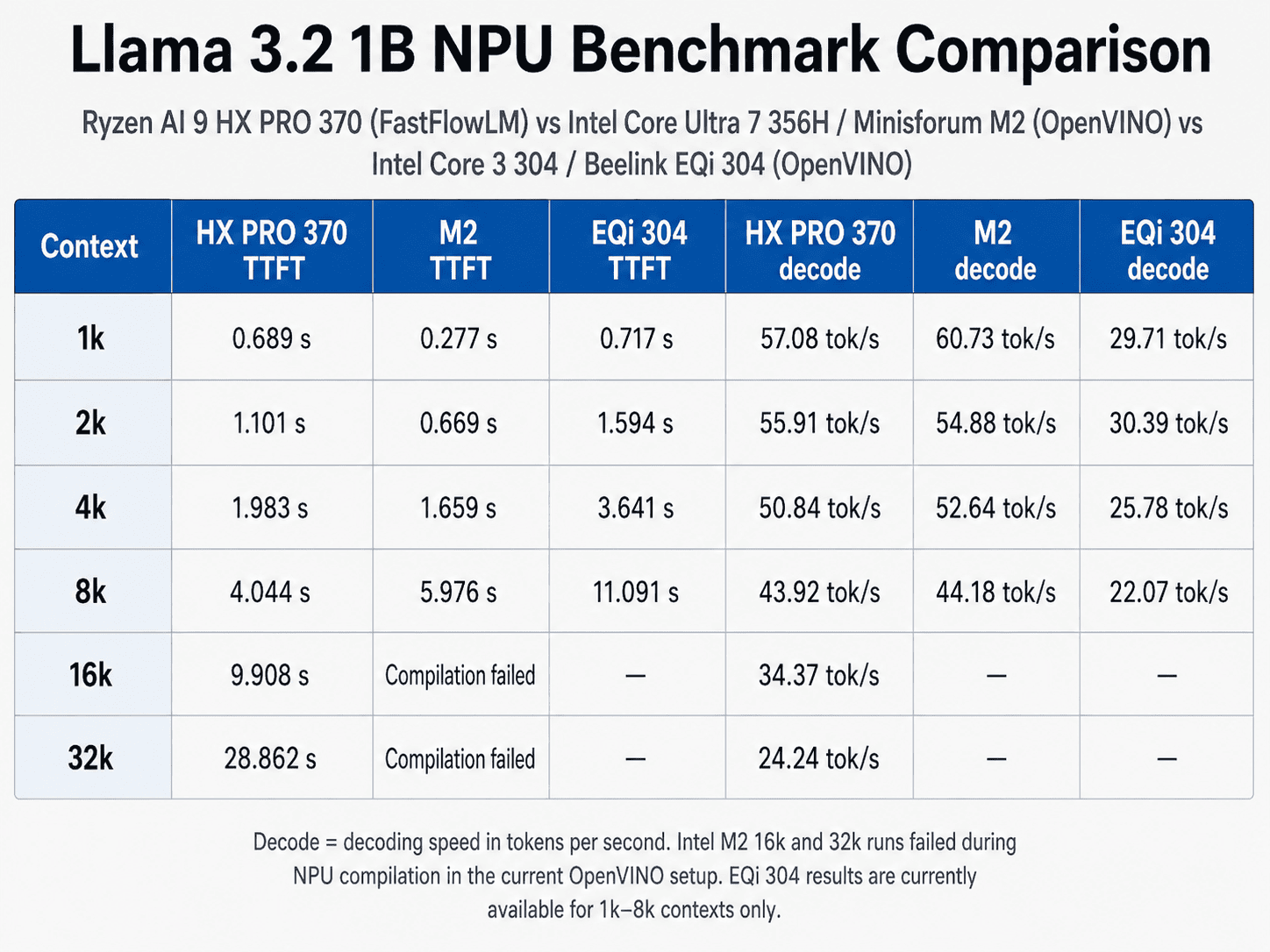
Given that the EQi 304’s NPU is rated at only 15 TOPS, its Llama 3.2 1B performance is quite strong relative to the 50-TOPS NPUs in the Ryzen AI 9 HX PRO 370 and Core Ultra 7 356H. At a 1K context length, it reaches 29.71 tokens/s, around half the decode speed of the other two systems despite having less than a third of their quoted NPU compute. It still manages 22.07 tokens/s at 8K, compared with roughly 44 tokens/s from both rivals.
Its weaker area is context scaling. TTFT rises from a competitive 0.717 seconds at 1K to 11.091 seconds at 8K, substantially slower than the HX PRO 370 and M2 at that point. Overall, the EQi 304 delivers surprisingly good decode performance for a 15-TOPS NPU, although larger contexts expose its more limited resources.
Is a 15-TOPS NPU useful?
The answer is yes, within limits.
There’s a tendency for NPU specifications to be reduced to a single TOPS figure, with bigger automatically assumed to be better. The Core 3 304 demonstrates why practical testing matters more.
If a small INT4 model can deliver responsive text generation while running entirely on the NPU, the accelerator has value even if its headline specification looks modest. The CPU remains available for the operating system and applications, while the integrated graphics aren’t occupied by the AI workload.
That may be a better use case for this class of NPU than trying to run increasingly large language models.
The EQi is also a compact, low-power system. Running appropriate always-on inference workloads on its dedicated accelerator could therefore make more sense than using a much more powerful CPU or GPU when the task simply doesn’t require that level of performance.
Final thoughts
The Beelink EQi Core 3 304 shows that a modest NPU can still be useful for local AI workloads. Using OpenVINO under Ubuntu 26.04, its 15-TOPS Intel NPU runs an INT4 Llama 3.2 1B model at interactive speeds, reaching around 30 tokens/s at shorter context lengths and 22 tokens/s at 8K.
While the 50-TOPS NPUs in the Minisforum M2 and N5 Pro are roughly twice as fast and handle longer contexts much better, the EQi delivers considerably more performance than its TOPS rating alone might suggest. For small models and low-power, always-on inference, its dedicated NPU is a practical addition rather than merely a box-ticking feature.
Complete list of articles in this series:
| Beelink EQi 304 Mini PC | |
|---|---|
| Introduction | Introduction to the series and interrogation of the machine |
| Benchmarks | Benchmarking the Beelink EQi 304 Mini PC |
| Power | Testing and comparing the power consumption |
| BIOS | The BIOS, which stands for Basic Input/Output System, plays a crucial role |
| Cores | P-core and LP Efficient-cores examined |
| Noise | How quiet is this mini PC? |
| NPU and Llama | Testing the NPU with Llama models |
| Scheduling | Can Linux use its one fast CPU core efficiently? |
Please read our Comment Policy before commenting.