
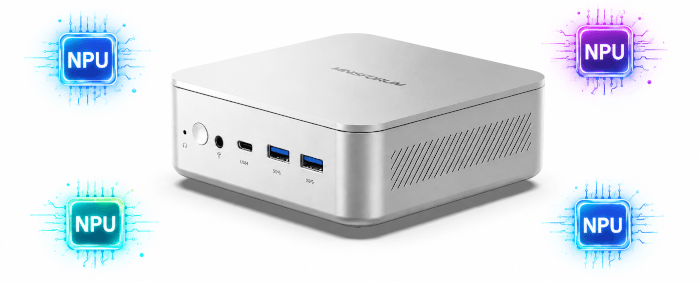
An NPU, or Neural Processing Unit, is a dedicated accelerator designed to run AI and machine-learning workloads more efficiently than a general-purpose CPU. It is particularly useful for inference tasks such as image recognition, object detection, speech processing and background effects, where low latency and low power consumption matter. Rather than replacing the CPU or GPU, the NPU provides another specialised engine that can handle suitable AI workloads while leaving the processor and graphics hardware free for other tasks.
The MINISFORUM M2 offers up to 90 TOPS of combined NPU and GPU AI performance, with 50 TOPS supplied by the NPU itself. That makes it a particularly interesting mini PC for local AI workloads.
I recently explored FastFlowLM on the Minisforum N5 Pro, which is powered by AMD’s Ryzen AI 9 HX PRO 370 processor. Its XDNA 2 NPU proved capable of running large language models locally while leaving the CPU and integrated GPU largely free for other work.
Having tested FastFlowLM on AMD hardware, I wanted to carry out a similar exercise on an Intel-based system. I chose the Minisforum M2 because its processor also includes a relatively powerful NPU, making it a useful comparison platform rather than simply testing AI inference on the CPU or GPU.
This article focuses on the performance of the M2’s NPU. I’ll run the same types of workload used with the N5 Pro and compare model throughput, time to first token and the effect of increasing the context length.
FastFlowLM is AMD-only
FastFlowLM currently targets AMD Ryzen AI NPUs. Its documentation describes the runtime as being built exclusively for Ryzen AI, with support covering XDNA 2 families such as Strix, Strix Halo, Kraken and Gorgon Point.
It therefore cannot use the Intel NPU in the Minisforum M2, which is powered by an Intel Core Ultra 7 356H processor.
The closest equivalent for Intel hardware is OpenVINO and Intel’s NPU software stack. Intel also offers its NPU Acceleration Library for Core Ultra processors, although its LLM support and performance characteristics differ substantially from FastFlowLM’s AMD-specific approach.
For this test, I used the following setup:
- System: MINISFORUM M2.
- Processor: Intel Core Ultra 7 356H.
- NPU: 50 TOPS.
- Operating system: Ubuntu 26.04 LTS.
- Software: OpenVINO 2026.3 and OpenVINO GenAI.
- Model: Llama 3.2 1B Instruct, converted to symmetric INT4 with a group size of 128.
Intel recommends group quantisation with a group size of 128 for models containing up to about 4–5 billion parameters.
Checking the Intel NPU
Before installing OpenVINO, I checked that Ubuntu could see the Intel NPU:
$ lspci -nn | grep -Ei 'vpu|npu|neural|processing accelerator'
On the M2, this reports the Panther Lake NPU:
00:0b.0 Processing accelerators [1200]: Intel Corporation Panther Lake NPU [8086:b03e] (rev 0f)
The kernel’s intel_vpu driver should also be loaded:
$ lsmod | grep intel_vpu
The NPU should be exposed through the Linux accelerator subsystem as /dev/accel/accel0:
$ ls -l /dev/accel/
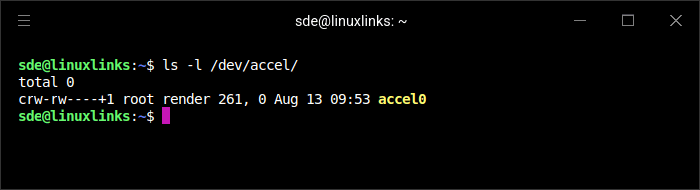
These checks confirm that the kernel has detected the accelerator, loaded the driver and exposed the NPU through the accelerator subsystem.
The device belongs to the render group, so my user account also needs to be a member of that group:
$ sudo usermod -aG render "$USER"
I logged out and back in, then checked my group membership:
$ groups
The output now includes render.
Installing OpenVINO
I first installed curl:
$ sudo apt update
$ sudo apt install curl
I used uv to create a Python 3.13 environment. The official installer sets up uv with:
$ curl -LsSf https://astral.sh/uv/install.sh | sh
I then installed Python 3.13:
$ ~/.local/bin/uv python install 3.13
Next, I created and activated a dedicated OpenVINO environment:
$ ~/.local/bin/uv venv ~/openvino-npu --python 3.13
$ source ~/openvino-npu/bin/activate
I installed the OpenVINO prerequisites using uv pip, which does not require a separate pip executable in the virtual environment:
$ ~/.local/bin/uv pip install nncf==2.19.0 onnx==1.18.0 optimum-intel==2.1.0 transformers==5.0.0
I then installed OpenVINO 2026.3 and its generative AI components:
$ ~/.local/bin/uv pip install openvino==2026.3.0 openvino-tokenizers==2026.3.0.0 openvino-genai==2026.3.0.0
At this point, OpenVINO could see only the CPU:
$ python - <<'PY'

import openvino as ov

print(ov.Core().available_devices)

PY
['CPU']
Ubuntu 26.04 already provides a working kernel driver and firmware for the M2’s Panther Lake NPU, but OpenVINO also needs Intel’s user-mode NPU driver and Level Zero libraries.
Canonical packages these components in the intel-npu-driver snap:
$ sudo snap install intel-npu-driver
The snap also supplies newer NPU firmware. I verified that its user-mode driver could communicate with the NPU by running:
$ intel-npu-driver.npu-umd-test
Most importantly, the test successfully compiled and executed inference workloads on the NPU.
The snap’s Level Zero libraries are stored in:
/snap/intel-npu-driver/current/usr/lib/x86_64-linux-gnu
They include libze_loader.so, libze_intel_npu.so and the OpenVINO NPU compiler libraries.
Because these libraries are supplied by a snap rather than installed system-wide, they are not automatically visible to the OpenVINO virtual environment. I therefore added the directory to LD_LIBRARY_PATH:
$ export NPU_LIB=/snap/intel-npu-driver/current/usr/lib/x86_64-linux-gnu
$ export LD_LIBRARY_PATH="$NPU_LIB${LD_LIBRARY_PATH:+:$LD_LIBRARY_PATH}"
Finally, I checked which devices OpenVINO could use:
$ python - <<'PY'

import openvino as ov

print(ov.Core().available_devices)

PY
This time the result was:
['CPU', 'NPU']
The M2’s Intel NPU was now accessible to OpenVINO and ready for inference workloads.
Converting Llama 3.2 1B
The model used for testing was Llama 3.2 1B Instruct, which contains 1.23 billion parameters. I converted it to OpenVINO format using symmetric INT4 compression and a group size of 128:
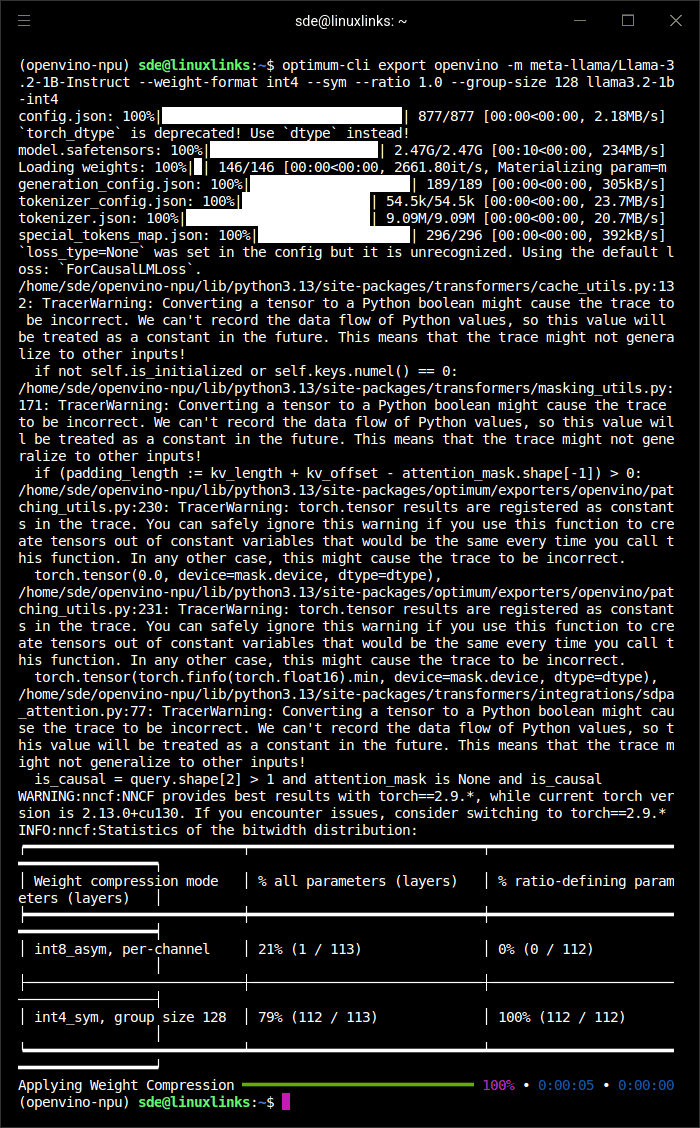
$ optimum-cli export openvino -m meta-llama/Llama-3.2-1B-Instruct --weight-format int4 --sym --ratio 1.0 --group-size 128 llama3.2-1b-int4
This command downloads Llama 3.2 1B Instruct from Hugging Face, converts it to OpenVINO format and compresses its weights to INT4 for efficient inference on the Intel NPU.
First benchmark
I created a small Python benchmark script:
$ nano benchmark-npu.py
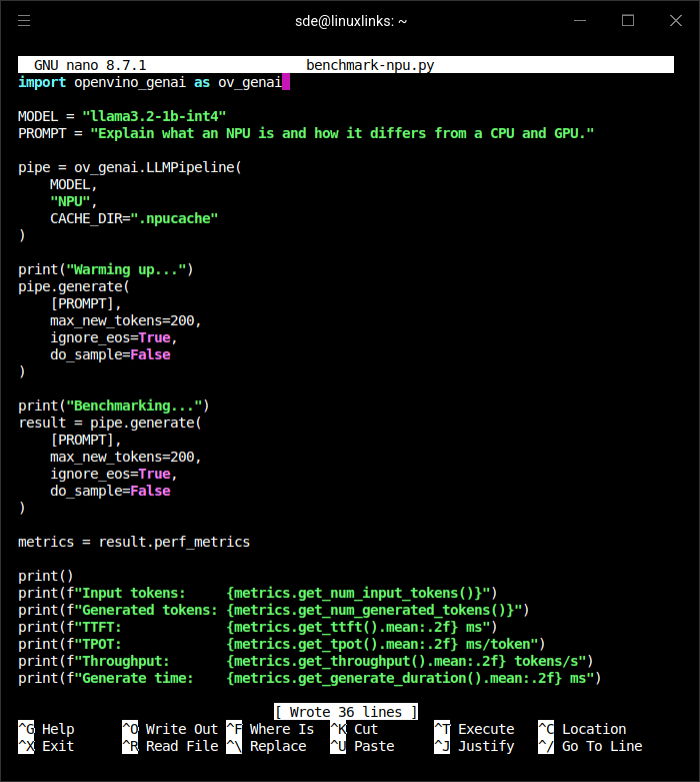
Before running it, I made the NPU libraries available in the current shell:
$ export NPU_LIB=/snap/intel-npu-driver/current/usr/lib/x86_64-linux-gnu
$ export LD_LIBRARY_PATH="$NPU_LIB${LD_LIBRARY_PATH:+:$LD_LIBRARY_PATH}"
Here are the results:
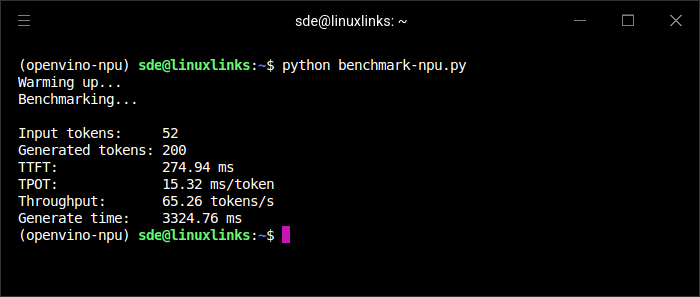
Llama 3.2 1B performs very well on the M2’s Intel NPU. After warm-up, OpenVINO generated 200 tokens at 65.26 tokens/s, with a time to first token (TTFT) of 275 ms. Token generation averaged 15.32 ms per token, making the model feel effectively instantaneous in interactive use.
Matching the FastFlowLM benchmark
This initial result is not directly comparable with my FastFlowLM benchmark on the Ryzen AI 9 HX PRO 370. The flm bench command tests context lengths from 1K to 32K, runs eight iterations and separately reports TTFT, prefill speed and decoding speed. My initial OpenVINO test used only 52 input tokens and generated 200 tokens.
For a fairer comparison, I modified benchmark-npu.py to emulate the FastFlowLM test as closely as possible.
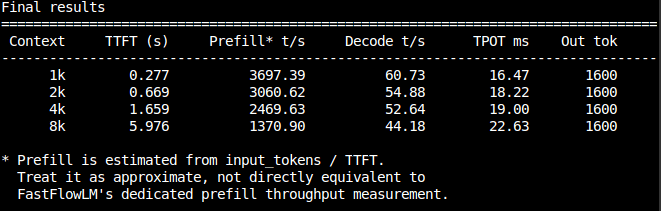
OpenVINO successfully ran Llama 3.2 1B on the Intel NPU at context lengths up to 8K. Attempts to configure 16K and 32K contexts failed during NPU model compilation because the compiler was unable to legalise a VPU.NCE.Reduce operation.
Intel and AMD NPU performance
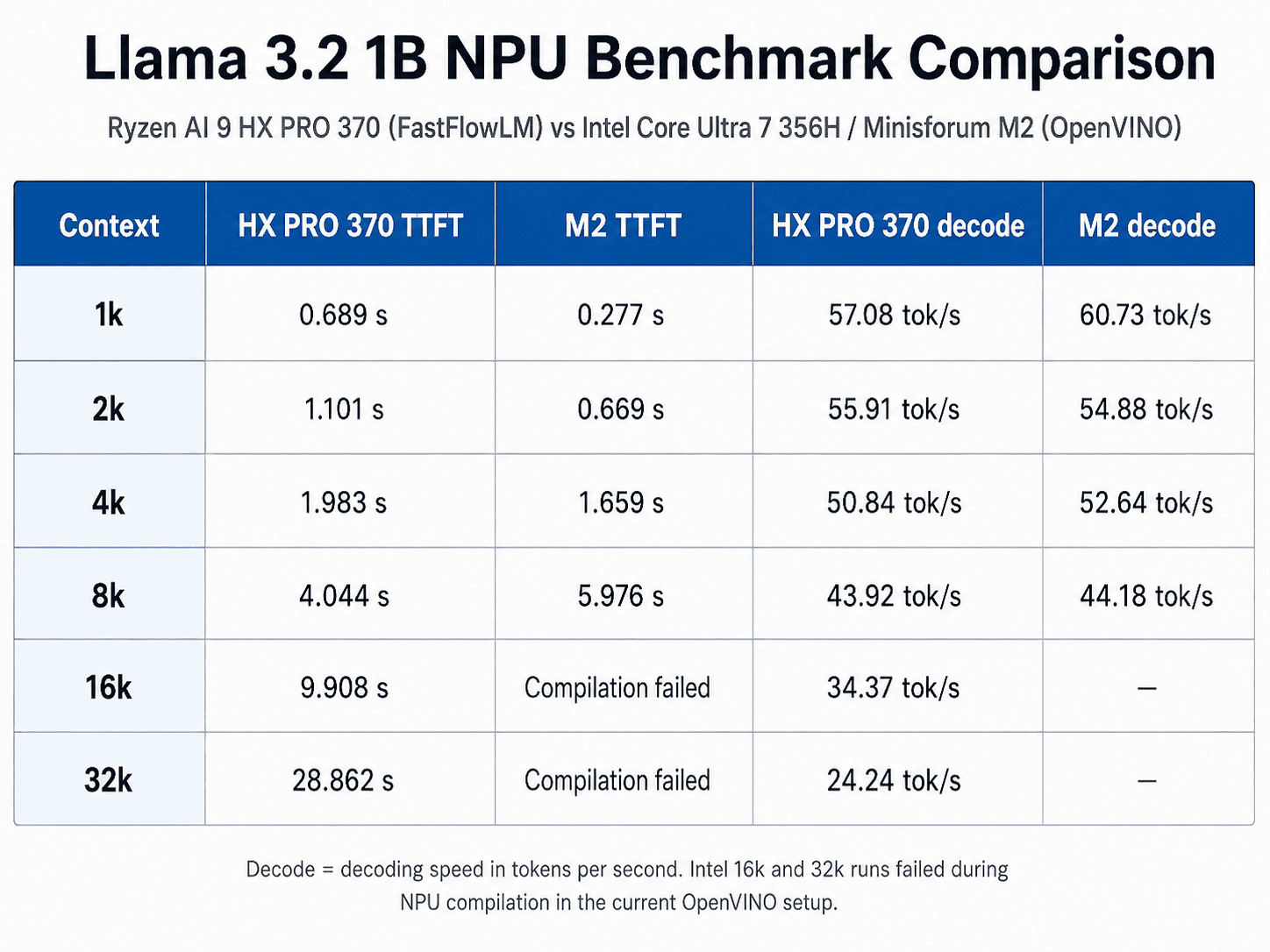
Decode performance is remarkably close. At 1K, the Intel NPU is about 6.4% faster. AMD is about 1.9% faster at 2K, while Intel leads by about 3.5% at 4K. At 8K they are effectively tied, with Intel only about 0.6% ahead. The FastFlowLM results for the AMD system were 57.08, 55.91, 50.84 and 43.92 tokens/s across those four context lengths.
TTFT reveals a clearer difference. The Intel M2 is substantially quicker at shorter contexts: its TTFT is about 60% lower at 1K, 39% lower at 2K and 16% lower at 4K. The position reverses at 8K. The AMD system produces its first token in 4.044 seconds, whereas Intel takes 5.976 seconds, making Intel roughly 48% slower at that context length.
The AMD benchmark also completes successfully at 16K and 32K, while the current OpenVINO setup cannot compile those configurations.
I have not compared the prefill figures numerically. FastFlowLM reports a dedicated prefill-speed measurement — for example, 1,460.24 tokens/s at 1K and 1,925.36 tokens/s at 8K — whereas my Intel script derives its prefill value simply by dividing the number of input tokens by TTFT. These are not equivalent metrics.
Final thoughts
Despite using completely different runtimes, these two 50 TOPS NPUs deliver almost identical Llama 3.2 1B decoding performance at context lengths up to 8K.
- Decode speed: The two NPUs are closely matched through 8K.
- Time to first token: Intel leads clearly at 1K–4K, but AMD pulls substantially ahead at 8K.
- Context support: FastFlowLM completes the 16K and 32K tests, while those configurations fail to compile with my current OpenVINO setup.
FastFlowLM therefore has the practical advantage at long context lengths, but the M2’s Intel NPU is an impressive performer at shorter contexts and provides excellent interactive performance with this small model.
Complete list of articles in this series:
| MINISFORUM M2 Core Ultra 7 356H Mini PC | |
|---|---|
| Introduction | Introduction to the series and interrogation of the machine |
| NPU | Setting up and testing the NPU |
| Benchmarks | I run a series of benchmarks focusing on the CPU, GPU, Memory, and Disk performance |
| Power | Testing and comparing the power consumption |
| BIOS | In the world of computing, BIOS, which stands for Basic Input/Output System, plays a crucial role |
| Cores | A look at Intel’s hybrid architecture |
| Intel processors | P-Cores, E-Cores and LP E-Cores Compared Across 4 Intel Processors |
| NPU | NPU and Llama |
| Scheduling | Does Linux Schedule Panther Lake Correctly? |
| Next articles in the series will continue to focus on the machine's NPU | |
Please read our Comment Policy before commenting.