
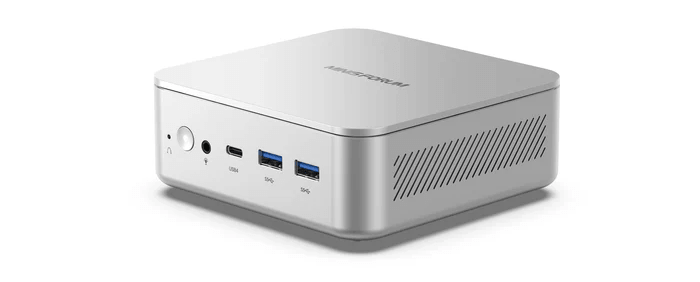
The Minisforum Elite Mini M2 is a compact mini PC built around Intel’s Panther Lake platform. In this series, I’ll explore the machine in detail from a Linux perspective, looking at hardware support, installation, power consumption, performance, thermals, noise, and everyday usability. I’ll also compare the M2 with a range of other mini PCs to see where it excels, where it falls short, and whether it’s a good choice for Linux users.
The M2 is a compact Panther Lake mini PC powered by Intel’s Core Ultra 7 356H, a 16-core, 16-thread processor, with dual DDR5 SODIMM slots, dual M.2 storage, Wi-Fi 7, dual 2.5GbE, and USB4. Its headline feature is local AI acceleration, with a 50 TOPS NPU and up to 90 TOPS combined NPU and GPU AI performance.
For this article in the series, I’ve benchmarked the Minisforum M2 using a range of tests, most of them run with the Phoronix Test Suite. I’ve compared its results against a selection of other systems, including mini PCs and two Intel desktop systems powered by Core i5-10400 and Core i5-12400 processors.
I’ve also included the Minisforum MS-02 Ultra, a mini workstation that sits in a much higher price bracket than all the other machines. Its inclusion provides a useful upper-end comparison point, showing what a more expensive, workstation-class compact system can deliver against smaller and cheaper mini PCs. The Intel N100 machine is included as a useful low-cost baseline. It shows what an inexpensive mini PC can deliver, making it easier to assess how much extra performance the higher-spec systems provide, and whether the added speed, responsiveness, and headroom justify their higher price.
Each system is tested with the same software stack and configured as consistently as possible for fair comparison. Power-saving features are disabled where possible, and where the BIOS offers a Power Limit option, Performance Mode is selected. I also use the performance governor for all tests, keep background processes to a minimum, and avoid running a Wayland session except where it’s required for graphics benchmarks.
I begin with benchmarks that concentrate specifically on processor performance.
$ phoronix-test-suite benchmark smallpt
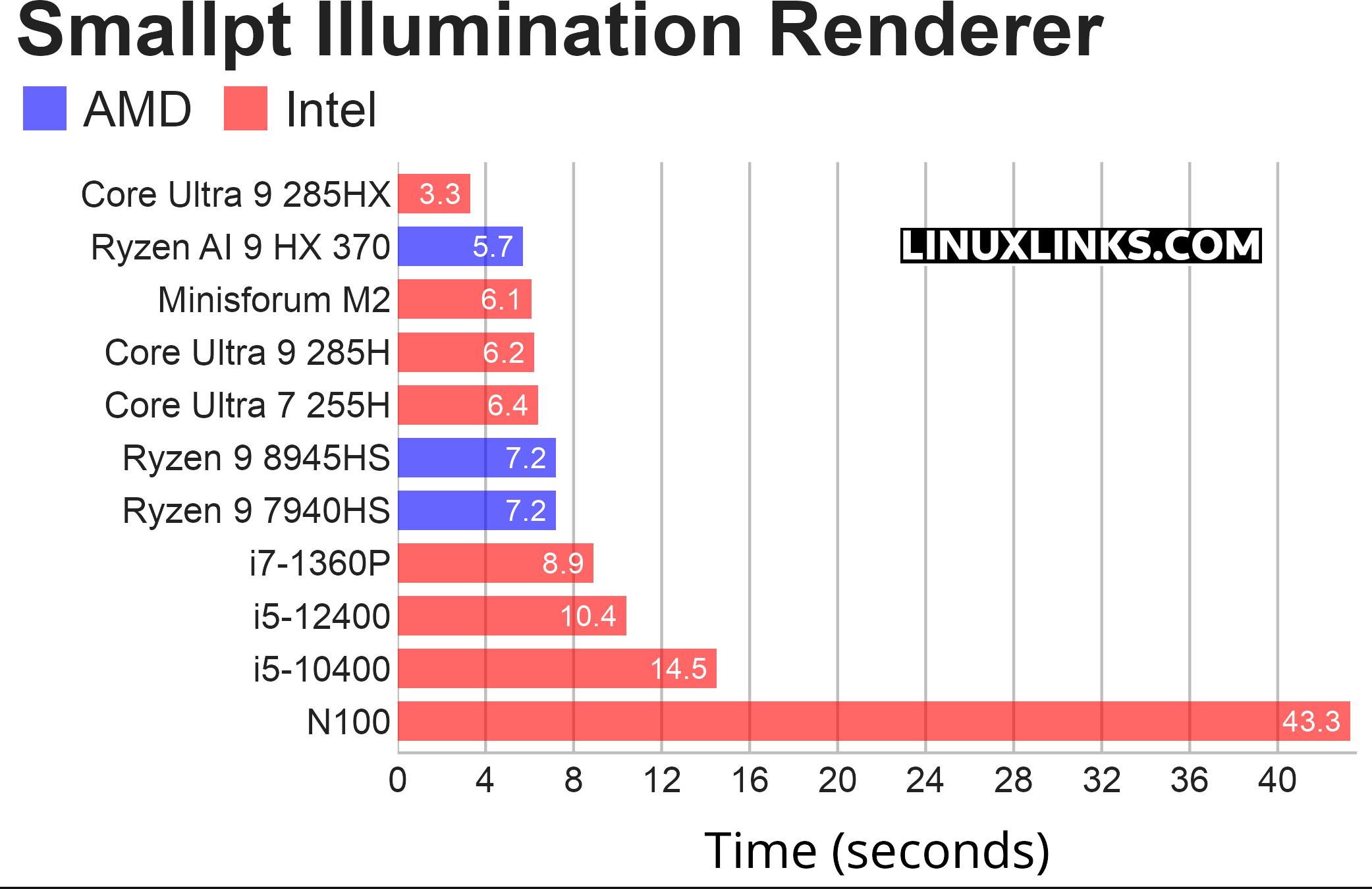
Smallpt is a C++ global illumination renderer written in fewer than 100 lines of code. It performs unbiased Monte Carlo path tracing and supports multi-threading via OpenMP. As this benchmark can use all CPU cores, processors with more cores complete the test considerably quicker.
In this CPU rendering benchmark, lower is better.
The Minisforum M2 performs extremely well in Smallpt. At 6.1 seconds, it sits just behind the Ryzen AI 9 HX 370 system while costing £110 less as a barebone unit. The cheaper Ryzen 9 8945HS machine still offers slightly better performance per pound, but the M2 strikes a stronger balance between outright speed, modern platform features, and price. For buyers who want high CPU performance without stepping up to the far more expensive Core Ultra 9 285HX class, the M2 looks very competitive.
$ phoronix-test-suite benchmark compress-pbzip2
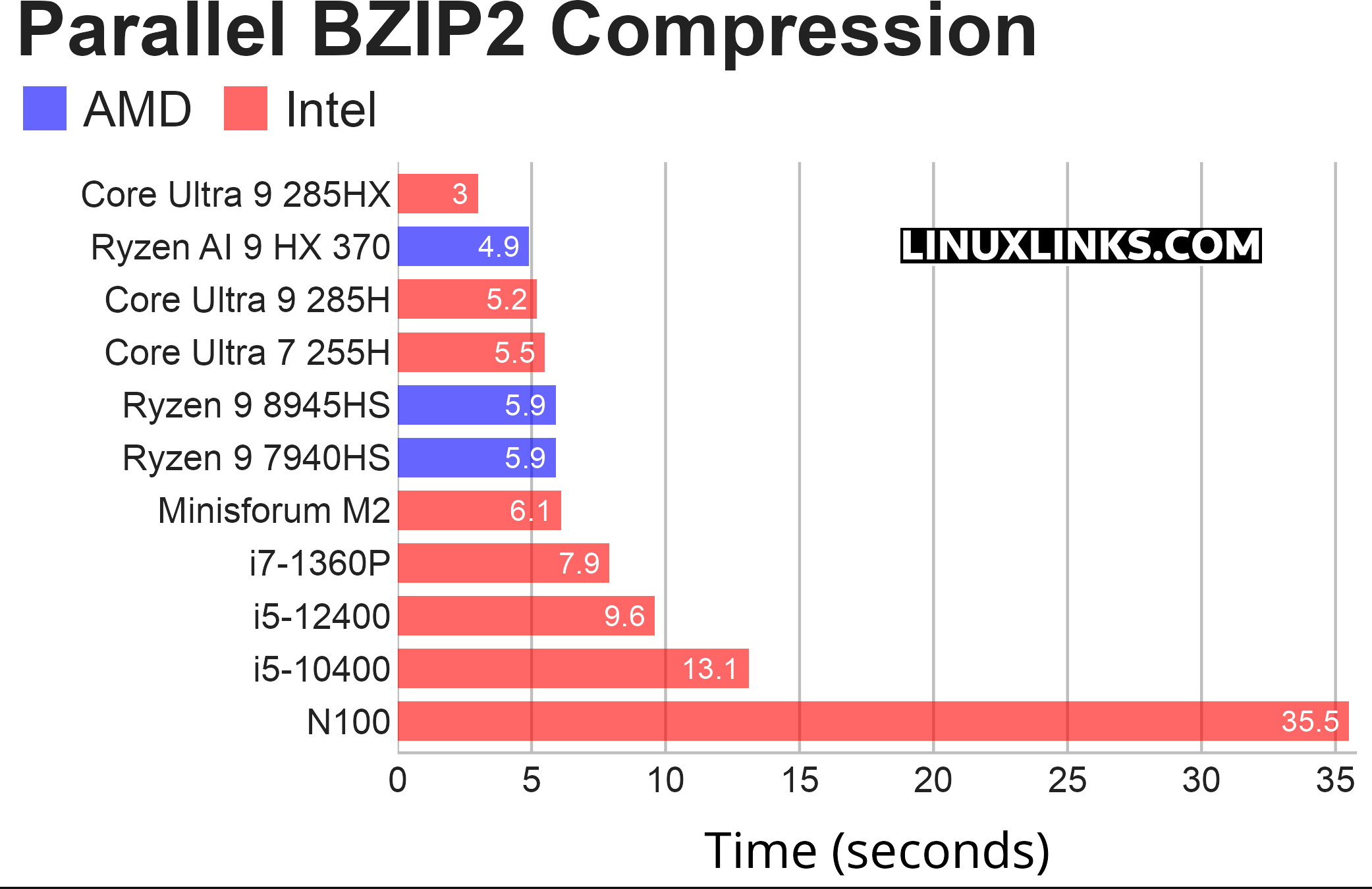
pbzip2 is a parallel implementation of the bzip2 block-sorting file compressor that uses pthreads and achieves near-linear speedup on SMP machines. This test measures the time needed to compress a file (a .tar package of the Linux kernel source code) using BZIP2 compression. Like the smallpt benchmark, this test can use all available CPU cores.
Parallel BZIP2 compression is a less flattering benchmark for the Minisforum M2. Its time of 6.1 seconds is still strong in absolute terms and comfortably ahead of older desktop Core i5 systems, but it trails both the Ryzen 9 8945HS and Ryzen AI 9 HX 370 machines. The Ryzen 9 8945HS comparison is particularly telling, as that system is slightly faster while costing £100 less as a barebone unit. The M2 remains a capable performer, but in this workload its value proposition is weaker than in the Smallpt rendering test.
$ phoronix-test-suite benchmark openssl
OpenSSL is an open-source cryptography toolkit best known for implementing TLS and the older SSL protocols. This test profile makes use of the built-in “openssl speed” benchmarking capabilities.
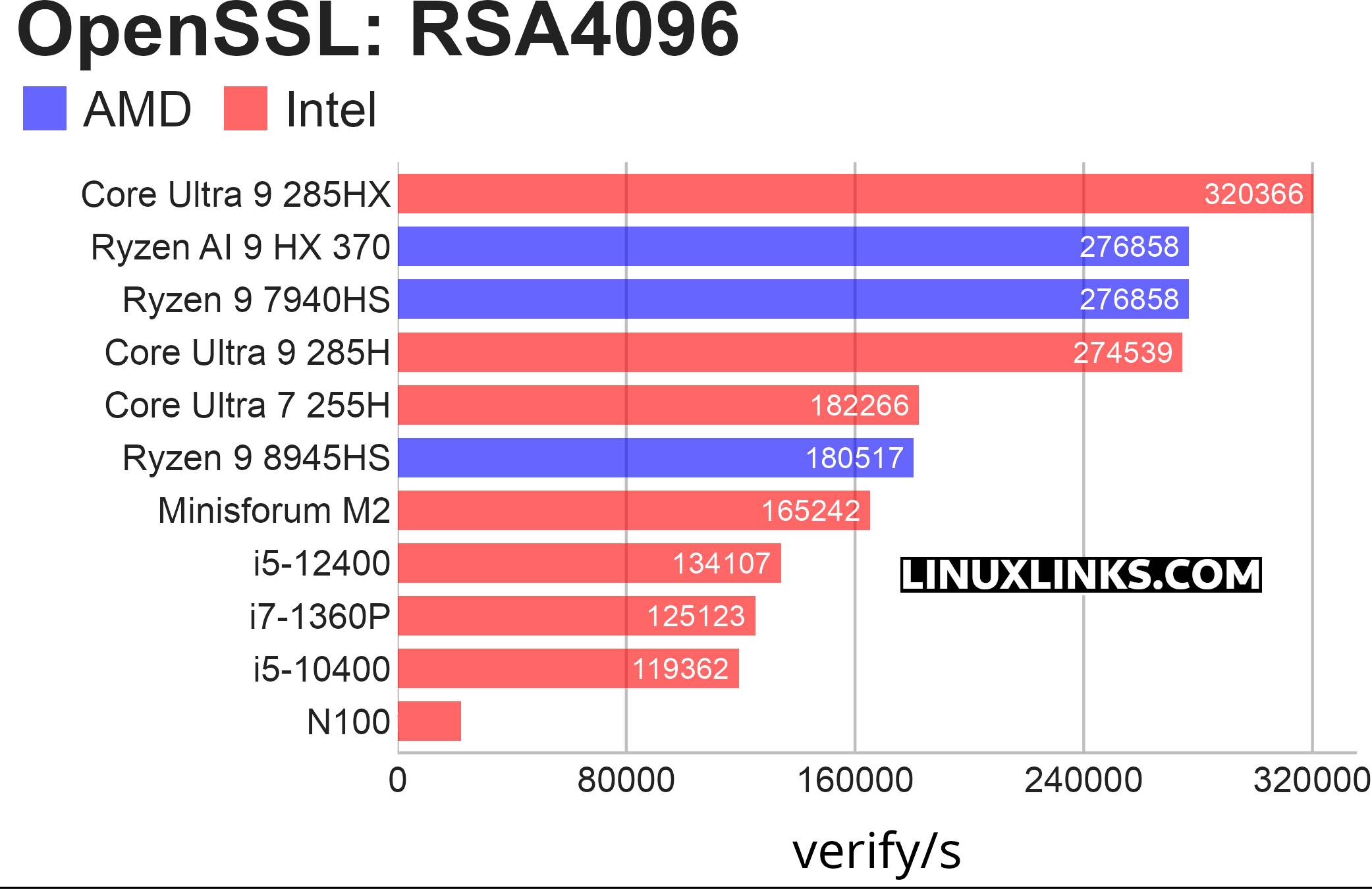
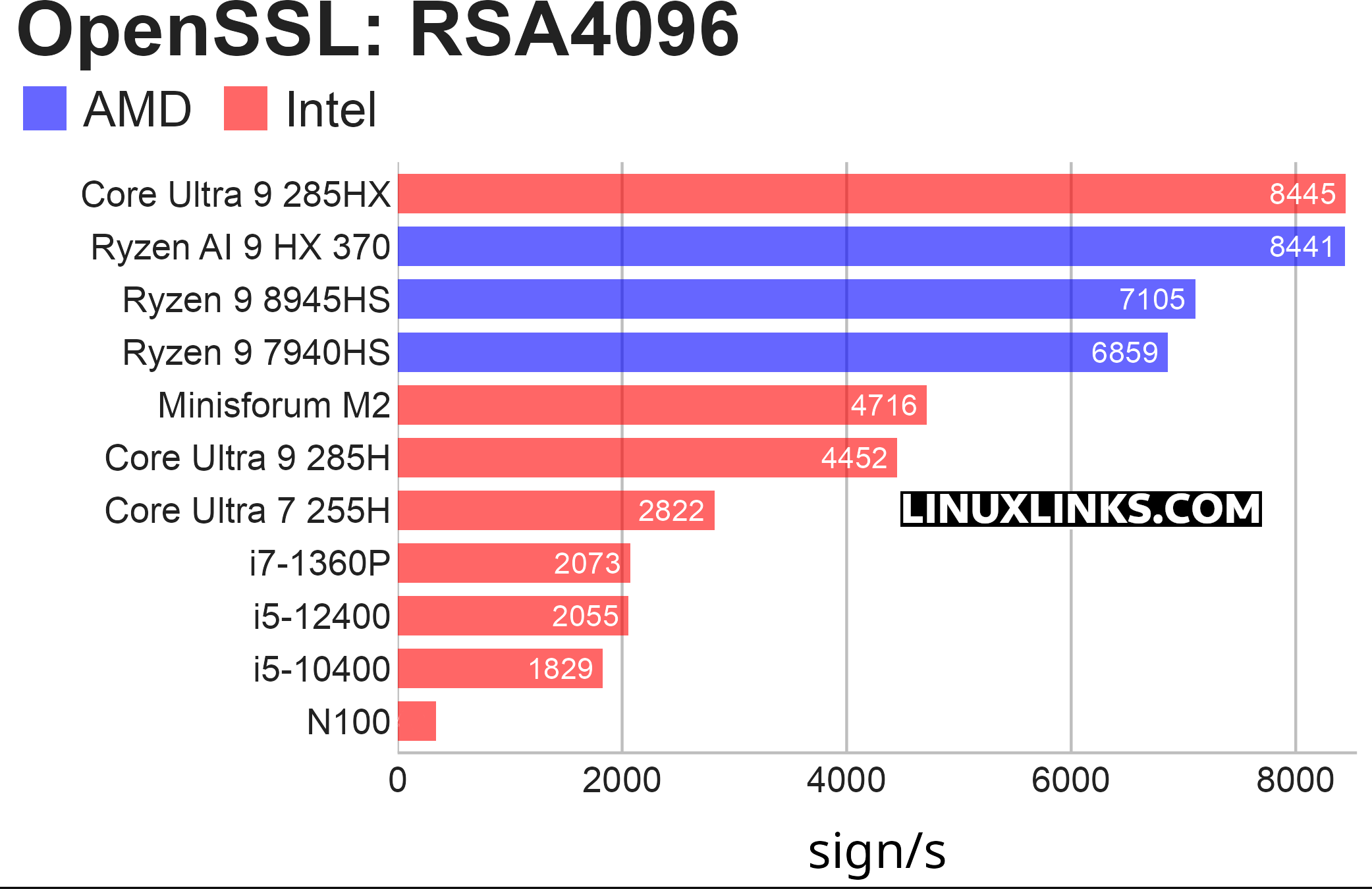
There are various algorithms that can be used for this benchmark. I focused on the RSA-4096 algorithm, since it serves as a good representative example for the other options. This benchmark includes two charts: one for signing speeds and another for verification speeds.
OpenSSL RSA-4096 is not one of the Minisforum M2’s strongest showings. In signing, the M2 reaches 4,716 sign/s, which is respectable, but it falls well behind the Ryzen 9 8945HS and Ryzen AI 9 HX 370 systems. The value comparison is particularly difficult, as the Ryzen 9 8945HS machine is both faster and cheaper as a barebone unit. Verification performance is more competitive, with the M2 reaching 165,242 verify/s, but it still trails the main AMD systems and the much more expensive Core Ultra 9 285HX. Overall, the M2 is capable in OpenSSL workloads, but this benchmark does not make the strongest case for it on performance per pound.
$ phoronix-test-suite benchmark coremark
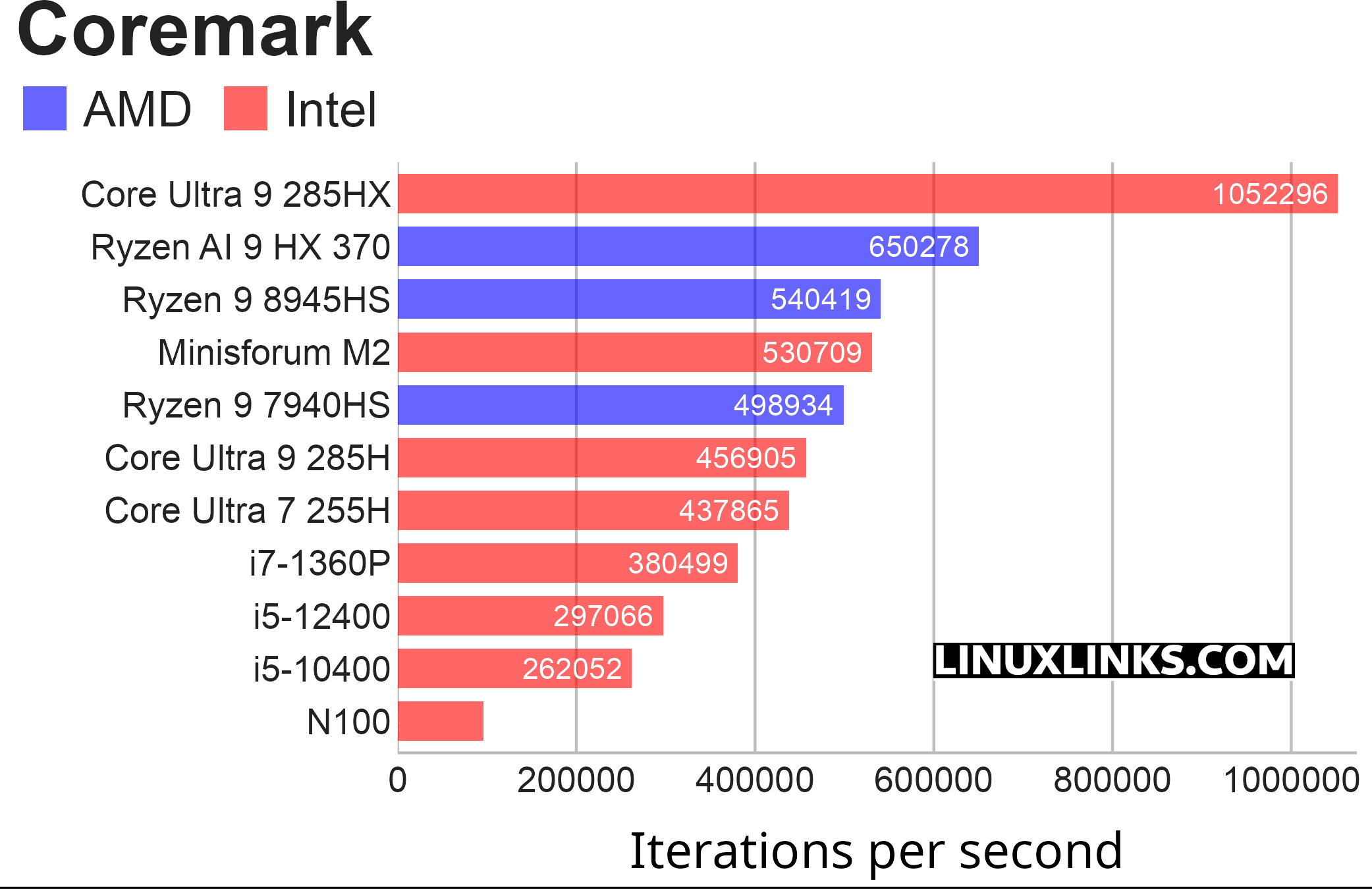
CoreMark is a benchmark that measures the performance of central processing units (CPU) used in embedded systems. It’s built around list processing, matrix manipulation, state-machine logic, and CRC, so it mostly stresses integer execution, branches, cache behavior, compiler output, and how well the CPU sustains clocks under load.
CoreMark is a strong result for the Minisforum M2. Its score of 530,709 iterations per second places it very close to the Ryzen 9 8945HS system and ahead of several other modern mini PCs, including the Ryzen 9 7940HS, Core Ultra 9 285H, and Core Ultra 7 255H machines. The value comparison is less favourable, as the Ryzen 9 8945HS system is fractionally faster while costing £100 less as a barebone unit. Even so, the M2 delivers excellent raw performance, and the more expensive Ryzen AI 9 HX 370 and Core Ultra 9 285HX machines only improve value slightly because their higher performance is matched by higher pricing.
$ phoronix-test-suite benchmark crafty
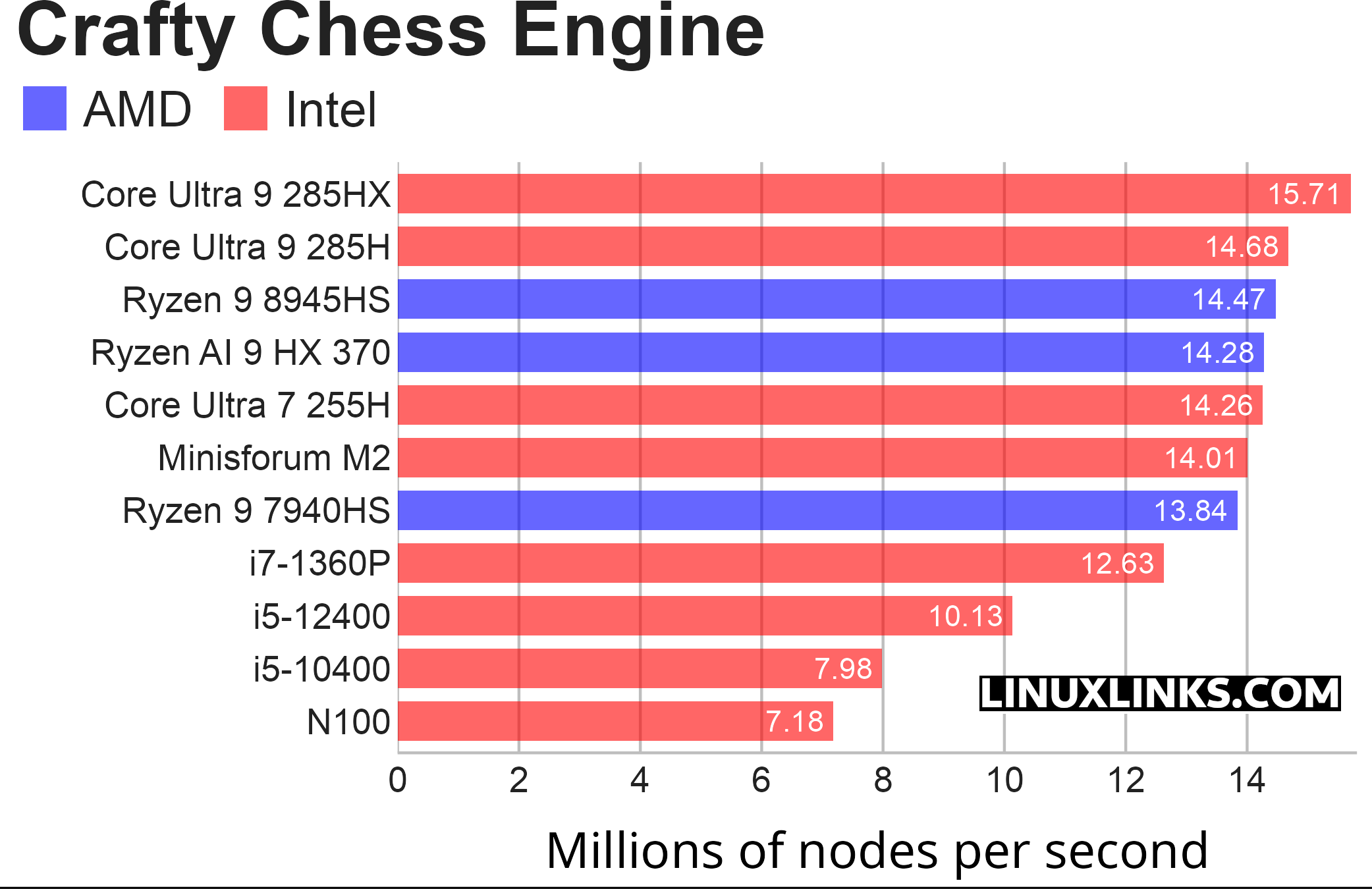
Crafty is a chess program directly derived from Cray Blitz, winner of the 1983 and 1986 World Computer Chess Championships. Crafty is a single-core benchmark, so it doesn’t reward CPUs simply for having more cores.
Single-core performance matters so much for desktop software because a lot of what makes a computer feel fast still depends on one main thread doing work quickly. Most desktop workloads aren’t perfectly parallel. Even on a 16-core or 24-core CPU, many tasks still have a “critical path” where one thread has to finish before the next step can happen. Faster single-core performance reduces waiting at each stage.
The Minisforum M2 performs well, reaching 14.01 million nodes per second and sitting close to the leading group. The gap to the Ryzen AI 9 HX 370 is very small, yet the M2 is £110 cheaper as a barebone unit. However, the Ryzen 9 8945HS remains a difficult comparison, as it is fractionally faster while costing £100 less. The Core Ultra 9 285HX tops the chart, but its modest single-core advantage doesn’t justify its much higher price for this type of workload alone. Overall, the M2 offers strong single-threaded performance, though not the best value in the group.
Pages in this article:
Page 1 – Introduction / Processor
Page 2 – Graphics
Page 3 – Memory
Page 4 – Disk and Summary
Complete list of articles in this series:
| MINISFORUM M2 Core Ultra 7 356H Mini PC | |
|---|---|
| Introduction | Introduction to the series and interrogation of the machine |
| NPU | Setting up and testing the NPU |
| Benchmarks | I run a series of benchmarks focusing on the CPU, GPU, Memory, and Disk performance |
| Power | Testing and comparing the power consumption |
| BIOS | In the world of computing, BIOS, which stands for Basic Input/Output System, plays a crucial role |
| Cores | A look at Intel’s hybrid architecture |
| Intel processors | P-Cores, E-Cores and LP E-Cores Compared Across 4 Intel Processors |
| NPU | NPU and Llama |
| Scheduling | Does Linux Schedule Panther Lake Correctly? |
| Next articles in the series will continue to focus on the machine's NPU | |
Please read our Comment Policy before commenting.