
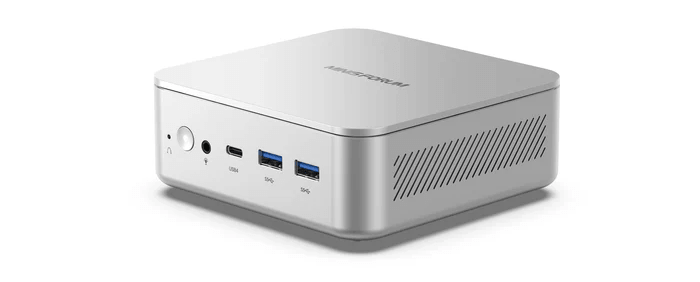
The Minisforum Elite Mini M2 is a compact mini PC built around Intel’s Panther Lake platform. In this series, I’ll explore the machine in detail from a Linux perspective, looking at hardware support, installation, power consumption, performance, thermals, noise, and everyday usability. I’ll also compare the M2 with a range of other mini PCs to see where it excels, where it falls short, and whether it’s a good choice for Linux users.
The M2 is powered by Intel’s Core Ultra 7 356H, a 16-core, 16-thread processor. It has dual DDR5 SODIMM slots, dual M.2 storage, Wi-Fi 7, dual 2.5GbE, and USB4. Its headline feature is local AI acceleration, with a 50 TOPS NPU and up to 90 TOPS combined NPU and GPU AI performance.
The Minisforum M2 uses Intel’s hybrid architecture, combining 4 Performance-cores, 8 Efficient-cores, and 4 Low Power Efficient-cores. The P-cores deliver the strongest single-threaded performance and are best suited to demanding foreground tasks. The E-cores add useful multi-threaded throughput, helping the chip perform well in heavily parallel workloads, while the LP E-cores are intended for light background activity and low-power operation. Unlike older Intel mobile chips with Hyper-Threading, the M2 exposes 16 cores and 16 threads, so each core maps to a single logical CPU.
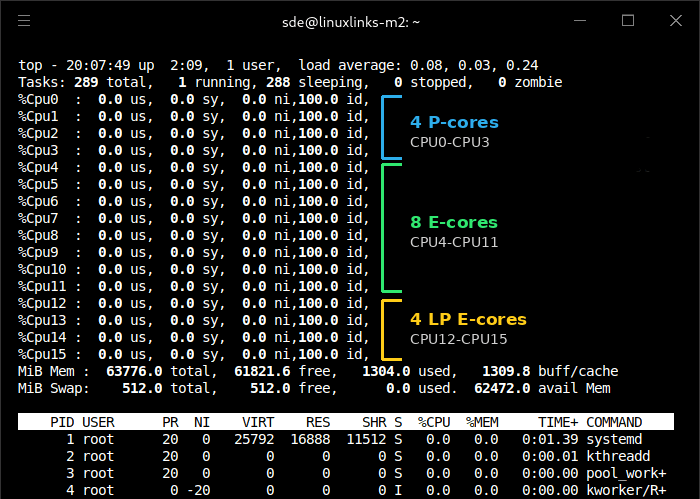
My annotated image is supported by the lscpu command, which reports the maximum clock frequency for each core type.
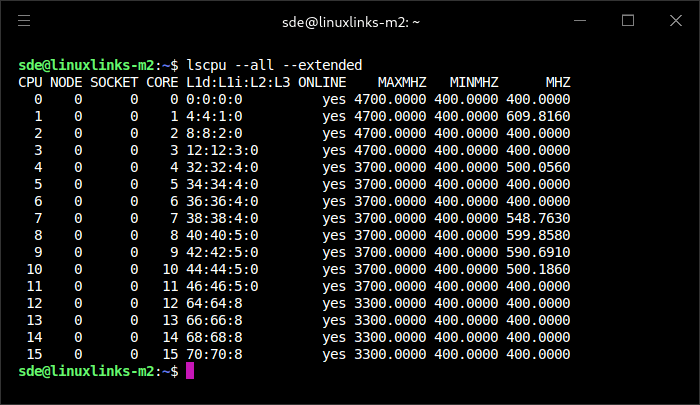
Unlike the Core Ultra Series 2 processors I’ve covered previously, the Ultra 7 356H’s LP E-cores can run at a much higher maximum frequency.
I want to see the performance difference between the P-cores, E-cores, and LP E-cores. The Minisforum M2’s BIOS doesn’t offer the flexibility to disable specific core types, so I can’t isolate them at firmware level. Fortunately, that isn’t a problem for this test. The taskset utility provides a simpler and more flexible approach, letting me run a process on selected CPU cores without changing the BIOS configuration.
$ taskset -c 0 phoronix-test-suite benchmark crafty
$ taskset -c 4 phoronix-test-suite benchmark crafty
$ taskset -c 12 phoronix-test-suite benchmark crafty
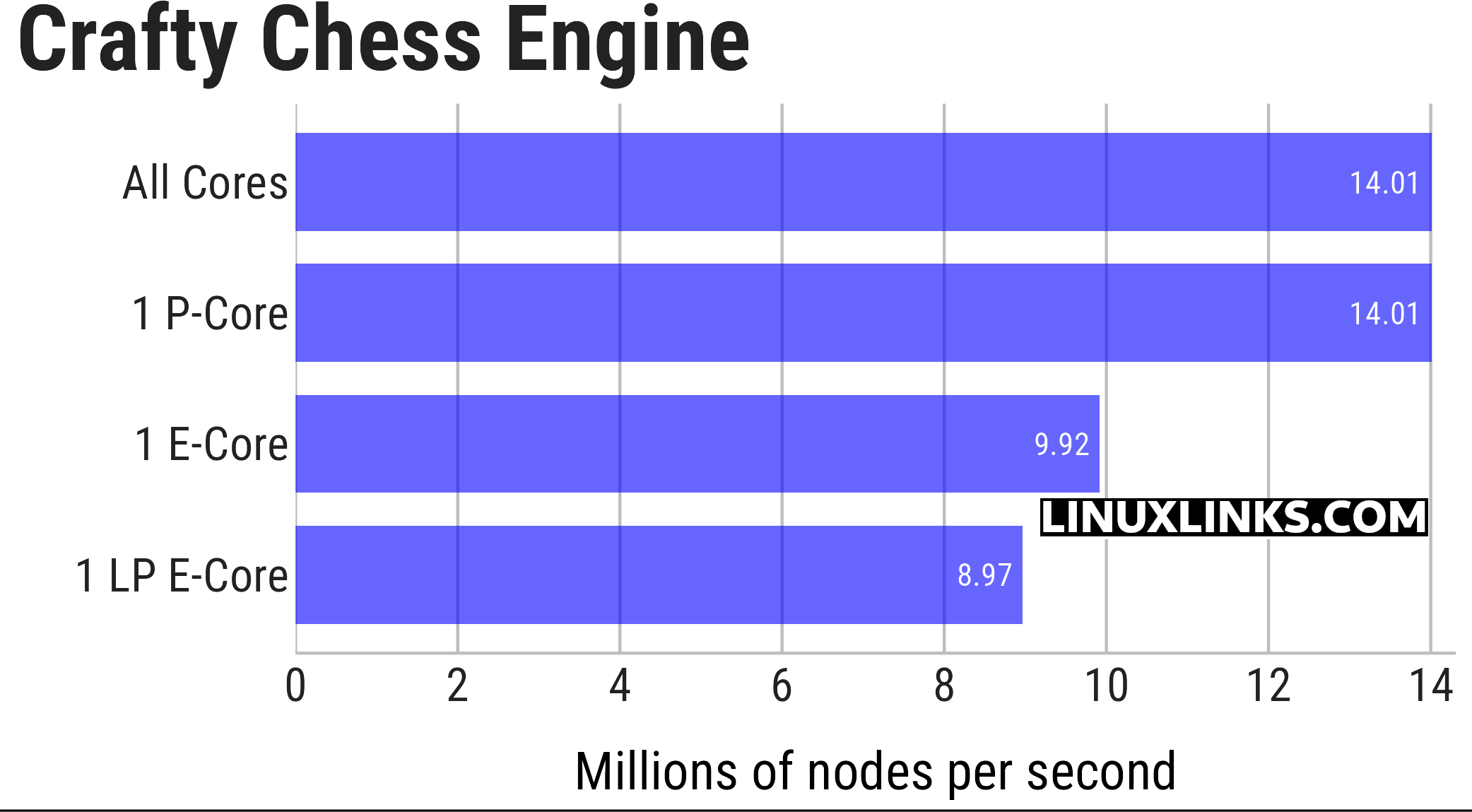
The Minisforum M2’s processor shows a very tight spread between its core classes compared with the Core Ultra 9 285H.
For the M2, All Cores and 1 P-Core both score 14.01 million nodes per second, which confirms Crafty is a single-threaded benchmark. Letting it run with access to all cores doesn’t improve throughput, because the workload ends up limited by one fast core. The 1 E-Core result is 9.92 Mnps, around 71% of the P-Core’s performance, while the 1 LP E-Core is 8.97 Mnps, around 64% of the P-Core’s performance.
The most interesting result is the LP E-Core. On the M2, the LP E-Core is only slightly behind the regular E-Core, delivering about 90% of the E-Core’s Crafty performance. That’s unusually strong for a low-power core and suggests the M2’s LP E-Cores are far more capable than their name implies, at least in this benchmark.
Compared with the Core Ultra 9 285H, the M2 is a little slower on the high-performance side. The 285H’s P-Core scores 14.68 Mnps, around 5% faster than the M2’s P-Core. Its E-Core is also stronger, scoring 12.32 Mnps, about 24% faster than the M2’s E-Core.
But the situation reverses dramatically with the LP E-Core. The M2 scores 8.97 Mnps, compared with just 5.71 Mnps on the 285H. That makes the M2’s LP E-Core roughly 57% faster in this test. On the 285H, the LP E-Core is clearly much weaker than the regular E-Core; on the M2, it’s much closer to it.
Overall, the Core Ultra 9 285H still has the faster P-Core and E-Core for Crafty, but the Minisforum M2’s processor has a much stronger LP E-Core. That makes the M2’s core hierarchy feel more balanced: its low-power cores are not just for background work, they can deliver surprisingly useful single-threaded performance.
Let’s look at the results for CoreMark, a benchmark that can use all of the Core Ultra 7 356H’s cores.
$ taskset -c 0 phoronix-test-suite benchmark coremark
$ taskset -c 4 phoronix-test-suite benchmark coremark
$ taskset -c 12 phoronix-test-suite benchmark coremark
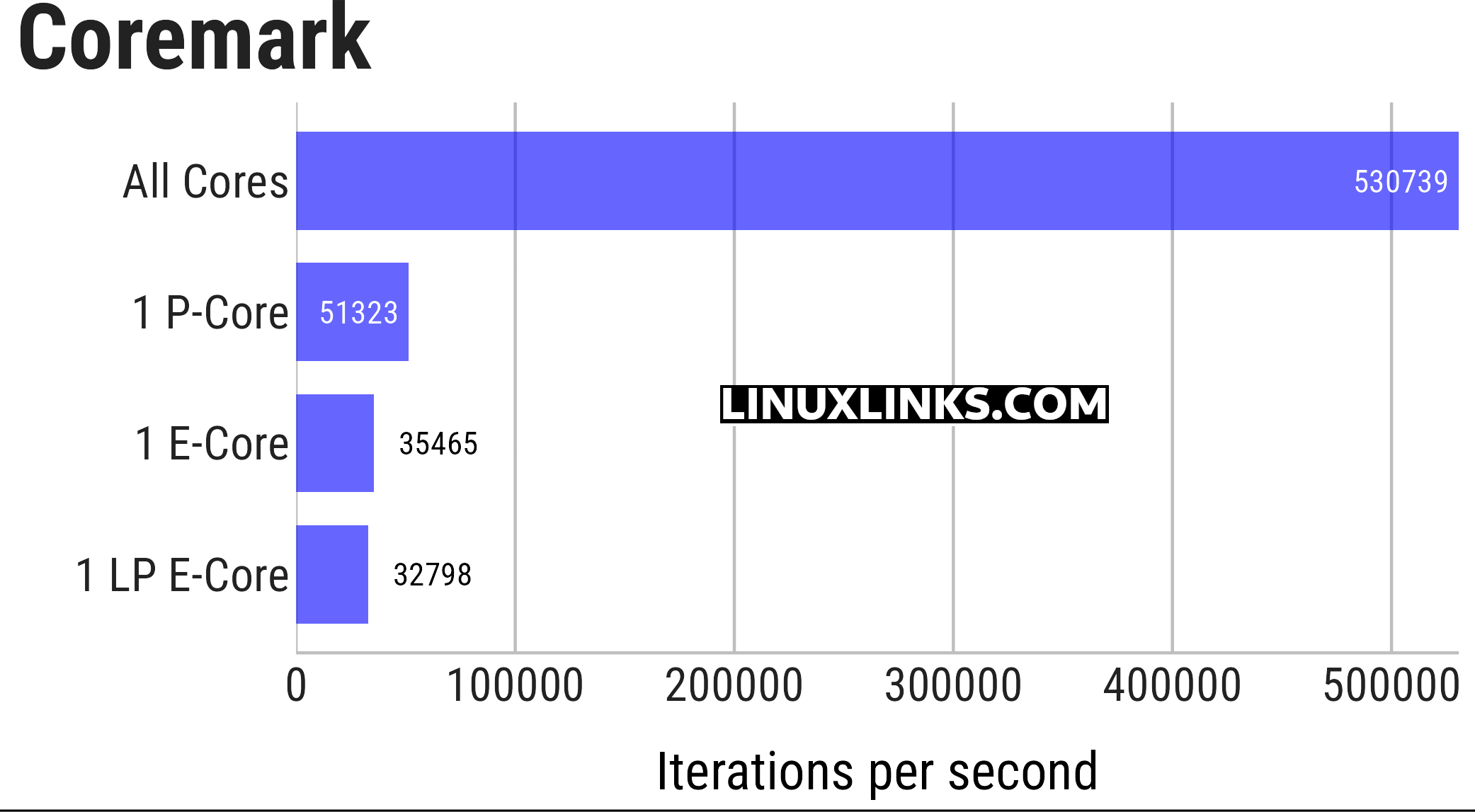
The CoreMark result paints a different picture from Crafty, because this benchmark can use all available cores.
On the Minisforum M2, the All Cores result is 530,739 iterations per second, which is comfortably ahead of the Core Ultra 9 285H’s 456,905. That gives the M2 an advantage of about 16% in the full processor run.
The single-core results are less favourable for the M2. Its 1 P-Core score is 51,323, whereas the 285H scores 58,038, making the 285H around 13% faster on a single P-Core. The same pattern appears with the regular E-Core: the M2 scores 35,465, while the 285H reaches 45,075, so the 285H’s E-Core is around 27% faster.
But the LP E-Core result again stands out. The M2’s 1 LP E-Core scores 32,798, compared with only 22,955 on the 285H. That makes the M2’s LP E-Core about 43% faster in this benchmark. It’s also very close to the M2’s regular E-Core, delivering around 92% of its performance. On the 285H, the LP E-Core delivers only about 51% of the regular E-Core’s performance.
This helps explain why the M2 wins the all-core CoreMark test despite having weaker individual P-Cores and E-Cores. The M2 has 4 LP E-Cores, and they’re genuinely useful contributors here. The 285H has only 2 LP E-Cores, and they’re much weaker. As a result, the M2’s all-core score benefits from a more balanced set of cores, while the 285H relies more heavily on its stronger P-Cores and E-Cores.
Overall, the Core Ultra 9 285H has the faster individual P-Core and E-Core, but the Minisforum M2 delivers the better total throughput in CoreMark. Its strong LP E-Cores make a real difference in workloads that can scale across the whole processor.
I’ll also perform the same exercise with the smallpt benchmark.
taskset -c 0 phoronix-test-suite benchmark smallpt
taskset -c 4 phoronix-test-suite benchmark smallpt
taskset -c 12 phoronix-test-suite benchmark smallpt
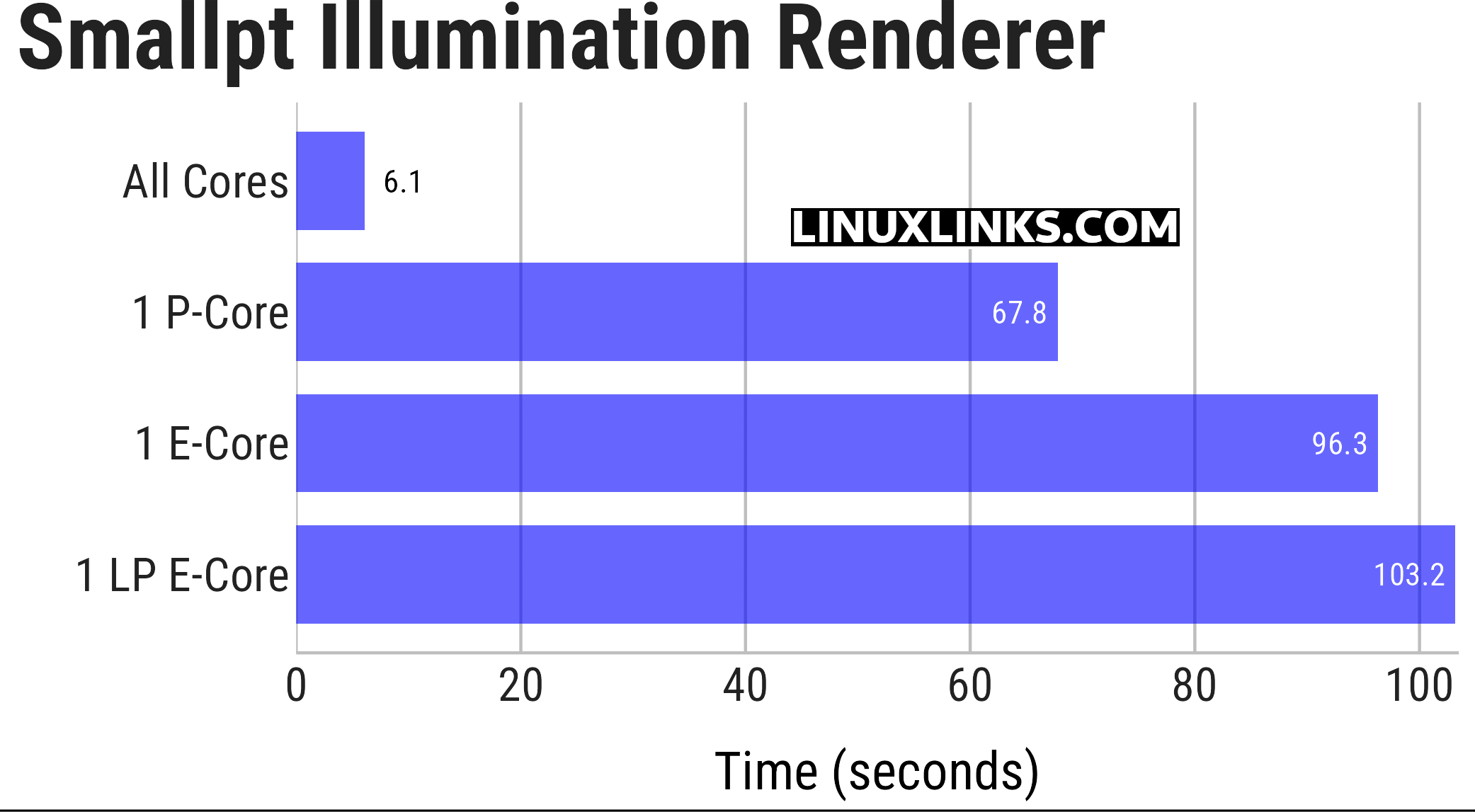
Smallpt tells much the same story as CoreMark, but in time rather than throughput, so lower is better.
The Minisforum M2 completes the all-core run in 6.1 seconds, fractionally ahead of the Core Ultra 9 285H at 6.2 seconds. In practice, that’s a near tie, but it shows the M2 can match the 285H when all cores are available.
On individual cores, the 285H is clearly stronger where expected. Its 1 P-Core result is 59.8 seconds, compared with 67.8 seconds for the M2. Its 1 E-Core result is also better, at 76.4 seconds versus 96.3 seconds.
The exception is again the LP E-Core. The M2 finishes in 103.2 seconds, while the 285H takes a much longer 174.2 seconds. That makes the M2’s LP E-Core dramatically more useful in this workload. It’s only slightly slower than the M2’s regular E-Core, whereas the 285H’s LP E-Core is a huge step down from its E-Core.
Overall, the 285H has faster P-Cores and E-Cores, but the M2’s stronger and more numerous LP E-Cores help it remain highly competitive, even slightly ahead, in the all-core Smallpt result.
Although the Core Ultra 9 285H has more P-Cores and stronger single-core results, the all-core smallpt result is virtually identical to the Minisforum M2. This shows that the benchmark is being influenced by sustained power limits, cooling, and core scheduling rather than core counts alone. The M2’s slower P-Core and E-Core results are offset by better all-core behaviour and much stronger LP E-Core performance in this workload. The difference between 6.1 and 6.2 seconds is also small enough to be considered marginal.
Complete list of articles in this series:
| MINISFORUM M2 Core Ultra 7 356H Mini PC | |
|---|---|
| Introduction | Introduction to the series and interrogation of the machine |
| NPU | Setting up and testing the NPU |
| Benchmarks | I run a series of benchmarks focusing on the CPU, GPU, Memory, and Disk performance |
| Power | Testing and comparing the power consumption |
| BIOS | In the world of computing, BIOS, which stands for Basic Input/Output System, plays a crucial role |
| Cores | A look at Intel’s hybrid architecture |
| Intel processors | P-Cores, E-Cores and LP E-Cores Compared Across 4 Intel Processors |
| NPU | NPU and Llama |
| Scheduling | Does Linux Schedule Panther Lake Correctly? |
| Next articles in the series will continue to focus on the machine's NPU | |
Please read our Comment Policy before commenting.
I thought the Core Ultra 3 CPU was meant to be good.
It is good, but this article isn’t saying the Core Ultra 7 356H is weak. The interesting part is how uneven Intel’s hybrid designs can be between generations and models.
The 356H’s individual P-cores and E-cores aren’t as quick as the Core Ultra 9 285H in these tests, but its LP E-cores are far stronger than expected and it performs very well when all cores are used. So it’s less a case of “bad CPU” and more a case of “different strengths”. For heavier multi-threaded workloads the M2 does very well, while the 285H still has the edge in some single-core and regular E-core tests.