
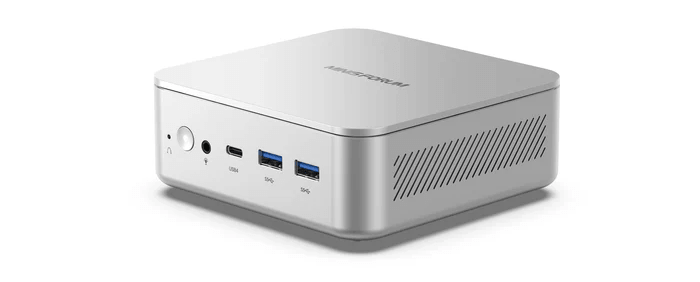
The Minisforum Elite Mini M2 is a compact mini PC built around Intel’s Panther Lake platform. In this series, I’ll explore the machine in detail from a Linux perspective, looking at hardware support, installation, power consumption, performance, thermals, noise, and everyday usability. I’ll also compare the M2 with a range of other mini PCs to see where it excels, where it falls short, and whether it’s a good choice for Linux users.
The M2 is powered by Intel’s Core Ultra 7 356H, a 16-core, 16-thread processor. It has dual DDR5 SODIMM slots, dual M.2 storage, Wi-Fi 7, dual 2.5GbE, and USB4. Its headline feature is local AI acceleration, with a 50 TOPS NPU and up to 90 TOPS combined NPU and GPU AI performance.
For this article in the series, I’m looking at the power consumption of the Minisforum M2.
I’ll compare it with seven mini PCs and two desktop machines: Minisforum MS-02 Ultra (“Core Ultra 9 285HX”), the Bosgame M7 Core Ultra 9 285H (“Core Ultra 9 285H”), Bosgame M4 Plus Ryzen 9 7940HS (“Ryzen 9 7940HS”), Minisforum UM890 Pro with Ryzen 9 8945HS (“Ryzen 9 8945HS”), Minisforum AI X1 Pro with AMD Ryzen AI 9 HX 370 (“Ryzen AI 9 HX 370”), ASRock Industrial NUC BOX-255H with an Intel Core Ultra 7 255H processor (“Core Ultra 7 255H”), DreamQuest Intel N100 (“N100”), and desktop machines with i5-10400 and i5-12400F processors.
Let’s start with idle power consumption.
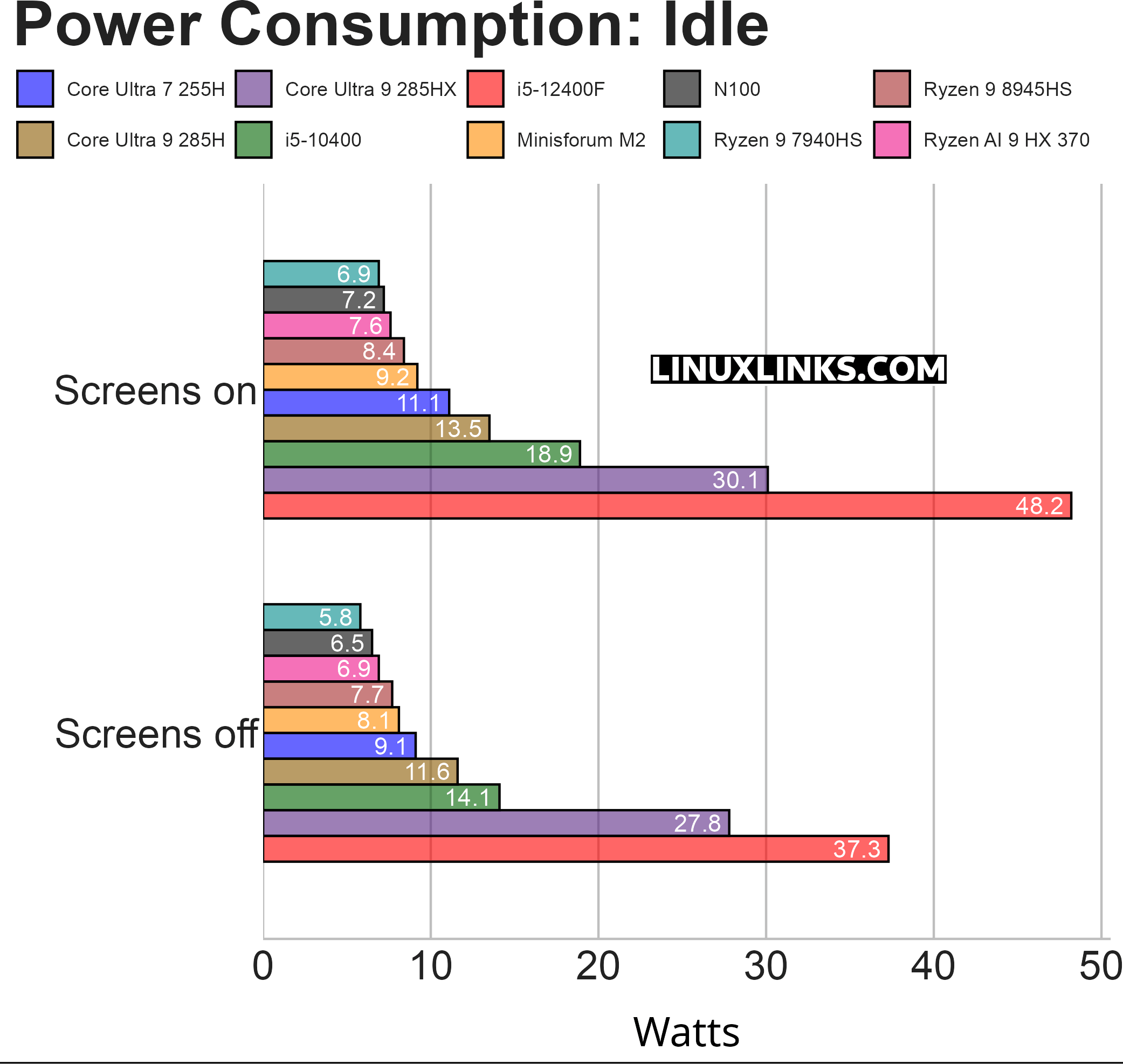
The Minisforum M2 performs very well at idle. With the screens on, it draws 9.2W, placing it just behind the very lowest-power systems in the chart: the Ryzen 9 7940HS, N100, Ryzen AI 9 HX 370, and Ryzen 9 8945HS machines. That’s still an excellent result, especially as it’s ahead of the Core Ultra 7 255H and Core Ultra 9 285H systems.
With the screens off, the M2 falls to 8.1W. Again, it’s not the absolute lowest result, but it’s only around 2W behind the most frugal systems. In practical terms, that’s a very small gap for a machine that may be left running for long periods.
The key point is that the M2 sits firmly in the efficient mini PC group. It’s nowhere near the higher idle draw of the desktop systems, and it’s dramatically lower than the Core Ultra 9 285HX workstation-class system.
The i5-12400F desktop is the clear outlier. Its 37.3W screens-off and 48.2W screens-on results are heavily influenced by the dedicated graphics card. That makes it a useful real-world comparison, but not a clean CPU/platform efficiency comparison. The large jump when screens are enabled also reflects the GPU/display side of the system rather than just the processor.
Notes about the chart:
- The chart measures the power consumption of each system, not just the CPU.
- The i5-12400F machine hosts a dedicated graphics card, whereas the other machines all have onboard graphics. Power consumption at idle is much higher with a dedicated graphics card; in this case, an NVIDIA ASUS RTX 3060 Ti
- The idle figures for the 285HX machine include the power consumption of its 25GbE network card, which by itself accounts for roughly 10W.
- The Bosgame M7, Bosgame M4 Plus, Minisforum AI X1 Pro, Minisforum MS-02 Ultra, i5-12400F, and i5-10400 machines offer BIOS power management options. These options are enabled.
- The Power Saver CPU governor is used.
- The machines are running Ubuntu.
Next page: Page 2 – Power Consumption With Light Usage
Pages in this article:
Page 1 – Power Consumption With System Idle
Page 2 – Power Consumption With Light Usage
Page 3 – Power Consumption With CPU Stressed
Page 4 – Electricity Costs
Complete list of articles in this series:
| MINISFORUM M2 Core Ultra 7 356H Mini PC | |
|---|---|
| Introduction | Introduction to the series and interrogation of the machine |
| NPU | Setting up and testing the NPU |
| Benchmarks | I run a series of benchmarks focusing on the CPU, GPU, Memory, and Disk performance |
| Power | Testing and comparing the power consumption |
| BIOS | In the world of computing, BIOS, which stands for Basic Input/Output System, plays a crucial role |
| Cores | A look at Intel’s hybrid architecture |
| Intel processors | P-Cores, E-Cores and LP E-Cores Compared Across 4 Intel Processors |
| NPU | NPU and Llama |
| Scheduling | Does Linux Schedule Panther Lake Correctly? |
| Next articles in the series will continue to focus on the machine's NPU | |
Please read our Comment Policy before commenting.
Can you publish articles in this series quicker? I need information NOW.