

A news aggregator gathers news, blog posts, and other web content into one place, making it easier to follow updates from many different sources. Given the huge number of news sites and blogs online, these tools are invaluable for quickly spotting important developments and breaking stories.
They’re especially useful for people who follow lots of blogs, as they remove the hassle of checking each site individually. That’s particularly helpful when some blogs are updated only occasionally.
Bulletty is a terminal-based RSS and Atom feed reader that stores articles locally as Markdown. It supports offline reading while keeping subscriptions, highlights, and comments under your control.
Installation
CachyOS is now the Linux distribution I use for most of my software evaluation.
bulletty is available in the official Arch repositories. I installed the program using pacman. Installation was trouble-free.
$ sudo pacman -S bulletty
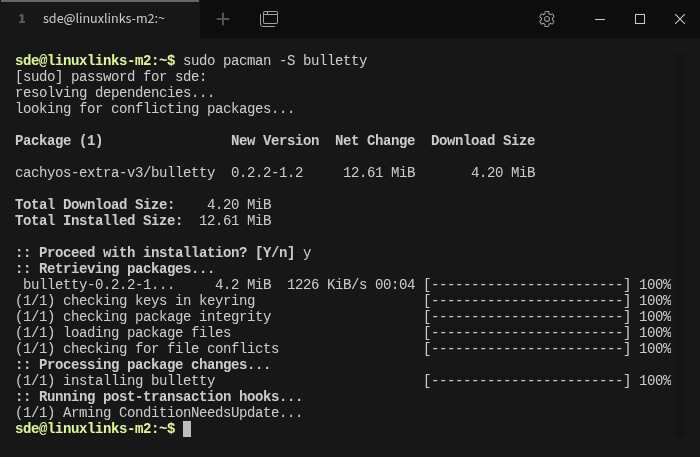
There are other ways of installing the software if you’re not using an Arch-based distro.
In Operation
When you first launch the program, your library will be empty, so you will need to add some feeds. This must be done from the command line, as there is no option to add feeds within the application itself. That is a glaring omission.
For example, to add our feed:
$ bulletty add https://www.linuxlinks.com/feed
bulletty has one of the most attractive TUIs I’ve seen in a terminal feed reader. Categories and feeds are displayed in the left pane, with unread counts clearly shown. The main pane lists articles together with their date, author, and description.
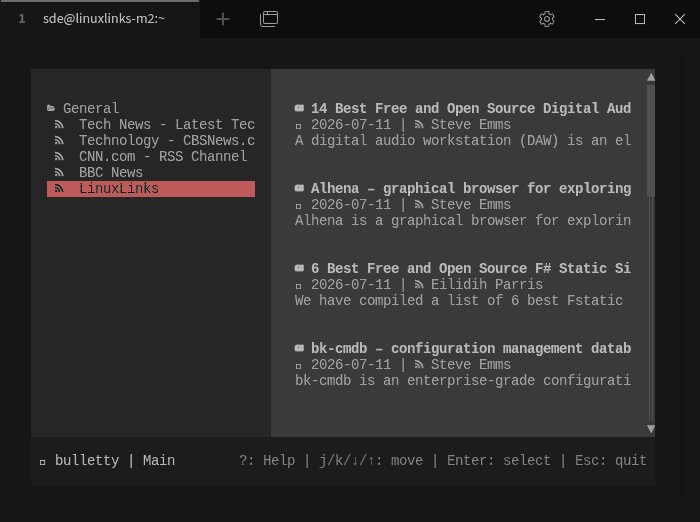
Keyboard navigation is fast and intuitive. Read/unread status is persistent, articles can be marked for Read Later, and pressing ? displays shortcuts relevant to the current screen.
The embedded Markdown reader is excellent. Articles are cleanly presented, the reading width can be adjusted, and n and p move directly between articles. Press o to open an article in your web browser.
But bulletty’s standout feature is how it stores data. Subscriptions and downloaded articles are kept locally under ~/.local/share/bulletty/.
Articles are ordinary Markdown files arranged in directories. This is a superb design. The library is transparent, easy to back up or synchronize, and accessible with standard Linux tools and text editors.
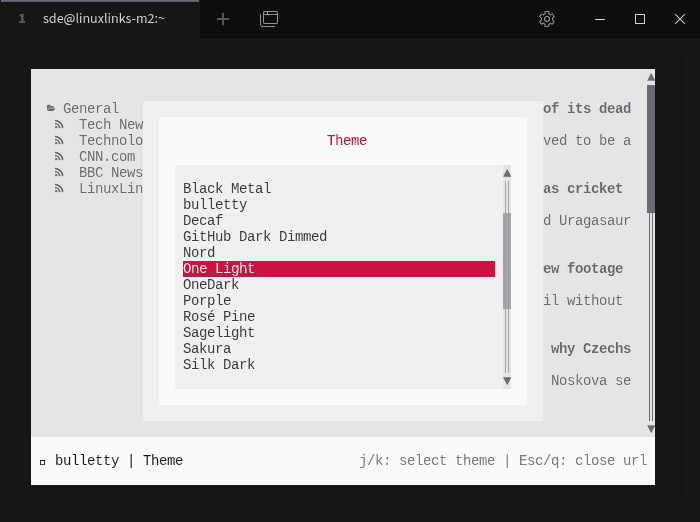
Feeds are added from the command line. bulletty can discover feeds from website URLs and supports OPML import and export. There’s also an excellent selection of themes.
The biggest omission is search or some sort of filtering. A program capable of accumulating thousands of Markdown articles really needs built-in search.
Full-text extraction is also absent. If a feed only provides a short summary, that’s all the embedded reader can display. Feedr’s ability to retrieve and extract the complete article is a major advantage.
There’s no configurable periodic background refresh, and feed and category management is largely restricted to the command line. I’d also like highlighting, notes, configurable keybindings, image support, and authenticated feeds.
Summary
bulletty combines a polished TUI and excellent Markdown reader with a wonderfully transparent local data model. Storing downloaded articles as ordinary Markdown files is a superb idea.
Search and full-text extraction are the major omissions. Add those features and bulletty would rank fairly high among the finest terminal feed readers available.
Website: github.com/CrociDB/bulletty
Support:
Developer: Bruno Croci
License: MIT License
bulletty is written in Rust. Learn Rust with our recommended free books and free tutorials.
Linux has lots of terminal-based news aggregators. If bulletty doesn’t meet your requirements, try one of these.
| Terminal-Based News Aggregators | |
|---|---|
| Newsboat | Snazzy RSS feed reader |
| Feedr | Polished Linux terminal-based RSS/Atom feed reader |
| Elfeed | Extensible web feed reader for Emacs, supporting both Atom and RSS |
| goread | Go-based news feed reader |
| gorss | Simple RSS/Atom reader written in Golang |
| Snownews | Text mode reader for RSS and Atom feeds written in C |
| tuifeed | News feed reader with a fancy terminal user interface |
| nom | RSS reader for the terminal written in Go |
| eilmeldung | Based on the awesome news-flash library |
| Newsraft | Greatly inspired by Newsboat and tries to be its lightweight counterpart |
| syndicationd | Keyboard-driven RSS and Atom reader with a clean interface |
| moccasin | TUI feed reader for RSS, Atom, and (eventually) Podcasts |
| izrss | Lightweight RSS reader focused on simplicity and speed |
| bulletty | Fast RSS and Atom reader with an uncluttered interface |
| CAST-text | Full-text RSS terminal reader |
| hys | RSS reader for digital minimalists |
| Feedln | Simple interface to view, update, and categorize feed |
| srss | Simple command-line news feed reader |
| newsroom | Modern CLI to get your favorite news |
| blogtato | RSS and Atom feed reader |
| Rivulet | Focuses on usability for users who prefer keyboard-driven tools |
| NewsGoat | Written in Go using the Bubble Tea TUI framework |
| Canto | Crank through feeds using a minimal, yet information packed interface |
Please read our Comment Policy before commenting.
Why did LinuxLinks move away from Manjaro?
All well documented really. Basically all the developers jumped ship over the past year or so, their in-house tools are basically abandoned. Couple that with the in-fighting/split with the few remaining trying to grab power, the lack of any effective leadership, as well as all the past acccounting disasters.
I move away from Manjaro to Garuda when all the issues came to a fore. While they still issue package updates, these are just Arch updates, so they don’t actually do anything really these days.
I gradually lost confidence in Manjaro as the best platform for my software and hardware testing. CachyOS offers newer packages, excellent performance, good hardware support and a very responsive development team. It has also proved reliable across the wide range of software and hardware I evaluate.
That does not mean Manjaro is unusable or that nobody should choose it. It simply no longer meets my requirements as well as CachyOS does. The other comments reflect those contributors’ own opinions rather than an official LinuxLinks position.
Manjaro’s moderators are pretty poor as well. Of the remaining team, only Yochanan and linux-aarhus seem to offer consistently useful insight. In many cases, you would probably get better assistance from an LLM than by posting on the forum.
Even so, none of them comes close to the level of expertise shown by Arch forum members such as seth—people who clearly know the system inside out.