

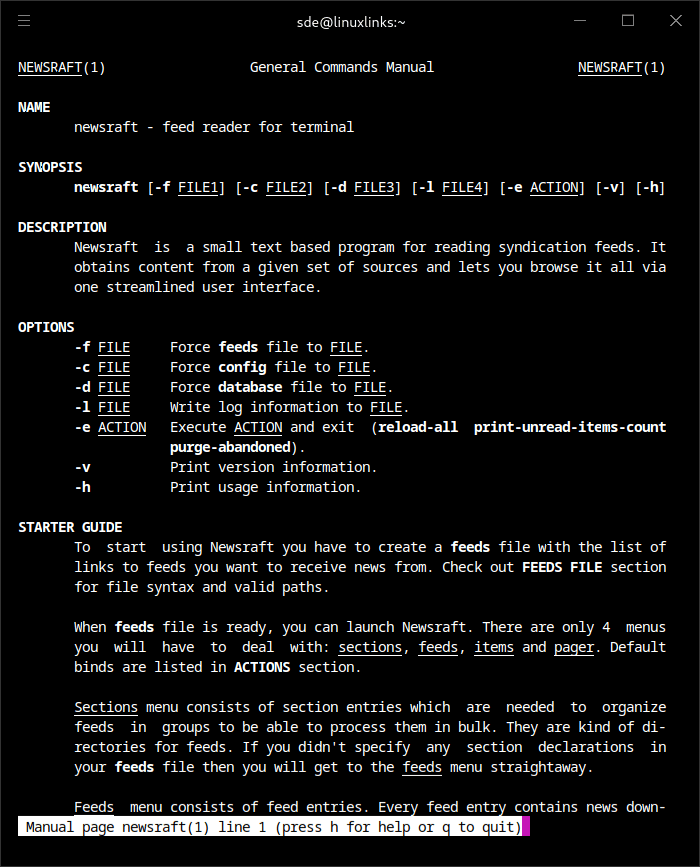
Newsraft is a small text based program for reading syndication feeds. It’s greatly inspired by Newsboat and tries to be its lightweight counterpart. It obtains content from a given set of sources and lets you browse it all via one streamlined user interface.
There are only 4 menus you will have to deal with: sections, feeds, items and pager. Default binds are listed in ACTIONS section.
Sections menu consists of section entries which are needed to organize feeds in groups to be able to process them in bulk. They are kind of directories for feeds. If you didn’t specify any section declarations in your feeds file then you will get to the feeds menu straight away.
Feeds menu consists of feed entries. Every feed entry contains news downloaded from one specific source which you have set in feeds file. To update a single feed you have to select it and press r or R if you want to update all feeds. From feeds menu you can get to the items menu by entering some feed.
Items menu consists of feed item entries (i. e. single pieces of news) which you get when you update feeds in the previous menu. Every feed item entry has two switchable properties – read state and importance state. Keys to change read state: d to mark read, D to mark unread, ^D to mark everything read. Keys to change importance state: f to flag important, F to flag unimportant. To view item’s content you have to go to pager menu by entering selected item.
Pager menu will display some details about selected item and render its content if it was provided by feed. Usually feed item entries have a links section with one link pointing to a related web page and several links that were mentioned in the item’s content. You can copy these links into your clipboard with y key and open them in your web browser with o key. To target a key action to link with a specific index you have to prefix your key with this index. For example, 5y will copy fifth link and 17o will open seventeenth link in the web browser. You can also setup custom command bindings to execute any commands with these links.
This is free and open source software.
Key Features
- Parallel downloads.
- Section-based feeds grouping.
- Opening links in any program.
- News filtering using SQL conditions.
- Viewing news from all feeds with explore mode.
- Automatic updates for feeds and sections.
- Per-feed settings and key bindings.
- Assigning multiple actions to key bindings.
- Processing feeds from command output.
- Text searching by news titles and content.
- Interactive news content viewing.
- Support for practically all feed formats.
Website: codeberg.org/newsraft/newsraft
Support:
Developer: Grigory Kirillov
License: ISC License
newsraft is written in C. Learn C with our recommended free books and free tutorials.
Related Software
| Terminal-Based News Aggregators | |
|---|---|
| Newsboat | Snazzy RSS feed reader |
| Feedr | Polished Linux terminal-based RSS/Atom feed reader |
| Elfeed | Extensible web feed reader for Emacs, supporting both Atom and RSS |
| goread | Go-based news feed reader |
| gorss | Simple RSS/Atom reader written in Golang |
| Snownews | Text mode reader for RSS and Atom feeds written in C |
| tuifeed | News feed reader with a fancy terminal user interface |
| nom | RSS reader for the terminal written in Go |
| eilmeldung | Based on the awesome news-flash library |
| Newsraft | Greatly inspired by Newsboat and tries to be its lightweight counterpart |
| syndicationd | Keyboard-driven RSS and Atom reader with a clean interface |
| moccasin | TUI feed reader for RSS, Atom, and (eventually) Podcasts |
| izrss | Lightweight RSS reader focused on simplicity and speed |
| bulletty | Fast RSS and Atom reader with an uncluttered interface |
| CAST-text | Full-text RSS terminal reader |
| hys | RSS reader for digital minimalists |
| Feedln | Simple interface to view, update, and categorize feed |
| srss | Simple command-line news feed reader |
| newsroom | Modern CLI to get your favorite news |
| blogtato | RSS and Atom feed reader |
| Rivulet | Focuses on usability for users who prefer keyboard-driven tools |
| NewsGoat | Written in Go using the Bubble Tea TUI framework |
| Canto | Crank through feeds using a minimal, yet information packed interface |
Read our verdict in the software roundup.
 LinuxLinks helps you discover the best free and open source software for Linux. Explore our extensive collection of recommended applications, including alternatives to popular proprietary software. LinuxLinks helps you discover the best free and open source software for Linux. Explore our extensive collection of recommended applications, including alternatives to popular proprietary software.We also publish software reviews, Linux tutorials, hardware reviews, free programming books and articles covering the wider open source community. Browse our Linux resources to discover more. Know a useful free and open source Linux application we haven't covered? Suggest a program for inclusion. Has your software been featured on LinuxLinks? Display one of our Featured on LinuxLinks badges on your website or GitHub README. |
Please read our Comment Policy before commenting.