
Power Consumption With Light Usage
In this test, I used each machine over many days while performing a variety of general desktop tasks, including web browsing, email, compiling source code, watching video, listening to music, and running virtual machines.
The chart shows total system power consumption, not just CPU power draw.
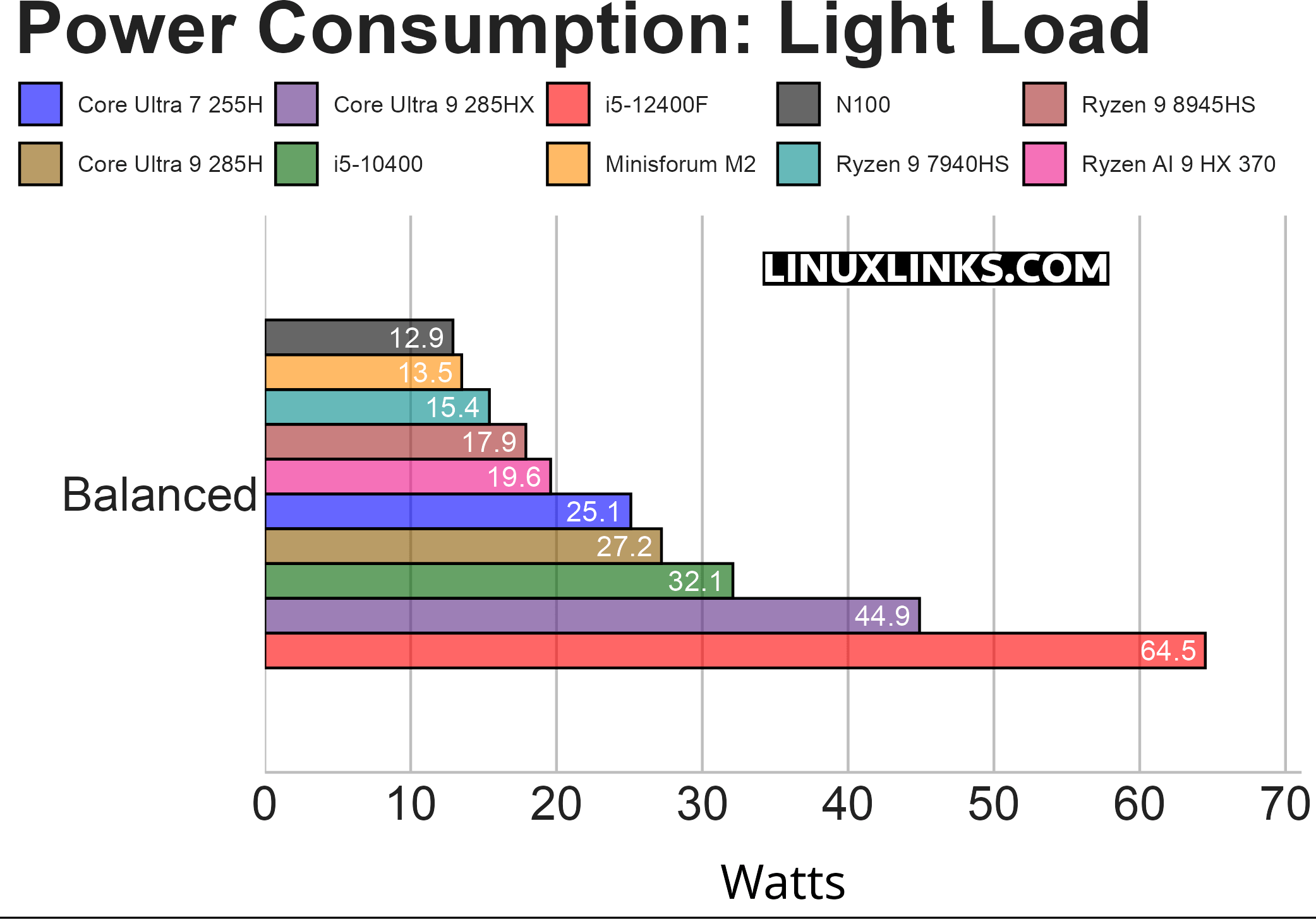
This is where the Minisforum M2 looks especially strong. Under light load it draws only 13.5W, just 0.6W more than the N100 system. That’s an excellent result considering that the M2 is a vastly more capable machine.
It’s also lower than the Ryzen 9 7940HS, Ryzen 9 8945HS, Ryzen AI 9 HX 370, Core Ultra 7 255H, and Core Ultra 9 285H systems. This matters because light-load use is often the most representative of everyday desktop work: web browsing, office tasks, package management, light development, background services, and general multitasking.
The M2 looks very well tuned for this type of workload. It doesn’t just idle efficiently; it also keeps power consumption low when doing modest work.
Notes about the chart:
- The tasks do not include GPU-intensive activities such as gaming, running locally hosted AI apps, video recording, or live streaming.
- While the tests use software that accesses the GPU, such as Wayland, GPU power consumption is minimal, with the exception of the i5-12400F, as that machine’s dedicated graphics card draws significantly more at idle.
- Two screens are used on each machine.
- The i5-12400F machine hosts a dedicated graphics card, whereas the other machines all use onboard graphics. The 285HX machine has a network card that draws around 10W when idle.
- The Balanced CPU governor is used.
- The machines are running Ubuntu.
Next page: Page 3 – Power Consumption With CPU Stressed
Pages in this article:
Page 1 – Power Consumption With System Idle
Page 2 – Power Consumption With Light Usage
Page 3 – Power Consumption With CPU Stressed
Page 4 – Electricity Costs
Complete list of articles in this series:
| MINISFORUM M2 Core Ultra 7 356H Mini PC | |
|---|---|
| Introduction | Introduction to the series and interrogation of the machine |
| NPU | Setting up and testing the NPU |
| Benchmarks | I run a series of benchmarks focusing on the CPU, GPU, Memory, and Disk performance |
| Power | Testing and comparing the power consumption |
| BIOS | In the world of computing, BIOS, which stands for Basic Input/Output System, plays a crucial role |
| Cores | A look at Intel’s hybrid architecture |
| Intel processors | P-Cores, E-Cores and LP E-Cores Compared Across 4 Intel Processors |
| NPU | NPU and Llama |
| Scheduling | Does Linux Schedule Panther Lake Correctly? |
| Next articles in the series will continue to focus on the machine's NPU | |
Please read our Comment Policy before commenting.
Can you publish articles in this series quicker? I need information NOW.