
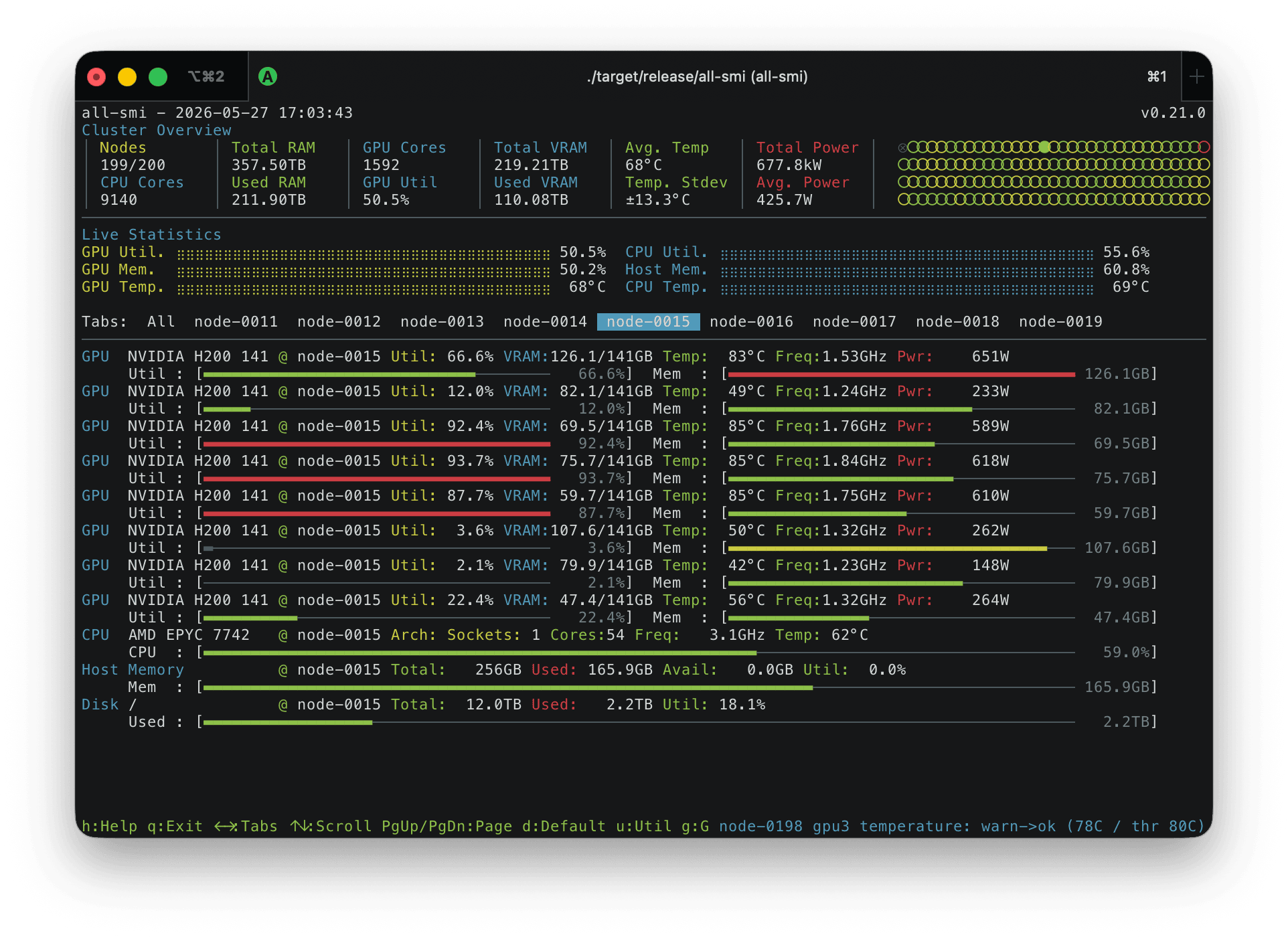
all-smi is a terminal-based monitoring utility for GPUs, NPUs, CPUs and system resources. It provides an interactive interface for inspecting hardware utilisation, memory consumption, temperatures, power consumption and running processes.
The application can monitor a single workstation or collect information from multiple machines across a compute cluster. Remote nodes can be accessed through HTTP exporters or SSH, allowing administrators to examine mixed accelerator hardware without switching between vendor-specific monitoring utilities.
This is free and open source software.
Key Features
- Monitors NVIDIA, AMD and Intel GPUs, including Radeon, Instinct, Arc, Iris Xe and NVIDIA Jetson hardware.
- Supports accelerator monitoring for Intel Gaudi, Google Cloud TPU, AWS Trainium and Inferentia, Tenstorrent, Rebellions and Furiosa hardware.
- Reports GPU and NPU utilisation, memory usage, temperature, clock frequencies and power consumption where supported by the hardware and drivers.
- Displays Apple Silicon GPU, CPU, memory, Neural Engine power and thermal metrics.
- Provides NVIDIA RTX Spark N1X monitoring, including DLA utilisation, clock information and other available accelerator metrics.
- Displays CPU utilisation, system memory, swap usage and available chassis power and thermal information.
- Lists running processes with process IDs, usernames, commands, CPU utilisation and GPU memory consumption.
- Provides interactive sorting, filtering and process-tree views for examining workloads.
- Offers multi-node cluster monitoring with aggregated resource information, user views and hardware topology.
- Supports remote monitoring through HTTP exporters and SSH connections.
- Exports Prometheus metrics and provides JSON, CSV and other machine-readable snapshots for monitoring systems and scripts.
- Records monitoring data and replays captured sessions in the terminal interface.
- Supports configurable monitoring intervals, colour schemes, alert thresholds and webhook notifications.
- Provides energy accounting for tracking accelerator power consumption and associated electricity costs.
- Includes a diagnostic command for checking hardware access, monitoring dependencies and unavailable metrics.
- Supports running its monitoring API as a supervised system service.
- Provides a library API for integrating accelerator monitoring into other applications.
- Cross-platform support – runs on Linux, macOS, and Windows.
Website: github.com/lablup/all-smi
Support:
Developer: Jeongkyu Shin
License: Apache License 2.0
all-smi is written in Rust. Learn Rust with our recommended free books and free tutorials.
Related Software
| NVIDIA GPU Monitoring Tools | |
|---|---|
| NVTOP | (h)top like task monitor for AMD, Intel and NVIDIA GPUs |
| nvitop | Bills itself as “the one-stop solution for GPU process management” |
| LACT | Configures and monitors AMD, NVIDIA and Intel GPUs |
| GPU Hot | Real-time NVIDIA GPU monitoring dashboard |
| gpustat | Query and monitor GPU status |
| NVDashboard | JupyterLab extension for displaying dashboards of GPU usage |
| nv-monitor | Lightweight terminal-based monitoring application |
| nvidia-htop | Enriches the output of nvidia-smi |
| GPU-T | Display graphics card specifications, sensors and API support |
| gptop | Cross-platform GPU monitor |
| all-smi | Monitor GPUs, NPUs and system resources |
| NVIDIA System Monitor | Task manager monitoring your GPU |
| siltide | Monitor AI accelerator activity, processes and device health |
| NviWatch | Monitor NVIDIA GPUs and manage running processes |
Read our verdict in the software roundup.
 LinuxLinks helps you discover the best free and open source software for Linux. Explore our extensive collection of recommended applications, including alternatives to popular proprietary software. We also publish software reviews, Linux tutorials, hardware reviews, free programming books and articles covering the wider open source community. Browse our Linux resources to discover more. Know a useful free and open source Linux application we haven't covered? Suggest a program for inclusion. Has your software been featured on LinuxLinks? Display one of our Featured on LinuxLinks badges on your website or GitHub README. |
Please read our Comment Policy before commenting.