

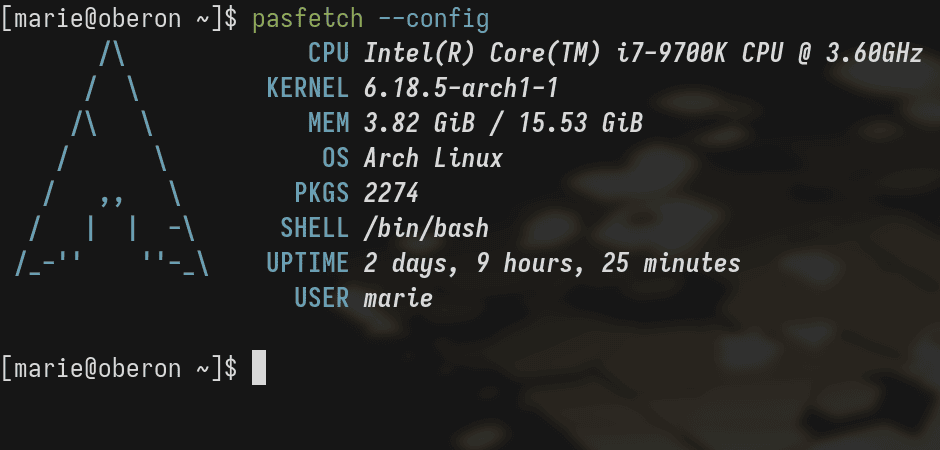
pasfetch is a lightweight command-line utility that presents information about a Linux system in a compact terminal display. It follows the familiar system fetch approach of combining technical information with a visually distinctive presentation.
The application is designed for users who want a straightforward overview of their system without the complexity of a comprehensive hardware inspection utility. It gathers information about the operating system, processor and runtime environment and presents the results in a format suitable for everyday terminal use.
Customisation is an important part of pasfetch. Users can determine which information is displayed, adjust the appearance of individual text elements and incorporate values obtained from environment variables. Preferences can be specified through command-line options or maintained in a configuration file.
This is free and open source software.
Key Features
- Display the operating system name and Linux kernel information.
- Identify the system hostname and processor model.
- Report current memory usage in gibibytes.
- Show system uptime.
- Display the number of installed software packages on supported Linux distributions.
- Include arbitrary environment variable values alongside built-in information fields.
- Select and arrange the information fields displayed in the terminal.
- Choose the foreground colour used for highlighted output.
- Disable coloured output when a plain-text presentation is preferred.
- Apply text formatting such as bold, dim, italic, underline and reverse video.
- Configure the appearance of information labels, values and logo artwork separately.
- Combine multiple supported formatting attributes for individual display elements.
- Store persistent preferences in an INI configuration file.
- Override saved preferences using command-line arguments.
Website: github.com/MarieEckert/pasfetch
Support:
Developer: Marie Eckert and contributors
License: ISC License
pasfetch is written in Pascal. Learn Pascal with our recommended free books and free tutorials.
Related Software
| Terminal-Based System Profilers | |
|---|---|
| inxi | Perl-based CLI system information tool |
| HyFetch | neofetch with LGBTQ+ pride flags |
| CPU-X | Similar tool to CPU-Z but differs in a few important ways |
| Fastfetch | Written in C, Fastfetch is a speedy fetcher |
| dmidecode | Reports information according to the SMBDIOS/DMI standard |
| Neofetch | Extremely customizable and runs on any operating that supports Bash |
| macchina | System information fetcher |
| brokefetch | neofetch clone |
| hwinfo | Provides a hardware probing library and a command line tool |
| screenFetch | Bash information tool |
| lshw | Console and graphical tool extracting detailed information |
| i7z | Reporting tool for i7, i5, i3 CPUs |
| Freshfetch | Fresh take on Neofetch |
| Katifetch | Focuses on identity and customization |
| rxfetch | Minimal but geeky fetch utility |
| albafetch | Written in C |
| UniFetch | Forked from Neofetch |
| NerdFetch | Fetch script using Nerdfonts |
| ArTTY | Art for your TTY |
| rtfetch | Neofetch but in Rust |
| F-Fetch | Fast and minimal system fetcher |
| Archey 4 | Simple system information tool |
| zeptofetch | No scripts, no bloat, just pure C |
| switchfetch | Written in Rust |
| pfetch | Pretty system information tool written in POSIX sh |
| dmitui | TUI version of dmidecode |
| zigfetch | Written in Zig |
| ufetch | Consists of platform-specific shell scripts that print concise system details |
| noorfetch | Minimalist system fetch |
| LeenFetch | Includes JSON output and remote fetching over SSH |
| Xfetch | Inspired by fastfetch and neofetch, written in Rust |
| blaeckfetch | Powered by blaeck for rendering |
| zfetch-rs | Focuses on providing a fast, minimal implementation |
| Yoctofetch | Billed as the fast(est) system fetch tool for Linux with a low footprint |
| Stormfetch | Written in Go |
| PeekFetch | Built with Go and Bubble Tea |
| NiTch Revived | System fetch written fully in Nim without any dependencies |
| Metetch | Minimal aesthetic inspired by KDE Plasma and Wayland |
| gnfetch | Written in Rust |
| bestfetch | Billed as a customizable, beautiful, and blazing fast system fetch |
Read our verdict in the software roundup.
 LinuxLinks helps you discover the best free and open source software for Linux. Explore our extensive collection of recommended applications, including alternatives to popular proprietary software. We also publish software reviews, Linux tutorials, hardware reviews, free programming books and articles covering the wider open source community. Browse our Linux resources to discover more. Know a useful free and open source Linux application we haven't covered? Suggest a program for inclusion. Has your software been featured on LinuxLinks? Display one of our Featured on LinuxLinks badges on your website or GitHub README. |
Please read our Comment Policy before commenting.