
A system profiler is a utility that presents information about the hardware attached to a computer. Having access to hard information about your hardware can be indispensable when you need to establish exactly what hardware is installed in your machine. For example, the information will help a technical support individual diagnose problems, or help to evaluate whether a system will support certain software or hardware.
This type of software lets individuals establish hardware details without opening the computer case. This may not be an option if you do not have direct access to the hardware, relying on the internet to connect to the machine. System profilers let you remotely interrogate a system.
In Windows circles, CPU-Z is a popular freeware tool that gathers information on the main devices of a system without having to conduct technical and manual searching. CPU-Z lays out the raw technical data out to read in easy-to-read tables and is well presented. For Linux, there are a number of good utilities that offer the same type of information, providing essential and extended hardware about the entire system.
This roundup is restricted to terminal-based apps. Here’s our verdict captured in a legendary LinuxLinks-style ratings chart. Only free and open source software is eligible for inclusion.
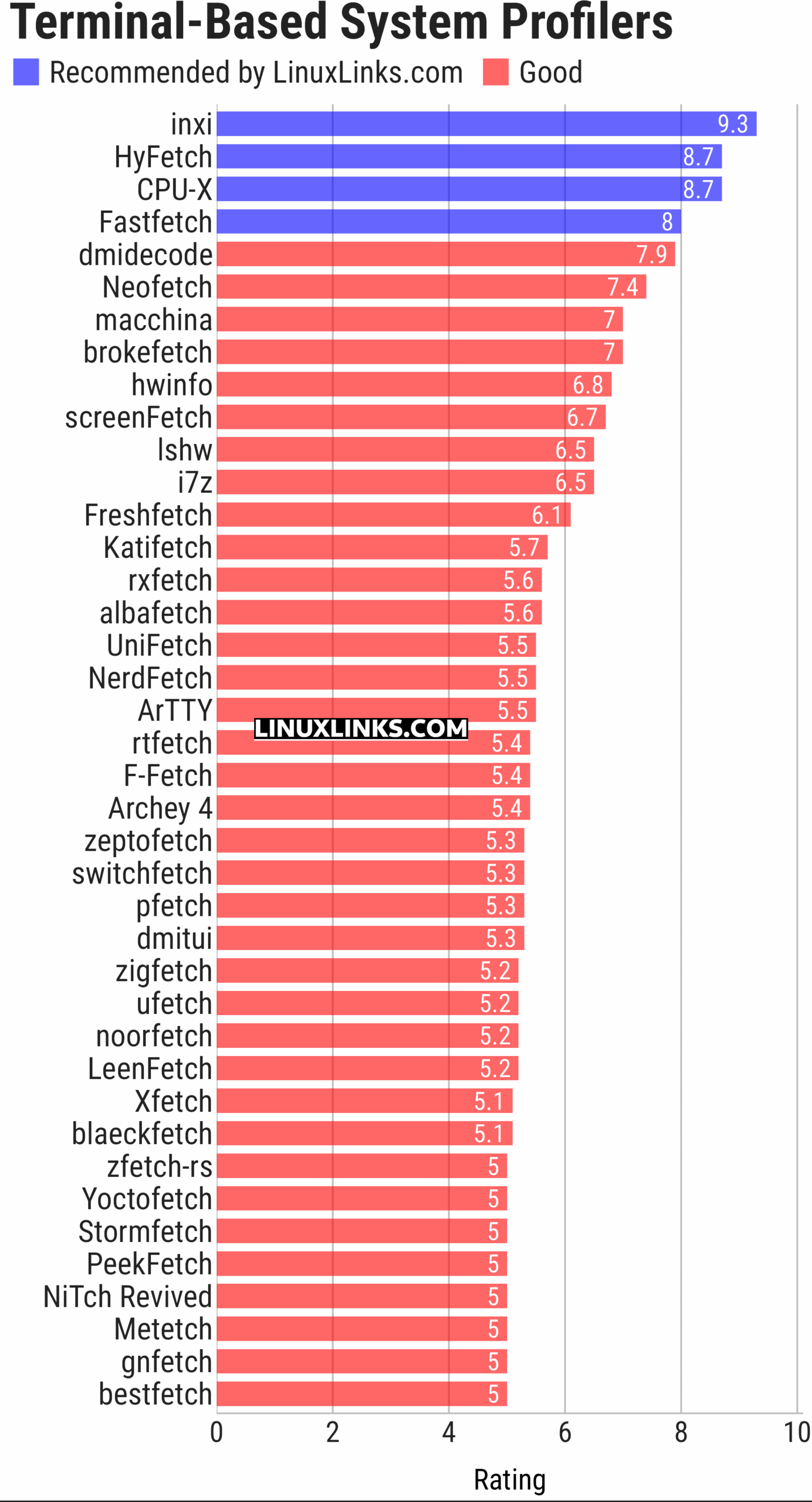
Click the links in the table below to learn all about each profiler.
| Terminal-Based System Profilers | |
|---|---|
| inxi | Perl-based CLI system information tool |
| HyFetch | neofetch with LGBTQ+ pride flags |
| CPU-X | Similar tool to CPU-Z but differs in a few important ways |
| Fastfetch | Written in C, Fastfetch is a speedy fetcher |
| dmidecode | Reports information according to the SMBDIOS/DMI standard |
| Neofetch | Extremely customizable and runs on any operating that supports Bash |
| macchina | System information fetcher |
| brokefetch | neofetch clone |
| hwinfo | Provides a hardware probing library and a command line tool |
| screenFetch | Bash information tool |
| lshw | Console and graphical tool extracting detailed information |
| i7z | Reporting tool for i7, i5, i3 CPUs |
| Freshfetch | Fresh take on Neofetch |
| Katifetch | Focuses on identity and customization |
| rxfetch | Minimal but geeky fetch utility |
| albafetch | Written in C |
| UniFetch | Forked from Neofetch |
| NerdFetch | Fetch script using Nerdfonts |
| ArTTY | Art for your TTY |
| rtfetch | Neofetch but in Rust |
| F-Fetch | Fast and minimal system fetcher |
| Archey 4 | Simple system information tool |
| zeptofetch | No scripts, no bloat, just pure C |
| switchfetch | Written in Rust |
| pfetch | Pretty system information tool written in POSIX sh |
| dmitui | TUI version of dmidecode |
| zigfetch | Written in Zig |
| ufetch | Consists of platform-specific shell scripts that print concise system details |
| noorfetch | Minimalist system fetch |
| LeenFetch | Includes JSON output and remote fetching over SSH |
| Xfetch | Inspired by fastfetch and neofetch, written in Rust |
| blaeckfetch | Powered by blaeck for rendering |
| zfetch-rs | Focuses on providing a fast, minimal implementation |
| Yoctofetch | Billed as the fast(est) system fetch tool for Linux with a low footprint |
| Stormfetch | Written in Go |
| PeekFetch | Built with Go and Bubble Tea |
| NiTch Revived | System fetch written fully in Nim without any dependencies |
| Metetch | Minimal aesthetic inspired by KDE Plasma and Wayland |
| gnfetch | Written in Rust |
| bestfetch | Billed as a customizable, beautiful, and blazing fast system fetch |
GUI system profilers are covered in this separate roundup.
This article has been updated to reflect the changes outlined in our recent announcement.
 Explore our carefully curated directory of recommended free and open source software, covering every major software category. Explore our carefully curated directory of recommended free and open source software, covering every major software category.The directory forms part of our extensive collection of articles for Linux enthusiasts. It includes hundreds of detailed reviews, together with free and open source alternatives to proprietary software from companies such as Google, Microsoft, Apple, Adobe, IBM, Cisco, Oracle, and Autodesk. LinuxLinks also covers interesting projects worth exploring, Linux-compatible hardware, free programming books and tutorials, and much more. Know a useful free and open source Linux application that we haven’t covered? Tell us about it using our submission form. |
Please read our Comment Policy before commenting.