

LinuxLinks gives me space to share my opinions about Linux, open source and whatever else catches my attention. The views and prejudices are my own.
I looked at fooyin partly because LinuxLinks has lavished so much praise on it. Luke Baker called fooyin the best open source music player, and he’s reviewed enough of them to make me curious. One feature in particular caught my eye. You can assign a keyboard shortcut to delete whichever music file is playing. I’ve often reached for the keyboard halfway through a song. Usually I just want to hear the next one.
I don’t think a music player should offer to delete the underlying audio file at all. Take a track off a playlist, certainly. I might want exactly that recording on half a dozen other playlists. If I’ve decided the file itself should go, I’m happy to open Dolphin and delete it there.
Should Delete be there at all?
Right-click a track in fooyin and choose File Operations > Delete. You’re asking it to delete the audio file. Any playlist that refers to that copy will lose track of it.
By default, fooyin 0.15.1 asks for confirmation before deleting tracks or removing source archives after extraction. The options to bypass the Trash and remove empty parent folders are both unticked. I’d leave all four boxes exactly as they are.
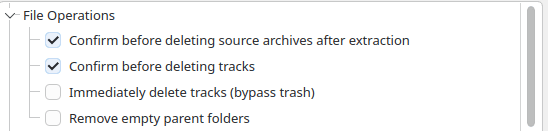
I can also make Delete disappear from the right-click menu altogether. Under Settings > Interface > Context Menu > Track, I can expand File Operations and untick Delete. Rename and Move are still there if I want them. Keyboard shortcuts are configured separately, and I can leave deletion unassigned. That takes care of my own setup. I’d still have left file deletion out of the player in the first place.
The best argument for including it is a bad rip. Suppose I’ve got two rips of the same CD and one skips halfway through track seven. The moment I hear the skip, I know which copy is faulty. Send me into a file manager to hunt through two directories full of identically named tracks and you’ve given me a fresh opportunity to delete the good one. If I spent my afternoons weeding out bad rips, I can see why I’d want Delete close to hand.
What bothers me is how easily listening and sorting get mixed up. Suppose I’ve highlighted a duplicate on disc two while disc one is still playing. If I’ve assigned Delete a shortcut with Playing track as its target, it’s the recording coming through the speakers that I’ve just asked fooyin to remove. The confirmation dialogue is sensible. I’d still rather the most damage I could do while sorting out a playlist was make a mess of the playlist.
Once the files start moving
That got me thinking about the other jobs I’d trust a music player with. Renaming is an easy one. Give me a badly named two-disc set and I’d much sooner let fooyin use the disc numbers, track numbers and titles in the tags than type out thirty filenames in Dolphin. I’d still want to review the old and new paths together. A playlist I’ve saved elsewhere may depend on every one of the old names.
That checkbox for removing empty parent folders deserves a moment’s thought too. If fooyin moves the last track out of an album folder, I can see the appeal of tidying up afterwards. But what if it was also the last album in the artist’s folder? The 0.13.0 release notes record a fix to stop empty-folder removal at the library root. Somebody writing a music player had to decide how far up my directory tree the housekeeping should go. I’m glad that box is unticked.
The jobs I’d happily give it
A tag editor earns its place. If a misspelt surname makes one musician appear twice in the library, the player is where I’ll spot it. I’d happily correct the spelling there and then. MusicBrainz lookup can save a lot of typing too, although I’d look twice at the proposed track list before applying it to a whole disc. A reissue with three bonus tracks can look remarkably like the edition sitting on my shelf.
I’m choosier about what else gets written to those files. I like seeing the cover while an album plays. Embedding the same picture in every track is a decision I’d want to make separately. Likewise, I’m happy for fooyin to remember how often I’ve played a record, but I’d keep that count in its database. I see little benefit in modifying one of my FLAC files because I’ve listened to it again.
Conversion is an extra I’d use. When I want a smaller copy of an album for my phone, fooyin already has the tracks, tags and artwork to hand. As Luke explains in his look at the audio converter, I can choose where the copies go and what happens if a file of that name already exists. I’d use the CD ripper and its AccurateRip verification too. If a disc needs another pass, I’d like to find out while it’s still in the drive.
I’d leave deletion to the file manager
There’s something to be said for the old Unix idea of doing one thing well. I like a music player that knows enough about my albums to put a two-disc set in order or spot a misspelt name. Even with that bad rip, fooyin has done the part I need a music player for. It’s let me hear the fault. If I decide the file should go, I’m happy to open Dolphin and give it a deliberate once-over before I delete it. That’s one extra step I’m quite happy to take.
I may skip the drum solo every time I play that live album. I’d still be annoyed to find it missing.
Please read our Comment Policy before commenting.