
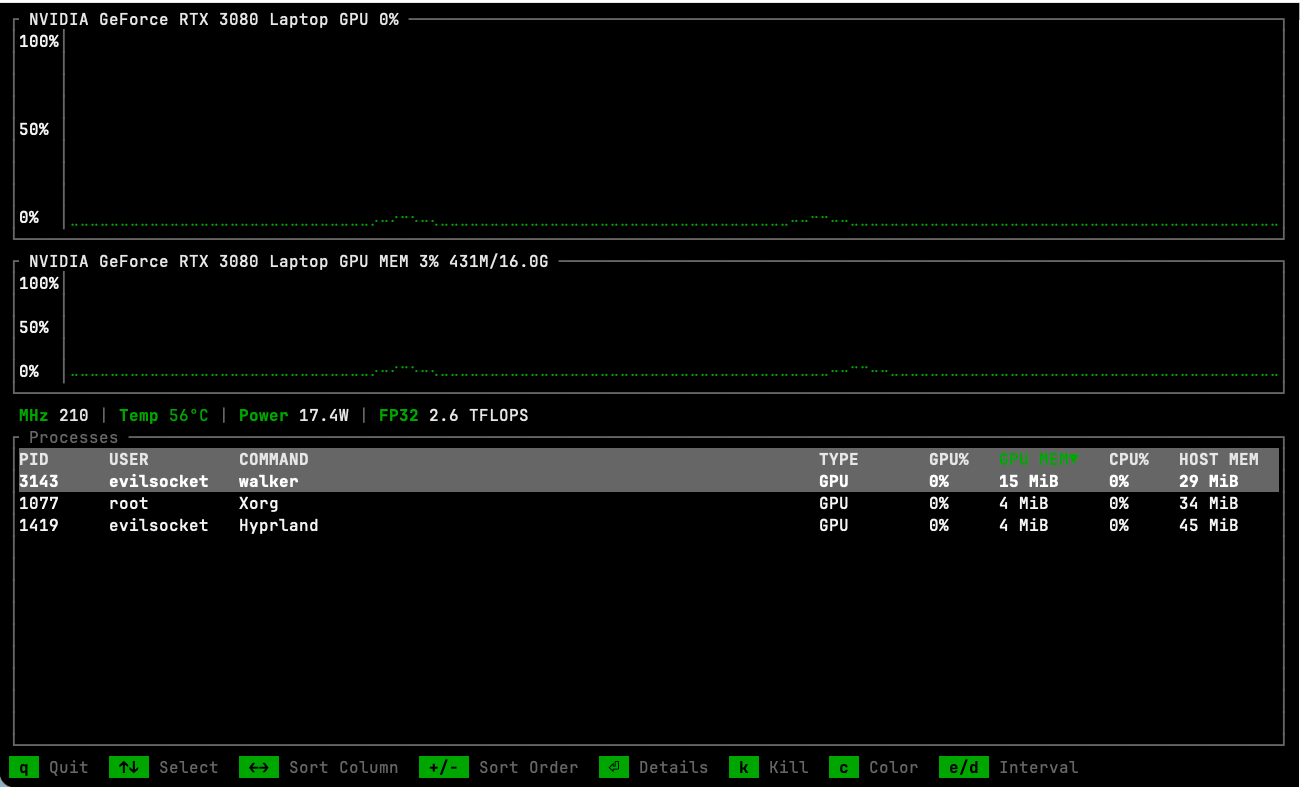
gptop is a terminal-based GPU monitoring application for Linux and macOS. It provides an interactive interface for examining graphics processor activity, memory consumption and the processes responsible for GPU workloads.
The application uses NVIDIA’s Management Library (NVML) on Linux and native system interfaces on Apple Silicon Macs. It combines continuously updated charts with detailed hardware statistics, providing a convenient way to investigate performance issues without relying on graphical desktop utilities.
gptop is particularly useful for developers, system administrators and users running GPU-intensive workloads. Its process inspection facilities help identify applications consuming graphics resources, while its monitoring charts make it easier to spot sustained utilisation and changes in memory consumption.
The application also offers machine-readable output for scripts and monitoring pipelines, alongside a configurable terminal interface that retains user preferences between sessions.
This is free and open source software.
Key Features
- Displays real-time GPU utilisation and memory usage through terminal-based charts.
- Monitors clock frequencies, temperatures, power consumption and estimated FP32 performance.
- Provides per-process GPU utilisation, allocated GPU memory and CPU usage information.
- Lists GPU processes with their process IDs, owners, commands and device assignments.
- Distinguishes between graphics and compute workloads.
- Includes a detailed process inspector showing executable paths, working directories, memory consumption and process state.
- Displays historical GPU activity for individual processes.
- Allows processes to be terminated directly from the interface, with confirmation.
- Supports monitoring multiple GPUs with side-by-side charts.
- Provides configurable process sorting and keyboard-driven navigation.
- Offers an advanced view showing hostname, uptime, system memory and swap usage.
- Displays additional hardware information including encoder and decoder activity, fan speed and power limits where supported.
- Provides performance-per-watt measurements and thermal throttling indicators.
- Supports JSON output for integration with scripts and external monitoring systems.
- Allows the monitoring interval and interface colours to be adjusted, with preferences saved between sessions.
- Cross-platform support – runs on Linux and macOS.
Website: github.com/evilsocket/gptop
Support:
Developer: Simone Margaritelli
License: GNU General Public License v3.0
gptop is written in Rust. Learn Rust with our recommended free books and free tutorials.
Related Software
| NVIDIA GPU Monitoring Tools | |
|---|---|
| NVTOP | (h)top like task monitor for AMD, Intel and NVIDIA GPUs |
| nvitop | Bills itself as “the one-stop solution for GPU process management” |
| LACT | Configures and monitors AMD, NVIDIA and Intel GPUs |
| GPU Hot | Real-time NVIDIA GPU monitoring dashboard |
| gpustat | Query and monitor GPU status |
| GreenWithEnvy | GUI System tool |
| NVDashboard | JupyterLab extension for displaying dashboards of GPU usage |
| nv-monitor | Lightweight terminal-based monitoring application |
| nvidia-htop | Enriches the output of nvidia-smi |
| gptop | Cross-platform GPU monitor |
| NVIDIA System Monitor | Task manager monitoring your GPU |
Read our verdict in the software roundup.
 Explore our carefully curated directory of recommended free and open source software, covering every major software category. Explore our carefully curated directory of recommended free and open source software, covering every major software category.The directory forms part of our extensive collection of articles for Linux enthusiasts. It includes hundreds of detailed reviews, together with free and open source alternatives to proprietary software from companies such as Google, Microsoft, Apple, Adobe, IBM, Cisco, Oracle, and Autodesk. LinuxLinks also covers interesting projects worth exploring, Linux-compatible hardware, free programming books and tutorials, and much more. Know a useful free and open source Linux application that we haven’t covered? Tell us about it using our submission form. |
Please read our Comment Policy before commenting.