

Security is paramount. Security involves defence in depth. Approaching security one step at a time, with consistency and rigour, you can mitigate threats, and keep intruders at bay.
Intruders use a variety of different techniques in an attempt to compromise a system. For example, systems can be attacked by denial of service, cracking, intrusion, snooping (intercepting the data of another user), or viruses/worms/Trojan horses. To have a secure box, a system therefore needs a variety of defences.
Anti-malware is a computer program used to prevent, detect, and remove malware. The most common types of malware include viruses, worms, trojans, ransomware, bots or botnets, adware, spyware, rootkits, fileless malware, and malvertising.
This article focuses on the best anti-malware tools for Linux. We only include free and open source software.
Here’s our verdict captured in a legendary LinuxLinks chart.
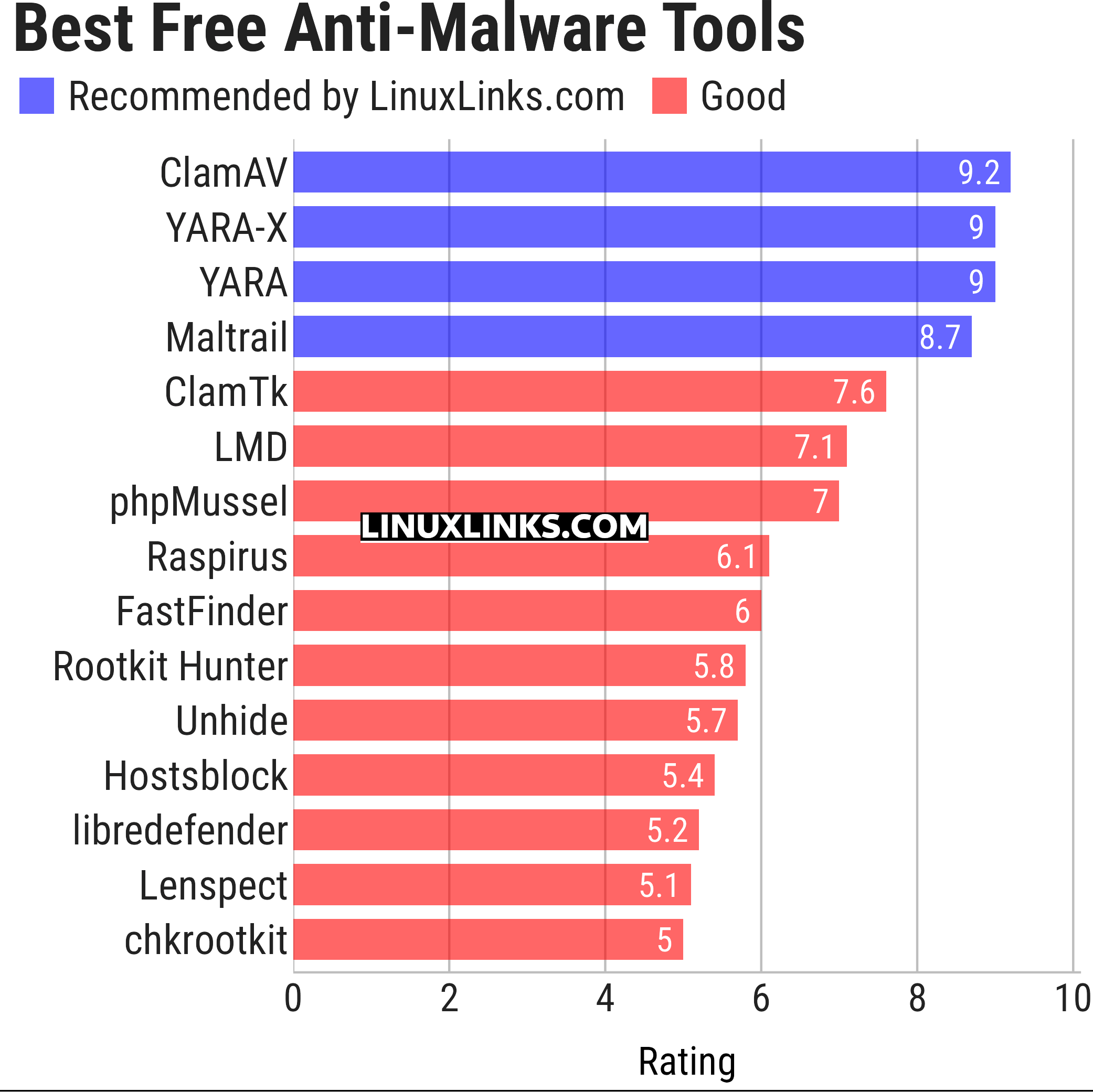
Let’s explore the 15 anti-malware tools. For each application we have compiled its own portal page, a full description with an in-depth analysis of its features, together with links to relevant resources.
| Anti-Malware Tools | |
|---|---|
| ClamAV | Antivirus engine for detecting trojans, viruses, malware and other threats |
| YARA-X | Re-incarnation of YARA |
| YARA | Pattern matching swiss knife for malware researchers |
| Maltrail | Malicious traffic detection system |
| ClamTk | Graphical frontend for ClamAV |
| LMD | Malware scanner focusing on threats faced in shared hosted environments |
| phpMussel | PHP-based anti-virus anti-trojan anti-malware solution |
| Raspirus | Lightweight signature-based malware scanner |
| FastFinder | Fast suspicious file finder |
| Rootkit Hunter | Scans for rootkits, backdoors and possible local exploits |
| Unhide | Forensic tool to find hidden processes and TCP/UDP ports |
| Hostsblock | Malware-blocking cronscript |
| libredefender | Antivirus program using libclamav |
| Lenspect | Lightweight security threat scanner |
| chkrootkit | Locally checks for signs of a rootkit |
This article has been updated to reflect the changes outlined in our recent announcement.
 Explore our comprehensive directory of recommended free and open source software. Our carefully curated collection spans every major software category. Explore our comprehensive directory of recommended free and open source software. Our carefully curated collection spans every major software category.This directory is part of our ongoing series of informative articles for Linux enthusiasts. It features hundreds of detailed reviews, along with open source alternatives to proprietary solutions from major corporations such as Google, Microsoft, Apple, Adobe, IBM, Cisco, Oracle, and Autodesk. You’ll also find interesting projects to try, hardware coverage, free programming books and tutorials, and much more. Know a useful open source Linux program that we haven’t covered yet? Let us know by completing this form. |
Please read our Comment Policy before commenting.
I like “Linux Malware Detect (LMD)”
works also with clamav or modsecurity+uploads
It’s already listed under LMD.
Good to know!
I am so sick of Linux. I am sick of spending a whole week figuring out how to do something I can do on WIndows with a single click – and then still not being able to do it. I am sick of smug Linux users talking in jargon. I am sick of hearing how bloody good it is, and how safe it is, when, let’s face it, a system that you can’t understand is neither good nor safe. Most of all I am sick of this expectation that we not being so devoted to Linux that I can spend my whole life keeping up to date with its ins and outs makes me retarded. So sick of Linux.
That’s a fair expression of frustration, but it’s also a pretty weak argument against Linux as a whole.
The strongest point is that Linux can be hostile to ordinary users. Too many tasks still involve terminal commands, obscure config files, conflicting advice, and forum replies written as if everyone has spent ten years administering servers. That’s a real usability problem, and Linux communities sometimes make it worse by treating confusion as personal failure rather than a design failure.
But the statement also overreaches. “I don’t understand it” doesn’t automatically mean “it isn’t good or safe.” Most people don’t understand how Windows handles drivers, permissions, updates, telemetry, registry changes, or security patches either. Familiarity isn’t the same thing as transparency. Windows often feels easier because vendors, hardware makers, and software companies design around it first. That’s convenience, not necessarily superiority.
The complaint also treats “Linux” as one thing, when it’s really a messy ecosystem. Some distributions are aimed at hobbyists and power users; others are made to be boring, friendly, and low-maintenance. Judging all of Linux by the worst forum answer or the most fiddly distro is like judging all of Windows by one broken printer driver or one forced update that ruins your day.
One thing that should be dropped entirely is the ableist insult. Being frustrated with software is fine. Feeling patronised is understandable. But using “retarded” weakens the point and redirects attention from the actual criticism.
So the fair version is: Linux can be powerful, safe, and worthwhile, but too often it asks users to become mechanics just to drive the car. The problem isn’t that frustrated users are stupid. The problem is that parts of the Linux world still confuse freedom and flexibility with needless complexity.