

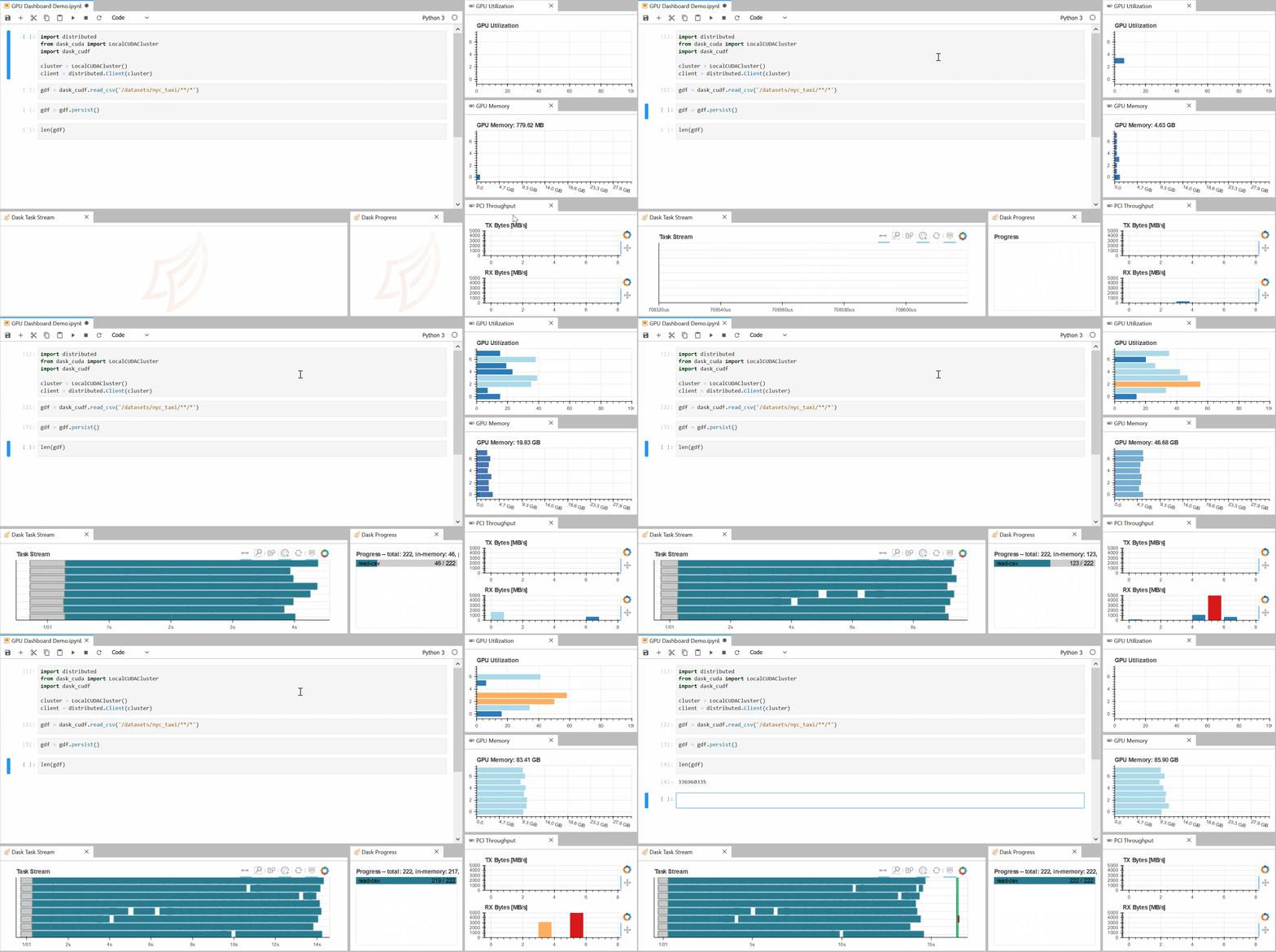
JupyterLab NVDashboard is an extension that brings GPU monitoring into the JupyterLab development environment. It allows users to observe hardware activity alongside notebooks, code and data analysis workflows without switching to a separate monitoring application.
The extension is particularly useful when developing GPU-accelerated applications. Researchers and developers can inspect resource consumption while executing notebooks, helping them understand the impact of different workloads on available hardware.
NVDashboard presents hardware metrics as interactive charts rather than relying exclusively on numerical snapshots. This makes it easier to recognise changes in utilisation, identify memory pressure and compare GPU activity with different stages of an analysis.
Recent versions also integrate controls for activating supported NVIDIA RAPIDS acceleration libraries, extending the extension beyond monitoring alone.
This is free and open source software.
Key Features
- Displays GPU compute utilisation within JupyterLab.
- Monitors GPU memory consumption during notebook execution.
- Provides charts for PCIe data-transfer throughput.
- Displays NVLink throughput on supported hardware.
- Offers interactive time-series charts for examining historical activity.
- Supports selecting time ranges through chart brushing.
- Provides synchronised tooltips across multiple charts.
- Adapts its dashboards to JupyterLab’s light and dark themes.
- Integrates monitoring directly into the notebook development environment.
- Offers controls for enabling cuDF pandas acceleration when the required dependencies are present.
- Supports activating cuML acceleration for compatible machine learning workloads.
- Allows available acceleration options to be enabled or disabled from the notebook toolbar.
- Provides prompts for restarting the notebook kernel when acceleration settings change.
Website: github.com/rapidsai/jupyterlab-nvdashboard
Support:
Developer: RAPIDS
License: BSD 3-Clause ‘New’ or ‘Revised’ License
NVDashboard is written in Python and TypeScript. Learn Python with our recommended free books and free tutorials. Learn TypeScript with our recommended free books and free tutorials.
Related Software
| NVIDIA GPU Monitoring Tools | |
|---|---|
| NVTOP | (h)top like task monitor for AMD, Intel and NVIDIA GPUs |
| nvitop | Bills itself as “the one-stop solution for GPU process management” |
| LACT | Configures and monitors AMD, NVIDIA and Intel GPUs |
| GPU Hot | Real-time NVIDIA GPU monitoring dashboard |
| gpustat | Query and monitor GPU status |
| GreenWithEnvy | GUI System tool |
| NVDashboard | JupyterLab extension for displaying dashboards of GPU usage |
| nv-monitor | Lightweight terminal-based monitoring application |
| nvidia-htop | Enriches the output of nvidia-smi |
| gptop | Cross-platform GPU monitor |
| NVIDIA System Monitor | Task manager monitoring your GPU |
Read our verdict in the software roundup.
 LinuxLinks helps you discover the best free and open source software for Linux. Explore our extensive collection of recommended applications, including alternatives to popular proprietary software. LinuxLinks helps you discover the best free and open source software for Linux. Explore our extensive collection of recommended applications, including alternatives to popular proprietary software.We also publish software reviews, Linux tutorials, hardware reviews, free programming books and articles covering the wider open source community. Browse our Linux resources to discover more. Know a useful free and open source Linux application we haven't covered? Suggest a program for inclusion. Has your software been featured on LinuxLinks? Display one of our Featured on LinuxLinks badges on your website or GitHub README. |
Please read our Comment Policy before commenting.