
SquirrelDisk is a cross-platform disk usage analyzer that helps you identify what’s consuming storage space and remove unwanted files. It’s written in Rust and offers both sunburst and treemap visualisations. Besides local disks and individual folders, SquirrelDisk can scan remote machines over SSH and cloud storage through rclone. The interface is unusually polished for this type of utility, while still exposing plenty of useful configuration options.
SquirrelDisk 2 is a complete rewrite of the original application.
This is free and open source software. Besides Linux, it’s also available for macOS and Windows, but my evaluation is restricted to Linux only.
AI Usage
The developer discloses the use of generative AI during development. AI has been used for translations, interface polish, parts of the website, issue and reply wording, and some small refactoring and build-related tasks. The developer states that the core of SquirrelDisk 2, including the scanner, chart and cleanup logic, was written from scratch by him, with releases reviewed and tested manually.
I therefore do not classify SquirrelDisk as AI-heavy, but readers should be aware that generative AI has been used in parts of its development.
Installation
The project provides an AppImage, a binary, and a tar.gz archive for Linux. I tested the AppImage, which worked without any installation or configuration being necessary.
I tested version 2.4.0.
In Operation
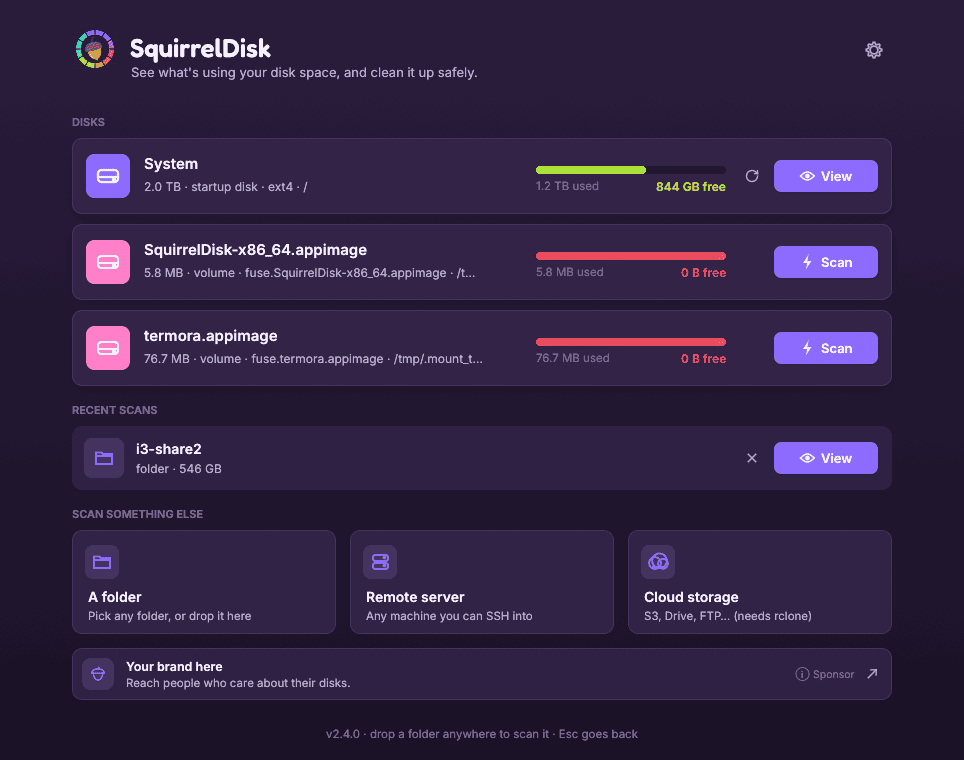
The opening screen is clean and straightforward. Local disks are displayed together with their capacity, used space and free space. From here you can also select an individual folder, connect to a remote server using SSH, or access cloud storage.
One irritation is that mounted AppImages are also displayed as local disks. In my case both SquirrelDisk and Termora appear in the list, even though neither is something I would ever want to analyse for disk usage. I’d prefer these temporary AppImage mounts to be filtered out automatically.
Scanning local storage is fast. Even with a large number of files, SquirrelDisk quickly starts building its visualisation rather than making you wait for the entire scan to complete.
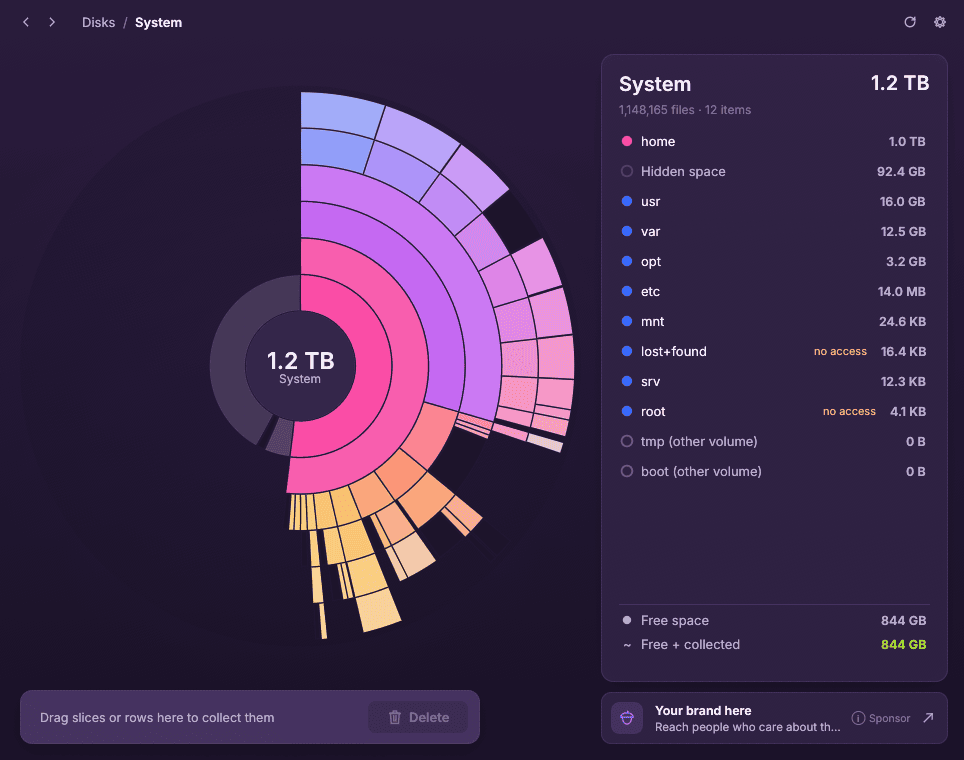
The default visualisation is a sunburst chart. Each ring represents another level of the directory hierarchy, with the size of each slice reflecting the disk space occupied.
Clicking a slice lets you drill down into that part of the filesystem, while the panel on the right provides a conventional list showing the largest items. This combination works well. The chart makes unusually large directories immediately obvious, while the list gives precise sizes without having to interpret the graphic.
There is also a treemap view if you prefer nested boxes to rings. Here it is with the Dracula theme.
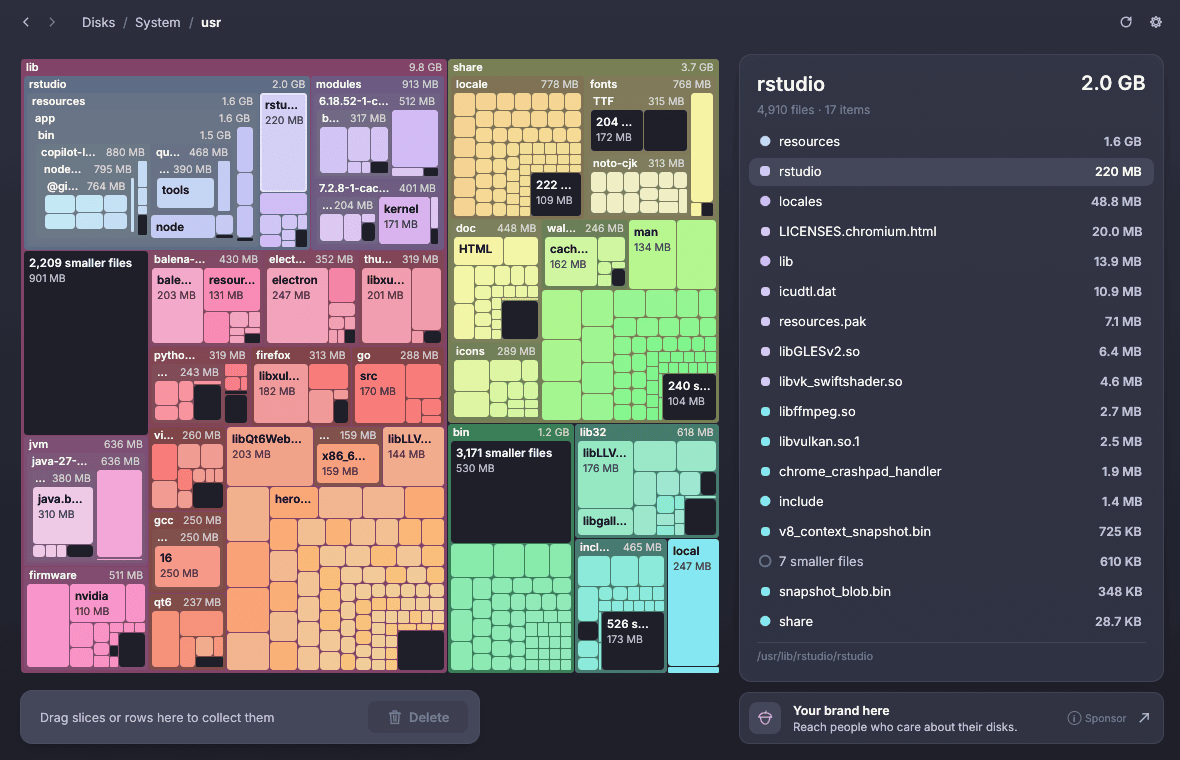
Files and directories can be collected for deletion by dragging slices or rows to the collector at the bottom of the window. SquirrelDisk includes safeguards intended to prevent important locations such as the home directory or an entire disk from being accidentally removed. But I prefer using a file manager for this type of activity.
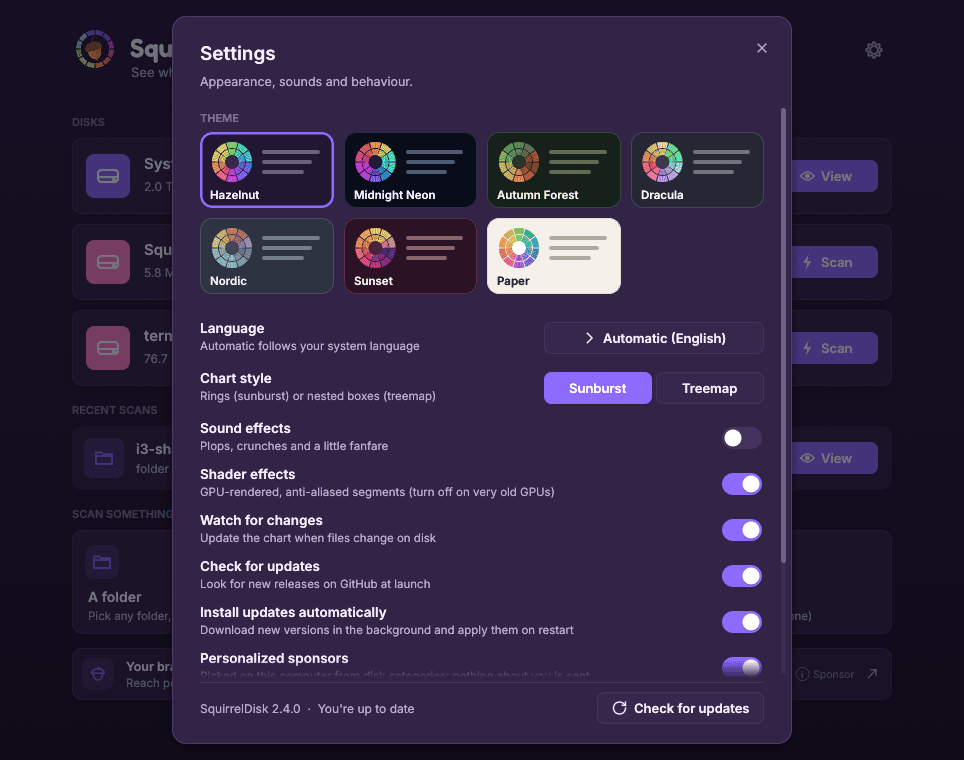
There is a healthy selection of preferences. Seven themes are included, ranging from dark colour schemes such as Hazelnut and Midnight Neon to the light Paper theme. You can also enable or disable sound and shader effects, automatically watch the filesystem for changes, and control application updates.
I particularly like the configurable chart depth (3 to 9 rings). Increasing the number of rings exposes more of the directory hierarchy at once, while reducing it produces a simpler chart and can improve performance on older hardware.
I’m less enthusiastic about the sponsorship elements. “Your brand here” banners appear prominently in the interface. More concerning is that anonymous sponsor statistics are enabled by default. They can be disabled in Settings, but I would much prefer this sort of reporting to be opt-in rather than opt-out.
Key Features
- Analyse local disks and individual folders.
- Sunburst and treemap visualisations.
- Scan remote machines over SSH.
- Access cloud storage using rclone.
- Filesystem monitoring.
- Configurable chart depth.
- 25 interface languages.
- Portable mode.
Summary
Overall, SquirrelDisk has an attractive, responsive interface and performs local scans quickly. The sunburst presentation is particularly effective for tracking down where large amounts of disk space have disappeared, while the alternative treemap and adjustable chart depth provide useful flexibility. The handling of mounted AppImages and the opt-out sponsor statistics could be improved, but neither detracts significantly from its core functionality.
ps_mem reports that memory usage is a frugal 73MB.
Website: github.com/adileo/squirreldisk
Support:
Developer: Adileo Barone
License: GNU Affero General Public License v3.0
SquirrelDisk is written in Rust. Learn Rust with our recommended free books and free tutorials.
Related Software
| Disk Usage Utilities | |
|---|---|
| QDirStat | Excellent Qt-based directory statistics |
| Filelight | Creates an interactive map to visualise disk usage |
| Baobab | Also known as Disk Usage Analyser |
| agedu | Utility for tracking down wasted disk space |
| SquirrelDisk | Bills itself as "the easiest app you will ever use to detect huge files" |
| K4DirStat | KDE Directory Statistics sums up disk usage for directory trees |
| Krusader | File manager with built-in disk usage functionality |
| SpaceMan | Treemap disk usage analyzer |
| xdiskusage | Light and frugal utility |
| MX Cleanup | GUI for system cleanup and maintenance |
| crossdirstat | File and directory statistics written using Electron |
Read our verdict in the software roundup.
 Explore our carefully curated directory of recommended free and open source software, covering every major software category. Explore our carefully curated directory of recommended free and open source software, covering every major software category.The directory forms part of our extensive collection of articles for Linux enthusiasts. It includes hundreds of detailed reviews, together with free and open source alternatives to proprietary software from companies such as Google, Microsoft, Apple, Adobe, IBM, Cisco, Oracle, and Autodesk. LinuxLinks also covers interesting projects worth exploring, Linux-compatible hardware, free programming books and tutorials, and much more. Know a useful free and open source Linux application that we haven’t covered? Tell us about it using our submission form. |
Please read our Comment Policy before commenting.