

xmldiff is a Python library and command-line utility for comparing XML documents structurally. Instead of reporting changes solely according to their physical line positions, it analyses XML trees and generates operations describing how one document can be transformed into another.
This makes it more suitable than a plain text diff for XML where formatting, indentation or element placement can obscure the meaningful changes. Generated edit scripts can also be applied back to XML through the companion patching functionality.
This is free and open source software.
Key Features
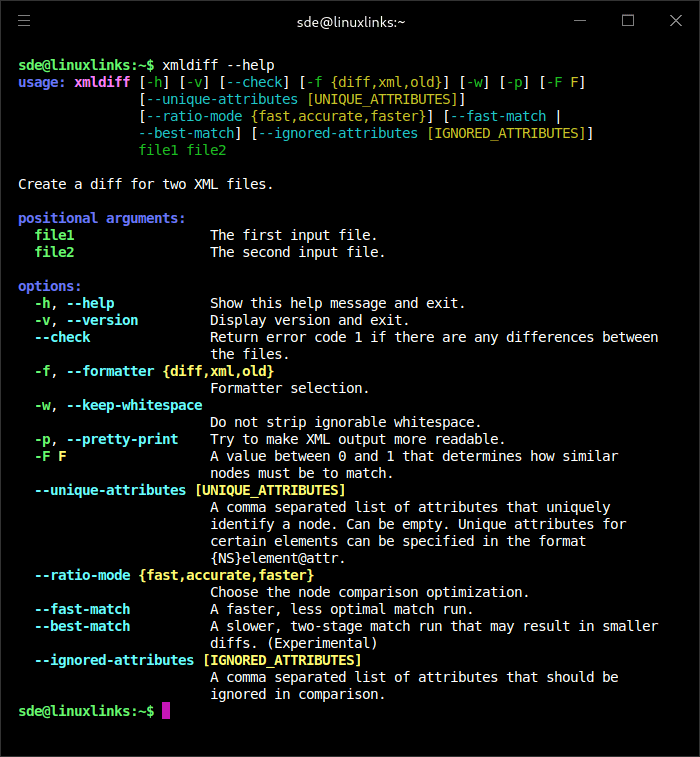
- Provides xmldiff for generating structural XML comparisons and xmlpatch for applying generated edit scripts.
- Can compare files, XML strings and existing lxml trees.
- Returns edit operations directly through its Python API or formats them for command-line use.
- Provides XML-marked output for presenting changes within document structure.
- Offers configurable node-matching thresholds and matching strategies.
- Supports unique attributes to improve identification of corresponding elements.
- Can ignore selected attributes during comparison.
- Offers faster matching modes as well as modes that favour comparison accuracy.
- Handles namespace insertion and deletion operations.
- Supports moves involving namespace-prefixed nodes.
- Can preserve information about old text when formatting text updates.
- Supports replacement-style XML formatting that combines neighbouring delete and insert operations.
- Includes optimisations for faster structural comparison and improved node matching.
- Can signal through its exit status whether differences were found, making it useful in scripts.
- Uses lxml for XML processing and can be embedded directly into Python applications.
Website: github.com/Shoobx/xmldiff
Support:
Developer: Shoobx
License: MIT License
xmldiff is written in Python. Learn Python with our recommended free books and free tutorials.
Related Software
| Terminal-Based Diff Tools | |
|---|---|
| difftastic | Structural diff tool that compares files based on their syntax |
| hunk | Terminal diff viewer with syntax highlighting and side-by-side views |
| diff-so-fancy | Attractive diffs with diff-highlight and more |
| delta | Viewer for git and diff output |
| icdiff | An improved colored diff |
| diffoscope | In-depth comparison of files, archives, and directories |
| colordiff | Wrapper for diff with pretty syntax highlighting |
| diffsitter | Semantic diff tool |
| objdiff | Local diffing tool for decompilation project |
| ydiff | Tool to view colored, incremental diff in a version controlled workspace |
| diffr | Word-by-word diff highlighting utility |
| dyff | diff tool for YAML files |
| Wdiff | Wordwise implementation of diff |
| dwdiff | diff program that operates at the word level |
| diffyml | Compares YAML documents by their structure |
| oyo | Step-through diff viewer |
| diff2html-cli | Generate HTML diffs |
| biodiff | Terminal-based binary diff viewer |
| dirdiff | Compute the differences between two directories |
| csvdiff | Fast diff tool for comparing CSV files |
| VBinDiff | Visual binary diff |
| riff | Wrapper around diff |
| csv-diff | Diffing CSV and JSON files |
| xmldiff | Compare XML documents |
| Patdiff | File diff using the Patience Diff algorithm |
| dead-ringer | Binary diff utility |
| sesdiff | Generates a shortest edit script |
| semdiff | Semantic diff tool written in Rust |
Read our verdict in the software roundup.
 LinuxLinks helps you discover the best free and open source software for Linux. Explore our extensive collection of recommended applications, including alternatives to popular proprietary software. We also publish software reviews, Linux tutorials, hardware reviews, free programming books and articles covering the wider open source community. Browse our Linux resources to discover more. Know a useful free and open source Linux application we haven't covered? Suggest a program for inclusion. Has your software been featured on LinuxLinks? Display one of our Featured on LinuxLinks badges on your website or GitHub README. |
Please read our Comment Policy before commenting.