

git-who is a command-line Git analysis tool that extends the idea of git blame from individual lines to whole file trees.
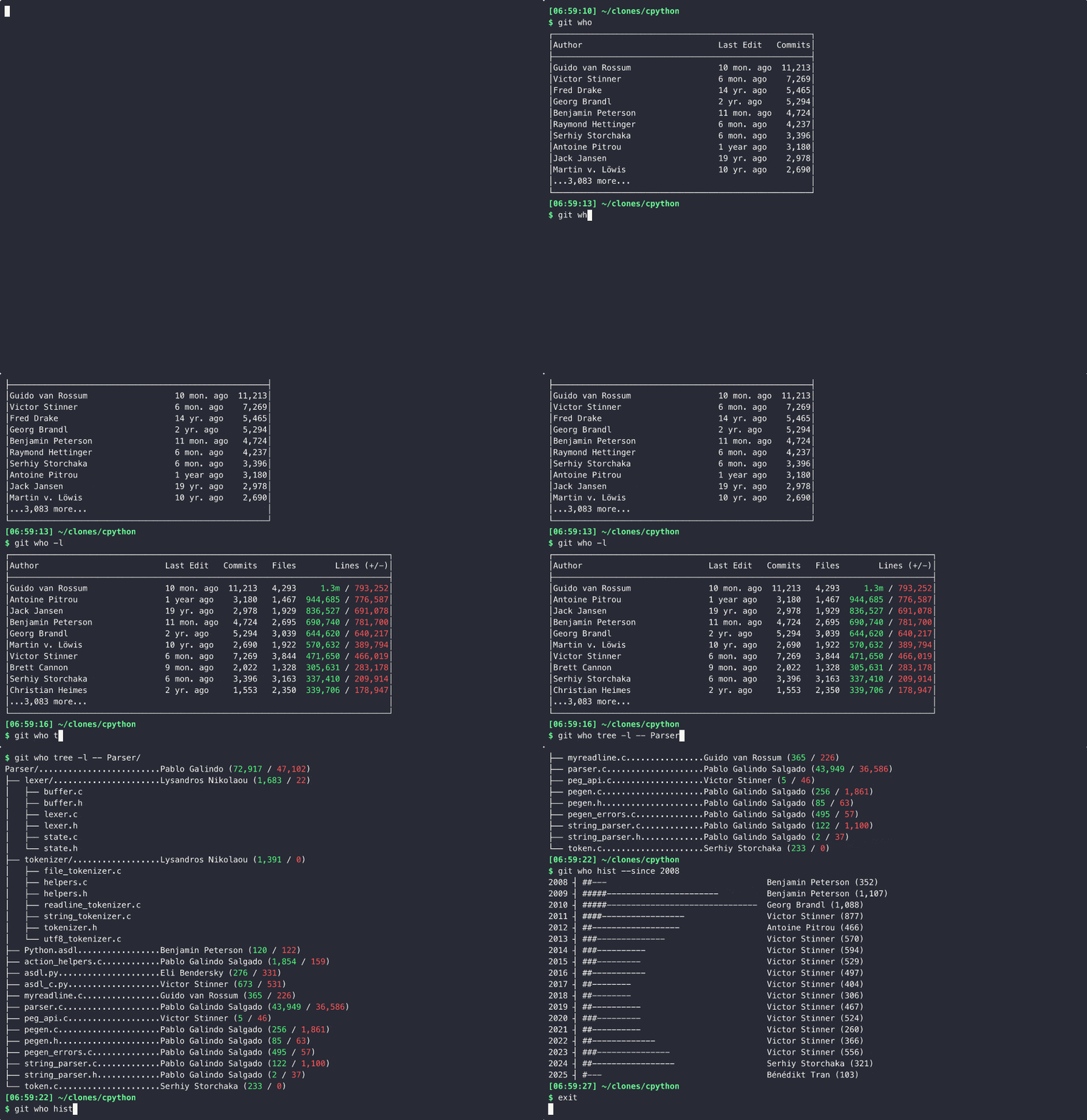
It helps developers identify who has contributed most to a repository, subdirectory, component, branch, tag, or revision range by walking the commit history and summarizing authorship across broader areas of a codebase.
This is free and open source software.
Key Features
- Shows contribution tables for Git repositories, paths, branches, tags, and revision ranges.
- Provides a tree view that annotates directories and files with the most significant contributor.
- Includes a history view that displays commit activity as a timeline-style bar chart.
- Supports sorting by last edit, first edit, number of commits, number of files modified, and lines changed.
- Offers filtering by author, excluded author, date range, path, and Git pathspecs.
- Can be run as a Git subcommand with
git who. - Offers precompiled binaries, Homebrew installation, Docker usage, and installation with Go.
- Cross-platform support – runs under Linux, macOS, and Windows.
Website: github.com/sinclairtarget/git-who
Support:
Developer: Sinclair Target
License: MIT License
git-who is written in Go. Learn Go with our recommended free books and free tutorials.
Related Software
| Git Tools for Diff Review and Repository History | |
|---|---|
| difftastic | Structural diff tool that compares files based on their syntax |
| git-filter-repo | Quickly rewrite git repository history |
| onefetch | Displays information about a local Git repository |
| git-stats | Local git statistics including GitHub-like contributions calendars |
| diff-so-fancy | Attractive diffs with diff-highlight and more |
| BFG Repo-Cleaner | Clean unwanted data from Git repository history |
| git-delta | Viewer for git and diff output |
| gitlogue | Cinematic Git commit replay tool |
| git-quick-stats | Access various statistics in a git repository |
| git-who | Command-line Git analysis tool |
| git-standup | Recall what you did on the last working day |
| git-of-theseus | Analyze how a Git repo grows over time |
| git-sizer | Compute various size metrics for a git repository |
| diffnav | Git diff pager based on delta but with a file tree, à la GitHub |
| critique | Terminal UI for reviewing git diffs |
| git-big-picture | Visualization tool for Git repositories |
| hercules | Gain advanced insights from Git repository history |
| keifu | TUI that visualizes Git commit graphs |
| git-fame | Git repository collaborators sorted by contributions |
| needle | Highlights GitHub PRs |
| mergiraf | Git merge driver |
| git-history | Analyze Git history using SQLite |
| ec | Terminal Git mergetool |
| diffr | Word-by-word diff highlighting utility |
| git-scope | Fast TUI dashboard to view the git status of all your repositories |
| mamediff | Manages unstaged and staged Git diffs |
| deadbranch | Keep Git repositories tidy |
| GitTop | Lightweight desktop client for GitHub notifications |
| git-heatmap | Generates a customizable heatmap |
Read our verdict in the software roundup.
 Explore our carefully curated directory of recommended free and open source software, covering every major software category. Explore our carefully curated directory of recommended free and open source software, covering every major software category.The directory forms part of our extensive collection of articles for Linux enthusiasts. It includes hundreds of detailed reviews, together with free and open source alternatives to proprietary software from companies such as Google, Microsoft, Apple, Adobe, IBM, Cisco, Oracle, and Autodesk. LinuxLinks also covers interesting projects worth exploring, Linux-compatible hardware, free programming books and tutorials, and much more. Know a useful free and open source Linux application that we haven’t covered? Tell us about it using our submission form. |
Please read our Comment Policy before commenting.