

Freedom of choice is a central plank of open source software. It should be the user who decides how their computer is configured. That’s particularly relevant when choosing and configuring a desktop environment.
GNOME offers a polished and coherent desktop, but it is deliberately conservative when it comes to customization. Its standard settings provide only a fraction of the options available to users who want to change the appearance, behaviour or workflow of GNOME Shell.
Fortunately, there’s an awesome range of extensions which add functionality to GNOME Shell.
We present our recommended GNOME Shell extensions. They range from docks, application menus and window tiling tools to system monitors, clipboard managers and purely cosmetic enhancements. Some fundamentally alter the way GNOME works; others make one small but useful change.
All of the extensions featured here are compatible with GNOME 50 at the time of writing. Naturally, there’s only open source goodness on offer.
Extensions can be installed from the GNOME Extensions website using GNOME Shell browser integration. Many are also packaged by Linux distributions. Always check the individual project’s documentation if you encounter installation or compatibility issues.
Panels, Menus & Navigation
1. Dash to Dock
Let’s start the ball rolling with a genuinely standout extension.
GNOME’s Dash provides quick access to running and favourite applications, but ordinarily lives inside the Activities Overview. Dash to Dock takes the Dash out of the Overview and turns it into an always-available, highly configurable dock.
There are a ton of options. You can position the dock on different edges of the screen, set its maximum size and icon size, customize its appearance and behaviour, and control how applications are launched or switched.
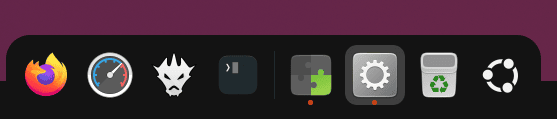
We’re particularly fond of intelligent autohide, which hides the dock when it would obstruct a window and brings it back when needed.
Website: micheleg.github.io/dash-to-dock
2. ArcMenu
If you’re keen on traditional desktop metaphors, an application menu may be an essential addition to GNOME.
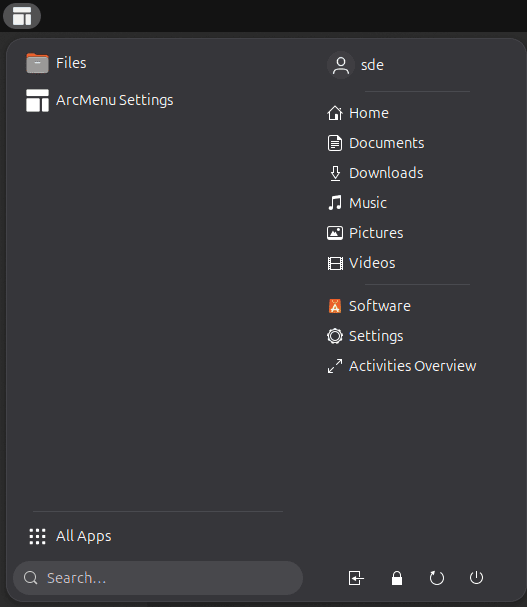
ArcMenu is one of the finest implementations. It provides quick access to applications, folders, system actions and search while offering an enormous range of configuration options.
It supports numerous menu layouts, allowing you to recreate familiar interfaces or build something distinctly different. Appearance, menu button, icon sizes, shortcuts and many other elements are customizable.
ArcMenu works particularly well alongside Dash to Dock or Dash to Panel.
Website: gitlab.com/arcmenu/ArcMenu
3. Window List
Window List restores another traditional desktop metaphor to GNOME.

It displays a list of open windows at the bottom of the screen, providing a simple way to switch between them without entering the Activities Overview. Users arriving from Windows or more traditional Linux desktops may immediately feel more at home.
Window grouping is configurable. Windows can always be grouped, grouped only when space becomes limited, or displayed separately. The window list can also be shown on one or multiple monitors.
Window List forms part of GNOME Shell Extensions.
Website: gitlab.gnome.org/GNOME/gnome-shell-extensions
4. Places Status Indicator
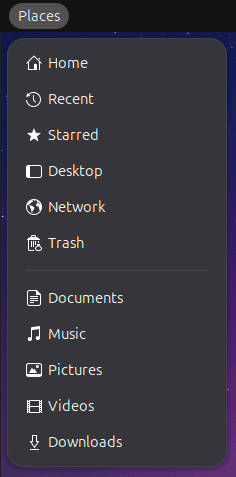 Places Status Indicator is a frequently recommended extension among GNOME users, and with good reason.
It adds a menu to the top panel for quickly navigating common locations without first opening the file manager.
Home, Documents, Downloads, Music, Pictures and Videos are readily accessible, along with mounted drives, removable media and network locations.
It’s a small addition, but one which can save a surprising number of clicks during everyday desktop use.
Places Status Indicator forms part of GNOME Shell Extensions.
Website: gitlab.gnome.org/GNOME/gnome-shell-extensions
Next page: Page 2 – Top Panel Workspace Scroll, Extension List, Tasks in panel, Dash to Panel
Pages in this article:
Page 1 – Dash to Dock, ArcMenu, Window List, Places Status Indicator
Page 2 – Top Panel Workspace Scroll, Extension List, Tasks in panel, Dash to Panel
Page 3 – Alphabetical App Grid, Kiwi Menu, Auto Move Windows, V-Shell
Page 4 – AATWS, Coverflow Alt-Tab, PaperWM, Tiling Assistant
Page 5 – WinTile, Tiling Shell, No overview at start-up, Space Bar
Page 6 – Custom Hot Corners – Extended, Just Perfection, Blur My Shell, Burn My Windows
Page 7 – Panel corners, Light Style, Lilypad Top Bar Manager, User Themes
Page 8 – Night Theme Switcher, Clipboard History, ddterm, Cronomix
Page 9 – Picture of the day, Emoji Copy, Todoit, Caffeine
Page 10 – Color Picker, Grand Theft Focus, Colosseum, Vitals
Page 11 – Astra Monitor, SimpleWeather, Removable Drive Menu, Quick Settings Audio Panel
Page 12 – Bluetooth Quick Connect, Battery Health Charging, Gtk4 Desktop Icons NG, GSConnect
Page 13 – Hanabi, AppIndicator and KStatusNotifierItem Support
Please read our Comment Policy before commenting.
Hey Steve. Thanks for updating your recommended GNOME Shell Extensions pages.
Hi Torin.
No worries, it was overdue!