

Productivity & Everyday Utilities continued
37. Color Picker
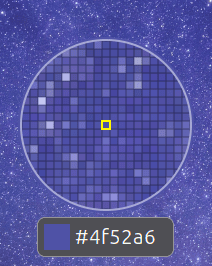
Color Picker lets you sample colours directly from the desktop.
Activate the picker, select a point on the screen, and the colour value is immediately available for use elsewhere.
It’s particularly handy for web developers, designers, artists and anyone trying to reproduce a colour seen in an application, image or website.
A dedicated colour-picker application can offer more functionality, but having the basic capability instantly available from GNOME Shell is extremely convenient.
Website: github.com/tuberry/color-picker
38. Grand Theft Focus
Grand Theft Focus fixes a small GNOME behaviour which can become surprisingly irritating.
GNOME can display a “Window is ready” notification instead of automatically giving a newly opened window focus.
This extension removes that notification and focuses the window instead.
There’s little more to explain. It’s a tiny behavioural change which makes the desktop feel more immediate, particularly if you frequently launch applications or open windows which take a few seconds to appear.
Website: github.com/zalckos/GrandTheftFocus
39. Colosseum
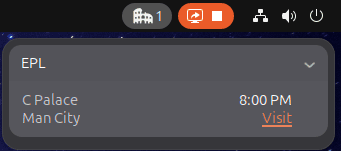 Colosseum is for the sports fans among you.
It lets you view live scores for favourite teams directly from GNOME Shell.
Major European football competitions are supported, including the English Premier League, LaLiga, Bundesliga, Serie A, Ligue 1 and UEFA Champions League.
American sports fans are catered for too, with scores from MLB, NBA, NHL and NFL games.
If you like keeping an eye on scores while working without leaving a browser tab permanently open, Colosseum fits the bill nicely.
Website: github.com/sereneblue/gnome-shell-extension-colosseum
System Monitoring, Hardware & Status
40. Vitals

Vitals offers an easy way to monitor important information about your computer directly from GNOME’s top panel.
It can display temperatures, voltages, fan speeds, memory consumption, CPU load, storage activity, network information and other system data.
The configuration options are particularly useful. Polling intervals can be adjusted and you decide exactly which sensors and readings should be visible.
Vitals manages to expose a lot of information while remaining fairly lightweight and unobtrusive.
Website: github.com/corecoding/Vitals
Next page: Page 11 – Astra Monitor, SimpleWeather, Removable Drive Menu, Quick Settings Audio Panel
Pages in this article:
Page 1 – Dash to Dock, ArcMenu, Window List, Places Status Indicator
Page 2 – Top Panel Workspace Scroll, Extension List, Tasks in panel, Dash to Panel
Page 3 – Alphabetical App Grid, Kiwi Menu, Auto Move Windows, V-Shell
Page 4 – AATWS, Coverflow Alt-Tab, PaperWM, Tiling Assistant
Page 5 – WinTile, Tiling Shell, No overview at start-up, Space Bar
Page 6 – Custom Hot Corners – Extended, Just Perfection, Blur My Shell, Burn My Windows
Page 7 – Panel corners, Light Style, Lilypad Top Bar Manager, User Themes
Page 8 – Night Theme Switcher, Clipboard History, ddterm, Cronomix
Page 9 – Picture of the day, Emoji Copy, Todoit, Caffeine
Page 10 – Color Picker, Grand Theft Focus, Colosseum, Vitals
Page 11 – Astra Monitor, SimpleWeather, Removable Drive Menu, Quick Settings Audio Panel
Page 12 – Bluetooth Quick Connect, Battery Health Charging, Gtk4 Desktop Icons NG, GSConnect
Page 13 – Hanabi, AppIndicator and KStatusNotifierItem Support
Please read our Comment Policy before commenting.
Hey Steve. Thanks for updating your recommended GNOME Shell Extensions pages.
Hi Torin.
No worries, it was overdue!