

Teclas, formerly known as Mecalin, is a touch typing tutor designed for the GNOME desktop. It combines structured lessons with a visual keyboard and finger-position guidance to help users develop accurate typing habits.
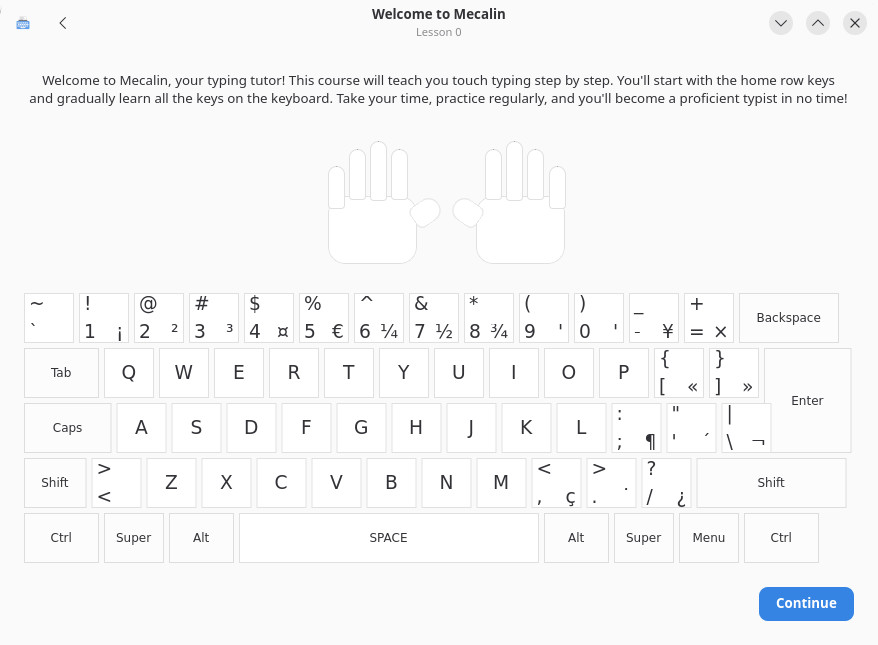
The application follows a progressive learning approach. Beginners start by learning the home row and the correct positions for their fingers before moving to additional keys and more demanding exercises. An on-screen keyboard illustrates the selected layout, while hand diagrams help users understand which fingers should be used.
Teclas adapts its training material to different languages and keyboard layouts. It detects the active keyboard layout where possible and loads the corresponding lessons and keyboard information. If suitable resources are unavailable, it can fall back to the system locale or the default English material.
This is free and open source software.
Key Features
- Structured lessons for learning touch typing fundamentals.
- Progressive exercises introducing keyboard rows and finger movements.
- Visual keyboard showing key positions and characters.
- Hand diagrams illustrating recommended finger placement.
- Support for language-specific lesson material.
- Keyboard layouts with corresponding finger mappings.
- Automatic detection of the active keyboard layout where supported.
- Fallback to system locale or English keyboard and lesson data.
- Graphical interface designed for GNOME using GTK and libadwaita.
- Translated user interface for supported languages.
Website: github.com/nacho/teclas
Support:
Developer: Ignacio Casal Quinteiro
License: GNU General Public License v3.0
Mecalin is written in Rust. Learn Rust with our recommended free books and free tutorials.
Related Software
| GUI Typing Tutors | |
|---|---|
| Klavaro | Very flexible and efficient touch typing tutor |
| TIPP10 | 10-finger intelligent touch typing tutor with different keyboard layouts |
| KTouch | Touch typing tutor for KDE |
| amphetype | Advanced typing practice software |
| Keypunch | Practice your typing skills |
| Tux Typing | Educational typing tutor game starring Tux |
| Open-Typer | Supports multiple keyboard layouts and provides auto-generated lessons |
| retype | Typing practice application |
| Mecalin | Typing tutor application built with GTK4, Rust, and Adwaita |
| FingerGo | Cross-platform touch-typing trainer |
Read our verdict in the software roundup.
 LinuxLinks helps you discover the best free and open source software for Linux. Explore our extensive collection of recommended applications, including alternatives to popular proprietary software. We also publish software reviews, Linux tutorials, hardware reviews, free programming books and articles covering the wider open source community. Browse our Linux resources to discover more. Know a useful free and open source Linux application we haven't covered? Suggest a program for inclusion. Has your software been featured on LinuxLinks? Display one of our Featured on LinuxLinks badges on your website or GitHub README. |
Please read our Comment Policy before commenting.