

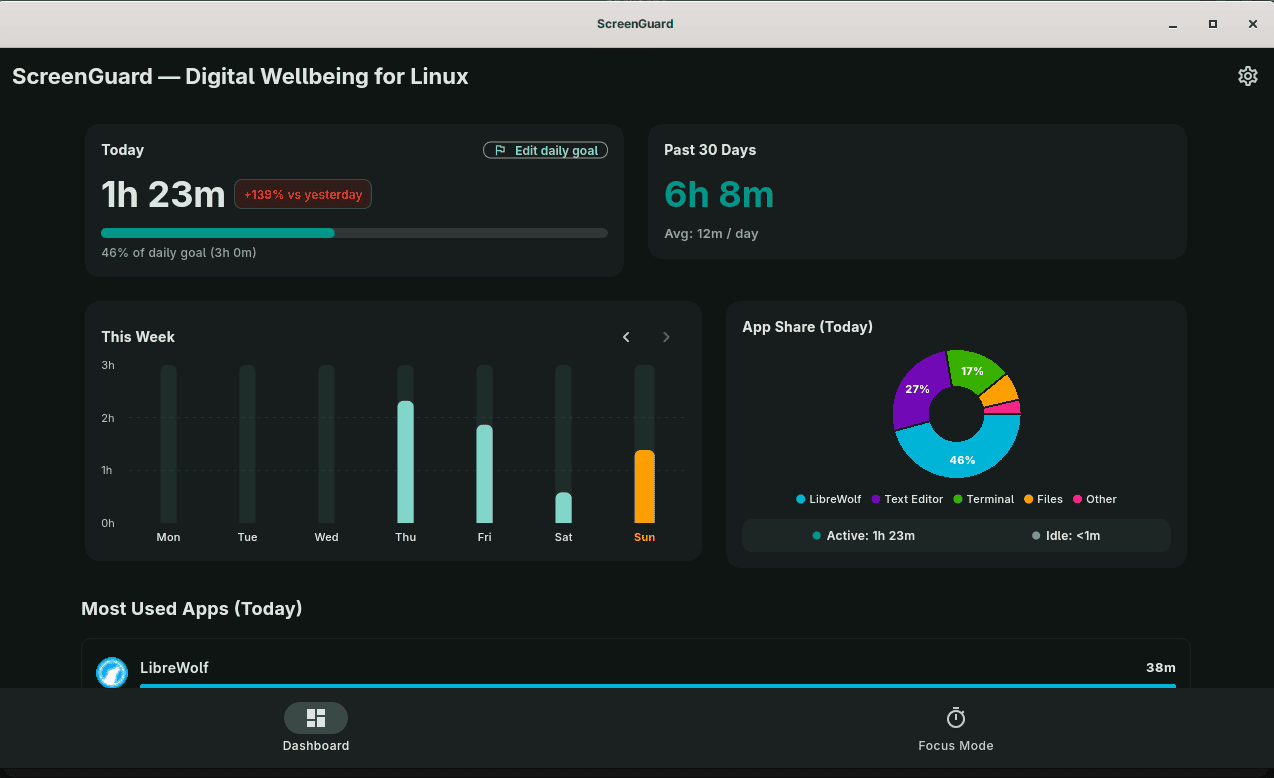
ScreenGuard is a digital wellbeing application for Linux that combines application usage tracking, daily limits and focused work sessions.
It supports GNOME Wayland through a GNOME Shell extension and offers an X11 backend undergoing community testing. Other Wayland desktops are not currently supported.
This is free and open source software.
Key Features
- Usage dashboard with daily screen time, weekly charts, application breakdowns and 30-day totals and averages.
- Browse previous weeks and select individual days to examine application usage.
- Set daily application limits using presets or custom durations, with warnings before limits are reached.
- Minimise applications when their allowance expires, with options to extend usage or adjust the limit.
- Pomodoro sessions with configurable focus and break durations, multiple cycles, pause and resume, and completed-session counts.
- Select distracting applications to minimise during focus sessions, with an optional strict mode that closes them.
- Set a daily screen-time goal and receive progress and overtime alerts.
- Track Steam and Proton game usage and apply daily limits and focus-mode restrictions.
- Customise themes, notifications and sounds, including custom audio files.
- Store usage history locally and delete records by date, date range or in full without removing settings.
- Optional anonymous diagnostics, enabled by default, report crashes and active-install information. These can be disabled in settings.
Website: github.com/adityakrishnan005-a11y/ScreenGuard
Support:
Developer: Aditya Krishnan
License: GNU General Public License v3.0
ScreenGuard is written in Dart. Learn Dart with our recommended free books and free tutorials.
Related Software
| GUI Time Tracking | |
|---|---|
| Super Productivity | Todo app with timeboxing & time tracking capabilities |
| ActivityWatch | Automated time tracking application |
| Kimai | Web based software that tracks work time, and classifies it |
| solidtime | Modern time tracking with projects, tasks, and reporting |
| Pomotroid | Simple and visually-pleasing Pomodoro timer |
| Project Hamster | Time tracking applet for the GNOME desktop environment |
| Time Tracker | Simple time-tracker program for GNOME |
| Time Cop | Billed as a time tracking app that respects your privacy |
| Tockler | Tracks time by monitoring your active window title |
| Task Coach | Designed to deal with composite tasks |
| dotProject | Web-based, multi-user, multi-language project management application |
| KTimetracker | Todo management and time tracking application |
| Kapow | Punch clock program designed to track time |
| Pomodorolm | Simple, good looking and configurable pomodoro tracker with tray icon |
| Focus Timer | Pomodoro timer for structured focus and break sessions |
| Timetrack | Simple timetrack app for GNOME |
| Flowkeeper | Pomodoro Technique desktop timer |
| Valot | Modern time tracking application |
| Furtherance | Track your time |
| TimeSlotTracker | Java based time tracking tool |
| Play Timer | Native-feeling timers |
| Flowtime | Spend your time wisely |
| Samaya | Minimalist Pomodoro timer for your desktop |
| Baralga | Simple and lightweight time tracking |
| TimeIT | Unobtrusive time tracker |
| dxtime | Small program for time tracking using wxWidgets, wxSQLite, and SQLIte3 |
| Sessions | Focus with timed work intervals |
| Pomolin | Minimalist Pomodoro timer |
| zomodoro | Simple pomodoro made with Qt |
| Toggl Desktop | Toggl time tracking client |
| Solanum | Balance working time and break time |
| Rachota | Designed for personal timetracking of projects |
| KTeaTime | Timer for steeping tea |
| Khronos | Simple tool to let you track the time spent on a task |
| HPR | Automatically tracks offline computer activity |
| Charm | Cross-platform software for professionals |
Read our verdict in the software roundup.
 Explore our carefully curated directory of recommended free and open source software, covering every major software category. Explore our carefully curated directory of recommended free and open source software, covering every major software category.The directory forms part of our extensive collection of articles for Linux enthusiasts. It includes hundreds of detailed reviews, together with free and open source alternatives to proprietary software from companies such as Google, Microsoft, Apple, Adobe, IBM, Cisco, Oracle, and Autodesk. LinuxLinks also covers interesting projects worth exploring, Linux-compatible hardware, free programming books and tutorials, and much more. Know a useful free and open source Linux application that we haven’t covered? Tell us about it using our submission form. |
Please read our Comment Policy before commenting.