

KTimeTracker is a todo management and time tracking application.
KTimeTracker tracks time spent on various tasks. It is useful for tracking hours to be billed to different clients or just to find out what percentage of your day is spent on a specific activity.
This time history can be exported to a comma-delimited text file for import into other billing and/or project management tools.
KTimetracker detects when your keyboard and mouse are idle and can associate different tasks with different desktops, two tools that can help keep the timer running on the correct task.
Key Features
- Unlimited tasks and task depth. Time may be logged to any task, and more than one task can be active at any given time.
- Edit your task’s history and to put a comment for every event that you’ve stopped.
- Import and export tasks to minimize your work.
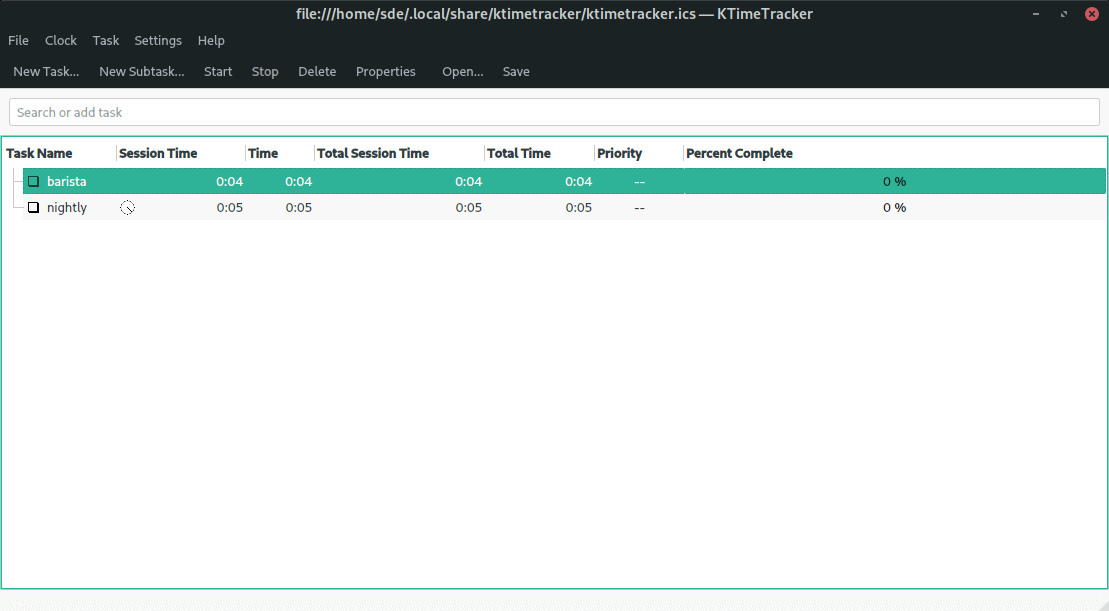
- Simple time tracking. KTimetracker maintains two timers for each task: one for the session time and one for the total time. In the default configuration, KTimetracker displays two columns for each timer, resulting in a total of four columns for each task.
- Can be configured to detect when the mouse and keyboard become idle.
- Uses the industry standard iCalendar format for its data. KTimetracker can read and write the to-do lists created by KOrganizer and Apple’s iCal.
- D-Bus support.
- Export both totals and history to a comma-delimited file format.
- Export history to CSV.
Website: apps.kde.org/en-gb/ktimetracker
Support: GitHub Code Repository
Developer: KTimeTracker developers
License: GNU General Public License v2.0
KTimeTracker is written in C++. Learn C++ with our recommended free books and free tutorials.
Related Software
| GUI Time Tracking | |
|---|---|
| Super Productivity | Todo app with timeboxing & time tracking capabilities |
| ActivityWatch | Automated time tracking application |
| Kimai | Web based software that tracks work time, and classifies it |
| Pomotroid | Simple and visually-pleasing Pomodoro timer |
| Project Hamster | Time tracking applet for the GNOME desktop environment |
| Time Tracker | Simple time-tracker program for GNOME |
| Time Cop | Billed as a time tracking app that respects your privacy |
| Tockler | Tracks time by monitoring your active window title |
| Task Coach | Designed to deal with composite tasks |
| dotProject | Web-based, multi-user, multi-language project management application |
| KTimetracker | Todo management and time tracking application |
| Kapow | Punch clock program designed to track time |
| Pomodorolm | Simple, good looking and configurable pomodoro tracker with tray icon |
| Timetrack | Simple timetrack app for GNOME |
| Flowkeeper | Pomodoro Technique desktop timer |
| Valot | Modern time tracking application |
| Furtherance | Track your time |
| TimeSlotTracker | Java based time tracking tool |
| Play Timer | Native-feeling timers |
| Flowtime | Spend your time wisely |
| Samaya | Minimalist Pomodoro timer for your desktop |
| Baralga | Simple and lightweight time tracking |
| TimeIT | Unobtrusive time tracker |
| dxtime | Small program for time tracking using wxWidgets, wxSQLite, and SQLIte3 |
| Sessions | Focus with timed work intervals |
| Pomolin | Minimalist Pomodoro timer |
| zomodoro | Simple pomodoro made with Qt |
| Toggl Desktop | Toggl time tracking client |
| Solanum | Balance working time and break time |
| Rachota | Designed for personal timetracking of projects |
| KTeaTime | Timer for steeping tea |
| Khronos | Simple tool to let you track the time spent on a task |
| Charm | Cross-platform software for professionals |
Read our verdict in the software roundup.
 Explore our comprehensive directory of recommended free and open source software. Our carefully curated collection spans every major software category. Explore our comprehensive directory of recommended free and open source software. Our carefully curated collection spans every major software category.This directory is part of our ongoing series of informative articles for Linux enthusiasts. It features hundreds of detailed reviews, along with open source alternatives to proprietary solutions from major corporations such as Google, Microsoft, Apple, Adobe, IBM, Cisco, Oracle, and Autodesk. You’ll also find interesting projects to try, hardware coverage, free programming books and tutorials, and much more. Discovered a useful open source Linux program that we haven’t covered yet? Let us know by completing this form. |
Please read our Comment Policy before commenting.
KTimeTracker has a very useful feature: virtual-desktop-related time-tracking. That way, you can use a virtual desktop for each group of tasks, and automatically track how much time you spend on each group of tasks :-).
For example, one good idea is having:
– One virtual desktop for working.
– One virtual desktop for reading the news.
– One virtual desktop for studying.
– One virtual desktop for leisure time.
That way, you can keep the time you spend working, or reading the news, etc. easily (without having to start/stop tasks throughout the whole day!).
For example, every virtual desktop can have its web browser, file manager, etc. so you can work without minding (all day long) if your web browser is on one page (or another) in order to track the time.
This sounds quite interesting. It might be very useful for my workflow and billing clients.