

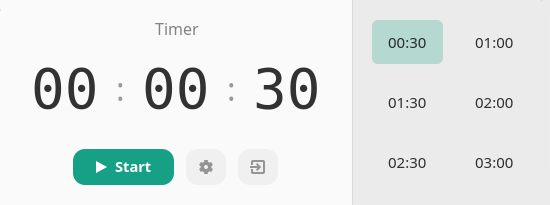
Play Timer is a desktop countdown timer designed for starting timed activities quickly with minimal interaction. Its distinguishing feature is integration with the MPRIS media player interface, which allows the timer to behave like a media player and interact with compatible desktop controls. The application is particularly suitable for short reminders, timed work intervals and other activities that need a simple countdown rather than a full time tracking system.
The interface is designed for keyboard operation, allowing users to enter a duration directly or navigate controls using familiar keys. Play Timer also provides command-line options for starting timers without opening the graphical time selector. Notifications, sounds and visual settings can be customised, while timer presets simplify frequently repeated countdowns.
This is free and open source software.
Key Features
- Start countdown timers through a graphical interface or command-line options.
- Integrate with desktop media controls through MPRIS.
- Enter timer durations directly using the keyboard.
- Navigate the interface with arrow keys, Tab, Space and Enter.
- Start a timer immediately without displaying the time selector.
- Display desktop notifications when countdowns finish.
- Configure custom notification messages and timer titles.
- Enable or disable audible alerts.
- Adjust alert volume or select custom audio files.
- Create, edit and remove timer presets.
- Configure the default timer preset.
- Choose custom colours for timer progress indicators.
- Adjust visual settings including rounded corners and shadows.
- Remember window dimensions between sessions.
- Provide an optional reduced-frame-rate display mode.
- Offer a native-looking GTK interface with desktop theme integration.
Website: github.com/efogdev/mpris-timer
Support:
Developer: Artem Suprun
License: MIT License
Play Timer is written in Go. Learn Go with our recommended free books and free tutorials.
Related Software
| GUI Time Tracking | |
|---|---|
| Super Productivity | Todo app with timeboxing & time tracking capabilities |
| ActivityWatch | Automated time tracking application |
| Kimai | Web based software that tracks work time, and classifies it |
| solidtime | Modern time tracking with projects, tasks, and reporting |
| Pomotroid | Simple and visually-pleasing Pomodoro timer |
| Project Hamster | Time tracking applet for the GNOME desktop environment |
| Time Tracker | Simple time-tracker program for GNOME |
| Time Cop | Billed as a time tracking app that respects your privacy |
| Tockler | Tracks time by monitoring your active window title |
| Task Coach | Designed to deal with composite tasks |
| dotProject | Web-based, multi-user, multi-language project management application |
| KTimetracker | Todo management and time tracking application |
| Kapow | Punch clock program designed to track time |
| Concentré | Simple, good looking and configurable pomodoro tracker with tray icon |
| Focus Timer | Pomodoro timer for structured focus and break sessions |
| Timetrack | Simple timetrack app for GNOME |
| Flowkeeper | Pomodoro Technique desktop timer |
| Valot | Modern time tracking application |
| Furtherance | Track your time |
| TimeSlotTracker | Java based time tracking tool |
| Play Timer | Native-feeling timers |
| Flowtime | Spend your time wisely |
| Samaya | Minimalist Pomodoro timer for your desktop |
| Baralga | Simple and lightweight time tracking |
| TimeIT | Unobtrusive time tracker |
| dxtime | Small program for time tracking using wxWidgets, wxSQLite, and SQLIte3 |
| Sessions | Focus with timed work intervals |
| Pomolin | Minimalist Pomodoro timer |
| zomodoro | Simple pomodoro made with Qt |
| Toggl Desktop | Toggl time tracking client |
| Solanum | Balance working time and break time |
| Rachota | Designed for personal timetracking of projects |
| KTeaTime | Timer for steeping tea |
| Khronos | Simple tool to let you track the time spent on a task |
| HPR | Automatically tracks offline computer activity |
| Charm | Cross-platform software for professionals |
Read our verdict in the software roundup.
 LinuxLinks helps you discover the best free and open source software for Linux. Explore our extensive collection of recommended applications, including alternatives to popular proprietary software. We also publish software reviews, Linux tutorials, hardware reviews, free programming books and articles covering the wider open source community. Browse our Linux resources to discover more. Know a useful free and open source Linux application we haven't covered? Suggest a program for inclusion. Has your software been featured on LinuxLinks? Display one of our Featured on LinuxLinks badges on your website or GitHub README. |
Please read our Comment Policy before commenting.