

A task manager is software which enables users to compile a list of tasks to be completed. This list is also known as a to-do list or things-to-do. For the purposes of this article, the term ‘task manager’ should not be confused with monitoring software which provides information about programs and processes running on a computer.
The list of activities that may form a to-do list include chores, grocery lists, reminders for important events (such as purchasing wedding presents or birthday gifts), self management, software development, project / business management, and so on. Task managers help to organise your day, ensuring that you know in an instant what you need to do.
Linux has a large range of open source task managers, in part because many of them have a limited feature set and hence are relatively quick to code. This feature selects our personal favorites, including both console based applications and software sporting an attractive graphical user interface.
To be productive, you may need more than a task manager. Our features on Productivity Tools and Personal Information Managers help to organize your day in other ways.
To provide an insight into the quality of software that is available, we have compiled a list of 30 useful terminal-based task managers. Hopefully, there will be something of interest here for anyone who wants to avoid that sinking feeling of remembering (albeit too late) something important that needs to be actioned. GUI task managers are covered in a separate roundup.
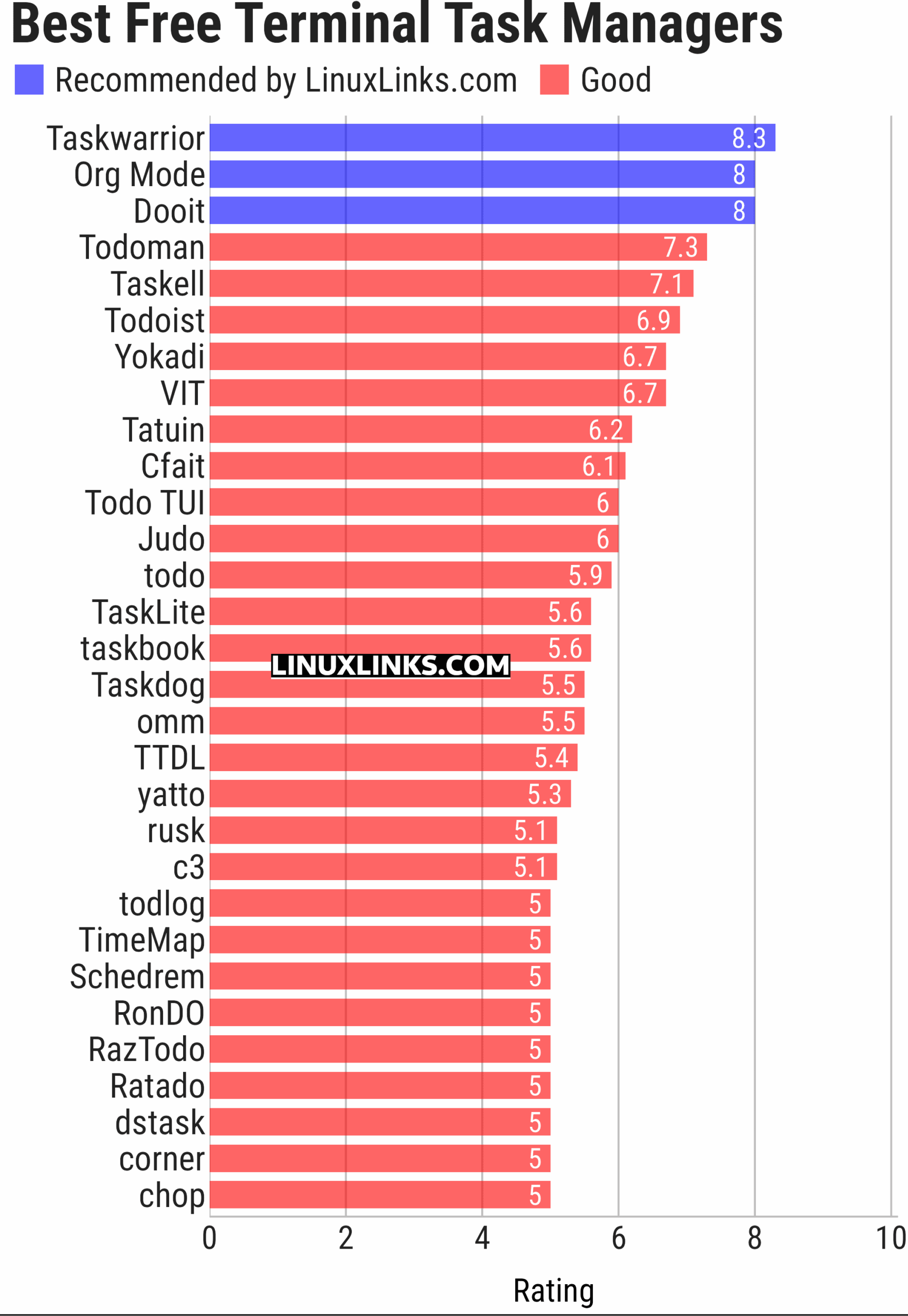
Here’s our verdict captured in a legendary LinuxLinks-style ratings chart. Only free and open source software is eligible for inclusion.
Click the links in the table below to learn more about each task manager.
| Terminal-Based Task Managers | |
|---|---|
| Taskwarrior | Manages your TODO list from the command line |
| Org Mode | Emacs major mode for keeping notes, maintaining to-do lists, and more |
| Dooit | Billed as a to-do manager that you didn’t ask for, but needed |
| Todoman | Simple, cli, standards-based task manager |
| Taskell | Command-line Kanban board/task manager |
| Todoist | TODO list web application |
| Yokadi | SQLite powered TODO list tool |
| VIT | Visual Interactive Taskwarrior |
| Tatuin | Task aggregation tool |
| Cfait | Take control of your TODO list |
| Todo TUI | Vim-like TUI that honors the simplicity of todo.txt |
| Judo | Terminal-based todo list application |
| todo | Lightweight and fast CLI-based todo program |
| TaskLite | Task manager built with Haskell and SQLite |
| taskbook | Tasks, boards & notes for the command-line |
| Taskdog | Task management system |
| omm | Keyboard-driven task manager |
| TTDL | Terminal ToDo List |
| yatto | Interactive VCS-based todo-list |
| rusk | Minimal cross-platform terminal task manager |
| c3 | Uses and extends calcurse’s format |
| todlog | Task and log manager |
| TimeMap | Personal knowledge tool |
| Schedrem | Python package that provides a tool for scheduling tasks and setting reminders |
| RonDO | Terminal productivity app |
| RazTodo | CLI task manager |
| Ratado | Keyboard-driven terminal task manager |
| dstask | Similar to Taskwarrior but uses git to synchronise instead of a special protocol |
| corner | Terminal-based task journal for developers |
| chop | Stream filter for todo lists. Like sed or sort, but for todos |
This article has been updated to reflect the changes outlined in our recent announcement.
 LinuxLinks helps you discover the best free and open source software for Linux. Explore our extensive collection of recommended applications, including alternatives to popular proprietary software. LinuxLinks helps you discover the best free and open source software for Linux. Explore our extensive collection of recommended applications, including alternatives to popular proprietary software.We also publish software reviews, Linux tutorials, hardware reviews, free programming books and articles covering the wider open source community. Browse our Linux resources to discover more. Know a useful free and open source Linux application we haven't covered? Suggest a program for inclusion. Has your software been featured on LinuxLinks? Display one of our Featured on LinuxLinks badges on your website or GitHub README. |
Please read our Comment Policy before commenting.