

Skorpion OS is a Debian-based Linux distribution designed to bring artificial intelligence into everyday desktop work. Its SKAI subsystem uses Ollama to run language models on the user’s computer, with the aim of keeping AI requests and their processing away from third-party services.
The project is intended for people who want to interact with Linux in natural language, including users unfamiliar with terminal commands. It retains a conventional desktop and command-line environment, so experienced users can work without relying on the assistant.
The system offers Cinnamon for a traditional graphical desktop and i3 for a keyboard-driven, tiling window manager. The developer also plans a shared AI memory facility, which would pass context between applications, but that part of the project remains in development.
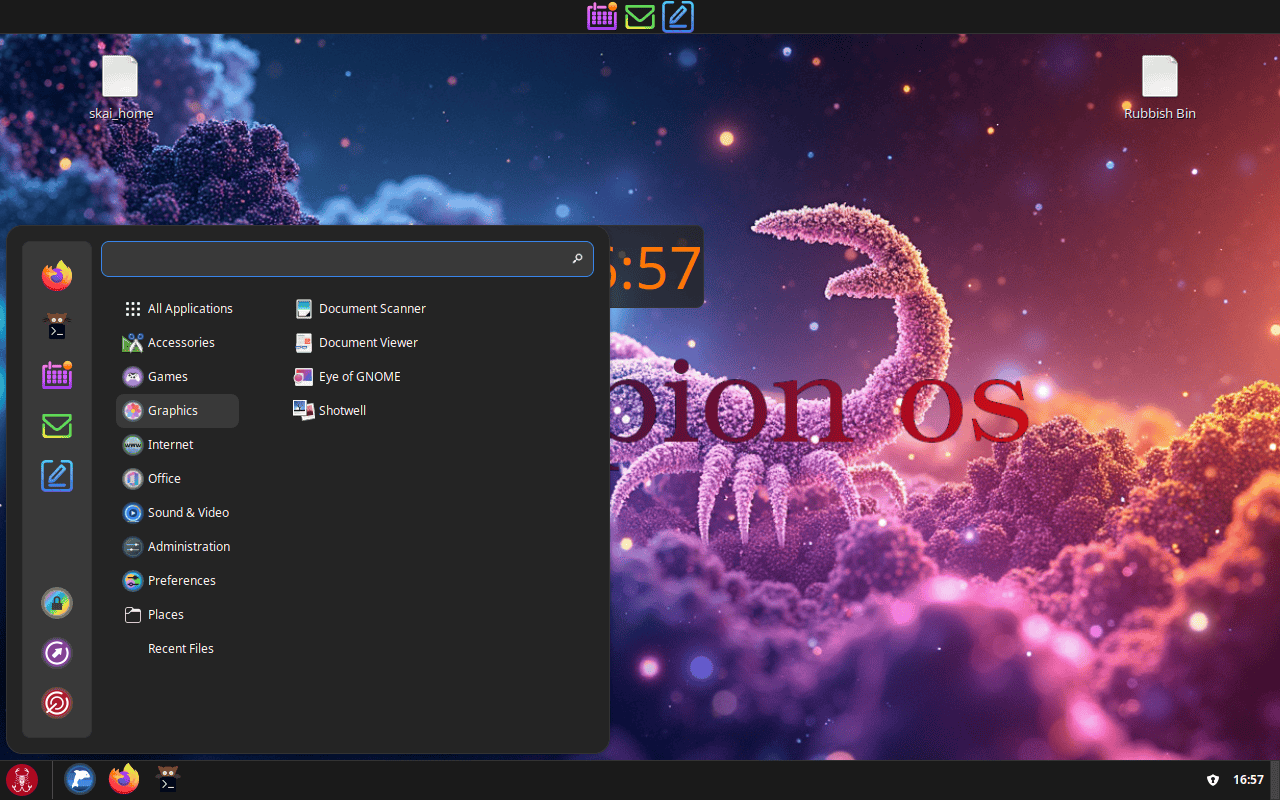
| Working state: | Active |
| Desktop: | Cinnamon, i3 |
| Init Software: | systemd |
| Package Management: | APT |
| Release Model: | Fixed |
| Platforms: | x86_64 |
| Home Page: | skossyte.pages.dev |
| Developer: | Enrico Miot |
| This article is part of our Big List of Active Linux Distributions and Open Source Operating Systems. |
What's a Linux distribution ("distro")? |
| A distro provides the user with a desktop environment, preloaded applications, and ways to update and maintain the system. Each distro makes different choices, deciding which open source projects to install and provides custom written programs. They can have different philosophies. Some distros are intended for desktop computers, some for servers without a graphical interface, and others for special uses. Because Linux is an open source operating system, combinations of software vary between Linux distros. |
Please read our Comment Policy before commenting.
Hi Erik, thanks a lot for covering Skorpion OS, and thanks to LinuxLinks for adding it to the Big List!
I’m Enrico, the developer. A quick update for anyone curious: the current release is 3.5, available in two editions, Cinnamon (recommended to start with) and Lite with i3. Everything runs locally through Ollama, so no data leaves your machine, and the AI can be removed with one click if you don’t want it. Version 3.5 also ships with sk_libre, a set of AI plugins for LibreOffice Writer, Calc and Math, preinstalled. An Arch-based edition with Hyprland, called Mantis, is in the works.
The idea behind the project is simple: AI should be a butler, not a master. It works with you, not instead of you.
ISOs are on SourceForge and the code is on GitHub (Endrx2008). It’s a small project, so feedback, bug reports and contributors are very welcome!
Thanks for the update, Enrico, and for clarifying what’s new in version 3.5. The LibreOffice integration is particularly interesting. Best of luck with Skorpion OS and the forthcoming Mantis edition!
Hi Enrico. Thank you so much for all your hard work. The OS is really beautiful. I need to restart the first-time wizard that sets up ollama and stuff. The computer I’ve installed your OS on to is not the same computer that has the GPU (that’s just one hop away at 10.69.69.69) .. so I want to set up skorpion to use 10.69.69.69:11434/api/chat …
t@pukey:~/.skai$ cat config.py
# Copyright (C) 2026 Enrico Miot
# Licensed under GNU GPL v3 or later — see /usr/share/common-licenses/GPL-3
# SPDX-License-Identifier: GPL-3.0-or-later
from pathlib import Path
import os
import re
import shutil
import subprocess
# ─── Ollama ────────────────────────────────────────────────────────────────────
OLLAMA_URL = “10.69.69.69:11434/api/chat”
****
t@pukey:~/.skai$ skai
=========================================================
AI features are disabled.
It looks like you turned off AI in the skai settings.
Without a selected model, skai cannot function.
(technical detail: could not connect to Ollama at localhost:11434)
Press any key to exit…
=========================================================
I have made a PDF guide on how to configure two PCs in version 3.5. If you’d like a copy, please contact me at [email protected].
In the next release, I will add a Python script to choose, download, delete and deactivate models, and to connect another PC or server to use as a remote server.