

Superpaper is an advanced multi monitor wallpaper manager.
This tool is notable for its advanced wallpaper spanning options.
This is free and open source software.
Key Features
- Set a single image across all displays.
- Set different image on every display.
- Span images on groups of displays: one image on laptop screen and another spanned on two external monitors, for example.
- Advanced wallpaper spanning options:
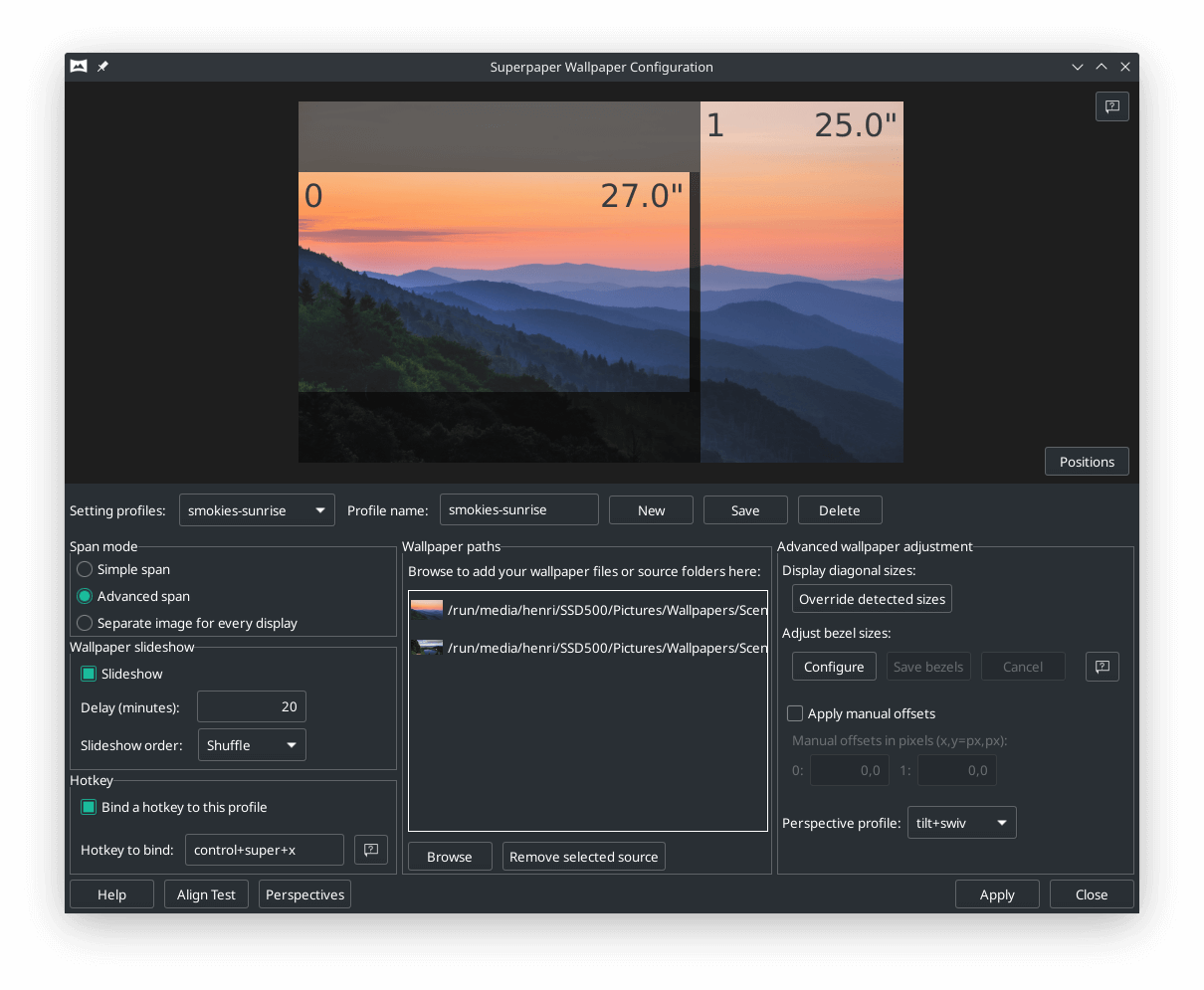
- Pixel density correction: span an image flawlessly across displays of different shapes and sizes. Pixel density correction needs two things to work: correct display sizes and the positions of your displays relative to each other on your desk (to tell how you pixels are located in physical space and what size they are). Display sizes are detected automatically and shown in the preview; a warning is given if the detection fails and then you can enter correct sizes with the “Override detected sizes” button.
- Bezel correction: let the image continuously span behind your bezels.
- Perspective correction: span the image even more flawlessly. You’ll need to measure your distance to one of the displays you consider central, though this can be done in relation to any of your displays, just choose the display that you use.
- Manual pixel offsets for fine-tuning.
- Slideshow with configurable file order from local sources.
- Add wallpapers one by one or a folder at a time (no subfolders).
- Command-line interface.
- Tray applet for slideshow control.
- Hotkey support for easy slideshow control (Only Linux and Windows).
- Align test tool to help fine tune your settings (Accessible only from GUI).
- Aims to support all desktop environments.
- Span wallpaper on KDE and XFCE.
- Runs under Linux and Windows with partial and untested support for Mac OS X.
Website: github.com/hhannine/Superpaper
Support:
Developer: Henri Hänninen
License: MIT License
Superpaper is written in Python. Learn Python with our recommended free books and free tutorials.
Related Software
| Terminal-Based Diff Tools | |
|---|---|
| difftastic | Structural diff tool that compares files based on their syntax |
| diff-so-fancy | Attractive diffs with diff-highlight and more |
| delta | Viewer for git and diff output |
| icdiff | An improved colored diff |
| diffoscope | In-depth comparison of files, archives, and directories |
| colordiff | Wrapper for diff with pretty syntax highlighting |
| diffsitter | Semantic diff tool |
| objdiff | Local diffing tool for decompilation project |
| ydiff | Tool to view colored, incremental diff in a version controlled workspace |
| diffr | Word-by-word diff highlighting utility |
| dyff | diff tool for YAML files |
| Wdiff | Wordwise implementation of diff |
| dwdiff | diff program that operates at the word level |
| oyo | Step-through diff viewer |
| diffyml | Compares YAML documents by their structure |
| diff2html-cli | Generate HTML diffs |
| biodiff | Terminal-based binary diff viewer |
| dirdiff | Compute the differences between two directories |
| csvdiff | Fast diff tool for comparing CSV files |
| VBinDiff | Visual binary diff |
| riff | Wrapper around diff |
| csv-diff | Diffing CSV and JSON files |
| xmldiff | Compare XML documents |
| vbl | Terminal-based hexadecimal viewer |
| Patdiff | File diff using the Patience Diff algorithm |
| dead-ringer | Binary diff utility |
| sesdiff | Generates a shortest edit script |
| semdiff | Semantic diff tool written in Rust |
Read our verdict in the software roundup.
 Explore our comprehensive directory of recommended free and open source software. Our carefully curated collection spans every major software category. Explore our comprehensive directory of recommended free and open source software. Our carefully curated collection spans every major software category.This directory is part of our ongoing series of informative articles for Linux enthusiasts. It features hundreds of detailed reviews, along with open source alternatives to proprietary solutions from major corporations such as Google, Microsoft, Apple, Adobe, IBM, Cisco, Oracle, and Autodesk. You’ll also find interesting projects to try, hardware coverage, free programming books and tutorials, and much more. Discovered a useful open source Linux program that we haven’t covered yet? Let us know by completing this form. |
Please read our Comment Policy before commenting.