

MusiQt is a lightweight audio player built with the Qt application framework.
The software provides a directory-based view view for browsing storage and bookmarking folders containing music. Selecting a directory automatically populates the playlist with its supported audio files.
You can also assemble and save custom playlists by dragging tracks from the directory browser. MusiQt offers compact and full interface layouts and supports conventional audio formats, tracker modules, chiptunes and game-music formats through multiple playback backends.
This is free and open source software.
Installation
I evaluated MusiQt with Ubuntu 26.04 LTS.
MusiQt is not currently packaged in the Ubuntu repositories, so I built it from source using Qt 6. Optional libraries add support for additional audio formats.
Let’s install the dependencies, many of which my test system already has installed.
$ sudo apt install git build-essential cmake pkg-config gettext qt6-base-dev qt6-multimedia-dev libsndfile1-dev libmpg123-dev libvorbis-dev libopusfile-dev libgme-dev libsidplayfp-dev libstilview-dev libopenmpt-dev libmpcdec-dev libwavpack-dev libavcodec-dev libavformat-dev libavutil-dev libbs2b-dev zlib1g-dev
Download the complete MusiQt source code repository from GitHub into a new directory named musiqt.
$ git clone https://github.com/MusiQt/musiqt.git
Change the current working directory to the downloaded musiqt directory.
$ cd musiqt
Configure the build:
-S .tells CMake that the source files are in the current directory.-B buildplaces the generated build files in a separate directory namedbuild.-DCMAKE_BUILD_TYPE=Releaseenables compiler optimisations and creates a release build rather than a debugging build.
$ cmake -S . -B build -DCMAKE_BUILD_TYPE=Release
Compile MusiQt:
--build buildbuilds the project configured in thebuilddirectory.-j"$(nproc)"runs multiple compiler jobs in parallel.nprocreturns the number of available CPU threads, allowing the build to use all of them.
$ cmake --build build -j"$(nproc)"
In Operation
Here’s an image of MusiQt in action.
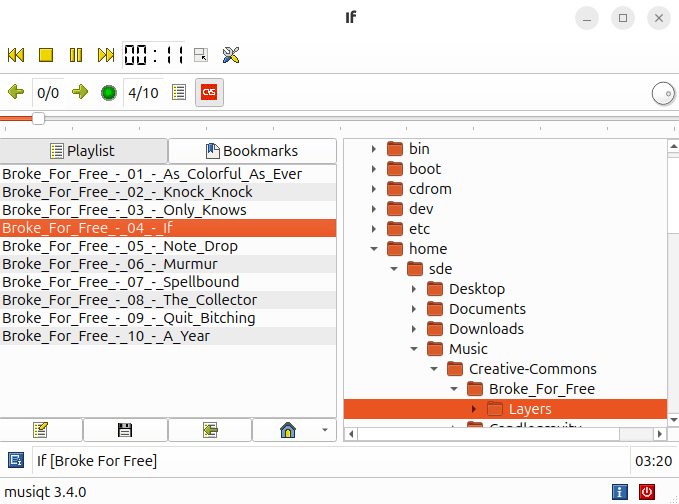
The interface uses a traditional two-pane layout. A playback toolbar runs across the top, with transport controls for previous, stop, pause, and next, and a digital elapsed-time display. The other two icons switch to a nifty compact view and open the settings. Below the toolbar are navigation and playback controls, including track position, volume, and playlist controls.
The main area is divided between a playlist on the left, showing numbered tracks with the current song highlighted, and a file browser on the right, which displays the filesystem as an expandable directory tree. Tabs above the left pane provide access to the playlist and bookmarks.
Along the bottom are shortcut buttons, a now-playing field showing the current track and album, the track duration, and a status bar identifying the application version. Overall, it is a compact, functional interface that prioritises direct access to music files and playback controls over visual polish.
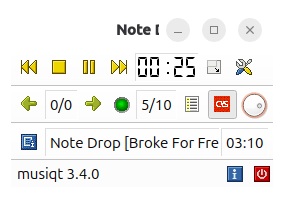 Here’s the compact view. I wish more music players offered this type of view.
MusiQt supports gapless playback. That’s an essential requirement for many music lovers. There is no separate option in the interface; it is handled automatically during normal sequential playback.
Other Features
- Bookmark frequently accessed music directories.
- Automatically populate the playlist from the selected directory.
- Create, edit and save custom playlists.
- Drag files from the directory view into a playlist.
- Play an entire playlist or an individual track.
- Compact and full interface layouts.
- MPRIS integration for controlling playback from compatible desktop tools.
- Last.fm scrobbling.
- Supports MP3, Ogg Vorbis, Opus, FLAC, WAV, AAC, WMA, Musepack, WavPack and MIDI, depending on the available backends.
- Plays tracker modules, SID files and numerous console and computer game-music formats.
- Can be built with Qt 5 or Qt 6.
- Optional support for interface translations.
Summary
MusiQt is better than I expected. Its interface is functional, the compact view is useful, and it offers essential gapless playback together with support for a wide range of audio formats. If you’re looking for a directory-based interface and don’t need all the bells and whistles offered by fooyin, it might be just the ticket.
The volume control is curious. I initially thought its presentation was a bug, but after installing the program on several Linux distributions, I confirmed that it behaves consistently.
ps_mem reports memory usage is around 90MB. That’s perfectly reasonable for a GUI music player.
Website: github.com/MusiQt/musiqt
Support:
Developer: Leandro Nini
License: GNU General Public License v2.0
Related Software
| Graphical Music Players | |
|---|---|
| fooyin | Customizable music player similar to foobar2000 |
| Tauon | Python-based music player that's an absolute gem |
| Strawberry | Music player and collection organizer originally forked from Clementine |
| Rhythmbox | Integrated music management application, originally inspired by iTunes |
| Sayonara Player | Small, clear and fast music player written in C++ |
| Audacious | XMMS-like skinnable player |
| Exaile | Music player aiming to be similar to KDE's Amarok, but for GTK+ |
| DeaDBeeF | Basic and simple player with a small footprint. |
| Clementine | Modern music player and library organiser. Inspired by Amarok |
| Lollypop | Modern music player for GNOME |
| Amarok | KDE audio player offering a wealth of features, yet intuitive to use |
| Musique | Small but sophisticated graphical music player |
| Cantata | Feature-rich client for Music Player Daemon |
| Quod Libet | GTK+-based music management program |
| GogglesMM | Polished music collection manager and player |
| Aqualung | Advanced, gapless Gtk2-based audio player |
| MusicPod | Music, podcast and internet radio player |
| gmusicbrowser | Music jukebox for large collections |
| Yarock | Qt music player with browsing based on cover art |
| qoob | A foobar-like music player |
| GNOME Music | Simple music player |
| Soul Player | Local-first music player built for privacy |
| Pragha | Distinguished and resplendent open source music player |
| Hummingbird | Rust-based music player with basic functionality |
| Deepin Music | Visually attractive and simple music player |
| Musicat | Music player for your local music library |
| Musicalypse | Music player and server built with Web technologies |
| Melody | Music player designed for elementary OS |
| Elisa | Simple music player developed by the KDE community |
| QMPlay2 | Video and audio player which can play most formats and codecs |
| Tomahawk | Qt-based music player |
| mtoc | Visually-rich music player and library browser |
| FolderPlay | Minimalist music player for local music collections |
| Daphne | Audio player and music library manager |
| Ratic | Basic offline music player |
| Musik | Lightweight audio player built for the KDE Plasma desktop |
| Kalorite | Lightweight audio player |
| Astra | Billed as an audiophile music player |
Read our verdict in the software roundup.
 LinuxLinks helps you discover the best free and open source software for Linux. Explore our extensive collection of recommended applications, including alternatives to popular proprietary software. LinuxLinks helps you discover the best free and open source software for Linux. Explore our extensive collection of recommended applications, including alternatives to popular proprietary software.We also publish software reviews, Linux tutorials, hardware reviews, free programming books and articles covering the wider open source community. Browse our Linux resources to discover more. Know a useful free and open source Linux application we haven't covered? Suggest a program for inclusion. Has your software been featured on LinuxLinks? Display one of our Featured on LinuxLinks badges on your website or GitHub README. |
Please read our Comment Policy before commenting.
Linux needs more music players lol
Quirky but not bad really.