

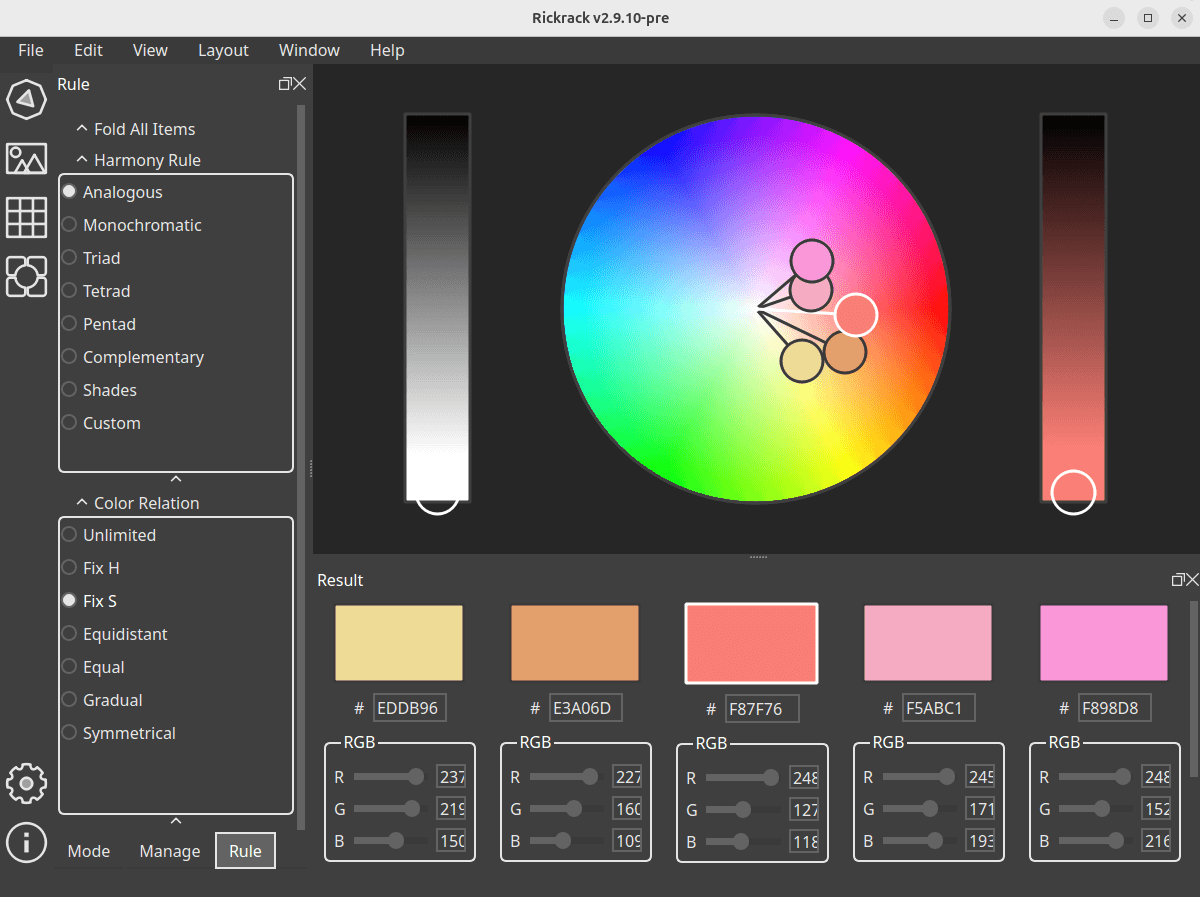
Rickrack (Real-time Color Kit) is a user-friendly color editor. It is designed to generate a set of harmonious colors from the color wheel or other places. You can share these colors with your friends, or apply them into your creative works.
The software lets you export them into individual files and import them into other software such as Adobe Photoshop, GIMP, Krita, Pencil 2D and Clip Studio Paint.
This is free and open source software.
Key Features
- A strong and free color editor.
- Create a set of colors from the color wheel.
- Pick-up a set of colors from an image.
- Generate a color board from the color set.
- Attach the color set and color board into the depot.
- Import colors from elsewhere and manage them in depot.
- Export colors and import them into other image processors.
- Obtain colors through the Python module in real-time.
- Cross-platform support – runs under Linux, macOS, and Windows.
Website: github.com/eigenmiao/Rickrack
Support:
Developer: Eigenmiao
License: GNU General Public License v3.0
Rickrack is written in Python. Learn Python with our recommended free books and free tutorials.
Related Software
| Color Pickers | |
|---|---|
| pastel | Generate, analyze, convert and manipulate colors |
| Gpick | Advanced color picker and palette editor |
| hyprpicker | wlroots-compatible Wayland colour picker for Linux |
| Eyedropper | Pick and format colors; this tool is geared towards advanced users |
| KColorChooser | Color picker designed for KDE but runs on any desktop environment |
| Pick | Python-based color picker |
| Rickrack | User-friendly color editor. |
| Gcolor3 | Color selection dialog written in GTK+ 3 |
| xcolor | Lightweight color picker written in Rust |
| epick | Color picker for creating harmonic color palettes |
| Colorpicker | Minimal but complete colorpicker Electron-based desktop app |
| Picket | Screen color picker with magnifier and custom/user defined formats |
| Paleta | Generates color palettes with ease |
| Xgrabcolor | Basic color picker |
| sxcs | Minimal X11 color picker and magnifier |
| Pigment | Extracts color palettes from your images |
| delicolour | Lightweight color finder |
| Deepin Picker | Simple color picker |
| ColorSmith | Color picker tool |
| Bella | Simple eye dropper and color picker |
| pik | Terminal-based color picker |
| wl-color-picker | Shell script for Wayland and wlroots sessions |
| cpick | Extensive color picker for the terminal |
| Coulr | Color box to help developers and designers |
| Wayland Color Picker | GTK4 application for Wayland desktops |
Read our verdict in the software roundup.
| Color Scheme Generators | |
|---|---|
| pastel | Generate, analyze, convert and manipulate colors |
| wpgtk | Colorscheme, wallpaper and template manager |
| Matugen | Cross-platform color generation tool |
| wallust | Create 16 color palettes |
| lule | Rust alternative to pywal |
| Rickrack | Color palette generator |
| KDE Material You Colors | Wallpaper-driven theming tool for KDE Plasma |
| Hellwal | Fast and extensible color palette generator |
| Pywal | Color schemes on the fly |
| walrs | Generates a color scheme from an image's dominant colors |
| Aether | Visual theming application |
| cwal | Generates dynamic color schemes from images |
| Tinct | Extracts color palettes from images |
| clrsync | Theme management tool for synchronizing color schemes |
| rong | CLI that extracts a Material You color palette |
| Colorway | GUI tool that generates color pairings |
Read our verdict in the software roundup.
 Explore our comprehensive directory of recommended free and open source software. Our carefully curated collection spans every major software category. Explore our comprehensive directory of recommended free and open source software. Our carefully curated collection spans every major software category.This directory is part of our ongoing series of informative articles for Linux enthusiasts. It features hundreds of detailed reviews, along with open source alternatives to proprietary solutions from major corporations such as Google, Microsoft, Apple, Adobe, IBM, Cisco, Oracle, and Autodesk. You’ll also find interesting projects to try, hardware coverage, free programming books and tutorials, and much more. Discovered a useful open source Linux program that we haven’t covered yet? Let us know by completing this form. |
Please read our Comment Policy before commenting.