

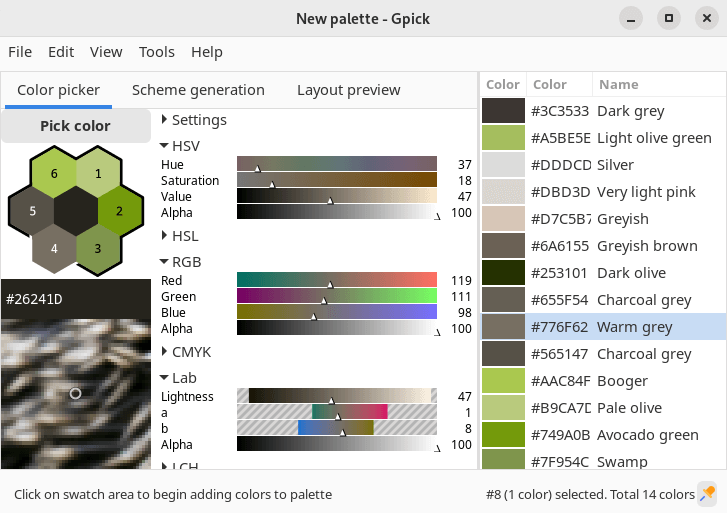
Gpick is an application that allows you to sample any color from anywhere on the desktop, and use it to create palettes (i.e. collections of colors) for use in graphic design applications.
Gpick also has other features that help in the creation of color palettes.
This is free and open source software.
Key Features
- Magnification and mouse pointer control with keyboard.
- Automatic color name assignment.
- Export to following formats:
- Inkscape/Gimp Palette (*.gpl)
- Adobe Swatch Exchange (*.ase)
- Alias/WaveFront Material (*.mtl)
- Cascaded Style Sheet (*.css)
- Hyper Text Markup Language (*.html)
- Customizable text file
- Import from following formats:
- Inkscape/Gimp Palette (*.gpl)
- Adobe Swatch Exchange (*.ase)
- Customizable text file
- Oversampling with five falloff types:
- Multiple pixel values are averaged to help picking colors from sources with noise, patterns and etc, where each pixel is different and overall color is produced by different amounts of particular color.
- Palette from image.
- Color scheme creation tools.
- Mix two or more colors using variable number of steps and different mixing types.
- Lightness and/or saturation variations.
- Harmonious colors.
Website: www.gpick.org
Support: GitHub Code Repository
Developer: Albertas Vyšniauskas
License: BSD 3-Clause “New” or “Revised” License
Gpick is written in C++ and C. Learn C++ with our recommended free books and free tutorials. Learn C with our recommended free books and free tutorials.
Related Software
| Color Pickers | |
|---|---|
| pastel | Generate, analyze, convert and manipulate colors |
| Gpick | Advanced color picker and palette editor |
| hyprpicker | wlroots-compatible Wayland colour picker for Linux |
| Eyedropper | Pick and format colors; this tool is geared towards advanced users |
| KColorChooser | Color picker designed for KDE but runs on any desktop environment |
| Pick | Python-based color picker |
| Rickrack | User-friendly color editor. |
| Gcolor3 | Color selection dialog written in GTK+ 3 |
| xcolor | Lightweight color picker written in Rust |
| epick | Color picker for creating harmonic color palettes |
| Colorpicker | Minimal but complete colorpicker Electron-based desktop app |
| Picket | Screen color picker with magnifier and custom/user defined formats |
| Paleta | Generates color palettes with ease |
| Xgrabcolor | Basic color picker |
| sxcs | Minimal X11 color picker and magnifier |
| Pigment | Extracts color palettes from your images |
| delicolour | Lightweight color finder |
| Deepin Picker | Simple color picker |
| ColorSmith | Color picker tool |
| Bella | Simple eye dropper and color picker |
| pik | Terminal-based color picker |
| wl-color-picker | Shell script for Wayland and wlroots sessions |
| cpick | Extensive color picker for the terminal |
| Coulr | Color box to help developers and designers |
| Wayland Color Picker | GTK4 application for Wayland desktops |
Read our verdict in the software roundup.
 Explore our comprehensive directory of recommended free and open source software. Our carefully curated collection spans every major software category. Explore our comprehensive directory of recommended free and open source software. Our carefully curated collection spans every major software category.This directory is part of our ongoing series of informative articles for Linux enthusiasts. It features hundreds of detailed reviews, along with open source alternatives to proprietary solutions from major corporations such as Google, Microsoft, Apple, Adobe, IBM, Cisco, Oracle, and Autodesk. You’ll also find interesting projects to try, hardware coverage, free programming books and tutorials, and much more. Discovered a useful open source Linux program that we haven’t covered yet? Let us know by completing this form. |
Please read our Comment Policy before commenting.