

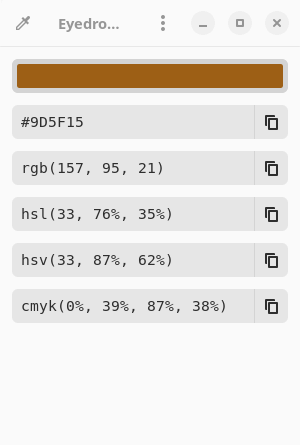
Eyedropper is a color selection and conversion utility designed for users who need to work with several color representations. It allows colors to be sampled from the screen, entered manually, or examined in formats used in graphic design, web development, and color analysis.
Unlike basic color pickers that display only hexadecimal and RGB values, Eyedropper supports a much wider collection of color spaces. A selected color can be viewed in perceptual, device-oriented, and mathematical representations, making it useful when comparing colors or preparing values for different applications.
The interface allows users to choose which representations appear and arrange them in a preferred order. It also includes a shade generator for producing related colors from an existing selection. Color names can be matched against established collections, including web colors, GNOME palette names, and the xkcd color survey.
This is free and open source software.
Key Features
- Pick colors directly from the screen.
- Enter colors using hexadecimal notation.
- Parse RGB, RGBA, and ARGB hexadecimal values.
- Display HEX, RGB, HSL, HSV, CMYK, XYZ, and HWB color representations.
- Support for CIELAB, CIELCh/HCL, LMS, and Hunter Lab color spaces.
- Match colors against W3C, GNOME, and xkcd naming collections.
- Customise which color formats are displayed.
- Rearrange color formats in the preferred display order.
- Generate palettes containing different shades of a selected color.
- Copy formatted color values for use in other applications.
- Graphical color selection and adjustment controls.
Website: github.com/FineFindus/eyedropper
Support:
Developer: FineFindus
License: GNU General Public License v3.0
Eyedropper is written in Rust. Learn Rust with our recommended free books and free tutorials.
Related Software
| Color Pickers | |
|---|---|
| pastel | Generate, analyze, convert and manipulate colors |
| Gpick | Advanced color picker and palette editor |
| hyprpicker | wlroots-compatible Wayland colour picker for Linux |
| Eyedropper | Pick and format colors; this tool is geared towards advanced users |
| KColorChooser | Color picker designed for KDE but runs on any desktop environment |
| Pick | Python-based color picker |
| Rickrack | User-friendly color editor. |
| Gcolor3 | Color selection dialog written in GTK+ 3 |
| xcolor | Lightweight color picker written in Rust |
| epick | Color picker for creating harmonic color palettes |
| Colorpicker | Minimal but complete colorpicker Electron-based desktop app |
| Picket | Screen color picker with magnifier and custom/user defined formats |
| Paleta | Generates color palettes with ease |
| Xgrabcolor | Basic color picker |
| sxcs | Minimal X11 color picker and magnifier |
| Pigment | Extracts color palettes from your images |
| delicolour | Lightweight color finder |
| Deepin Picker | Simple color picker |
| ColorSmith | Color picker tool |
| Bella | Simple eye dropper and color picker |
| pik | Terminal-based color picker |
| Piccolo | GTK4 colour picker with screen sampling and session history |
| Cherrypick | Screen colour picker with history and multiple output formats |
| wl-color-picker | Shell script for Wayland and wlroots sessions |
| Cpick | Extensive color picker for the terminal |
| Color Picker for COSMIC | Native COSMIC colour utility supporting six colour spaces |
| Coulr | Color box to help developers and designers |
| Wayland Color Picker | GTK4 application for Wayland desktops |
Read our verdict in the software roundup.
 LinuxLinks helps you discover the best free and open source software for Linux. Explore our extensive collection of recommended applications, including alternatives to popular proprietary software. We also publish software reviews, Linux tutorials, hardware reviews, free programming books and articles covering the wider open source community. Browse our Linux resources to discover more. Know a useful free and open source Linux application we haven't covered? Suggest a program for inclusion. Has your software been featured on LinuxLinks? Display one of our Featured on LinuxLinks badges on your website or GitHub README. |
Please read our Comment Policy before commenting.