

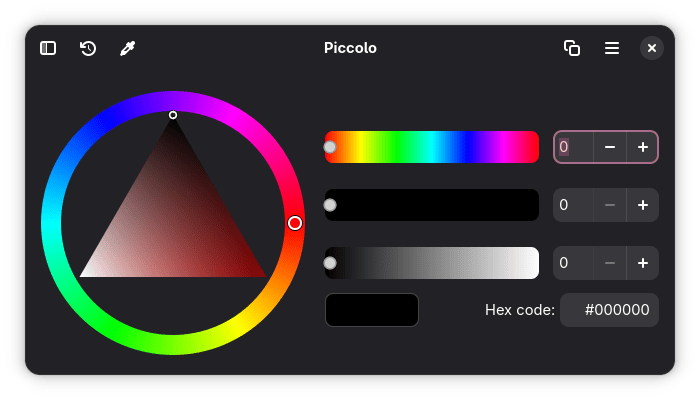
Piccolo is a color picker built for the modern GNOME desktop using GTK4 and Libadwaita. It provides a compact graphical environment for grabbing a color from the screen or choosing one interactively, then transferring the resulting value to another application.
The application draws on components from the developer’s Brush project and focuses on straightforward color selection rather than broader graphics or palette-management functionality. Its native toolkit, adaptive interface and keyboard support make it well suited to contemporary Linux desktop environments.
This is free and open source software.
Key Features
- Pick a color directly from the screen using desktop portal integration.
- Select colors interactively using graphical color controls.
- Copy selected colors to the clipboard.
- Output colors as hexadecimal values.
- Copy colors using CSS color-function representations.
- Converts between different color representations using dedicated color-conversion libraries.
- Maintains a per-session history of previously selected colors.
- Lets users copy colors directly from history entries.
- Provides keyboard navigation throughout the application.
- Makes color-selector sliders accessible through keyboard controls.
- Includes keyboard shortcuts for common actions such as copying a color.
- Uses an adaptive layout that accommodates smaller window and screen sizes.
- Respects desktop window-decoration layouts.
- Provides a modern interface based on Libadwaita conventions.
- Supports localization and has infrastructure for translated interfaces.
- Uses the desktop screenshot portal rather than relying on display-server-specific screen capture.
Website: github.com/Azakidev/Piccolo
Support:
Developer: Azakidev
License: MIT License
Piccolo is written in Rust. Learn Rust with our recommended free books and free tutorials.
Related Software
| Color Pickers | |
|---|---|
| pastel | Generate, analyze, convert and manipulate colors |
| Gpick | Advanced color picker and palette editor |
| hyprpicker | wlroots-compatible Wayland colour picker for Linux |
| Eyedropper | Pick and format colors; this tool is geared towards advanced users |
| KColorChooser | Color picker designed for KDE but runs on any desktop environment |
| Pick | Python-based color picker |
| Rickrack | User-friendly color editor. |
| Gcolor3 | Color selection dialog written in GTK+ 3 |
| xcolor | Lightweight color picker written in Rust |
| epick | Color picker for creating harmonic color palettes |
| Colorpicker | Minimal but complete colorpicker Electron-based desktop app |
| Picket | Screen color picker with magnifier and custom/user defined formats |
| Paleta | Generates color palettes with ease |
| Xgrabcolor | Basic color picker |
| sxcs | Minimal X11 color picker and magnifier |
| Pigment | Extracts color palettes from your images |
| delicolour | Lightweight color finder |
| Deepin Picker | Simple color picker |
| ColorSmith | Color picker tool |
| Bella | Simple eye dropper and color picker |
| pik | Terminal-based color picker |
| Piccolo | GTK4 colour picker with screen sampling and session history |
| Cherrypick | Screen colour picker with history and multiple output formats |
| wl-color-picker | Shell script for Wayland and wlroots sessions |
| Cpick | Extensive color picker for the terminal |
| Color Picker for COSMIC | Native COSMIC colour utility supporting six colour spaces |
| Coulr | Color box to help developers and designers |
| Wayland Color Picker | GTK4 application for Wayland desktops |
Read our verdict in the software roundup.
 LinuxLinks helps you discover the best free and open source software for Linux. Explore our extensive collection of recommended applications, including alternatives to popular proprietary software. LinuxLinks helps you discover the best free and open source software for Linux. Explore our extensive collection of recommended applications, including alternatives to popular proprietary software.We also publish software reviews, Linux tutorials, hardware reviews, free programming books and articles covering the wider open source community. Browse our Linux resources to discover more. Know a useful free and open source Linux application we haven't covered? Suggest a program for inclusion. Has your software been featured on LinuxLinks? Display one of our Featured on LinuxLinks badges on your website or GitHub README. |
Please read our Comment Policy before commenting.