

Genius Mathematics Tool (Genius) is a general purpose calculator program similar in some aspects to BC, MATLAB or Maple. It is useful both as a simple calculator and as a research or educational tool.
The language used in Genius Mathematics Tool is designed to be ‘mathematical’ in the sense that it should be ‘what you mean is what you get’. Of course that is not an entirely attainable goal. Genius Mathematics Tool features rationals, arbitrary precision integers and multiple precision floats using the GMP library. It handles complex numbers using Cartesian notation.
The software has good vector and matrix manipulation and can handle basic linear algebra. The programming language allows user defined functions, variables and modification of parameters.
Genius Mathematics Tool comes in two versions; a graphical GNOME version, which features an Integrated Development Environment (IDE) style interface and the ability to plot functions of one or two variables. There is also a command line version does not require GNOME, but naturally does not implement any feature that needs the graphical interface.
The syntax is very intuitive and is designed to mimic how mathematics is usually written.
Key Features
- Arbitrary precision ints, multiple precision floats.
- Rational numbers, stored as quotient and denominator.
- Complex numbers, stored in cartesian coordinates as usual.
- Math-like-looking expressions, tries to be as much a what-you-mean-is-what-Genius-understands, up to a limit of course.
- Matrix calculations / Linear Algebra, with many related functions.
- Number theory.
- Calculus, numerical and even very limited symbolic calculations.
- Statistics; all the basic statistical functions.
- Numerical equation solving, polynomial roots, etc.
- Combinatorics.
- Most common elementary / trigonometric functions.
- Modular arithmetic, including inversions and modular arithmetic on matrices
- A complete programming language, with automatic typing. In fact large part of Genius standard library is written in GEL.
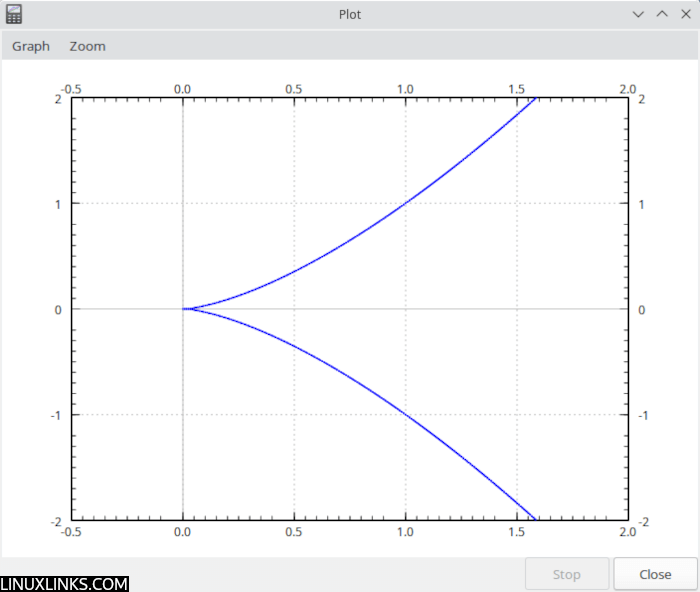
- 2D Function line plots, standard 2D graphs of up to 10 functions at once, with possibility to export to EPS or PNG.
- Parametric plots, with possibility to export to EPS or PNG.
- 3D Function surface plots, with possibility to export to EPS or PNG.
- Slopefield/Vectorfield plotting.
- GUI IDE where you can edit and run/test your programs.
- Outputs matrices in LaTeX, Troff (eqn) or MathML.
- Plot point clouds.
Website: www.jirka.org/genius.html
Support: Manual
Developer: Jiri (George) Lebl, Nils Barth, Kai Willadsen, Adrian E. Feiguin
License: GNU General Public License v3.0
Genius is written in C. Learn C with our recommended free books and free tutorials.
Related Software
| Calculators | |
|---|---|
| Qalculate! | Powerful and easy to use multi-purpose desktop calculator |
| Genius | Desktop calculator, an educational tool in mathematics, and for research |
| SpeedCrunch | High precision and powerful desktop calculator |
| KCalc | Scientific calculator designed for KDE |
| Calculator | Simple and easy to use calculator |
| KAlgebra | Replace your graphing calculator |
| rpCalc | Simple RPN calculator |
| Kalk | Cross-platform application built with the Kirigami framework |
| Modular Calculator | Aimed at scientific, engineering or computing work |
| Nonpareil | High-Fidelity calculator simulator |
| Wombat | High-precision scientific calculator |
| Uno Calculator | Port of Windows calculator |
| SwitchCalc | GTK4 calculator |
| Schulrechner | Calculator you know from school |
| Pebbles | GTK-based app |
| Cuneo | Widget-like calculator and conversion tool |
| RCalc | RPN calculator |
| galculator | RPN and algebraic calculator |
| Extcalc | Multifunctional scientific graphic calculator |
| gdcalc | Financial, scientific, statistical and programming calculator |
| Sums | Postfix calculator designed for quick calculations |
| Free42 | HP-42S calculator simulator |
| Yesser Calculator | Extensible calculator |
| xcalc | Simple scientific calculator that can emulate a TI-30 or an HP-10C |
| x48ng | Reboot of the HP 48 emulator |
| tCalc | Simple calculator written in core Tcl/Tk |
| OxiCalc | Small, simple calculator. It uses GTK4. |
| MCalc | Perform simple mathematical operations |
| Eigen | GTK4 matrix calculator |
Read our verdict in the software roundup.
| Terminal-Based Calculators | |
|---|---|
| Genius | Desktop calculator, an educational tool in mathematics, and for research |
| Numbat | High precision scientific calculator supporting physical units |
| kalker | Calculator with math syntax |
| qalc | Symbolic maths, arbitrary precision and unit conversion |
| calc | C-style arbitrary precision calculator |
| concalc | Parser-algorithm of extcalc |
| wcalc | Uses intuitive expressions and implicit multiplication |
| pcalc | Terminal calculator made for programmers |
| bcal | Storage expression calculator |
| numr | Text calculator for natural language expressions |
| kalc | Complex numbers, 2d/3d graphing, arbitrary precision calculator |
| clac | Stack-based calculator with postfix notation |
| CalcPy | Calculator and advanced math solver using Python, IPython and SymPy |
| fortbite | Powerful mathematical calculator leveraging Fortran’s strengt |
| abacus | Simple interactive calculator CLI |
| Daisy | General-purpose TUI scientific calculator |
| Quich | Just an advanced terminal calculator |
| orpie | curses-based RPN calculator |
| val | Arbitrary-precision language with variables, functions and complex numbers |
| Squiid | Advanced calculator supporting both RPN and algebraic input |
| mucalc | Convenient calculator for the command line |
| HIP35 | HP-35 RPN calculator emulator |
| csc | Scientific maths using 64-bit floating-point arithmetic |
| RCalc | Reverse Polish Notation calculator |
| ec | RPN calculator with array operations and quotations |
| coriolinus-calc | CLI calculator app and library |
| spigot | Streaming exact real calculator |
| Rink | Provides unit conversions, arbitrary precision and dimensional analysis |
Read our verdict in the software roundup.
| Plotting Tools | |
|---|---|
| matplotlib | Python based plotting system in a style similar to Matlab |
| ggplot2 | Powerful R package for declaratively creating graphics |
| gnuplot | Command-line driven interactive plotting program |
| ROOT | Solves the data analysis challenges of high-energy physics |
| Octave | Built-in plotting and visualization tools |
| DataMelt | Produces professional graphics with libraries for data manipulation |
| Veusz | Scientific plotting and graphing program |
| LabPlot | Data plotting and function analysis tool for KDE |
| PyQtGraph | Scientific Graphics and GUI Library for Python |
| Makie | interactive data visualizations and plotting for Julia |
| GLE | Graphics Layout Engine |
| PyVista | 3D plotting and mesh analysis |
| PLplot | Scientific plotting library |
| AlphaPlot | Fork of SciDAVis |
| SciDAVis | Scientific Data Analysis and Visualization |
| RLPlot | Generate publication quality graphs |
| Genius | Educational tool in mathematics and for research |
| ZeGrapher | 2D math and data plotter |
| Uniplot | Lightweight terminal plotting library for Python |
| Kst | Real-time large dataset viewing and plotting tool |
| Ctioga2 | Command-line plotting utility |
| Plots | Simple graph plotting app for GNOME |
| brplot | Ssmall application and library that plots data |
| SSPlot | Simple plotting utility and numerical simulator |
| KmPlot | Supports Cartesian, parametric, polar, implicit and differential plots |
| Charta | Generate colorful terminal graphs |
| Incplot | Command like tool for drawing great looking plots in the terminal |
Read our verdict in the software roundup.
 Explore our comprehensive directory of recommended free and open source software. Our carefully curated collection spans every major software category. Explore our comprehensive directory of recommended free and open source software. Our carefully curated collection spans every major software category.This directory is part of our ongoing series of informative articles for Linux enthusiasts. It features hundreds of detailed reviews, along with open source alternatives to proprietary solutions from major corporations such as Google, Microsoft, Apple, Adobe, IBM, Cisco, Oracle, and Autodesk. You’ll also find interesting projects to try, hardware coverage, free programming books and tutorials, and much more. Discovered a useful open source Linux program that we haven’t covered yet? Let us know by completing this form. |
Please read our Comment Policy before commenting.
So, how do you download the damn thing ? Lots of words here, but who knows how to download it to Linux Mint on the toolbar ??
Look at https://www.jirka.org/genius.html#requirements