
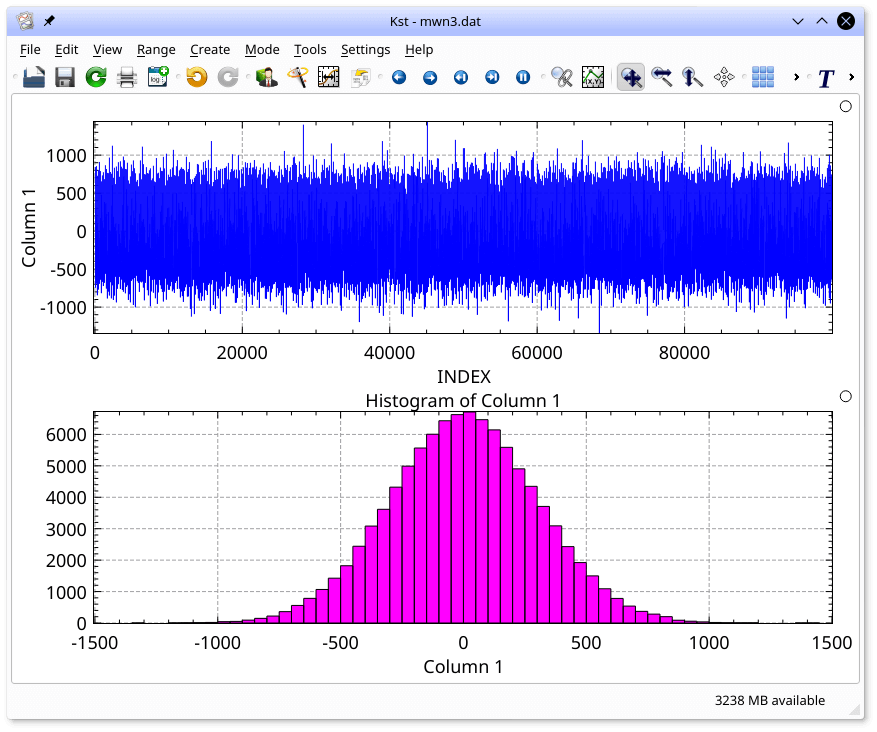
Kst is a data plotting and viewing program.
There are two main methods of quickly obtaining plots in Kst. The Kst command-line interface provides quick access to the main Kst features, while the graphical data wizard enables intuitive fine tuning of plot and data settings. Kst can be completely controlled through the graphical user interface, without ever using the command line.
This is free and open source software.
Key Features
- Robust plotting of live “streaming” data.
- Powerful keyboard and mouse plot manipulation.
- Powerful plugins and extensions support. It has simple and standardized interface that facilitates easy creation of additional plugins.
- Large selection of built-in plotting and data manipulation functions, such as histograms, equations, and power spectra.
- Color mapping and contour mapping capabilities for three-dimensional data, as well as matrix and image support.
- Built-in filtering and curve fitting capabilities.
- Convenient command-line interface.
- Powerful graphical user interface with non-modal dialogs for an optimized workflow.
- Support for several popular data formats.
- Multiple tabs.
- Extended annotation objects similar to vector graphics applications.
- High-quality export to bitmap or vector formats.
- Supports ASCII, Dirfile/Getdata, netCDF including metadata, CFitsIO, QImage-compatible image types and Matlab’s .mat format with support from the matio library.
- Fully scriptable in Python.
Website: kst-plot.kde.org
Support:
Developer: Barth Netterfield and contributors
License: GNU General Public License v2.0
Kst is written in C++. Learn C++ with our recommended free books and free tutorials.
Related Software
| Plotting Tools | |
|---|---|
| matplotlib | Python based plotting system in a style similar to Matlab |
| ggplot2 | Powerful R package for declaratively creating graphics |
| gnuplot | Command-line driven interactive plotting program |
| ROOT | Solves the data analysis challenges of high-energy physics |
| Octave | Built-in plotting and visualization tools |
| DataMelt | Produces professional graphics with libraries for data manipulation |
| Veusz | Scientific plotting and graphing program |
| LabPlot | Data plotting and function analysis tool for KDE |
| PyQtGraph | Scientific Graphics and GUI Library for Python |
| Makie | interactive data visualizations and plotting for Julia |
| GLE | Graphics Layout Engine |
| PyVista | 3D plotting and mesh analysis |
| PLplot | Scientific plotting library |
| AlphaPlot | Fork of SciDAVis |
| SciDAVis | Scientific Data Analysis and Visualization |
| RLPlot | Generate publication quality graphs |
| Genius | Educational tool in mathematics and for research |
| ZeGrapher | 2D math and data plotter |
| Uniplot | Lightweight terminal plotting library for Python |
| Kst | Real-time large dataset viewing and plotting tool |
| Ctioga2 | Command-line plotting utility |
| Plots | Simple graph plotting app for GNOME |
| brplot | Ssmall application and library that plots data |
| SSPlot | Simple plotting utility and numerical simulator |
| KmPlot | Supports Cartesian, parametric, polar, implicit and differential plots |
| Charta | Generate colorful terminal graphs |
| Incplot | Command like tool for drawing great looking plots in the terminal |
Read our verdict in the software roundup.
 Explore our carefully curated directory of recommended free and open source software, covering every major software category. Explore our carefully curated directory of recommended free and open source software, covering every major software category.The directory forms part of our extensive collection of articles for Linux enthusiasts. It includes hundreds of detailed reviews, together with free and open source alternatives to proprietary software from companies such as Google, Microsoft, Apple, Adobe, IBM, Cisco, Oracle, and Autodesk. LinuxLinks also covers interesting projects worth exploring, Linux-compatible hardware, free programming books and tutorials, and much more. Know a useful free and open source Linux application that we haven’t covered? Tell us about it using our submission form. |
Please read our Comment Policy before commenting.