
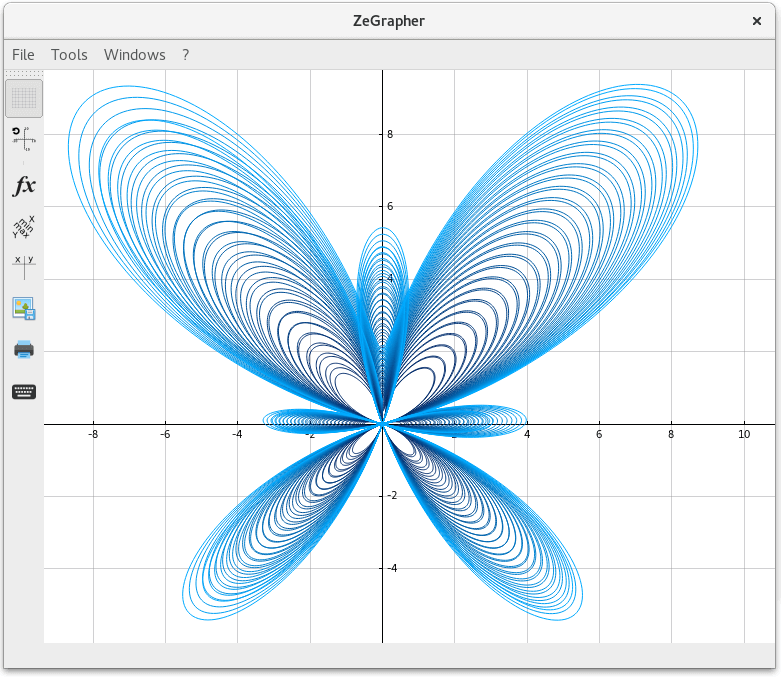
ZeGrapher is an easy to use math plotter. It can plot functions, sequences, parametric equations and data on the plane.
It uses Qt, a widget toolkit for creating graphical user interfaces as well as cross-platform applications.
ZeGrapher is free and open source software.
Key Features
- Visualize up to six functions simultaneously. All the usual functions can be called: they’re all written on a virtual keyboard. On a given function, others can be called, so it is possible to associate or compose functions.
- Numerical sequence plotting, they can be defined by a recurrent relation or explicitly. Visualize up to six numerical sequence simultaneously.
- Parametric equation plotting. The curves can be animated, with adjustable framerate and speed.
- Experimental data plot and polynomial fit (regression). Data can be imported/exported from a CSV file.
- Parametric plot for functions, sequences and parametric equations: the parameter symbol to use is “k”.
- Plot tangents: they can be moved and resized simply with the mouse.
- Plot derivatives and antiderivatives.
- Print the graph with these options:
- Choose the size and the position of the graph on the sheet.
- Apply legends to the X and Y axis.
- Print in color or grayscale.
- Export on a PDF file.
- Export to all common image formats (PNG, JPEG, TIFF, GIF, and more).
- Display a table of values with different options.
- Navigate on the graph:
- Select a curve to display the coordinates of its points.
- Zoom/unzoom on each axis separately, around the mouse (with the scroll wheel), or fit on a mouse drawn rectangle.
- Move the graph.
- Customize the presentation:
- Change all the colors: axes, background, functions…
- Adjust the plotting precision. Note that it will also affect rendering speed.
- Show/hide a grid.
- Activate/deactivate curves’ smoothing.
- Plot the graph on an orthonormal basis. In linear algebra, two vectors in an inner product space are orthonormal if they are orthogonal (or perpendicular along a line) unit vectors.
- Internationalization support – English, French, German, and Chinese.
- Cross-platform support – runs under Linux, Mac OS X, and Windows.
Website: zegrapher.com
Support: GitHub Code Repository
Developer: Adel Kara Slimane
License: GNU General Public License v3.0
ZeGrapher is written in C++. Learn C++ with our recommended free books and free tutorials.
Related Software
| Plotting Tools | |
|---|---|
| matplotlib | Python based plotting system in a style similar to Matlab |
| ggplot2 | Powerful R package for declaratively creating graphics |
| gnuplot | Command-line driven interactive plotting program |
| ROOT | Solves the data analysis challenges of high-energy physics |
| Octave | Built-in plotting and visualization tools |
| DataMelt | Produces professional graphics with libraries for data manipulation |
| Veusz | Scientific plotting and graphing program |
| LabPlot | Data plotting and function analysis tool for KDE |
| PyQtGraph | Scientific Graphics and GUI Library for Python |
| Makie | interactive data visualizations and plotting for Julia |
| GLE | Graphics Layout Engine |
| PyVista | 3D plotting and mesh analysis |
| PLplot | Scientific plotting library |
| AlphaPlot | Fork of SciDAVis |
| SciDAVis | Scientific Data Analysis and Visualization |
| RLPlot | Generate publication quality graphs |
| Genius | Educational tool in mathematics and for research |
| ZeGrapher | 2D math and data plotter |
| Uniplot | Lightweight terminal plotting library for Python |
| Kst | Real-time large dataset viewing and plotting tool |
| Ctioga2 | Command-line plotting utility |
| Plots | Simple graph plotting app for GNOME |
| brplot | Ssmall application and library that plots data |
| SSPlot | Simple plotting utility and numerical simulator |
| KmPlot | Supports Cartesian, parametric, polar, implicit and differential plots |
| Charta | Generate colorful terminal graphs |
| Incplot | Command like tool for drawing great looking plots in the terminal |
Read our verdict in the software roundup.
 Explore our carefully curated directory of recommended free and open source software, covering every major software category. Explore our carefully curated directory of recommended free and open source software, covering every major software category.The directory forms part of our extensive collection of articles for Linux enthusiasts. It includes hundreds of detailed reviews, together with free and open source alternatives to proprietary software from companies such as Google, Microsoft, Apple, Adobe, IBM, Cisco, Oracle, and Autodesk. LinuxLinks also covers interesting projects worth exploring, Linux-compatible hardware, free programming books and tutorials, and much more. Know a useful free and open source Linux application that we haven’t covered? Tell us about it using our submission form. |
Please read our Comment Policy before commenting.