

Git is a distributed version control system originally created by Linus Torvalds in 2005 for development of the Linux kernel. It has since become the dominant version control system for software development, used for projects ranging from small personal repositories to some of the world’s largest collaborative codebases.
Unlike centralised version control systems, every Git working copy contains the repository’s complete history. Developers can create branches, commit changes and inspect history locally, while synchronising their work with remote repositories when required. Git places particular emphasis on speed, distributed development, flexible branching and protecting the integrity of repository data.
Git itself is primarily a command-line tool, but a large ecosystem of graphical and terminal-based clients has developed around it. These clients can make common tasks such as staging changes, reviewing diffs, resolving merge conflicts, managing branches and exploring commit history easier to understand and perform.
Git also includes two long-standing graphical tools. git-gui is a Tcl/Tk interface focused mainly on creating and amending commits, staging files, branch management and interaction with remote repositories. gitk is a repository browser which visualises commit history, branches and changes between revisions. They remain useful lightweight tools, but more integrated Git clients offer a broader range of features and a more modern interface.
The purpose of this article is to provide an insight into the finest free and open source GUI-based Git clients. We explore text-based Git clients in a separate roundup.
We make the following recommendations succinctly captured in a legendary LinuxLinks.com ratings chart.
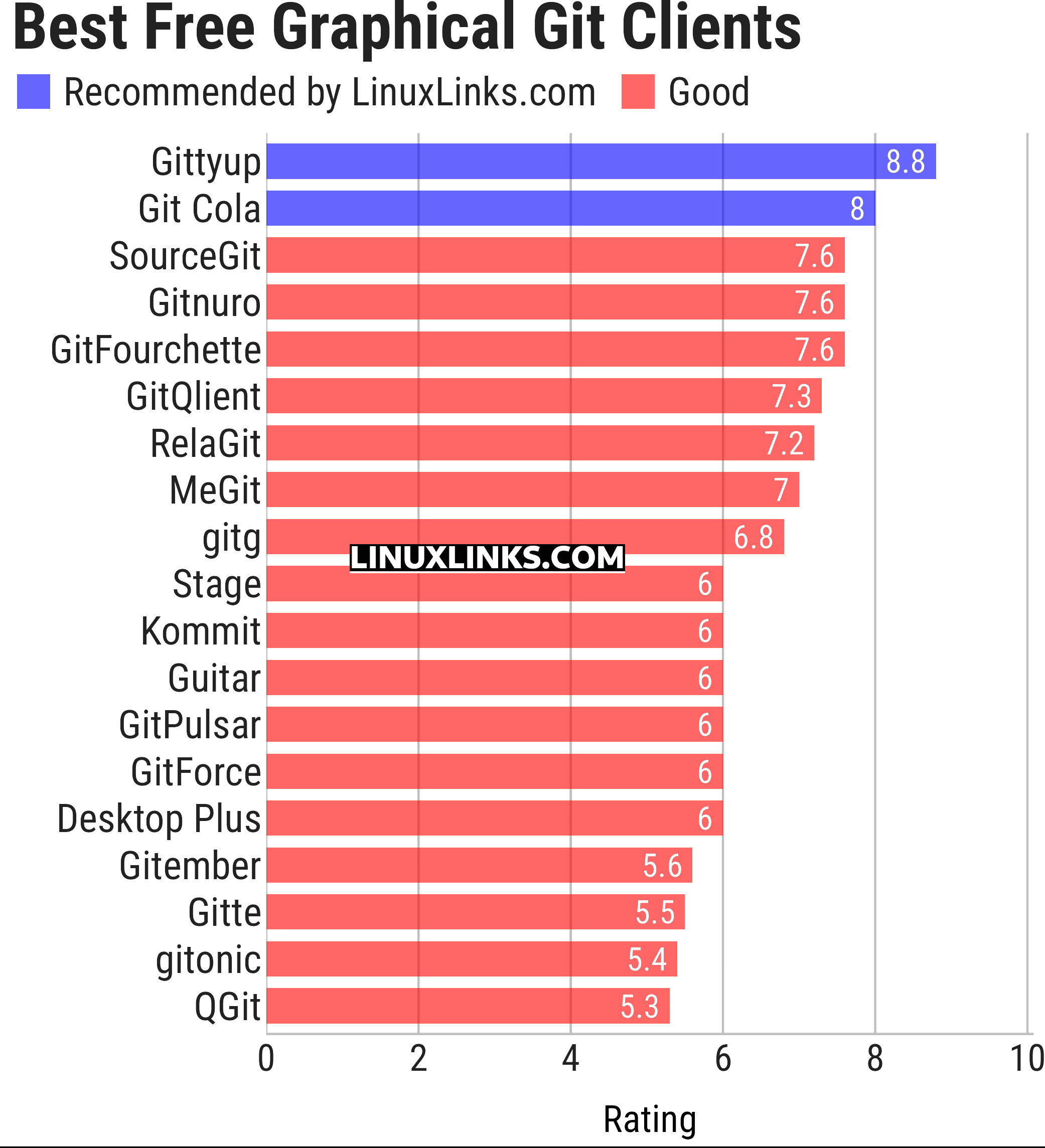
Click the links in the table below to learn all about each client.
| GUI Git Clients | |
|---|---|
| Gittyup | Fast Qt client and continuation of GitAhead |
| Git Cola | Powerful Python and Qt client focused on staging workflows |
| SourceGit | Feature-rich cross-platform Git GUI |
| Gitnuro | Multiplatform Git client written in Kotlin |
| GitFourchette | Comfortable Qt Git interface with precise staging tools |
| GitQlient | Qt client with hunk staging, rebase and forge integration |
| RelaGit | Modern and extensible graphical Git client |
| MeGit | Standalone desktop client based on EGit |
| gitg | Streamlined Git client for the GNOME desktop |
| Stage | Keyboard-friendly Git GUI inspired by Magit |
| Kommit | KDE client designed for everyday version control work |
| Guitar | Fast Qt-based Git GUI with extensive repository tools |
| GitPulsar | Lightweight native Git client for GNOME |
| GitForce | C# Git frontend with multi-repository workspaces |
| Desktop Plus | Enhanced GitHub Desktop fork with Linux support |
| Gitember | Cross-platform Java Git GUI with advanced tooling |
| Gitte | Native GNOME Git client with history editing |
| gitonic | Tkinter client for managing multi-repository workspaces |
| QGit | Qt/C++ history viewer and graphical Git client |
This article has been updated to reflect the changes outlined in our recent announcement.
 Explore our carefully curated directory of recommended free and open source software, covering every major software category. Explore our carefully curated directory of recommended free and open source software, covering every major software category.The directory forms part of our extensive collection of articles for Linux enthusiasts. It includes hundreds of detailed reviews, together with free and open source alternatives to proprietary software from companies such as Google, Microsoft, Apple, Adobe, IBM, Cisco, Oracle, and Autodesk. LinuxLinks also covers interesting projects worth exploring, Linux-compatible hardware, free programming books and tutorials, and much more. Know a useful free and open source Linux application that we haven’t covered? Tell us about it using our submission form. |
Please read our Comment Policy before commenting.
Thanks for putting this roundup together. It’s useful to have so many graphical Git clients compared in one place, especially as the best choice depends so much on workflow rather than raw feature count.
It always amazes me how much is available in the open source world that I don’t know about.